



rline is a readline package for Go. A readline package reads a line of text
from a terminal, and gives the person typing it editing, history, completion
and colored output.
This package is written in pure Go. It does not use cgo, and it does not link against any C library.
rline is a port of isocline, a readline replacement written in C
by Daan Leijen, under the MIT license.
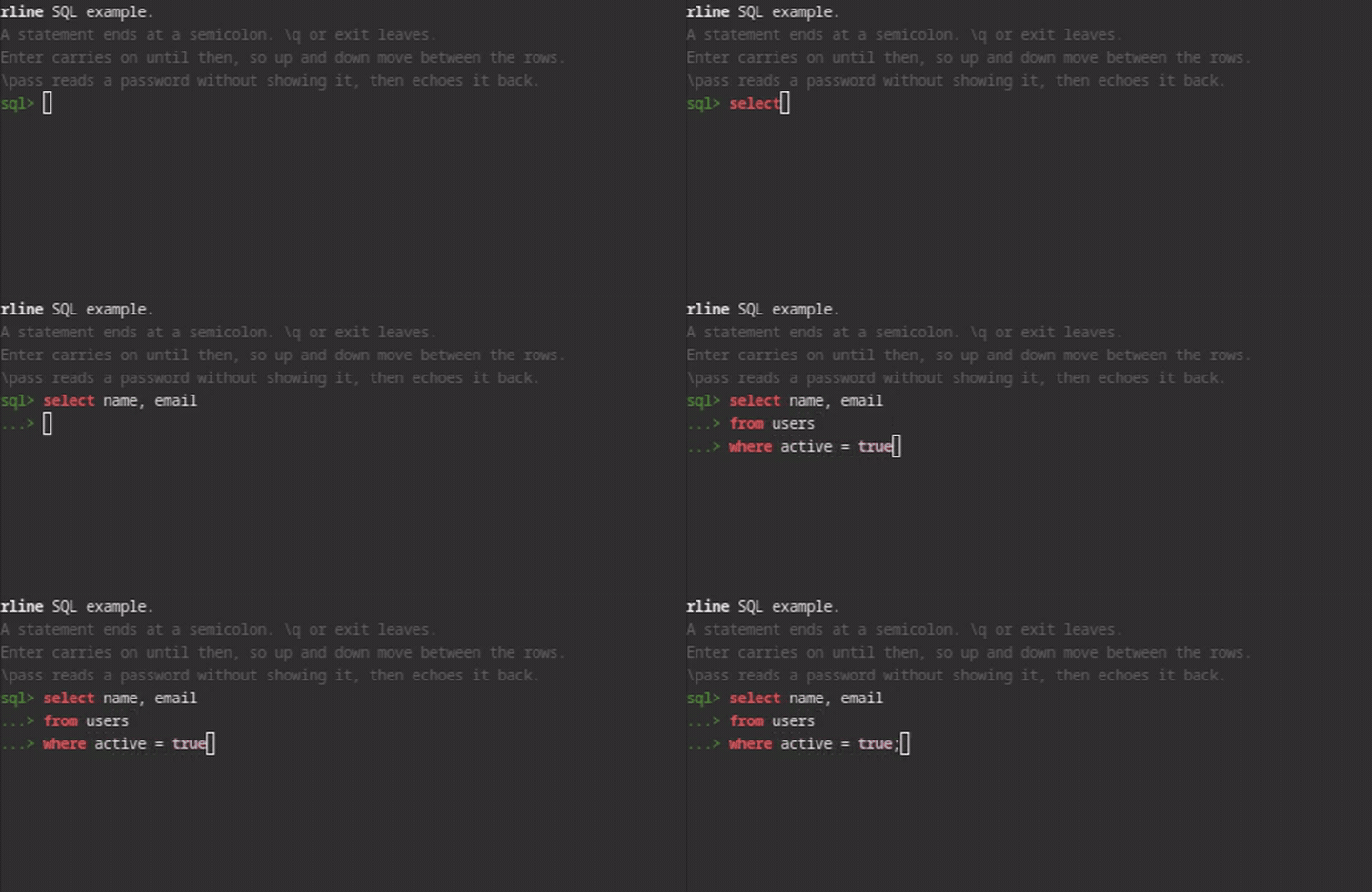
The recording is generated rather than taken by hand.
contrib/make-demo-gif.sh opens a real terminal
on a private compositor, types the session with a virtual keyboard and records
it, so it can be made again after the code changes and shows what rline does
now rather than what it did when somebody last remembered to take a
screenshot. See uitest/README.md for the harness.
Complete and working on Linux, macOS and Windows, including cmd.exe, Windows PowerShell and pwsh. Every module of isocline is either ported or deliberately replaced.
What works:
- Editing a line, and moving by character, word and line.
- The eleven kinds of delete, with undo and redo.
- Input over more than one line.
- Syntax highlighting, matching braces, and hints.
- Markup for colored output.
- A history file.
- Reading a plain line when there is no terminal to edit on.
Password reads a line without showing it, without recording it, and without
completion or highlighting.
Completion is finished too. Tab fills in the longest start every answer shares,
and offers a menu when several remain. The menu lays out in columns, and how
many depends on how wide the entries are: in the example, c then Tab gives
three columns and co then Tab gives two.
Inside, the port keeps the C's behavior even where that behavior is wrong,
because recorded output from the C build is the test corpus. The interface is
deliberately not a translation of the C one: it is shaped for Go. One
behavior departs rather than one name. ReadLine answers ErrInterrupted,
because the C cannot tell a line the user gave up from an empty one, and a
shell has to.
p, err := rline.New(
    rline.WithPrompt("> ", "| "),
    rline.WithHistoryFile(".history"),
    rline.WithHistoryLimit(200),
)
if err != nil {
    return err
}
defer p.Close()

for {
    line, err := p.ReadLine("")
    switch {
    case errors.Is(err, io.EOF):
        return nil            // the input ended: Ctrl-D on an empty line
    case errors.Is(err, rline.ErrInterrupted):
        continue              // the line was given up: Ctrl-C
    case err != nil:
        return err
    }
    fmt.Fprintf(p, "read: %s\n", line)
}
New returns a *Prompt: a Session that reads lines, with the markup
Writer that goes with it. The reading methods are promoted, so p.ReadLine,
p.Password and p.Close are the Session's.
A Prompt is an io.Writer for plain text, which is what most of what a
program prints is. A bracket in it is not a tag. Markup goes through
p.Markup(), which is never nil:
fmt.Fprintf(p, "read: %s\n", line)                     // plain
fmt.Fprintf(p.Markup(), "[ic-error]%s[/]\n", err)       // styled
Write through the Prompt rather than to os.Stdout, because the terminal it
writes through is the one that knows where the prompt is. A Prompt is an
io.Writer, so hand it straight to anything that wants one.
ReadLine answers io.EOF when the input ends and ErrInterrupted when the
user gave the line up with Ctrl-C. Those are different answers on purpose: the
C cannot tell them apart, and a shell has to.
_examples/sql/ is a small SQL prompt. It shows input over more than one line,
highlighting that changes as the line is typed, and a completer.
A statement ends at a semicolon. Until then Enter starts another row inside the
same line rather than handing it back, which is what WithContinue does. The
rows are one buffer, so the up and down keys move the cursor between them and
the whole statement comes back at once.
\pass reads a password and then echoes it back, so that what was collected
can be checked against what was typed. A real program does not echo it.
The history is kept in rline_example_history, in the directory the example
was run from rather than the home directory, so that running it leaves
nothing where the person running it is not looking. The up arrow brings back
what was typed in an earlier run.
Run it from the root of the repository with:
go run ./_examples/sqlThe folder starts with an underscore, so go build ./... and go test ./...
leave the examples out, and a command has to name the folder.
Pass -log FILE to record the session. Every line says which direction it
went: < for what was written to the terminal, > for a key that was read,
and = for a finished line. The bytes are escaped, so the log can be read by
eye.
_examples/transit/ highlights and completes code with transit,
the pure Go port of tree-sitter. After each key it parses the text again from
the old tree and marks it with the grammar's highlight query, and Tab offers
what the parser can accept at the cursor. It is a module of its own, so
rline gets no new dependency, and it needs a checkout of transit beside
this one. Run it from its folder, with one of bash, c, go, javascript, json,
python, ruby and rust:
cd _examples/transit && go run . -lang pythonReading C and writing Go that looks like it is not enough to know the two agree. So each module was checked against the C rather than against a reading of it.
A probe program links the C code, calls it with a fixed corpus of inputs, and
writes down what it returns. The Go port then answers the same corpus and the
two are compared. There are fifteen such corpora, holding about 130000
recorded calls, and tools/ holds the probe that produced each one.
The whole editor is checked the same way. internal/capture starts a program
under a pseudo-terminal, sends it keystrokes, and records every byte it wrote.
This found faults that reading does not find. It also found the limit of the method. A corpus checks that a function answers correctly, and nothing in a corpus checks that the functions are wired together. So the parts that only a running program exercises are tested by running one.
A third kind of test sits between the two. It feeds a string of keystrokes to the editor and asserts on the line and the cursor that come out. That covers the key dispatch, meaning which key reaches which operation. It is also where the behaviors other line editors test live: how a line ends, input that is not UTF-8, characters wider than one column, and a completion list too long to show.
A test that nobody attacked is not known to work. So before a corpus is
trusted, the code it covers is broken on purpose. One break per thing the
corpus is meant to pin, and each break has to fail it. tools/mutate.sh does
that. It reports "did not compile" as its own answer rather than folding it
into "caught".
Linux, macOS and Windows each have their own session running the same checks. A person also drove the Windows editor by hand from a real console. Everything else on that platform is a test or an injected record. The Platforms section below says what that run covered.
docs/PORT.md records the port order, every place the port departs from the C, and why.
Linux, macOS and Windows are supported and tested. Each has its own session
running the same checks, and the full suite, the linter and go vet for all
three targets pass on each. The race detector runs clean on Linux and macOS.
On Windows the editor works in cmd.exe, Windows PowerShell 5.1 and pwsh,
under the classic console host. Everything passes there except the recorded
sessions, which do not exist yet. Recording one needs a pseudo console, which
Windows creates with CreatePseudoConsole, and that part is not written.
Instead, a person drove the editor by hand from a real console: typing, syntax
highlighting, backspace, statements over three and four rows, the completion
menu, the arrow keys within and between rows, the password read, and leaving.
Those runs found no fault.
rline needs Windows 10 or later, because it asks the console to read escape
sequences rather than driving the console through its API. Older consoles
cannot read them.
FreeBSD 15.1, NetBSD 11.0 and OmniOS r151058 pass the whole suite, built from source on the machine with the Go each one ships. None of them can record sessions, so that one test fails there as it does on Windows.
OpenBSD, Dragonfly and Solaris compile and are not tested. They take the same terminal code as their measured relatives, with their own ioctl numbers. Compiling is not the same as being supported, so treat the editor there as unproven.
Any other system builds and reads plain lines with no editing. That is a mode rather than a failure: the prompt still works, and the keys are not read one at a time.
- CONTRIBUTING.md: how to change the project, the checks to run, and how to install the agent skills.
- AGENTS.md: the rules for a coding agent.
CLAUDE.mdimports it. - docs/PLAN.md: the plan, every decision, and the open questions.
- docs/BACKLOG.md: the work that is known and not done.
- docs/PORT.md: the port against the C, the departures from it, and the faults found in it.
- docs/TESTING.md: the design of the test suite.
- docs/LESSONS.md: what the tests taught.
- docs/PLATFORMS.md: the systems rline runs on, and the checks.
- docs/LAYOUT.md: where code goes.
- docs/USQL.md: what usql needs from rline.
- uitest/README.md: the harness that drives real terminals.
rline supports usql, a universal command-line interface for SQL
databases.