A fast, keyboard-driven TUI theme, settings & prompt manager for the Ghostty terminal.
Browse every theme with a live truecolor preview, tweak the settings you actually change, manage your Starship prompt presets, and apply — all without ever hand-editing a config file. hauntty reads and writes your Ghostty config surgically: it only touches the lines it manages and leaves your comments, formatting, and everything else byte-for-byte intact, with an automatic timestamped backup on every write.
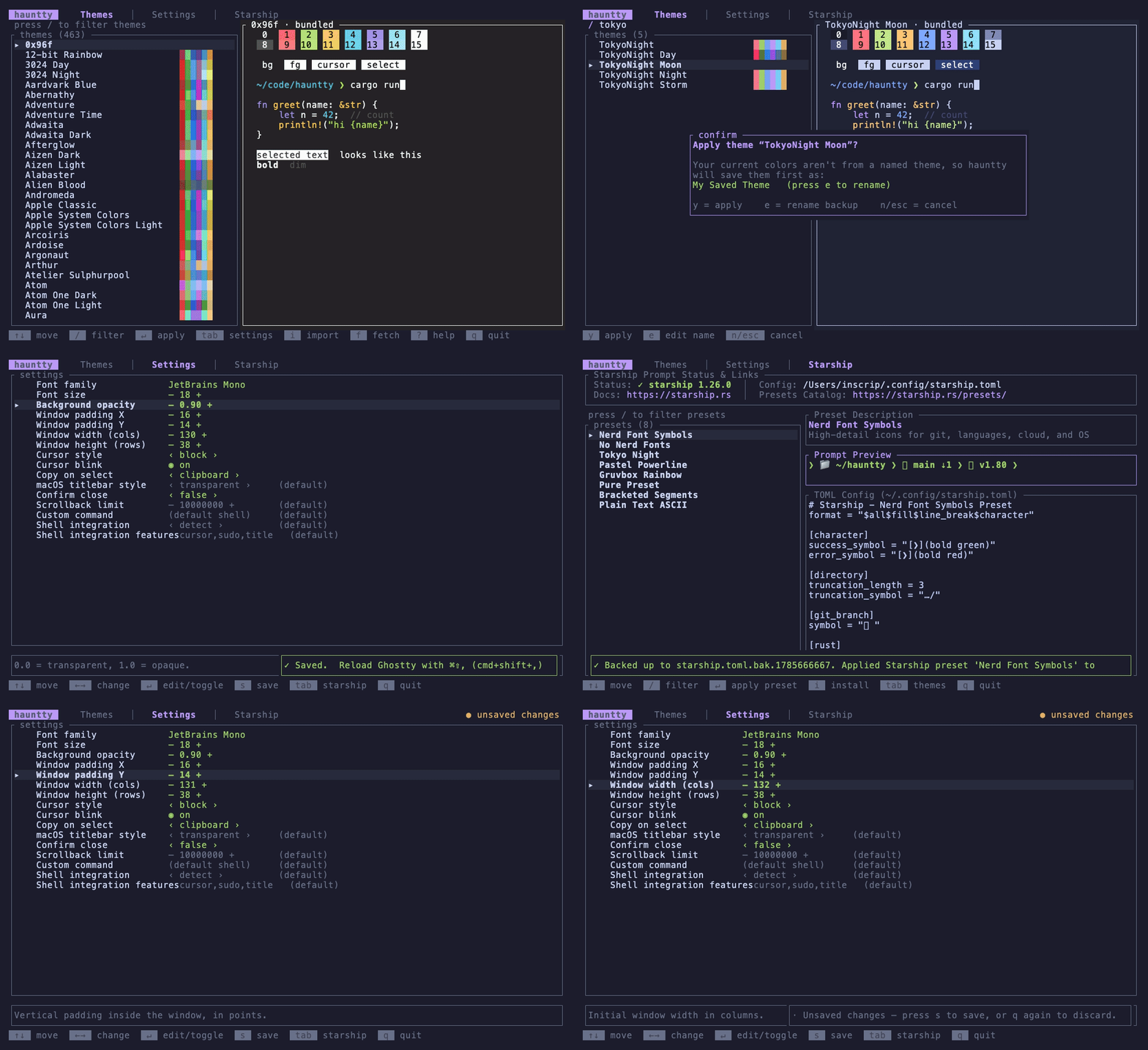
- Theme browser with a live preview (ANSI palette, cursor, selection, a syntax sample) rendered in true color — no need to apply to see how a theme looks.
- Fuzzy filter across all your installed themes.
- Curated settings — font, size, opacity, padding, window size, cursor, shell command, shell integration, and more — edited through friendly toggles / steppers / selects, never raw text.
- macOS app icon picker — set Ghostty's Dock / app-switcher icon to the official icon or one of its eight artist-drawn variants, right from the Settings tab.
- Starship prompt management — detect, install, browse, and apply official Starship prompt presets (Tokyo Night, Gruvbox Rainbow, Pastel Powerline, Pure, and more) with automatic config backups.
- Import iTerm2
.itermcolorsfiles, converted to Ghostty themes. - Fetch more themes on demand from the upstream iTerm2-Color-Schemes catalog.
- Safe by construction — surgical, comment-preserving edits; atomic writes; a
timestamped
config.bak.*before every change; your current inline colors are saved as a named theme before switching, so nothing is ever lost. - Cross-platform (macOS + Linux), single self-contained binary, no runtime deps.
brew install winterweken/tap/haunttycargo install haunttyOr build the latest straight from the repo:
cargo install --git https://github.com/winterweken/hauntty --lockedcurl -fsSL https://raw.githubusercontent.com/winterweken/hauntty/main/install.sh | shgit clone https://github.com/winterweken/hauntty
cd hauntty
cargo build --release
# binary at target/release/haunttyHomebrew,
cargo install hauntty, andinstall.shall track the latest stable release. Release candidates are published separately — see below.
Development lands on the dev branch
and ships as vX.Y.Z-rc.N pre-releases for testing before it reaches main and the
stable channels. When one is open, grab the tarball for your platform from the
releases page — for example, on
Apple Silicon:
gh release download vX.Y.Z-rc.N --repo winterweken/hauntty --pattern "*aarch64-apple-darwin*"Each asset ships with a .sha256 checksum.
hauntty                       # manage the default Ghostty config
hauntty --config /path/config # operate on a specific config file
hauntty --themes-dir /path # add a directory to search for themes| Key | Action |
|---|---|
Tab / 1 2 3 |
switch between Themes, Settings, and Starship |
↑ ↓ / j k |
move selection |
/ |
filter themes or Starship presets |
Enter |
apply theme / edit setting / apply Starship preset |
← → / h l |
change a setting |
i |
import .itermcolors (Themes) / install Starship (Starship) |
f |
fetch themes (Themes) / presets (Starship) from the upstream catalogs |
s |
save settings changes |
? |
help |
q |
quit |
Note: Ghostty applies config changes on reload. After hauntty writes your config, reload Ghostty with ⌘⇧, (
cmd+shift+,) to see the change.
- Theme backups can no longer lose colors. The backup written before a theme apply
now captures the effective look: repeated keys follow Ghostty's last-one-wins rule,
values hauntty can't model as RGB (named X11 colors,
cell-foreground/cell-background, palette indices 16–255) are preserved verbatim — inline or inherited from the base theme — and applying over a conditionaltheme = dark:…,light:…line refuses rather than writing a lossy backup. - Settings are safer. A repeated key (e.g. a
font-familyfallback stack) shows as "(multiple entries)" and can no longer be wiped from the editor; text settings prefill their real current value. - macOS app icon setting — pick between Ghostty's official icon and its eight
artist-drawn variants;
block_hollowalso joins the cursor styles. - Cursor style, explained. Ghostty's shell integration forces a bar cursor at the
prompt; when you change the cursor style, hauntty now points you at
shell-integration-features = no-cursorso the change actually sticks. - Starship apply hardening — the config's file permissions (e.g.
0600) are preserved or the apply aborts cleanly, plus a broad batch of review fixes across the app (input handling, path guards, MSRV 1.88).
Why 1.0.0 and not 0.1.4. This release changes the library target's API (
apply::apply_themetakes a base theme,theme::Themegainedraw_extras,starship::StarshipPresetholdsCow<'static, str>). In a0.xcrate Cargo treats the minor as the compatibility boundary, so^0.1.3would have picked up a0.1.4that no longer compiles for it. Leaving0.xputs hauntty on ordinary semver —1.0.1for fixes,1.1.0for additions,2.0.0for breaks — and release candidates continue asvX.Y.Z-rc.Npre-releases.The published library target (
haunttyas a crate dependency) exists to serve the binary and the integration tests; it carries no API stability guarantee and may change in any release. Depend on thehaunttybinary, not the lib.
- v0.1.3 — fetch, preview, and apply Starship presets from the full official catalog, beyond the bundled eight.
- v0.1.2 — published to crates.io; hardening: panic hooks, path sanitization, config file locking, more robust color parsing.
- v0.1.1 — Starship prompt management (status, install, preset browser) and shell settings; atomic writes resolve symlinks so dotfile-managed configs stay symlinked.
- v0.1.0 — first release: theme browser with live preview, curated settings,
.itermcolorsimport, and theme fetching.
If your config sets colors inline (a palette = … block with no theme = line),
hauntty first saves those colors as a named theme in ~/.config/ghostty/themes/, then
replaces the inline block with a single theme = <Name> line. Your old look isn't lost
— it shows up in the theme list as a user theme you can switch back to any time.
The Starship tab lets you manage your Starship cross-shell prompt without leaving hauntty:
- Status detection — shows whether
starshipis installed, its version, and the path to~/.config/starship.toml. - One-key install — press
ito install Starship via Homebrew (or the official install script as a fallback). - Preset browser — browse and preview 8 curated official presets (Nerd Font Symbols, No Nerd Fonts, Tokyo Night, Pastel Powerline, Gruvbox Rainbow, Pure, Bracketed Segments, Plain Text ASCII) with a live TOML preview.
- Safe apply — writes
~/.config/starship.tomlwith a timestamped backup (starship.toml.bak.<timestamp>) created automatically. - Links — docs at starship.rs and the full presets catalog at starship.rs/presets.
cargo build --release        # all features (import-iterm, online)
cargo build --no-default-features   # core only, no plist/http deps
cargo test                   # unit + round-trip + apply + starship + TUI smoke tests
The config round-trip is covered by a test that parses and re-renders every Ghostty theme file installed on your machine and asserts byte-for-byte equality.
Cutting a release is one command (scripts/release.sh):
scripts/release.sh 0.1.1 # or: patch | minor | majorIt verifies a clean, green, up-to-date main, bumps the version in Cargo.toml and the
Homebrew formula, commits and pushes the vX.Y.Z tag, waits for the release workflow to
build the platform binaries, writes their real checksums back into dist/hauntty.rb, and
syncs the formula into the Homebrew tap.
Requires gh (authenticated). Override the tap with TAP_REPO=owner/name.
- Ghostty by Mitchell Hashimoto and the Ghostty contributors — the terminal itself, its bundled theme collection, and the artist-drawn app-icon variants that the icon setting selects between.
- The color schemes fetched with
fcome from mbadolato/iTerm2-Color-Schemes — the catalog Ghostty's own bundled themes are generated from. Each scheme belongs to its original author, collected and converted there. - Starship (starship/starship) and its official preset gallery, which the Starship tab installs and fetches from.
MIT © winterweken