
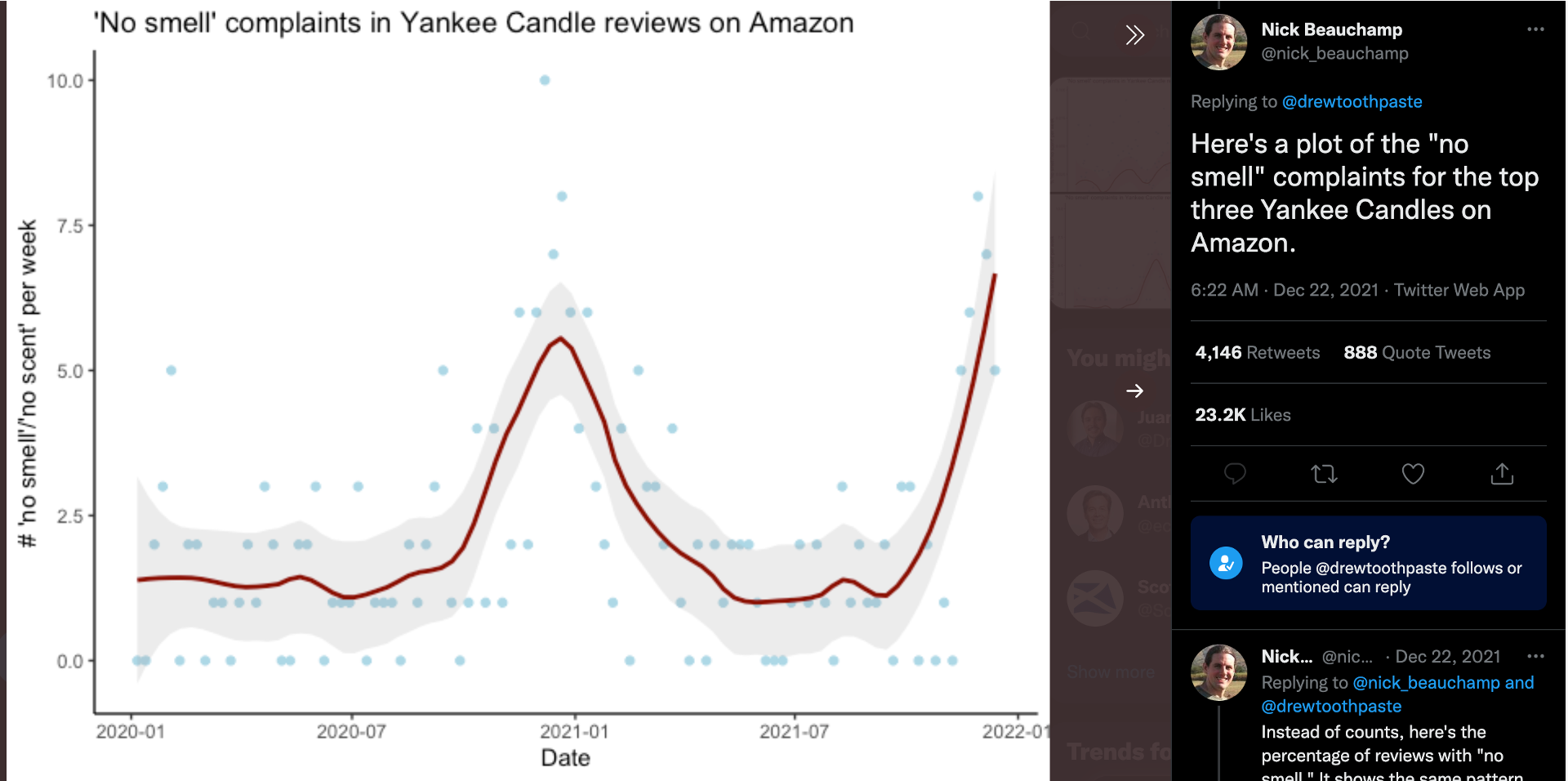
This example was inspired by a Twitter post and investigates whether statistically there's a relationship between weekly COVID cases in the US and critical "no scent" US Amazon reviews for one of the most popular Yankee candles on Amazon.
The example uses the functionalities of VDK to create, automate and execute on schedule the program that ingests the raw data into a database, performs transformations and builds a Streamlit dashboard to showcase the results.
The Amazon reviews are fetched through webscraping with the help of the BeautifulSoup Python package. The daily COVID-19 data for the US is fetched using an API.
The purpose of this scenario is to:
- Publish extracted data to a configured DB in an incremental fashion (i.e. not ingest records that are already present in the tables).
- Read data from а DB.
- Perform data cleaning.
- Perform correlation analysis.
- Present the results in a Streamlit dashboard showing:
- Weekly Covid cases vs. No Scent complaints over time.
- Recalculate the correlation each week as new data comes in and check how results change over time.
- Schedule the data job to execute once per week.
If you feel comfortable with the concept of Correlation and its calculation, please feel free to skip to the next section.
Correlation is a statistical term describing the degree to which two variables move in coordination with one another. Correlation coefficients are used as measures indicating the strength of the relationship between 2 variables. Correlation is used in predictive modelling to investigate the multicollinearity between predictors and also as an independent analysis to track relationships between variables.
Correlation coefficients range in values between -1 and 1, where:
- 1 indicates a strong positive relationship - for every positive increase in one variable, there is a positive increase of a fixed proportion in the other. For example, shoe sizes go up in (almost) perfect correlation with foot length.
- -1 indicates a strong negative relationship - for every positive increase in one variable, there is a negative decrease of a fixed proportion in the other. For example, the amount of gas in a tank decreases in (almost) perfect correlation with speed.
- 0 indicates no relationship at all - for every unit of increase in one variable, there isn’t any positive or negative change in the other. The two events just aren’t related.
The absolute value of the correlation coefficient gives us the relationship strength. The larger the number, the stronger the relationship. For example, |-0.75| = 0.75, which has a stronger relationship than 0.65.
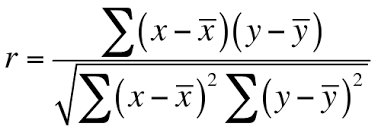
The most widely used correlation coefficient is the Pearson correlation coefficient which shows the linear relationship between two sets of data. It is the ratio between the covariance of two variables and the product of their standard deviations:
Versatile Data Kit is a data engineering framework that enables data engineers to develop, troubleshoot, deploy, run, and manage data processing workloads (called "Data Jobs").
The full VDK project could be found in this Github repository.
vdk create -n hello-world -t my-team
When you run this command through a terminal, it will create a data job locally with sample files that can be used to quickly start developing. See vdk create --help for details on what each argument does.
In this example, the mybinder environment in which you will be developing also has Control Service installed (i.e. the feature responsible for saving data job state and scheduling the job for automatic execution). This means that when a data job is created, it will also be registered/created in the cloud. In this case, each data job needs to have a unique name.
Once created, the data job directory will be automatically populated with some files:
- SQL files (.sql) - called SQL steps - they are directly executed as queries against your configured database;
- Python files (.py) - called Python steps - they are Python scripts which contain a run function that takes as an argument the VDK's job_input object;
- config.ini is needed in order to configure the job. This is the only file required to deploy a Data Job;
- requirements.txt is an optional file needed when your Python steps use external python libraries.
From the automatically created files, delete any files you do not need and/or replace them with your own.
VDK supports having many Python and/or SQL steps in a single Data Job. Steps are executed in ascending alphabetical order based on file names. Prefixing file names with numbers makes it easy to follow the logical and execution order of the different steps.
To run the Data Job locally from a terminal:
vdk run <path to Data Job directory>
When a job is ready to be productionized, it can be deployed in the Versatile Data Kit runtime (cloud). To do this, run the command below in a terminal and follow the instructions (you can see the deploy options with vdk deploy --help):
vdk deploy
Please open the following MyBinder to get started on the exercises:

If you have any issue with the above link, please try:
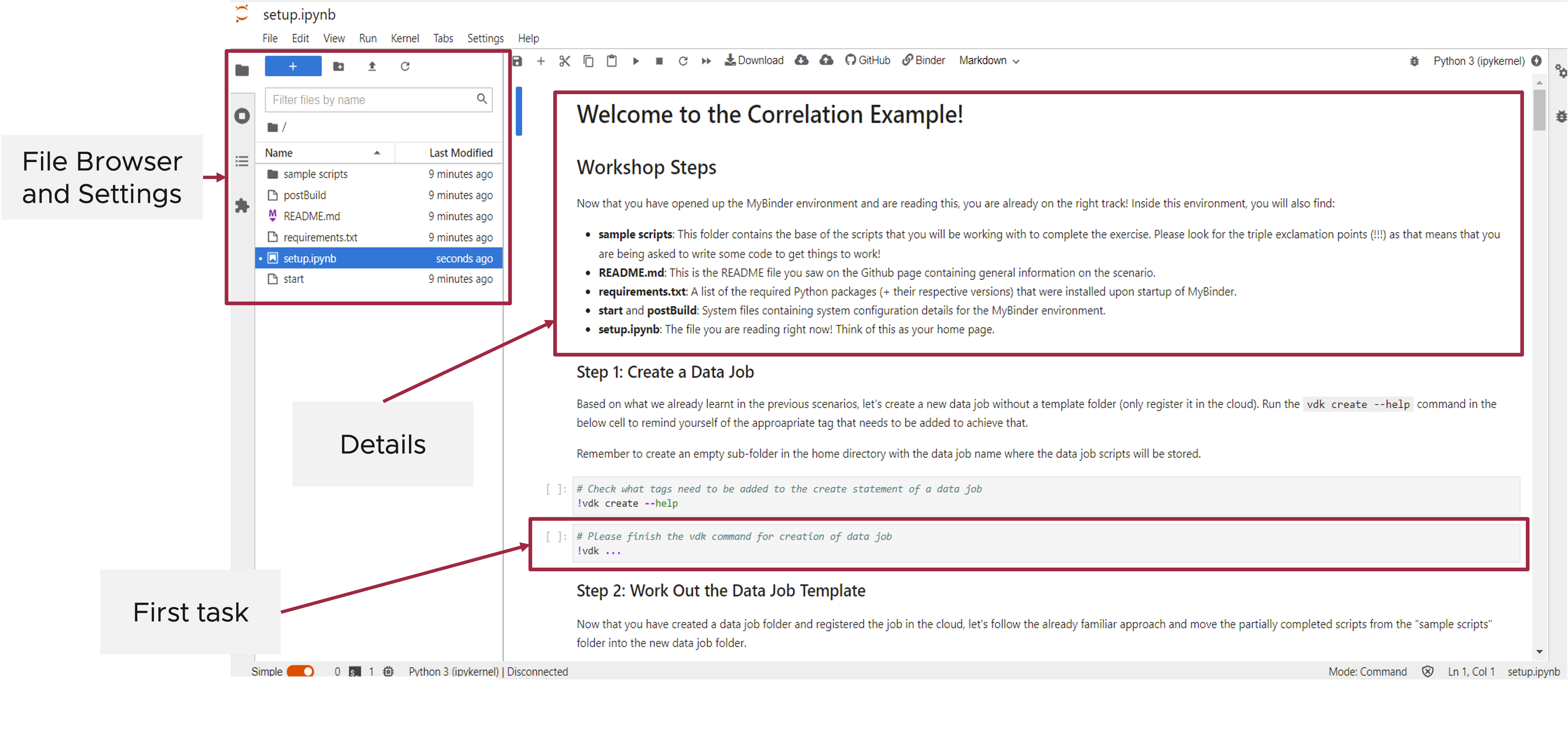
You can find the solved MyBinder environment here.
For more information on MyBinder, please visit: https://mybinder.readthedocs.io
In this scenario you created a data job which:
- Reads data on daily COVID-19 cases in the US using an API and ingests it in a Trino cloud DB in an incremental fashion.
- Reads Yankee candle reviews from Amazon through webscraping and ingests them in a Trino cloud DB in an incremental fashion.
- Performs data cleaning and transformations on the Yankee candle reviews text data and records it in a new DB table.
- Aggregates data on weekly level.
- Realculates correlation coefficients each week as new data comes in and records them in a separate DB table.
- Is scheduled to run once each week so that newly generated Amazon reviews and data about COVID cases from the past week is appended to the respective DB tables.
You also created an interactive Streamlit dashboard which showcased the relationship between weekly COVID-19 cases and "no scent" candle reviews over time, and plotted the respective correlation coefficients.
Congrats!
You've reached the end of this workshop.
Please share your feedback : https://bit.ly/vdk-openfest