A line-boundary-aligning stream library for TypeScript. Ships two entry points so you can use whichever streaming API fits your environment.
| Import | Stream API | Runtimes |
|---|---|---|
aline |
Node.js Transform |
Node.js |
aline/web |
Web Streams TransformStream |
Browsers, Node.js ≥ 18, Deno, Bun |
When data arrives from a network socket, file, or any other streaming source, chunks are split at arbitrary byte positions with no respect for newlines. Aline buffers across chunk boundaries and re-emits data so that every chunk you receive either ends with a newline (boundary mode) or contains exactly one complete line (readline mode) — making downstream parsing trivial.
Input chunks:    [ "foo\nba" ]  [ "ar\nbaz" ]
                       ↓ Aline ↓
Output chunks:   [ "foo\n" ]  [ "baar\n" ]  [ "baz" ]
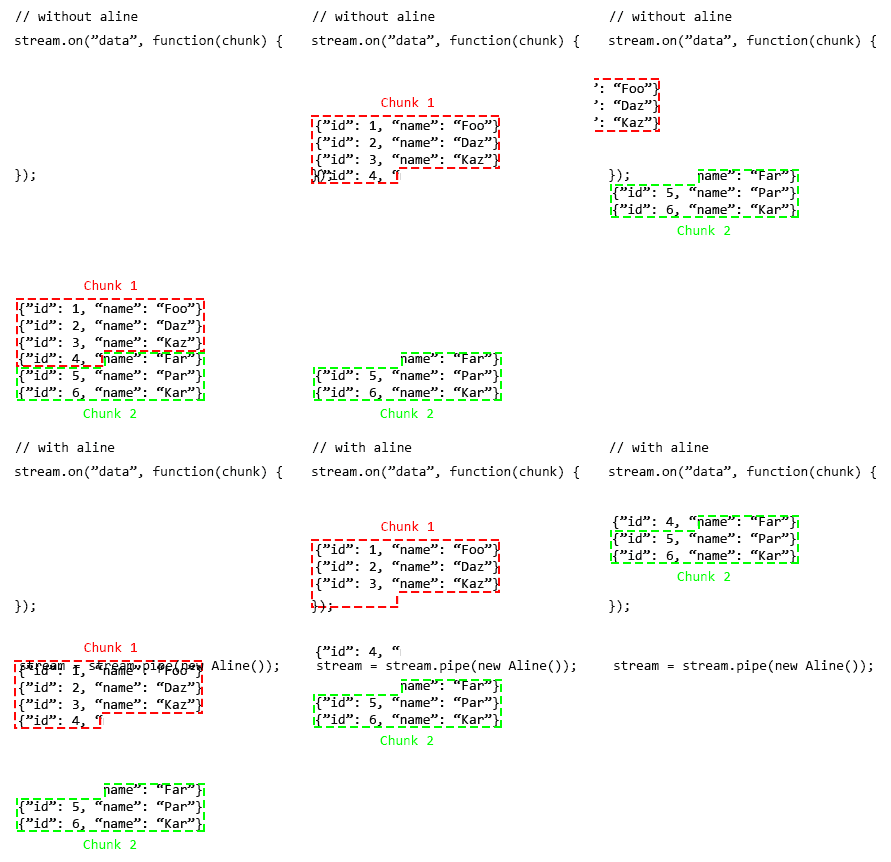
- Two entry points — Node.js
Transformfor existing Node pipelines; Web StreamsTransformStreamfor browsers, Deno, and Bun. - Shared options — identical
AlineOptionstype (separator,readline) across both entry points. - Two operating modes — boundary alignment (default) or one-line-per-chunk readline mode.
- Custom separators — any string, including multi-byte sequences like
\r\n. - Zero dependencies — no runtime dependencies.
- Fully typed — written in TypeScript and ships its own types.
| Entry point | Runtime | Minimum version |
|---|---|---|
aline |
Node.js | 14.0.0 |
aline/web |
Node.js | 18.0.0 |
aline/web |
Deno | 1.0 |
aline/web |
Bun | 1.0 |
aline/web |
Browser | Any modern browser with Web Streams support |
npm install alineyarn add alinedeno add npm:alineimport { Aline } from 'aline';
import { createReadStream } from 'node:fs';
const stream = createReadStream('data.ndjson').pipe(new Aline());
stream.on('data', (chunk: Buffer) => {
// chunk always ends with '\n' (or is the final partial line)
console.log(chunk.toString());
});import { Aline } from 'aline/web';
const response = await fetch('https://example.com/stream');
const reader = response.body!
.pipeThrough(new Aline())
.pipeThrough(new TextDecoderStream())
.getReader();
while (true) {
const { done, value } = await reader.read();
if (done) break;
// value always ends with '\n' (or is the final partial line)
console.log(value);
}import { Aline } from 'aline';Aline extends Node.js Transform. It integrates directly into existing .pipe() chains and accepts all standard TransformOptions alongside the AlineOptions described below. Use this when you are on Node.js and want to stay with the Node Streams API.
import { Aline } from 'aline/web';Aline extends the platform TransformStream<Uint8Array, Uint8Array>. Use this when you need to run in a browser, Deno, Bun, or Node.js ≥ 18 via the Web Streams API. The class is used directly with .pipeThrough() — no wrapper needed.
Migrating from the old
AlineWebclass? Thealine/webentry point is a drop-in replacement. Replacenew TransformStream(new AlineWeb(...))withnew Aline(...)and remove the wrapper.
Both entry points export the same AlineOptions type and the concat / lastIndexOf utility functions, so library code that only uses those can import from either path.
Every emitted chunk ends at a separator boundary. The buffer accumulates bytes until a separator is found, then emits everything up to and including that separator in one chunk. Bytes after the last separator are held until the next separator arrives or the stream closes.
Best choice when you want chunks that may contain multiple lines but need the guarantee that no single line is ever split across two chunks.
Input:   [ "foo\nbar\nbam\nra" ]   [ "am\nbaz" ]
Output:  [ "foo\nbar\nbam\n" ]     [ "raam\n" ]   [ "baz" ]
With readline: true, each emitted chunk is exactly one line. Every chunk except possibly the last ends with the separator.
Best choice when you want to process a stream one line at a time without writing your own split logic.
Input:   [ "foo\nbar\n" ]   [ "baz" ]
Output:  [ "foo\n" ]  [ "bar\n" ]  [ "baz" ]
Creates a new stream that aligns chunks to separator boundaries.
For the Node.js entry point, options also accepts any TransformOptions (e.g. highWaterMark, encoding) alongside the AlineOptions below.
| Option | Type | Default | Description |
|---|---|---|---|
separator |
string |
'\n' |
The separator string to align on. Any string is valid, including multi-byte sequences like '\r\n'. |
readline |
boolean |
false |
When true, emit exactly one line per chunk rather than separator-aligned multi-line buffers. |
When the source stream closes, any bytes remaining in the internal buffer are emitted as a final chunk regardless of whether they end with a separator. This represents a partial (unterminated) final line.
Concatenates two Uint8Array instances. Returns the non-empty input unchanged when one side is empty, avoiding an allocation. Exported from both aline and aline/web.
import { concat } from 'aline/web';

const a = new TextEncoder().encode('hello ');
const b = new TextEncoder().encode('world');
const ab = concat(a, b); // Uint8Array for "hello world"Returns the index of the last occurrence of the byte sequence search within data, or -1 if not found. Both an empty data and an empty search return -1. Exported from both aline and aline/web.
import { lastIndexOf } from 'aline/web';

const enc = new TextEncoder();
lastIndexOf(enc.encode('foo\nbar\nbaz'), enc.encode('\n')); // → 7
lastIndexOf(enc.encode('foobar'), enc.encode('\n')); // → -1import { Aline } from 'aline/web';
const response = await fetch('/api/events');
const reader = response.body!
.pipeThrough(new Aline({ readline: true }))
.pipeThrough(new TextDecoderStream())
.getReader();
while (true) {
const { done, value } = await reader.read();
if (done) break;
const event = JSON.parse(value.trim());
console.log(event);
}import { Aline } from 'aline/web';
const response = await fetch('/api/sse');
const reader = response.body!
.pipeThrough(new Aline({ readline: true }))
.pipeThrough(new TextDecoderStream())
.getReader();
while (true) {
const { done, value } = await reader.read();
if (done) break;
if (value.startsWith('data: ')) {
const payload = value.slice(6).trim();
console.log(JSON.parse(payload));
}
}import { Aline } from 'aline/web';
const reader = tcpStream
.pipeThrough(new Aline({ separator: '\r\n', readline: true }))
.pipeThrough(new TextDecoderStream())
.getReader();
while (true) {
const { done, value } = await reader.read();
if (done) break;
console.log(value); // each value ends with '\r\n'
}import { Aline } from 'aline/web';
const reader = dataStream
.pipeThrough(new Aline({ separator: '|', readline: true }))
.pipeThrough(new TextDecoderStream())
.getReader();
while (true) {
const { done, value } = await reader.read();
if (done) break;
console.log(value.replace(/\|$/, '')); // strip trailing delimiter
}import { Aline } from 'aline';
import { createReadStream } from 'node:fs';
const stream = createReadStream('data.ndjson').pipe(new Aline({ readline: true }));
for await (const chunk of stream) {
console.log(JSON.parse((chunk as Buffer).toString().trim()));
}Node.js 17+ exposes .toWeb() on Node Readable streams to bridge to the Web Streams API.
import { Aline } from 'aline/web';
import { createReadStream } from 'node:fs';

const reader = createReadStream('data.ndjson')
    .toWeb()
    .pipeThrough(new Aline({ readline: true }))
    .pipeThrough(new TextDecoderStream())
    .getReader();

while (true) {
    const { done, value } = await reader.read();
    if (done) break;
    console.log(JSON.parse(value.trim()));
}import { Aline } from 'aline/web';
async function* lines(stream: ReadableStream<Uint8Array>): AsyncGenerator<string> {
const reader = stream
.pipeThrough(new Aline({ readline: true }))
.pipeThrough(new TextDecoderStream())
.getReader();
try {
while (true) {
const { done, value } = await reader.read();
if (done) return;
yield value;
}
} finally {
reader.releaseLock();
}
}
for await (const line of lines(response.body!)) {
console.log(line);
}The table below summarises how Aline handles various input patterns. Both entry points produce identical output. All examples use the default '\n' separator.
| Input chunks | Mode | Output chunks |
|---|---|---|
["foo\nba", "ar\nbaz"] |
boundary | ["foo\n", "baar\n", "baz"] |
["foo\nbar\nbam\nra", "am\nbaz"] |
boundary | ["foo\nbar\nbam\n", "raam\n", "baz"] |
["foo\nbar\nbam\nram"] |
boundary | ["foo\nbar\nbam\n", "ram"] |
["foo\n"] |
boundary | ["foo\n"] |
["\nfoo"] |
boundary | ["\n", "foo"] |
["\nfoo\n"] |
boundary | ["\nfoo\n"] |
["foo"] |
boundary | ["foo"] |
[""] |
boundary | [] |
["foo\nbar\nbaz"] |
readline | ["foo\n", "bar\n", "baz"] |
["fo", "o\nbar\nbaz"] |
readline | ["foo\n", "bar\n", "baz"] |
["foo\nbar"] |
readline | ["foo\n", "bar"] |
["foo"] |
readline | ["foo"] |
[""] |
readline | [] |
core.ts          Shared utilities (AlineOptions, concat, lastIndexOf, splitLines)
index.ts         Node.js Transform implementation  →  import { Aline } from 'aline'
web.ts           Web TransformStream implementation →  import { Aline } from 'aline/web'
core.test.ts     Tests for shared utilities
index.test.ts    Tests for the Node.js implementation
web.test.ts      Tests for the Web Streams implementation
The package.json exports field maps the entry points:
{
    "exports": {
        ".": "./dist/index.js",
        "./web": "./dist/web.js"
    }
}Aline maintains an internal byte buffer (tail) between calls to _transform / transform.
On each incoming chunk the chunk is appended to the tail, then lastIndexOf scans backwards from the end to find the rightmost occurrence of the separator sequence. Using lastIndexOf rather than indexOf means a chunk containing many lines produces a single downstream write in boundary mode, which is more efficient than scanning forward and writing each line individually.
If no separator is found, the entire combined buffer is stored as the new tail and nothing is emitted. If a separator is found, the bytes up to and including it form the head, which is emitted (split into individual lines in readline mode), and the remaining bytes become the new tail.
When the source stream closes, _flush / flush emits whatever remains in the tail as a final chunk — representing a partial unterminated line.
Both entry points share the same core.ts utilities (concat, lastIndexOf, splitLines) so the logic is only written once and the two classes are thin wrappers around it.
# Install dependencies
npm install

# Run all tests (requires Node.js ≥ 18 for web.test.ts)
npm test

# Run only Node.js tests (works on Node.js ≥ 14)
npx jest index.test.ts core.test.ts

# Type-check
npx tsc --noEmit

# Build
npm run buildMIT