Text ➜ SVG | Image ➜ SVG | Smart SVG Resizing
Turn your text or images into optimized, scalable SVGs effortlessly.


Pysvgenius is a powerful Python library designed for generating and optimizing scalable vector graphics (SVGs). It provides an end‑to‑end workflow that includes:
-
Text‑to‑SVG: Generate SVG illustrations directly from text prompts.
-
Image‑to‑SVG: Convert raster images into clean, scalable vector graphics.
-
Smart SVG Optimization & Resizing: Optimize paths and file size while preserving visual quality.
With Pysvgenius, you can effortlessly create high‑quality SVGs for design, AI applications, and modern web projects, ensuring both scalability and efficiency.
| Input | Text-to-Image | Image-to-SVG | Optimized SVG |
|---|---|---|---|
| "A lighthouse overlooking the ocean" |  |
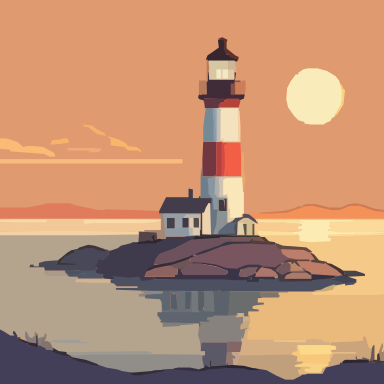 |
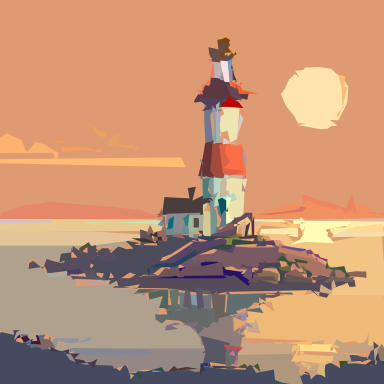 |
| "A serene Asian dragon" |  |
 |
 |
| "Futuristic skyscraper with neon lights" |  |
 |
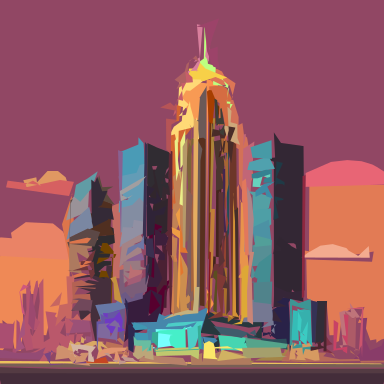 |
To install and run pysvgenius smoothly, we recommend the following minimum setup:
- OS: Linux / macOS / Windows 10+ (x86_64)
- Python: 3.10 or higher
- CPU: 4 cores (Intel i5/Ryzen 5 or higher)
- RAM: 16 GB minimum (24 GB recommended for large models)
- Storage: ~30 GB for models & caches
- GPU: NVIDIA GPU with CUDA 11+ for faster generation and DiffVG optimization
- Recommended: 16 GB VRAM or more
⚡ Tip: CPU-only mode works but is slower for image generation and optimization.
# Basic installation
pip install pysvgenius

# With OpenAI CLIP support
pip install git+https://github.com/openai/CLIP.gitTo use advanced SVG optimization features, you need to build diffvg from source.
# 1. DiffVG (SVG optimizer)
git clone https://github.com/BachiLi/diffvg.git
cd diffvg

git submodule update --init --recursive

pip install svgwrite
pip install svgpathtools
pip install cssutils
pip install numba
pip install torch-tools
pip install visdom

python setup.py install

# 2. Diff-JPEG (Differentiable JPEG compression)
pip install git+https://github.com/necla-ml/Diff-JPEGGenerate SVGs directly from text prompts using the built-in generator:
from pysvgenius.generator import load_generator
from pysvgenius.common import registry

# List all available generator models
print(registry.list_generator())

# Load the generator (example: SDXL-Turbo)
generator = load_generator("sdxl-turbo")

# Generate 5 SVGs from a text prompt
images = generator("A lighthouse overlooking the ocean", num_images=5)

# images is a list of PIL.Image objects or SVG paths depending on the mode
for idx, img in enumerate(images):
img.save(f"lighthouse_{idx}.png")Convert images to SVG paths with the built-in converters:
from pysvgenius.converter import load_converter
from pysvgenius.common import registry

# List all available converters
print(registry.list_converter())

# Load the converter (example: VTracer Binary Search)
converter = load_converter("vtracer-binary-search")

# Convert an image to SVG paths
# `image` can be a PIL.Image or a path to an image
svgs = converter(image, limit=10000)

# `svgs` is a list of SVG path strings
for idx, svg in enumerate(svgs):
    with open(f"output_{idx}.svg", "w") as f:
f.write(svg)After generating SVG candidates, you can rank them using different strategies:
- Aesthetic Ranker → Scores based on visual aesthetics.
- SigLIP Ranker → Scores based on semantic similarity to a text prompt.
from pysvgenius import setup_path
from pysvgenius.ranker import load_ranker
from pysvgenius.common import registry

# Setup paths (run ONCE at the start of your script)
setup_path()

# Check available rankers
print(registry.list_ranker())

# Load rankers
aesthetic_ranker = load_ranker("aesthetic")
siglip_ranker = load_ranker("siglip")

# Rank purely by visual aesthetics (top 5 SVGs)
aesthetic_results, score = aesthetic_ranker(svgs=svgs, top_k=5)

# Rank by semantic similarity to a text prompt (top 1 SVG)
prompt = "a serene Asian dragon flying over green mountains"
siglip_results, score = siglip_ranker(svgs=svgs, prompt=prompt, top_k=1)

print("Aesthetic Ranking:", aesthetic_results)
print("SigLIP Ranking:", siglip_results)from pysvgenius.optimizer import load_optimizer
from pysvgenius import load_config, setup_path
# Initialize paths and configuration
setup_path() # Run once before loading any model
config = load_config() # Load default configuration
args = config.optimizer_cfg["diffvg"]["args"] # Get DiffVG optimizer arguments
# Load the DiffVG Optimizer
optimizer = load_optimizer("diffvg")
# Optimize the SVG based on the original image
# ⚠ Note: 'limit' should match the converter's limit for the best results
optimized_svg = optimizer(
svg=svgs[0], # Input SVG
image=image, # Original image for comparison
args=args, # Optimizer arguments
limit=20000 # Sampling points, ideally the same as converter's limit
)pysvgenius/
├── src/
│ ├── generator/ # Text-to-image generation models
│ │ ├── sdxl_turbo_generator.py
│ │ ├── factory.py
│ │ └── base.py
│ ├── converter/ # Image-to-SVG conversion
│ │ ├── vtracer.py
│ │ ├── factory.py
│ │ └── base.py
│ ├── ranker/ # Aesthetic & similarity ranking
│ │ ├── aesthetic_ranker.py
│ │ ├── siglip_ranker.py
│ │ ├── paligemma_ranker.py
│ │ ├── factory.py
│ │ └── base.py
│ ├── optimizer/ # SVG optimization with DiffVG
│ │ ├── diffvg_optimizer.py
│ │ ├── factory.py
│ │ └── base.py
│ ├── utils/ # Utilities and helpers
│ │ ├── image_utils.py
│ │ ├── svg_utils.py
│ │ └── logger.py
│ └── services/ # Service layer
├── configs/ # Configuration files
│ └── configs.yaml
├── models/ # Pre-trained model cache
├── data/ # Test data and results
│ ├── test/ # Sample input files
│ └── results/ # Output results
├── notebooks/ # Example notebooks
This project builds upon the amazing work of the following projects and research:
-
VTracer – Vector image tracer
-
CLIP – Connecting vision and language
-
Improved Aesthetic Predictor
-
DiffVG – Differentiable Vector Graphics
-
Hugging Face Transformers – Model hosting and inference
-
Kaggle: Drawing with LLMs – Discussion and inspiration
Contributions are welcome! Please open an issue or submit a pull request.