A React-based chat application with multi-provider AI support (Google Gemini, OpenAI, Groq) and Swiss German speech capabilities.
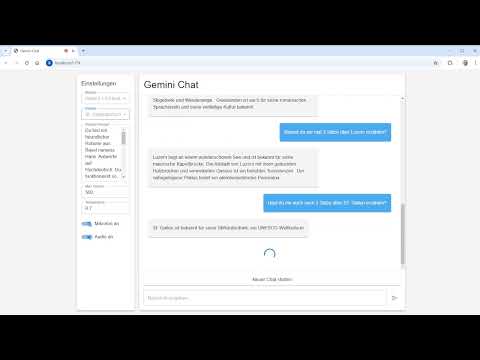
- Native Swiss German speech input and output
- 8 Swiss German dialects supported:
- Aargauerdeutsch
- Berndeutsch
- Baseldeutsch
- Graubündnerdeutsch
- Luzernerdeutsch
- St. Gallerdeutsch
- Walliserdeutsch
- Zürichdeutsch
- Seamless voice conversations in your local dialect
- Powered by multiple specialized Swiss German TTS engines
- Multiple AI Providers: Switch between Google Gemini, OpenAI, and Groq
- Groq as Default: Ultra-low latency inference (set as default provider)
- Extensive Model Selection:
- Groq: Llama 3.3 70B, GPT-OSS 120B, Mixtral, Qwen, and more (⚡ fastest)
- Google Gemini: Gemini 3 Pro Preview, Gemini 3 Flash, Gemini 2.5 Pro and more
- OpenAI: GPT-5.2, GPT-5.1 Instant, GPT-5, o3/o4 reasoning models
- Real-time streaming responses with the Vercel AI SDK
- Configurable TTS Engine: Choose between FHNW (Gradio) and SlowSoft (Slang)
- Modern and responsive UI with Material-UI
- Real-time streaming chat
- Configurable model settings (temperature, max tokens, system prompt)
- Speech-to-text and text-to-speech toggle controls
- Frontend: React with TypeScript and Material-UI
- AI SDK: Vercel AI SDK for unified multi-provider support
- AI Providers:
- Google Gemini (via
@ai-sdk/google) - OpenAI (via
@ai-sdk/openai) - Groq (via
@ai-sdk/groq)
- Google Gemini (via
- Speech-to-Text: Microsoft Azure Speech Services
- Text-to-Speech:
- Build Tool: Vite
This application implements several strategies to minimize response latency and provide a fluid conversational experience:
When using voice input, Azure Speech Services provides ultra-low latency through continuous streaming:
- Real-time transcription: Speech is transcribed while you're still speaking
- Continuous recognition mode: No need to stop and wait for processing
- Immediate feedback: Partial results appear instantly in the UI
- Recognized text sent immediately: As soon as a complete utterance is detected, it's sent to the AI
- Groq as default provider for near-instantaneous inference
- Hardware-optimized LPU™ (Language Processing Unit) architecture
- ~300ms to first sentence: Typically 10x+ faster than traditional cloud providers
- Text appears on screen almost immediately
- Responses are streamed token-by-token as they're generated
- User sees the first words within ~300ms
- No waiting for complete response before display
The Swiss German audio generation is optimized with a sophisticated pipeline:
- Stream parsing: Text chunks are parsed in real-time to extract complete sentences
- Immediate processing: As soon as the first sentence is complete (~300ms), it's sent to STT4SG for Swiss German TTS
- TTS generation: Audio generation takes ~500-1000ms depending on sentence length
- Parallel pipeline: While the first sentence is being converted to audio, subsequent sentences are queued and processed sequentially
- Queue-based playback: Audio segments are played in order as they become available
Timing breakdown:
- Time to first sentence text: ~300ms (Groq)
- Time for TTS generation: ~500-1000ms (depends on sentence length)
- Total time to first audio: ~800-1300ms
The app supports two TTS engines with optimized strategies:
- FHNW (Gradio): Uses Progressive Sentence Splitting. Each sentence is processed individually as soon as it's generated, ensuring the lowest possible latency for the entire stream.
- SlowSoft (Slang): Uses Hybrid Splitting. The first sentence is processed immediately for a fast start. The rest of the response is collected and processed as a single chunk, significantly improving prosody and audio naturalness while maintaining a snappy initial response.
- Node.js (Version 18 or higher) - Download here
- Clone the repository:
git clone https://github.com/studerus/swiss_german_gemini
cd swiss_german_gemini- Install dependencies:
npm install- Create a
.envfile in the root directory and add your API keys:
# AI Provider API Keys (at least one required)
VITE_GEMINI_API_KEY=your_gemini_api_key_here
VITE_OPENAI_API_KEY=your_openai_api_key_here
VITE_GROQ_API_KEY=your_groq_api_key_here

# Speech Services (optional - only needed for voice INPUT via microphone)
# Note: Swiss German voice OUTPUT works without Azure
VITE_AZURE_SPEECH_KEY=your_azure_speech_key_here
VITE_AZURE_SPEECH_REGION=your_azure_region_here- Start the development server:
npm run dev- After starting the dev server, the application will automatically open in your browser (typically at
http://localhost:5173) - Configure your settings:
- Select AI Provider: Choose between Google Gemini, OpenAI, or Groq
- Select Model: Pick from available models for the chosen provider
- Select Swiss German Dialect: Choose your preferred dialect
- Select TTS Engine: Toggle between FHNW (Gradio) and SlowSoft (Slang)
- Adjust Model Settings: Configure temperature, max tokens, and system prompt
- Interact with the AI:
- Text Input (works without Azure): Type messages in the input field
- Voice Input (requires Azure): Enable the microphone for speech recognition
- Swiss German Voice Output: Toggle audio output on/off (works without Azure)
- The AI response will be displayed as text and optionally read aloud in Swiss German
Want to quickly test the Swiss German voice output? You only need:
- ✅ One AI provider API key (Groq recommended - free tier)
- ✅ Type your messages instead of using the microphone
- ✅ Enjoy Swiss German voice responses (powered by STT4SG)
No Azure account needed for this basic setup!
- Groq: Ultra-fast inference with open-weight models (Llama, Mixtral, etc.) - Default provider ⚡
- Google Gemini: Advanced AI models with multi-modal capabilities
- OpenAI: GPT-5 and GPT-4 series, including reasoning models
- STT4SG: Specialized Swiss German speech synthesis by FHNW
- SlowSoft Slang: Commercial-grade Swiss German TTS engine
- Microsoft Azure Speech Services: High-quality Speech-to-Text
To use the application, you need at least one AI provider API key.
Note: You can use the app with just text input/output without Azure Speech Services. Azure is only needed if you want to use the microphone for voice input. Swiss German voice output (TTS) works independently through STT4SG.
-
Groq API Key (Recommended - Default Provider ⚡)
- Visit Groq Console
- Create a new API key (generous free tier available)
- Add to
.envasVITE_GROQ_API_KEY - Benefits: Ultra-low latency, free tier, excellent for development
-
Google Gemini API Key
- Visit Google AI Studio
- Create a new API key
- Add to
.envasVITE_GEMINI_API_KEY
-
OpenAI API Key
- Visit OpenAI Platform
- Create a new API key
- Add to
.envasVITE_OPENAI_API_KEY
- Microsoft Azure Speech Services (Optional)
- Only required for: Using the microphone for voice input (Speech-to-Text)
- Not required for: Text input or Swiss German voice output (TTS works without Azure)
- Setup:
- Create an Azure Account
- Create a Speech Services resource
- Add to
.env:VITE_AZURE_SPEECH_KEYVITE_AZURE_SPEECH_REGION
- Never share your API keys
- The
.envfile is already listed in.gitignoreand won't be synchronized with Git - Check before each commit that no sensitive data is included in the code
MIT
