
Try the web app on this link https://nst-v01.streamlit.app/
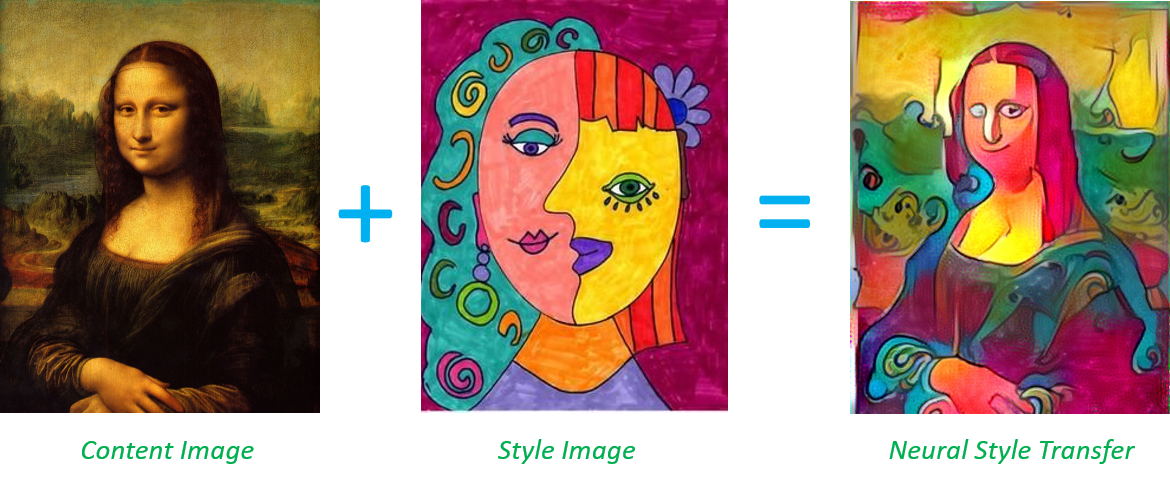
This project is based on the Neural-Style algorithm developed by Leon A. Gatys, Alexander S. Ecker and Matthias Bethge. Neural-Style, or Neural-Transfer, allows you to take an image and reproduce it with a new artistic style. The algorithm takes three images, an input image, a content-image, and a style-image, and changes the input to resemble the content of the content-image and the artistic style of the style-image.
We have referred to the paper Gatys_Image_Style_Transfer_CVPR_2016_paper.pdf for understanding the underlying principles.
- Apply the style of famous artworks to your photos.
- Adjustable style strength.
- Supports multiple image formats.
- Easy to use command-line interface.
- The notebook demonstrates the PyTorch version utilizing the CUDA GPU available on Google Colab for executing the neural style transfer.\
- For completeness and project fulfillment, we have also uploaded the PyTorch version of app.py in the branch called
master. - We have referred to the paper Gatys_Image_Style_Transfer_CVPR_2016_paper.pdf for understanding the underlying principles.
Neural Style Transfer is the technique of blending style from one image into another image keeping its content intact. The only change is the style configurations of the image to give an artistic touch to your image.
The content image describes the layout or the sketch and Style being the painting or the colors. It is an application of Computer Vision related to image processing techniques and Deep Convolutional Neural Networks.

Now, let’s explore how NST works.
The aim of Neural Style Transfer is to give the Deep Learning model the ability to differentiate between the style representations and content image. NST employs a pre-trained Convolutional Neural Network with added loss functions to transfer style from one image to another and synthesize a newly generated image with the features we want to add. Style transfer works by activating the neurons in a particular way, such that the output image and the content image should match particularly in the content, whereas the style image and the desired output image should match in texture, and capture the same style characteristics in the activation maps.
These two objectives are combined in a single loss formula, where we can control how much we care about style reconstruction and content reconstruction. Here are the required inputs to the model for image style transfer:
A Content Image –an image to which we want to transfer style to A Style Image – the style we want to transfer to the content image An Input Image (generated) – the final blend of content and style image
Changing style weight gives you less or more style on the final image, assuming you keep the content weight constant.
We did increments of 10 here for style weight (1e4, 1e5), while keeping content weight at constant 1, and we used random image as initialization image like Gaussian Noise or White Noise.

The total variation loss i.e. its corresponding weight controls the smoothness of the image.
We also did increments of 10 here (1e-4, 1e-5, 1e-6) and we used content image as initialization image.

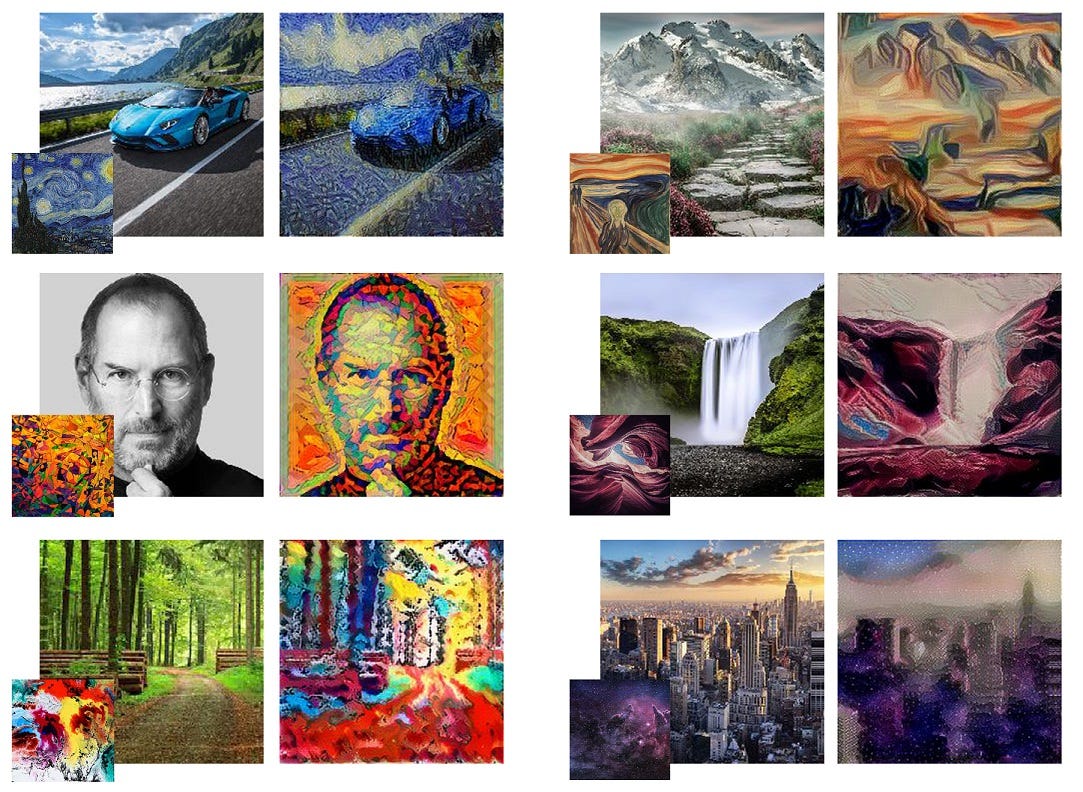
Here are a few examples of the style transfer in action:


- Apply the style of famous artworks to your photos.
- Adjustable style strength.
- Supports multiple image formats.
- Easy to use command-line interface.
- Python 3.6 or higher
- Git
- Virtual environment (optional but recommended)
-
Clone the repository:
git clone https://github.com/swas-kar/Neural_Style_Transfer.git cd Neural_Style_Transfer -
Create and activate a virtual environment:
python3 -m venv venv
source venv/bin/activate   # On Windows use `venv\Scripts\activate`
-
Install the required dependencies:
pip install -r requirements.txt
--content: Path to the content image.--style: Path to the style image.--output: Path to save the output image.--iterations: Number of iterations to run (default: 500).--style-weight: Weight of the style (default: 1e6).--content-weight: Weight of the content (default: 1).
We welcome contributions! If you find a bug or want to add a new feature, feel free to open an issue or submit a pull request. Please follow the guidelines below:
- Fork the repository.
- Create a new branch (
git checkout -b feature-branch). - Commit your changes (
git commit -am 'Add new feature'). - Push to the branch (
git push origin feature-branch). - Create a new pull request.
This project is licensed under the MIT License - see the MIT LICENSE file for details.