Weather and hazard alerts for Home Assistant, one entity per active alert.
Single-entity alert integrations pack every alert into one attribute blob and run into Home Assistant's 16 KB attribute limit. CAP Alerts gives each alert its own sensor. The state is a normalized severity, the attributes are the alert's CAP 1.2 fields, and an event fires when an alert is created, updated or removed.
The providers are the visible part. The point of the project is the model
underneath them: one identity per incident across re-issues, a lifecycle that
does not trust feed presence, bounded attributes, and lifecycle events.
docs/rfc-summary.md is the one-page version of the
proposal: that model as an incident integration for Home Assistant Core, with
this integration as its reference implementation. rfc.md argues it
in full, and docs/evidence/ holds the field
evidence behind it, one page per finding.
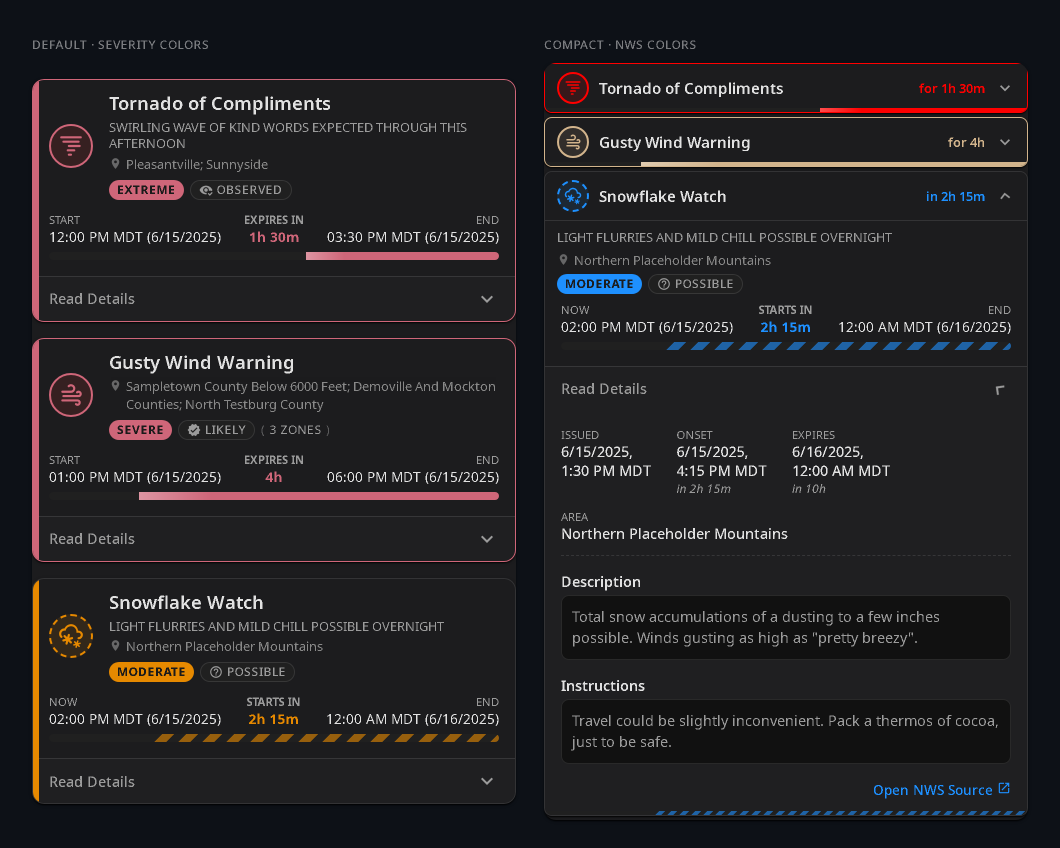
Shown with the companion Weather Alerts Card. Generic cards work too, see Cards and automations.
| Provider | Source | Coverage | Location modes |
|---|---|---|---|
| NWS | U.S. National Weather Service | United States | Zone ID (ILZ014, comma-separated allowed), GPS lat,lon, device_tracker entity |
| ECCC | Environment and Climate Change Canada | Canada | Province code (AB, BC, ON, …), GPS, device_tracker entity |
| MeteoAlarm | EUMETNET European aggregator | About 37 national services | Country (DE), with an optional GPS filter or a region multi-select |
| WMO | WMO Severe Weather Information Centre | About 100 national services with no dedicated provider | Source ID from the live SWIC registry (mx-smn-es), with an optional GPS filter |
| GDACS | Global Disaster Alert and Coordination System | Worldwide earthquakes, cyclones, floods, volcanoes, droughts, wildfires, tsunamis | Worldwide, GPS, or device_tracker entity |
| BBK | German federal civil protection (the NINA app backend) | Germany: MoWaS, KATWARN, BIWAPP, LHP flood warnings, DWD weather warnings of level 3 and up | District (Regionalschlüssel, 09564), GPS, or device_tracker entity |
| AU | Australian state fire and emergency services | NSW (RFS), Queensland (QFD), Western Australia (DFES), Tasmania (TasALERT): bushfires and incidents, plus SES weather warnings on TasALERT | State |
GPS and tracker modes keep only alerts whose affected area contains the point.
The Australian feeds have no GPS mode: most of their alerts are a location
marker with no polygon, so a point test would drop them. Filter by distance on
the card instead, which reads the marker from points.
The MeteoAlarm region picker lists EMMA_ID codes for most countries, NUTS
codes for some, and area names where a feed publishes no geocodes.
GDACS and BBK are the non-weather sources, and the reason the model is a CAP model rather than a weather model. Further providers (BoM, a direct DWD feed, …) plug in behind the same provider protocol; see Contributing.
Requires Home Assistant 2026.4.3 or newer.
HACS. CAP Alerts is not in the HACS default store yet, so it is installed as a custom repository. This badge adds the repository and opens it in HACS:

Or add it by hand: HACS → ⋮ → Custom repositories, repository
https://github.com/seevee/cap_alerts, type Integration. Then install
CAP Alerts and restart Home Assistant. Once it lands in the default store
the custom repository can stay in place; HACS treats the two the same for
updates.
Manual. Copy custom_components/cap_alerts/ into your configuration's
custom_components/ directory and restart.

Settings → Devices & Services → Add Integration → CAP Alerts. Pick a provider, then a location mode from the table above. One entry covers one scope. Add another entry for a second zone, province or country.
- Reconfigure changes an entry's provider or location.
- Options changes its behavior: polling, language, filters.
Every provider:
| Option | Range | Default |
|---|---|---|
| Scan interval | 60–3600 s | 300 |
| Timeout | 5–120 s | 30 |
Per provider:
| Option | Providers | What it does |
|---|---|---|
| Language | ECCC, MeteoAlarm, WMO, BBK | Which <info> block to read. ECCC: auto, en-CA or fr-CA. MeteoAlarm: a two-letter prefix (en, de, fr). WMO: auto or any BCP 47 tag the source publishes (zh-Hans). BBK: auto, de, de-LS (easy-read German), en or one of the app's other translations. NWS is English only. |
| Real-time streaming | ECCC | Ingest alerts the moment they are issued, over the NAAD socket. Default on. See ECCC streaming. |
| Feed source | ECCC | Which NAAD GeoRSS host serves polling and backfill. auto (default) fetches both hosts and unions them. alertready or pelmorex pins one. |
| Event types | GDACS | Which hazards to track. All by default. Applied before any geometry is fetched, so narrowing it also cuts fetch cost. |
| Minimum alert level | GDACS, AU | GDACS: Green, Orange (default) or Red, on GDACS's own impact scale. The entity state derives from it too: Green → minor, Orange → severe, Red → extreme. AU: All (default), Advice, Watch and Act or Emergency Warning on the Australian Warning System; All also keeps the informational tiers below the ladder (planned burns, incidents with no warning). |
| Exclude marine alerts | NWS, ECCC | Drop alerts carrying a marine zone code. Default off. |
| Area codes (prefix match) | All but GDACS, BBK and AU | Keep only alerts whose area codes start with one of the listed prefixes (13,37). See Area-code narrowing. |
With streaming on, the GeoRSS feed becomes a startup and reconnect backfill plus a periodic resync. A diagnostic binary sensor reports the socket state. Alerts issued while the socket is down are recovered from the NAAD 48-hour repository, so a reconnect gap does not depend on the GeoRSS index carrying the alert.
Turning streaming off falls back to GeoRSS polling on the scan interval.
Deprecation. The legacy NAAD GeoRSS host (pelmorex) retires in late
September 2026. The surviving host omits some live alerts, which a polling
entry reads as ended. Two configurations therefore raise a repair under
Settings → Repairs:
- Streaming off. Submitting the repair turns streaming back on. Ignore it if polling is deliberate.
- Feed source pinned to
pelmorex. Submitting sets it back toauto.
Opt-in narrowing on top of the location chosen at setup. Codes are
hierarchical, so a shorter prefix covers a wider area: 13 is Hebei, 1307
is Zhangjiakou. It exists for sources with no per-alert geometry and no region
picker, notably WMO's cn-cma-xx, where 13 cuts a country-wide entry from
about 234 alerts to 28. Code lengths vary within a scheme, so prefer the
leading digits over a full code.
Every entry produces one device, named CAP Alerts <PROVIDER>, grouping:
| Entity | State | Notes |
|---|---|---|
sensor.cap_alerts_<provider>_cap_alert_<event>_<hash> |
minor, moderate, severe, extreme or unknown |
One per active alert. Created and removed dynamically each poll. |
sensor.cap_alerts_<provider>_alert_count |
number of alerts | Attributes active and upcoming split the total on whether onset has passed. Diagnostic. |
sensor.cap_alerts_<provider>_last_updated |
ISO timestamp | Last successful poll. Diagnostic. |
button.cap_alerts_<provider>_refresh |
— | Fetch now, without waiting for the next poll. Diagnostic. |
binary_sensor.cap_alerts_eccc_real_time_stream |
on / off |
NAAD socket connected. ECCC with streaming on only. Diagnostic. |
The device name is stable across reconfigures, so entity IDs do not drift when you change GPS, zone or region. The entry title carries the location detail. With several entries of one provider, rename the devices to tell them apart.
Attributes are a sparse dict of CAP fields: only populated fields appear.
docs/frontend_hints.md is the consumer-facing
reference; CAPAlert in model.py is the full schema.
Polygons are never emitted as attributes. Each alert carries a geometry_ref
handle plus a bbox, and the full GeoJSON FeatureCollection comes from:
- REST:
GET /api/cap_alerts/geometry/{geometry_ref}(HA auth required) - Websocket:
{"type": "cap_alerts/geometry", "geometry_ref": "<ref>"}
The integration domain is cap_alerts. It names the integration in config
entries, device identifiers and event types. It is never the start of an
entity ID. Alert entities are sensors, so their IDs start with sensor..
An alert entity ID is the device name, the alert's event text, then an
8-character hash:
sensor.cap_alerts_nws_cap_alert_tornado_warning_1f0c6a62
       └── device ──┘ └──── event slug ───────┘ └─ hash ─┘
The device prefix is applied by Home Assistant, so renaming a device changes it. The hash disambiguates two concurrent alerts with the same event name. Unique IDs are stable across restarts, so the registry keeps identity even when the entity ID changes.
Don't pattern-match on the entity ID. Users can rename it, and the event
slug follows the alert language. Discover alert entities by device, or by the
incident_platform_version attribute, which the diagnostic sensors don't
carry.
Three event types fire on the Home Assistant bus:
| Event | When |
|---|---|
incident_created |
A new alert ID appears. |
incident_updated |
An alert's phase or another tracked field changed. |
incident_removed |
An alert reached a terminal phase, cancel or expired. |
incident_removed carries the terminal phase, so an automation can tell an
upstream cancel from a natural expiry. When the provider says why, it also
carries removal_reason (superseded or ended). An automation with a
message budget can skip superseded, since the replacement fires its own
incident_created.
An alert that merely disappears from the feed is not removed. Feeds have been measured dropping live alerts, so the alert is retained until its published expiry. An alert with no expiry, and no other way for its source to end it, ends on absence instead. That covers every GDACS alert and a few WMO authorities.
Full payload schema and semantics: docs/events.md.
Once an alert ends, its entity leaves the entity registry, so the History
dashboard shows past alerts by entity ID only. Recorder rows survive. To keep
a readable archive, forward incident_removed to a store of your choice.
blueprints/cap_alerts_archive_incident_removed.yaml
is a reference blueprint.
One entity per alert with flat attributes means generic cards work without an
adapter: auto-entities, flex-table-card, markdown and template cards.
docs/frontend_hints.md has copy-paste snippets for
finding alert entities, reading severity, and fetching geometry.
The companion Weather Alerts Card renders severity, progress bars, expandable details and an affected-area map.
HA Alert Card is a compact list
alternative. Its device: source follows the alert entities as they come and
go, and from 2026.10.3 it reads web, severity_normalized and sent with no
mapping:
type: custom:ha-alert-card
sources:
- device: <device id>Settings → Devices & Services → CAP Alerts → ⋮ on the entry → Download diagnostics. Attach it to a bug report instead of a debug log. It reports:
- provider, scope mode, and the upstream endpoints the next fetch will use
- when the last update succeeded, when one last failed, and with what error
- alert counts plus a per-alert lifecycle row, capped at 25 rows
- active filters and the resolved language
- which per-source convention row is in effect
GPS coordinates, the tracker entity, and the MeteoAlarm country source are redacted everywhere they appear, including inside provider URLs. Alert text and geometry are omitted. The file is safe to paste into a public issue.
- Settings → Devices & Services → CAP Alerts → ⋮ → Delete, once per entry. This removes the device, its diagnostic entities, and any active alert entities.
- Uninstall via HACS, or delete
custom_components/cap_alerts/. - Restart Home Assistant.
The integration writes nothing to .storage/, so nothing is left behind.
Recorder history for past alert entities ages out under your recorder purge
policy.
- ECCC fetches each alert's CAP XML body, not just the Atom envelope, so alerts carry the full headline, description and instruction. Revision chains (NEW → UPDATE → CANCEL) collapse to the current leaf.
- WMO covers national services with no dedicated provider. EU and US users are better served by MeteoAlarm and NWS. Already-expired RSS items are skipped before fetch, so high-volume feeds fit the poll timeout.
- GDACS has no working per-event CAP endpoint, so the RSS item is the
record and geometry comes from the episode's GeoJSON. Both GDACS indexes
are polled and unioned, since neither contains the other. No GDACS alert
carries an
expires. Withdrawal from the feed ends it, so retention scales with significance: days for a major earthquake, a year for a drought. Identity is keyed on event type and event ID, so an episode re-issue updates the entity rather than minting a new one. - BBK reads the same CAP the NINA app does, serialized as JSON, with the
polygons from a separate per-warning GeoJSON. The district scope takes the
Amtlicher Regionalschlüssel and widens it to the district, which is the
granularity warnung.bund.de answers at. Weather warnings on the DWD channel
are the same ones MeteoAlarm Germany relays (levels 3 and up only), so a
German user running both gets those twice. MoWaS messages carry no expiry
and end when the feed withdraws them. Each alert names its channel in the
bbk_channelparameter. - AU reads one EDXL-wrapped CAP-AU document per state. Severity is the
Australian Warning System tier (
AlertLevel: Advice →moderate, Watch and Act →severe, Emergency Warning →extreme), not the near-uniform CAP severity the feeds publish; WA writes the tier in the headline and the provider fills the parameter in. No alert carries an expiry: every feed'sexpiresis a regeneration TTL, so an incident ends when its feed withdraws it. Each alert's location marker is published inpoints, alongside the fire-ground polygon where there is one.
Per-field mappings and the reasoning behind each provider are in
docs/architecture.md.
| Document | Covers |
|---|---|
docs/frontend_hints.md |
Consumer contract: attributes, discovering entities, fetching geometry |
docs/events.md |
Event payload schema and lifecycle semantics |
docs/architecture.md |
Alert identity, provider mappings, normalization, design rationale |
rfc.md |
The incident model as a proposed Home Assistant Core integration; this integration is its reference implementation |
docs/rfc-summary.md |
The RFC on one page: the two claims, the ten requirements, what runs today |
docs/evidence/ |
Evidence behind the RFC, one page per finding: the measurement, the excerpt, how to reproduce it |
docs/roadmap.md |
Planned work that has no issue yet |
docs/provider-watch.md |
Provider drift monitoring (feed vocabulary, WMO mirror lag) and the response playbook |
CONTRIBUTING.md |
Dev setup, test gates, adding a provider, translations |
CHANGELOG.md |
Generated release history |
MIT.