A SID music player for USBSID-Pico hardware, software emulation, and Commodore Ultimate 64 network playback. Built with Rust and Iced.

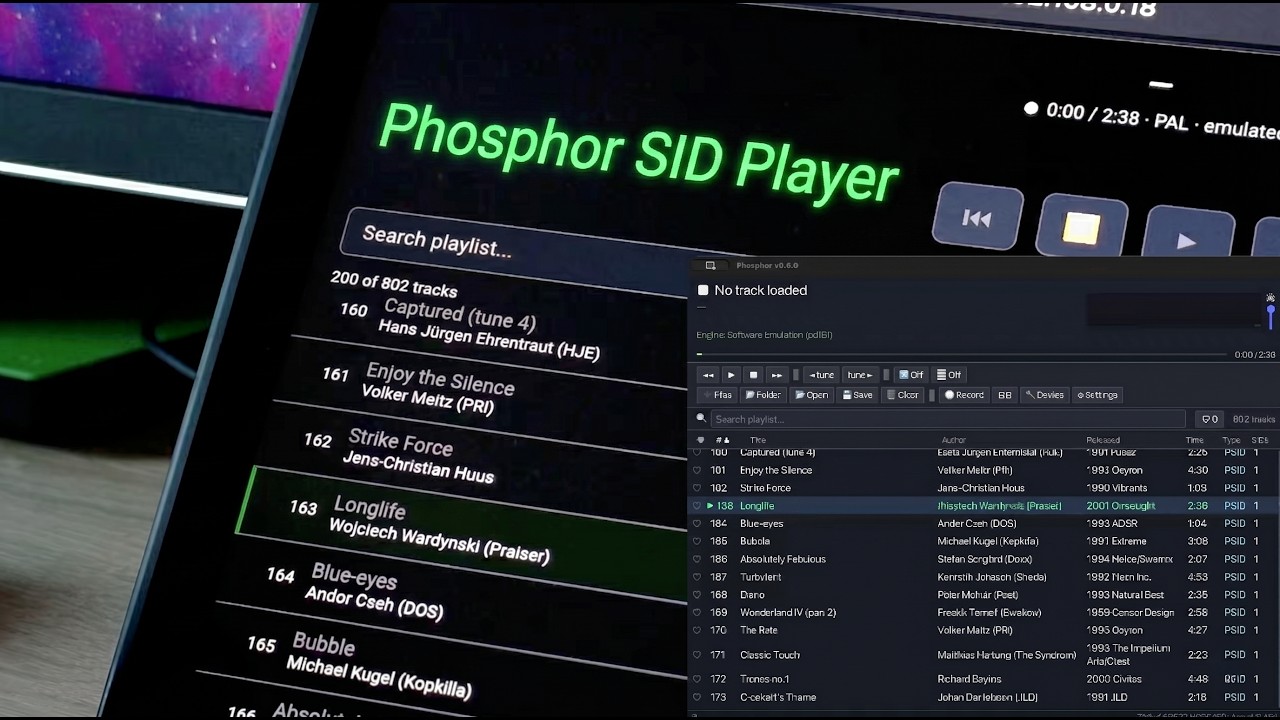
Trailer by @exploraart — Adam Kazmierski.
Full feature tour with screenshots, install guide and trailer: https://sandlbn.github.io/Phosphor/.
Prebuilt binaries for macOS, Linux and Windows are available on the GitHub Releases page:
https://github.com/sandlbn/Phosphor/releases
- Four playback engines — USB hardware, software emulation (reSID or SIDLite), or Commodore Ultimate 64 over the network
- 📚 Library panel — browse Local HVSC, search Assembly64 live, and load curated Playlists synced from the Phosphor repo
- Rich HVSC search — global search across the whole category shows title, released year, subsong count, duration, and STIL ✓ marker for every hit, not just the filename
- 🎲 Surprise me — one-click random tune from your synced HVSC tree or from the currently-loaded playlist (source is configurable in Settings)
- USBSID-Pico device config — built-in Device panel (🔧 button) for chip routing, clock rate, presets, and save-to-flash, all without leaving Phosphor
- HTTP remote control — built-in web server for controlling playback from any browser on the network (phone, tablet, another PC)
- Browser audio streaming — the same web UI can also play the current SID output as a live MP3 through the browser's
<audio>element. Click 🔊 Listen and any device on the LAN — phone, laptop, another room's tablet — hears what the desktop is playing. Works with the reSID and SIDLite engines; the USB / U64 hardware paths are analog and can't be tapped - HTTP proxy support — single-field setting for
http:///https:///socks5://, applied to all outbound requests - Playlist management — add files and folders, drag & drop, save/load M3U playlists; duplicate detection on import
- Session restore — playlist automatically saved on exit and restored on next launch
- Sortable columns — click any column header to sort by title, author, released, duration, type, or SID count
- Search & filter — real-time search across title, author, released year, and file path
- Liked tracks — ♥ any tune to remember it forever. Load your liked collection as a fresh playlist with one click; tracks resolve back to disk even if you removed them from the current playlist, moved your HVSC folder, or migrated from another machine. Share via M3U import / export
- Recently played — persistent history of the last 100 unique tracks with human-readable timestamps
- HVSC Songlength DB — automatic song-length lookup with configurable fallback duration
- HVSC STIL — song info overlay (cover titles, original artists, composer comments) via the ⓘ button; downloaded or loaded from a local STIL.txt
- MUS file support (beta) — Compute's Gazette SIDplayer format with stereo (MUS+STR), PETSCII lyrics display (WDS), and real-time karaoke mode synchronized via FLAG commands
- Multi-SID support — PSID/RSID, 1SID/2SID/3SID tunes, PAL/NTSC
- Sub-tune navigation — step through all sub-tunes within a SID file
- SID register panel — real-time scrolling tracker view (note, waveform, ADSR per voice) plus live register readout for all active SID chips
- U64 audio streaming — stream SID audio from the Ultimate 64 back to the host machine over UDP
- Keyboard shortcuts — full keyboard control (see below)
- Mini player mode — compact window mode for background listening; all transport buttons carry hover tooltips in both mini and full player
- Focused Settings — five tabs (General · Audio · Library · Network · Help) so you find the knob you want without scrolling through a wall of options
- Window geometry — size and position are remembered between sessions
- HVSC completion tracking — persistent log of every unique SID heard; status bar shows your progress against the full HVSC collection. Good luck hearing all 60,000+ — at four minutes each that's only about 167 straight days without sleep
| Key | Action |
|---|---|
Space |
Play / Pause |
← |
Previous track |
→ |
Next track |
↑ |
Select previous track in playlist |
↓ |
Select next track in playlist |
F |
Toggle full-screen visualiser |
V |
Cycle visualiser mode (Bars → Scope → Tracker → Karaoke) |
K |
Toggle karaoke lyrics (MUS files with .wds) |
L |
Toggle 📚 Library panel |
M |
Toggle mini player |
H |
Toggle favourite for currently playing track |
Shift+H |
Toggle shuffle |
, / . |
Nudge master volume −5% / +5% |
? |
Show keyboard shortcuts & about |
Delete |
Remove selected track |
Ctrl+F |
Focus search |
Escape |
Close overlay / exit full-screen |
Selectable in Settings (⚙):
- Auto — tries USB first, falls back to software emulation
- USB — USBSID-Pico hardware via register-level writes
- Emulated (reSID) — software SID via resid-rs + cpal audio output
- SIDLite (libsidplayfp) — lightweight SID emulation from libsidplayfp + cpal audio output
- Ultimate 64 — native playback on Ultimate 64 / Elite II via REST API (firmware 3.14+ required)
Phosphor includes a built-in web server for controlling playback from any device on the same network. The browser UI is a near-complete replacement for the desktop for anything a "phone on the couch" user needs.
- Open Settings (⚙) → Remote control (HTTP) → click Start remote server
- Open the displayed URL (e.g.
http://192.168.1.42:8364) on your phone or another computer - Browse the playlist, search, play/pause/skip — all from the browser
- Hit 🔊 Listen to stream the live audio through the browser (reSID / SIDLite engines only — hardware playback paths can't be tapped)
Playlist management — right-click / long-press a row for a context menu (Play now, Toggle favourite, Move to top / up / down, Copy title, Remove). Desktop users can drag rows to reorder. The toolbar adds Import M3U / Save as M3U / Clear / Favourites-only chip / Sort dropdown, and every action pops a small toast confirmation.
Library discovery — Published Playlists (with inline preview accordion — click any playlist to see its track list before loading), HVSC browser (Musicians / Demos / Games), Recently Played history, plus one-click HVSC sync trigger with live progress.
Modern-player polish — persistent Now Playing bar on phones so the transport controls stay reachable when you scroll deep in the playlist, iOS lock-screen + Android notification-shade media controls with title / author / progress (via the Media Session API), subtune stepper 1/N ◀ ▶ when a tune has multiple songs, keyboard shortcuts mirroring the desktop (Space, ← / →, F / H favourite, S surprise, R shuffle, L library, / search focus, ? help), skeleton loading rows during first fetch, friendly empty-state panels, smooth CSS view-transition animations for reorder / remove / import in Chromium browsers.
Quick settings — the ⚙ Settings drawer in the browser flips Skip RSID / Force stereo / Surprise Me source / Repeat mode / Shuffle without walking to the desk.
The web UI auto-refreshes whenever the desktop side changes the playlist (Surprise Me, drag-add, favourites toggle, sort, reorder). Port is configurable (default 8364). The setting persists across restarts. A green ● Remote pill in the desktop's bottom toolbar shows when the server is up and clicking it opens the URL.
Hearting a tune with the ♥ button (or the H key) remembers it forever in <config_dir>/favorites.json alongside the file path, title, author, released date and MD5. The button in the search bar shows a live count.
Load all liked tracks as a playlist — hit ❤️ Load (right of the ♥ badge) or POST /api/favorites/play from the remote. Phosphor resolves each MD5 back to a file via a stored path → HVSC-md5 lookup fallback, replaces the current playlist with everything it can find, and reports any it couldn't. That resolution chain means:
- Removing a hearted track from the current playlist doesn't lose it.
- Moving your HVSC folder auto-heals cached paths on the next Load.
- Legacy MD5-only rows (migrated from an older
favorites.txt) get enriched with title / author / path the first time you play them.
Share / back up via Settings → Library → ⬇ Export as M3U… / ⬆ Import from M3U…. The exported M3U opens in any SID player; importing merges into your collection without touching existing hearts.
- Rust toolchain (
cargo) - SID files (e.g. from HVSC)
- One or more of: USBSID-Pico device, audio output (for emulation), or Commodore Ultimate 64 / Elite / Ultimate-II+ on the network
You don't need to build from source. Prebuilt binaries for macOS, Linux, and Windows are available on the Releases page. The instructions below are only needed if you want to develop or customise Phosphor.
Two-step build: .app bundle (with the bridge daemon embedded as a Helper), then the .pkg installer that drops it into /Applications and registers the LaunchDaemon.
# 1. Build Phosphor.app (ad-hoc signed; pass --sign "Developer ID ..." for distribution)
./macos/build_bundle.sh

# 2. Wrap the bundle in a double-clickable installer + matching uninstaller
./macos/build_pkg.sh
build_pkg.sh produces two files in dist/:
Phosphor-<version>.pkg— installs Phosphor.app to /Applications, registers + starts thecom.phosphor.usbsid-bridgeLaunchDaemon.Phosphor-<version>-Uninstaller.pkg— removes both in one click.
Double-click either, or use the CLI:
sudo installer -pkg dist/Phosphor-<version>.pkg -target /For signing + notarisation flags see the comment headers in build_bundle.sh and build_pkg.sh. Release builds should pass --notarize so Gatekeeper accepts the installer. The macOS USB transport toggle (Settings → Bridge / Direct) is covered in MACOS_DEBUG.md.
Dragging Phosphor.app to Trash leaves the bridge LaunchDaemon orphaned — launchd keeps trying to relaunch a binary that no longer exists. Use the matching uninstaller pkg from the same release:
sudo installer -pkg Phosphor-<version>-Uninstaller.pkg -target /This removes /Applications/Phosphor.app, stops + deletes the com.phosphor.usbsid-bridge LaunchDaemon, and cleans the bridge socket. Your personal data in ~/Library/Application Support/phosphor (config, playlists, HVSC cache) is preserved on purpose — delete it manually if you want a full wipe.
If you're hacking on the usbsid-bridge daemon and need to swap in a fresh local build, see MACOS_DEBUG.md — covers stopping the LaunchDaemon, copying the new binary, restarting it, and tailing the logs.
Most users should just grab the installer from the Releases page:
- Install the WinUSB driver for your USBSID-Pico using Zadig (one-time; only needed for the USBSID-Pico hardware — software emulation and Ultimate 64 network playback work without it).
- Download and run
Phosphor-<version>-windows-x86_64-setup.exe. It installs Phosphor with a Start-menu shortcut (and an optional desktop icon) and registers an uninstaller in Add/Remove Programs.
For development you can build the installer on your own machine. You need the Rust MSVC toolchain and Inno Setup 6 (iscc.exe):
make -f Makefile.windows windows_installer   # exe + installer
make -f Makefile.windows windows             # bare exe, no installer
This produces dist\Phosphor-<version>-windows-x86_64-setup.exe. The script builds with a static CRT (see .cargo/config.toml) so the exe is self-contained, then builds the Inno Setup installer (windows/phosphor.iss).
- Add a udev rule for the USBSID-Pico (VID
cafe):
echo 'SUBSYSTEM=="usb", ATTR{idVendor}=="cafe", MODE="0666"' | sudo tee /etc/udev/rules.d/99-usbsid.rules
sudo udevadm control --reload-rules- Build and run:
cargo build --release
./target/release/phosphorPhosphor stores its configuration in:
| Platform | Path |
|---|---|
| macOS | ~/Library/Application Support/phosphor/ |
| Linux | ~/.config/phosphor/ |
| Windows | %APPDATA%\phosphor\ |
Files stored there:
| File | Contents |
|---|---|
config.json |
Settings, window geometry, last-used directories |
favorites.txt |
Favorited tune MD5 hashes (one per line) |
recently_played.json |
Last 100 played tracks with timestamps |
Songlengths.md5 |
Cached HVSC Songlength database |
STIL.txt |
Cached HVSC SID Tune Information List |
heard.txt |
MD5 hashes of every SID ever played (one per line) |
session_playlist.m3u |
Auto-saved playlist restored on next launch |
Phosphor can load two HVSC databases from Settings (⚙):
Songlength DB — provides per-subtune durations so tracks advance automatically at the right time.
STIL — the SID Tune Information List maps each SID file to the original songs it covers, the performing artists, and curator comments. Once loaded, a ⓘ button appears next to the ♥ heart whenever info is available for the current tune.
For the most accurate STIL lookups, set the HVSC root directory in Settings to the root of your local HVSC tree (e.g. /home/user/C64Music). Without it Phosphor falls back to matching by filename, which works for most collections but can be ambiguous when multiple composers share a filename.
When using the Ultimate 64 engine, Phosphor can stream the C64's audio output back to the host machine so you can hear playback through your computer speakers.
Enable it in Settings (⚙) under U64 audio streaming. Set the UDP port (default 11001) to any free port above 1024.
When a tune starts playing, Phosphor sends a REST command to the U64 asking it to stream audio as UDP unicast packets to your machine's IP on the configured port. A local receiver resamples from the C64's native PAL/NTSC clock rate to your audio device's sample rate and plays through your default output device with a short jitter buffer to absorb network timing variation.
Requires Ultimate 64 firmware 3.14 or later. Earlier firmware versions had a bug in the audio streaming API. A wired network connection to U64 machine is required.
Huge thanks to Adam Kazmierski for countless hours of testing, breaking things, and helping fix them. From catching audio glitches to spotting swapped stereo channels — this project sounds way better because of him.