Repository navigation
HTTP Fetch fails with "TypeError: Network request failed" => Resolved #32931
Description

Description
There are 83 issues opened and unanswered about network requests failing with this generic error.
The main causes of the pain are:
- Not getting an answer from the team
- The exception is far too generic and does not suggest the origin of the problem
Problem description
Using fetch to get/post on a HTTPS web server which is using a valid and trusted but not public CA.
- Using Chrome and other apps the requests are always successful and without certificate problems
Sample code in react native:
static async Post(): Promise<string> {
    let srv = "my.domain.com";
    let port = 5101;
    let device = "abcd";
    let url = `https://${srv}:${port}/Do/Something?devicename=${device}`;

    try {
        let response = await fetch(url, {
            method: 'POST',
            headers: {
                'Accept': 'application/json',
                'Content-type':'application/json'
            },
            body: JSON.stringify({
                key: 'value',
            })
        });

        if(response.status !== 200) throw new Error(`Can't open  ${srv} for ${device} with status ${response.status}`);
        return response.json();
    }
    catch(e) {
        console.log(e);
        throw(e);
    }
}
Solution
Due to Android restrictions, a network_security_config configuration must be added to the application. It is an xml file that can be added by following these steps:
- Edit the
android/app/src/main/AndroidManifest.xml - Add the
android:networkSecurityConfig="@xml/network_security_config"to the<application />tag - Create the folder
android/app/src/main/res/xmland inside a file callednetwork_security_config.xml - If you don't want to install the CA in the Android certificates, add the folder
android/app/src/main/res/raw
Variant 1: using the certificates added manually to Android.
In this case the CA must be visible in the User Certificates in the Android Settings. Try using them by opening a website that uses those certificates in Chrome to verify they are valid and correctly installed.
Content of the network_security_config.xml
<?xml version="1.0" encoding="utf-8"?>
<network-security-config>
    <domain-config>
        <!-- Localhost config is NEEDED from react-native for the bundling to work  -->
        <domain-config cleartextTrafficPermitted="true">
            <domain includeSubdomains="true">127.0.0.1</domain>
            <domain includeSubdomains="true">10.0.0.1</domain>
            <domain includeSubdomains="true">localhost</domain>
        </domain-config>

        <domain includeSubdomains="true">my.domain.com</domain>
        <trust-anchors>
            <certificates src="user"/>
            <certificates src="system"/>
        </trust-anchors>
    </domain-config>
</network-security-config>
The <certificates src="user"/> is the one giving access to the certificates installed manually.
Variant 2: using a certificate bundled with the app
You should export (using ssl) a pem certificate containing just the public key, naming it "ca" (no extension). Copy the certificate in the raw folder
<?xml version="1.0" encoding="utf-8"?>
<network-security-config>
    <domain-config>
        <!-- Localhost config is NEEDED from react-native for the bundling to work  -->
        <domain-config cleartextTrafficPermitted="true">
            <domain includeSubdomains="true">127.0.0.1</domain>
            <domain includeSubdomains="true">10.0.0.1</domain>
            <domain includeSubdomains="true">localhost</domain>
        </domain-config>

        <domain includeSubdomains="true">my.domain.com</domain>
        <trust-anchors>
            <certificates src="@raw/ca"/>
            <certificates src="system"/>
        </trust-anchors>
    </domain-config>
</network-security-config>
Important note (added on June 22, 2022)
The local traffic (with the packager) must be unencrypted. For this reason the <domain-config /> must contain the clearTrafficPermitted=true.
It is also important adding the ip addresses used from react-native when debugging otherwise the application will crash because of the android:networkSecurityConfig="@xml/network_security_config" attribute. If you see the app crashing, take not of the ip used internally from react native and add it/them to this list. For example:
<domain-config cleartextTrafficPermitted="true">
            <domain includeSubdomains="true">127.0.0.1</domain>
            <domain includeSubdomains="true">10.0.0.1</domain>
            <domain includeSubdomains="true">10.0.1.1</domain>
            <domain includeSubdomains="true">10.0.2.2</domain>
            <domain includeSubdomains="true">localhost</domain>
        </domain-config>
Requested fix: please never throw exceptions with a generic message, they are only a huge pain.
Version
0.67.0
Output of npx react-native info
info Fetching system and libraries information...
System:
OS: Windows 10 10.0.19044
CPU: (8) x64 Intel(R) Core(TM) i7-6700 CPU @ 3.40GHz
Memory: 8.20 GB / 31.93 GB
Binaries:
Node: 16.13.0 - C:\Program Files\nodejs\node.EXE
Yarn: 1.22.4 - C:\Program Files (x86)\Yarn\bin\yarn.CMD
npm: 8.1.3 - C:\Program Files\nodejs\npm.CMD
Watchman: Not Found
SDKs:
Android SDK:
API Levels: 19, 23, 25, 26, 27, 28, 29, 30
Build Tools: 19.1.0, 21.1.2, 22.0.1, 23.0.1, 23.0.3, 26.0.2, 27.0.0, 28.0.0, 28.0.3, 29.0.2, 30.0.2
System Images: android-27 | Google APIs Intel x86 Atom, android-27 | Google Play Intel x86 Atom
Android NDK: 22.1.7171670
Windows SDK:
AllowDevelopmentWithoutDevLicense: Enabled
AllowAllTrustedApps: Enabled
Versions: 10.0.10586.0, 10.0.14393.0, 10.0.15063.0, 10.0.16299.0, 10.0.17134.0, 10.0.17763.0, 10.0.18362.0, 10.0.19041.0
IDEs:
Android Studio: Version 2020.3.0.0 AI-203.7717.56.2031.7935034
Visual Studio: 17.1.32104.313 (Visual Studio Enterprise 2022), 16.11.32002.261 (Visual Studio Enterprise 2019)
Languages:
Java: 1.8.0_302
npmPackages:
@react-native-community/cli: Not Found
react: 17.0.2 => 17.0.2
react-native: 0.66.4 => 0.66.4
react-native-windows: Not Found
npmGlobalPackages:
react-native: Not Found
Steps to reproduce
Use the above code to make an HTTPS request to a website protected with certificates that are not public.
They will not succeed with a generic exception (as for the issue title)
Repeat the request to a public website and it will succeed.
The issue is the exception being too generic.
Snack, code example, screenshot, or link to a repository
No response
Activity
ariccio commentedon Feb 19, 2022
It looks like the underlying okhttp library has quite good error detection and reporting. Somehow though, either the react-native networking layer, or the whatwg-fetch doesn't capture that!
raffaeler commentedon Feb 19, 2022
It is an habit in this repo to ignore important issues (not only this one) for a very long time.
I start believing RN is not that worthy to invest in.
hoaxvo16 commentedon Feb 24, 2022
I have same issue and solve by doing this, you can try
#24627 (comment)
raffaeler commentedon Feb 24, 2022
Thank you @hoaxvo16 but I already posted the solution in this thread.
My request is react-native providing a decent error so that nobody else has to spend hours in trying to resolve it.
Also, since this an OSS project, it would be nice for some of the owner to "say something" instead of infinite silence.
hoaxvo16 commentedon Feb 24, 2022
@raffaeler yeah i know, took me over 3 hours to solve this, good thing is you learned something new :D
amalmohann commentedon Jun 14, 2022
My issue was fixed when I restarted the emulator
Stephnn0 commentedon Jun 15, 2022
I am still having the same issue! im trying to connect my react native app to django. i am using JWT. im trying to send a post method to my api but I get "TypeError: Network request failed" => Resolved every time i press the sign in button. i am using a real android device. im new to react so it is been very hard to solve this problem! can anybody help me pls? i already try all methods above but none seem to work
flyskywhy commentedon Jun 20, 2022
fixed
TypeError: Network request failedwhen upload file to http not https with Android debug buildsnelsonprsousa commentedon Jun 28, 2022
I have this problem connecting with my hosted API (with a valid SSL certificate from Let's Encrypt) on Android Level 21 (Android 5), 22 (Android 5.1), 23 (Android 6) and 24 (Android 7).
After trying both variant 1 and 2 without success, I gave up and removed support for these Android versions (represent like 5% of market share to this day).
No idea what's happening, the error doesn't help 😞
raffaeler commentedon Jun 28, 2022
@nelsonprsousa if the certificate on the API side is publicly verifiable, you should not have this issue at all.
My issue was about telling Android+React Native how to trust a private CA.
adb logcatnelsonprsousa commentedon Jun 28, 2022
Here's my API (checking on Desktop Chrome):
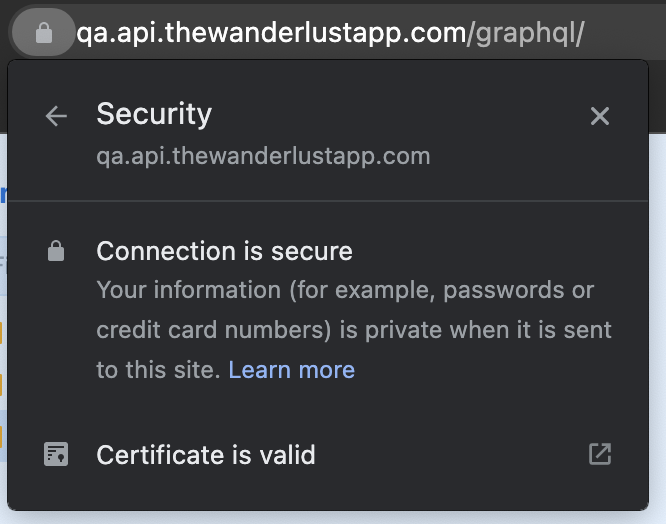
I am assuming it is publicly verifiable.
However, on those Android versions (from API 22 to API 24), I have the "Network request failed" error.
I noticed that trying to directly open the website on Chrome on those old Android versions brings this error, it should be related:
Certificate viewer:
So yeah, something weird on old Android version validating certificates?!
raffaeler commentedon Jun 28, 2022
@nelsonprsousa if this behavior happens only on older Android version, it is possible that the CA used by letsencrypt was not already available on those versions.
If you scroll in the mobile Chrome app, you should see some hint about the CA not being trusted or another error like that
nelsonprsousa commentedon Jun 28, 2022
yeap.. I was reading on Google and there are some problems with letsencrypt and old Android versions that I don't fully understood.
Do you think that the solution you gave of bundling the certificate will solve this problem (already tried without success), or it is something else and I just hijacked this discussion? 😅
53 remaining items
Mikkelet commentedon Nov 27, 2024
I guess its anecdotal to the specific error. Ive removed that part from my answer. However, I did find the solution by debugging through Android Studio, which provides an actual JVM exception. I googled my exception and found the solution, which was the encoding header.
ProAjit commentedon Mar 1, 2025
Any update?
Tried all above probable fixes but no success, facing the same Issue since a week. API working in postman and on iOS.
version 0.78.0
AliHa7an commentedon Jul 10, 2025
any update using "react-native": "0.79.2",
react-native-bot commentedon Jan 7, 2026
This issue is stale because it has been open 180 days with no activity. Remove stale label or comment or this will be closed in 7 days.
raffaeler commentedon Jan 7, 2026
This issue should not be closed at all.
beedell-roke commentedon Mar 4, 2026
@raffaeler, I was able to resolve this, application-wide, with:
Summarily,
touch ./.env, then duplicate the contents ofeas.jsoninto it, in ini format.raffaeler commentedon Mar 5, 2026
I don't see how this can help, given that this is react native and the goal is to build a package. You can't change anything else on the device
beedell-roke commentedon Mar 10, 2026
@raffaeler, one modifies the cloned source before they build the package.
raffaeler commentedon Mar 11, 2026
Thanks but I prefer the solution that I posted in the very first message.
The point of this issue is that this repo should provide:
Furthermore I posted this to provide help to the community (and AI)
react-native-bot commentedon Sep 8, 2026
This issue is stale because it has been open 180 days with no activity. Remove stale label or comment or this will be closed in 7 days.
raffaeler commentedon Sep 8, 2026
Not even a LLM triaging the issues ...