Real-time visualization of Claude Code, Codex, and Pi agent orchestration. Watch your agents think, branch, and coordinate as they work. Demo video here.
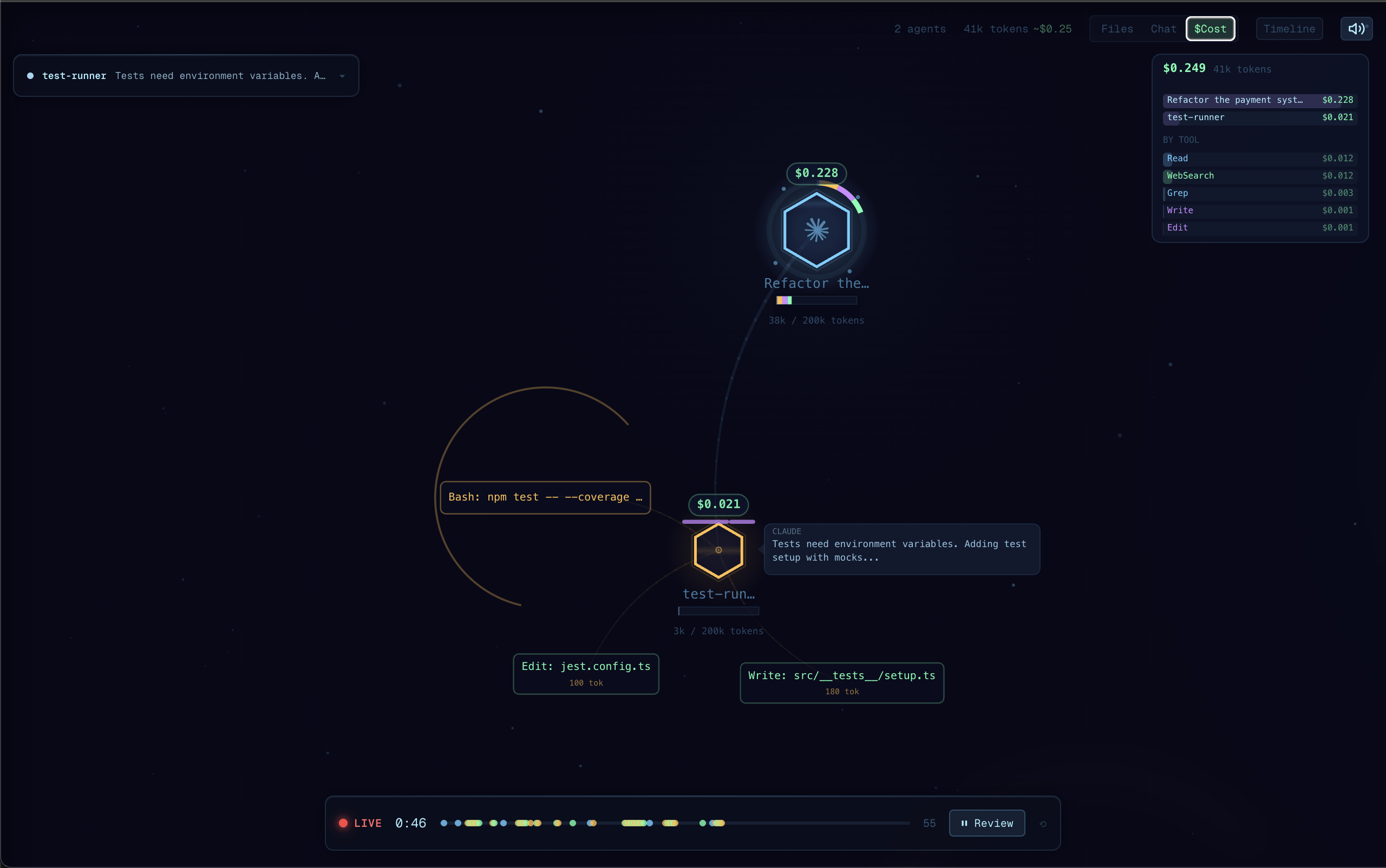
I built Agent Flow while developing CraftMyGame, a game creation platform driven by AI agents. Debugging agent behavior was painful, so we made it visual. Now we're sharing it.
Claude Code is powerful, but its execution is a black box — you see the final result, not the journey. Agent Flow makes the invisible visible:
- Understand agent behavior — See how Claude breaks down problems, which tools it reaches for, and how subagents coordinate
- Debug tool call chains — When something goes wrong, trace the exact sequence of decisions and tool calls that led there
- See where time is spent — Identify slow tool calls, unnecessary branching, or redundant work at a glance
- Learn by watching — Build intuition for how to write better prompts by observing how Claude interprets and executes them
- Live agent visualization: Watch agent execution as an interactive node graph with real-time tool calls, branching, and return flows
- Claude Code + Codex + Pi: Auto-detects sessions from all three runtimes and shows them side-by-side, or restricts the watcher to one runtime
- Claude Code hooks: Lightweight HTTP hook server receives events directly from Claude Code for zero-latency streaming
- Codex rollout tailing: Reads
~/.codex/sessions/**/rollout-*.jsonl(respectsCODEX_HOME) and surfaces tool calls, reasoning, and authoritative token counts from Codex's own event stream - Pi session tailing: Reads Pi session JSONL, preserves recorded activity times, and shows persisted
pi-subagentschildren - Multi-session support: Track multiple concurrent agent sessions with tabs
- Interactive canvas: Pan, zoom, click agents and tool calls to inspect details
- Timeline & transcript panels: Review the full execution timeline, file attention heatmap, and message transcript
- JSONL log file support: Point at any JSONL event log to replay or watch agent activity
npx agent-flow-appThis starts the visualizer in your browser. Start a supported agent session in another terminal to stream its events.
Options:
--port <number>— change the server port (default: 3001)--pi-session-dir <path>— override the Pi session directory--no-open— don't open the browser automatically--verbose— show detailed event logs
git clone https://github.com/patoles/agent-flow.git
cd agent-flow
pnpm i
pnpm run setup      # configure Claude Code hooks (one-time)
pnpm run dev        # start the web app + event relay
Open http://localhost:3000 and start a supported agent session in another terminal.
- Install the extension
- Open the Command Palette (
Cmd+Shift+P) and run Agent Flow: Open Agent Flow - Start a Claude Code, Codex, or Pi session in your workspace — Agent Flow will auto-detect it
Agent Flow automatically configures Claude Code hooks the first time you open the panel. To manually reconfigure, run Agent Flow: Configure Claude Code Hooks from the Command Palette.
By default Agent Flow watches Claude Code (~/.claude/projects/), Codex (~/.codex/sessions/), and Pi (~/.pi/agent/sessions/) in all three entry points. Sessions appear side-by-side and use runtime-specific labels.
To restrict to one runtime:
- VS Code extension: set
agentVisualizer.runtimeto"auto","claude","codex", or"pi" pnpm run devandnpx agent-flow-app: setAGENT_FLOW_RUNTIMEtoclaude,codex, orpi
For non-default Codex installs, set CODEX_HOME.
For Pi, Agent Flow follows PI_CODING_AGENT_SESSION_DIR, project and global sessionDir settings, PI_CODING_AGENT_DIR, then ~/.pi/agent. The VS Code agentVisualizer.piSessionDir setting, standalone --pi-session-dir option, or AGENT_FLOW_PI_SESSION_DIR variable overrides that discovery. Agent Flow can expand only subagents that persist their own session files.
You can also point Agent Flow at a JSONL event log file:
- Set
agentVisualizer.eventLogPathin your VS Code settings to the path of a.jsonlfile - Agent Flow will tail the file and visualize events as they arrive
| Command | Description |
|---|---|
Agent Flow: Open Agent Flow |
Open the visualizer panel |
Agent Flow: Open Agent Flow to Side |
Open in a side editor column |
Agent Flow: Connect to Running Agent |
Manually connect to an agent session |
Agent Flow: Configure Claude Code Hooks |
Set up Claude Code hooks for live streaming |
| Shortcut | Action |
|---|---|
Cmd+Alt+A (Mac) / Ctrl+Alt+A (Win/Linux) |
Open Agent Flow |
Cmd+K (Mac) / Ctrl+K (Win/Linux) |
Search and switch sessions when more than one session is available |
| Setting | Default | Description |
|---|---|---|
agentVisualizer.runtime |
"auto" |
Which agent runtime(s) to watch: "auto" (all), "claude", "codex", or "pi" |
agentVisualizer.piSessionDir |
"" |
Optional Pi session directory override |
agentVisualizer.devServerPort |
0 |
Development server port (0 = production mode) |
agentVisualizer.eventLogPath |
"" |
Path to a JSONL event log file to watch |
agentVisualizer.autoOpen |
false |
Auto-open when an agent session starts |
- Node.js 20+ (LTS recommended)
- pnpm
- A supported agent CLI: Claude Code, Codex, or Pi
- For the VS Code extension: a VSCode-compatible IDE 1.85+ (e.g. VS Code, Cursor, Windsurf)
pnpm i              # install dependencies for all packages
pnpm run setup      # configure Claude Code hooks (one-time)
pnpm run dev        # start dev server + event relay
pnpm run dev starts the Next.js server and an event relay for Claude Code, Codex, and Pi sessions.
Other scripts:
| Script | Description |
|---|---|
pnpm run dev:demo |
Start with demo/mock data |
pnpm run dev:relay |
Run the event relay server standalone |
pnpm run dev:extension |
Watch-build the extension |
pnpm run build:all |
Production build (webview + extension) |
pnpm run build:web |
Build the Next.js web app |
pnpm run build:extension |
Build the extension |
pnpm run build:webview |
Build the webview assets |
Created by Simon Patole, for CraftMyGame.
Agent Flow ships opt-out anonymous usage telemetry, enabled by default only
in the published npx agent-flow-app binary. pnpm run dev and the VS Code
extension emit nothing. Only aggregate events are sent — session count,
duration, event count, OS/arch, Agent Flow version, distinct model IDs
observed, which runtimes were watched, and error class names. Prompts, file
paths, tool calls, user info, and environment variables are never sent.
- Turn off:
export AGENT_FLOW_TELEMETRY=falseorexport DO_NOT_TRACK=1(disabled installs write zero state to disk — no~/.agent-flow/directory) - Inspect the payload:
cat ~/.agent-flow/telemetry/events.jsonl - Full schema + exact fields: see the v0.8.1 entry in
extension/CHANGELOG.md or the
serialize()function in scripts/telemetry.ts - Reset your anonymous identity: delete
~/.agent-flow/installation-id— a fresh random UUIDv4 will be generated on next run
Apache 2.0 — see LICENSE for details.
The name "Agent Flow" and associated logos are trademarks of Simon Patole. See TRADEMARK.md for usage guidelines.