🔗 Live example / 実装サンプル: ny000815/LeetCode — a repository running this tool (see its README top for the auto-generated stats dashboard).
(日本語版 / Japanese version below)
A GitHub Actions workflow that automatically backs up your accepted LeetCode submissions to a Git repository on a daily schedule.
For each problem you have solved, it keeps the source code of your latest accepted submission, named by problem number and slug:
submissions/
├── 0001-two-sum.py
├── 0011-container-with-most-water.cpp
├── 0146-lru-cache.py
└── ...
The backup runs entirely on GitHub Actions, so once it is set up you do not need to run anything manually. Each solution is committed as a separate commit whose date is set to when you actually solved the problem, so the auto-commits land on your GitHub contribution graph on the day you solved each problem — see Commit identity & contribution graph.
Your auto-generated stats dashboard will appear here after the first workflow run (updated by generate_stats.py).
- It reads the last sync time from git history: each solution is committed with its date backdated to the submission time, so the most recent sync commit's date is the newest submission already backed up. The git log itself is the state store — no external database or state file.
- It calls the LeetCode GraphQL API (
submissionList) with your session cookie, paginating newest-first viaoffset/hasNext, and stops as soon as it reaches a submission at or before the last sync time. So each run only pulls what's new. - It keeps only the latest accepted submission per problem in that new batch.
- For each, it fetches the source code via
submissionDetailsand writes it tosubmissions/<problem_number>-<title_slug>.<ext>. - Each file is committed individually with the commit date backdated to the submission time, and the workflow pushes them.
Because syncing is keyed on submission time (not filename), a new accepted submission to an already-solved problem is picked up and updates the file on the next run. The very first run has no prior sync commit, so it backs up your entire accepted history.
The API approach (GraphQL queries, headers, language map, locked-problem handling) is based on joshcai/leetcode-sync; the overall structure and workflow are based on the AtCoder version.
-
Obtain your LeetCode cookies. Log in to leetcode.com, then:
- Right-click the page → Inspect, and open the Network tab.
- Refresh the page and click any request to
leetcode.com. - Under Request Headers, find the
cookie:line and copy the values ofcsrftokenandLEETCODE_SESSION.
-
Fork or copy this repository into your own GitHub account (it can be private or public).
-
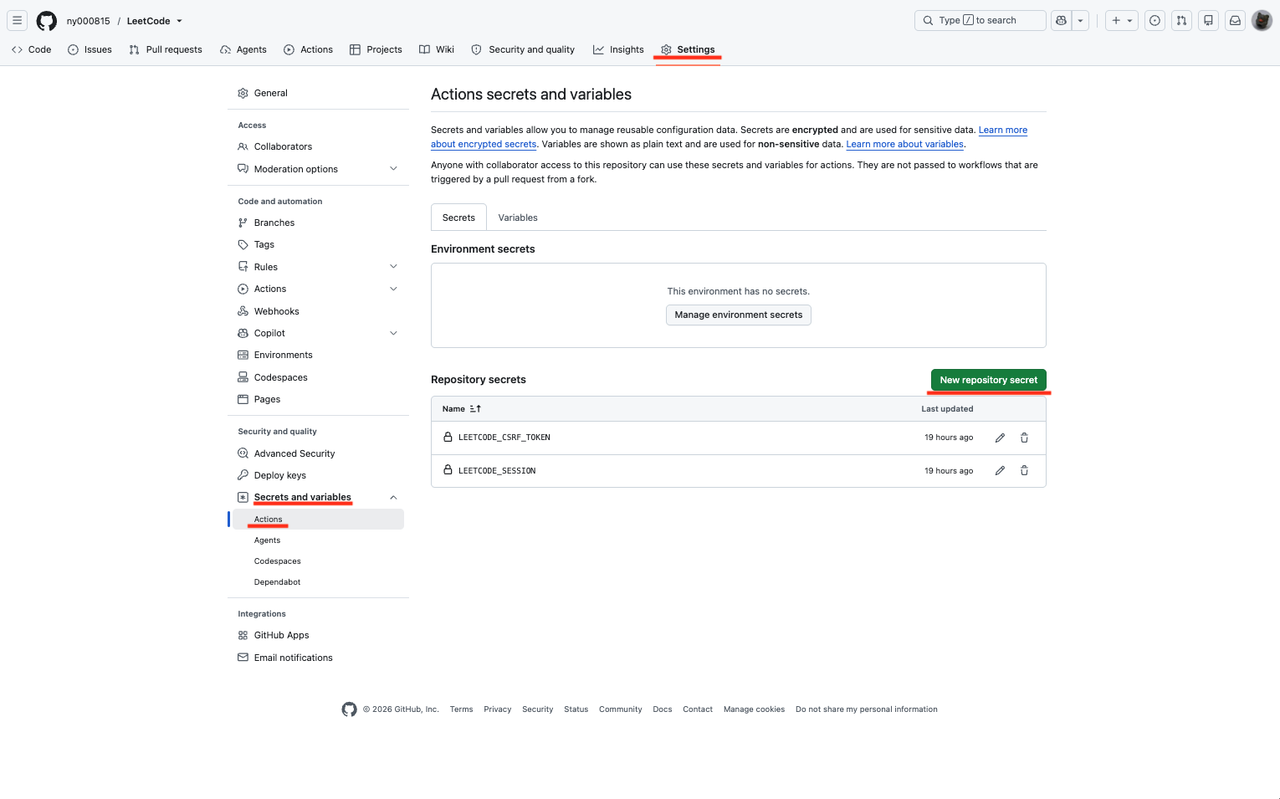
Add the cookies as GitHub secrets in your repo (Settings → Secrets and variables → Actions):
LEETCODE_SESSION— theLEETCODE_SESSIONcookie valueLEETCODE_CSRF_TOKEN— thecsrftokencookie value
-
Give Actions write permission. Settings → Actions → General → Workflow permissions → select Read and write permissions. (The workflow also requests
contents: write.) -
Set the commit identity. See the next section — this controls whether the auto-commits appear on your contribution graph.
-
Run it. Trigger it manually from the Actions tab (Run workflow), or wait for the daily scheduled run.
The first run backs up your entire accepted history, so it may take a while. Subsequent runs only fetch newly solved problems and finish quickly.
Note: the
LEETCODE_SESSIONcookie expires periodically. If the workflow starts failing with an authentication error, repeat step 1 and update the secrets.
The commits are made with the identity configured in .github/workflows/leetcode-backup.yml:
- name: Configure git identity
  run: |
    git config user.name  "your_github_username"
    git config user.email "your_github_username@users.noreply.github.com"
GitHub only adds a commit to your contribution graph when the commit's author email matches a verified email on your GitHub account.
| Email you set | Email exposed publicly? | Counts as contribution? |
|---|---|---|
your_github_username@users.noreply.github.com |
No | Yes |
12345678+your_github_username@users.noreply.github.com |
No | Yes |
| Your real email | Yes — gets scraped for spam | Yes |
github-actions[bot]@users.noreply.github.com |
No | No (shows as a bot) |
Recommended: use your personal GitHub no-reply address (Settings → Emails). It keeps your real email private and still grows your grass. Because each commit is backdated to the submission time, the grass appears on the day you actually solved each problem.
The daily run is controlled by the cron line in .github/workflows/leetcode-backup.yml:
schedule:
- cron: '0 5 * * *' # 05:00 UTC every day- GitHub Actions cron is always in UTC; it does not use your local time zone.
0 15 * * *is 15:00 UTC (= 00:00 JST the next day). - Daylight Saving Time is not handled automatically.
- Scheduled runs can be delayed a few minutes when runners are busy.
The file extension is chosen from the submission language (based on LeetCode's language slugs):
bash c cpp csharp dart elixir erlang golang java javascript kotlin mysql mssql oraclesql postgresql php python python3 pythondata racket ruby rust scala swift typescript
Anything not in the list is saved with a .txt extension. To add a language, edit the LANG_TO_EXTENSION dictionary in fetch_submissions.py.
- LeetCode Premium–locked problems are skipped (the API returns 403 for their code/details).
- The API is undocumented and may change; if the backup stops working, check the request/response shape.
- If LeetCode ever blocks the plain
requestsclient (Cloudflare), install and swap incloudscraperinfetch_submissions.py(create the scraper and reuse it instead ofrequests.Session()).
You can verify authentication without writing files or making commits:
export LEETCODE_SESSION="..."
export LEETCODE_CSRF_TOKEN="..."
export DRY_RUN=1
python fetch_submissions.py
It prints the accepted submissions and the file names it would create.
- API approach based on leetcode-sync by @joshcai.
- Structure based on the AtCoder Submission Backup.
自分の AC(正解)した LeetCode の提出コードを、毎日定期的に Git リポジトリへ自動バックアップする GitHub Actions ワークフローです。
解いた各問題について、最新の AC 提出のソースコードを「問題番号-スラグ」の名前で保存します。
submissions/
├── 0001-two-sum.py
├── 0011-container-with-most-water.cpp
├── 0146-lru-cache.py
└── ...
バックアップは GitHub Actions 上で完結するため、一度セットアップすれば手動で何かを実行する必要はありません。各提出は コミット日時を実際に解いた日時に設定した個別コミットとして記録されるので、GitHub のコントリビューショングラフ(草)には解いた日に草が生えます。詳しくは コミットの author 設定とコントリビューショングラフ を参照してください。
- 前回同期時刻を git 履歴から読み取ります。各解答はコミット日時を提出日時に遡らせて記録されるため、直近の同期コミットの日時=すでにバックアップ済みの最新提出の時刻になります。git のログそのものが状態ストアで、外部 DB や状態ファイルは不要です。
- LeetCode の GraphQL API(
submissionList)をセッション Cookie 付きで新しい順にページングし、前回同期時刻以前の提出に達した時点で取得を打ち切ります。つまり毎回「新しい分だけ」を取得します。 - その新規バッチの中で、各問題の最新 AC 提出だけを残します。
- それぞれの提出について
submissionDetailsでソースコードを取得し、submissions/<問題番号>-<title_slug>.<ext>に書き出します。 - 各ファイルを、コミット日時を提出日時に遡らせて個別にコミットし、ワークフローが push します。
同期の基準は提出日時(ファイル名ではない)なので、既に解いた問題に新しい AC 提出をすると、次回実行時にそれを取り込んでファイルを更新します。初回実行時は同期コミットが無いため、AC 履歴の全件をバックアップします。
API の実装方針(GraphQL クエリ・ヘッダ・言語マップ・ロック問題の扱い)は joshcai/leetcode-sync を、全体構成とワークフローは AtCoder 版 を参考にしています。
-
LeetCode の Cookie を取得 します。leetcode.com にログインし、
- ページを右クリック →「検証(Inspect)」→ Network タブを開く。
- ページを再読み込みし、
leetcode.comへのリクエストをクリック。 - Request Headers の
cookie:行からcsrftokenとLEETCODE_SESSIONの値をコピー。
-
このリポジトリを自分の GitHub アカウントに フォーク(または複製) します(private / public どちらでも可)。
-
取得した値を GitHub Secrets に登録します(Settings → Secrets and variables → Actions):
LEETCODE_SESSION…LEETCODE_SESSIONCookie の値LEETCODE_CSRF_TOKEN…csrftokenCookie の値
-
Actions に書き込み権限を付与 します。Settings → Actions → General → Workflow permissions で Read and write permissions を選択。
-
コミットの author を設定 します。次のセクションを参照。
-
実行 します。Actions タブから手動実行(Run workflow)するか、毎日の定期実行を待ちます。
初回実行では AC 履歴の全件をバックアップするため時間がかかることがあります。2 回目以降は新しく解いた問題だけを取得するのですぐ終わります。
注意:
LEETCODE_SESSIONCookie は定期的に失効します。認証エラーで失敗し始めたら、手順 1 をやり直して Secrets を更新してください。
コミットは .github/workflows/leetcode-backup.yml の git config で設定した identity で作成されます。
- name: Configure git identity
  run: |
    git config user.name  "your_github_username"
    git config user.email "your_github_username@users.noreply.github.com"
GitHub は、コミットの author メールが自分のアカウントに登録済み(verified)のメールと一致する場合にのみ 草を生やします。
| 設定するメール | メールが公開される? | 草が生える? |
|---|---|---|
your_github_username@users.noreply.github.com |
されない | 生える |
12345678+your_github_username@users.noreply.github.com |
されない | 生える |
| 実際のメール | される — スパムに収集される | 生える |
github-actions[bot]@users.noreply.github.com |
されない | 生えない(bot 扱い) |
推奨: 自分の GitHub no-reply アドレス(Settings → Emails)を使ってください。実際のメールを非公開に保ったまま草も生やせます。各コミットは提出日時に遡って記録されるため、解いた日に草が生えます。
毎日の実行は .github/workflows/leetcode-backup.yml の cron 行で制御されます。
schedule:
- cron: '0 5 * * *' # 毎日 05:00 UTC- GitHub Actions の cron は常に UTC です。
0 15 * * *は 15:00 UTC(日本時間 JST の翌 0:00)。 - 夏時間は自動調整されません。
- 定期実行はランナー混雑時に数分遅延することがあります。
ファイルの拡張子は提出言語(LeetCode の言語スラグ)から選ばれます。
bash c cpp csharp dart elixir erlang golang java javascript kotlin mysql mssql oraclesql postgresql php python python3 pythondata racket ruby rust scala swift typescript
リストにないものは .txt で保存されます。言語を追加するには fetch_submissions.py の LANG_TO_EXTENSION を編集してください。
- LeetCode Premium 限定のロック問題はスキップされます(コード取得 API が 403 を返すため)。
- API は非公式のため仕様が変わることがあります。動かなくなったらリクエスト/レスポンス形式を確認してください。
- LeetCode に
requestsがブロックされる(Cloudflare)場合は、cloudscraperを導入しfetch_submissions.pyのrequests.Session()を差し替えてください。
ファイル書き込みやコミットをせずに認証だけ確認できます。
export LEETCODE_SESSION="..."
export LEETCODE_CSRF_TOKEN="..."
export DRY_RUN=1
python fetch_submissions.py
AC 提出一覧と、作成される予定のファイル名が表示されます。
- API 実装方針は @joshcai 氏の leetcode-sync を参考にしています。
- 構成は AtCoder 提出コードバックアップ を参考にしています。