
Point it at something and it names it. Hold it up to a bill and it reads the bill. Press one button and it describes the whole room in a sentence you can act on. No account. No signal. No server. Nothing ever leaves the phone.
It is a native iPhone and Android app that runs object detection, text recognition and a fine-tuned vision-language model on the phone itself, and speaks what they find out loud.




Free on iPhone and Android — no ads, no subscription, nothing to buy inside.






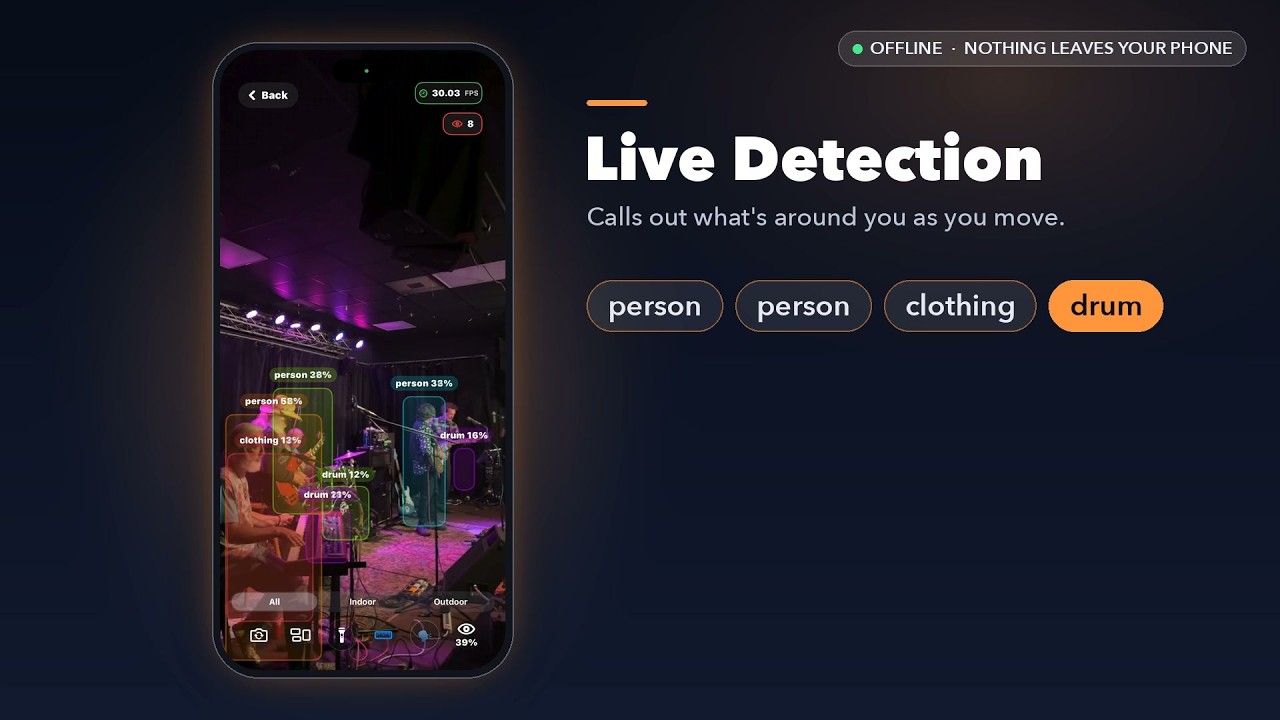
▶ Watch on YouTube: live detection at a concert, describing a scene, answering a question out loud, reading mail, and Help Me Aim talking you into a photo. All real screen recordings, all offline.
| 🌎 Translation | 🐶 Detection | 🏠 Home Screen | 📱 App Info | 📏 LiDAR Distance |
|---|---|---|---|---|
 |
 |
 |
 |
 |
| Offline Spanish→English | 601 object classes | Clean, native UI | Lightweight install | Pro model depth sensing |
Designed, written and shipped by Matt Macosko (NiceDreamzApps). The detector, the base language model and the inference runtimes are upstream work, credited below; the app around them is this repo.
- 📱 The iOS app: SwiftUI screens (
ContentView.swift,HomeView.swift) and the camera pipeline with thermal throttling (CameraViewModel.swift) - 🎯 Detection around upstream YOLOv8: 601-class decoding and the indoor/outdoor filters (
YOLOv8Processor.swift), tracking (ObjectTracker.swift), LiDAR distance (LiDARManager.swift) - 🗣️ The on-device narrator: running the fine-tuned model through upstream MLX Swift (
OnDeviceVisionNarrator.swift), a check that says what is wrong with a bad shot before the model runs (FrameQualityGate.swift), and model lookup with a size- and hash-checked install (VisionModelStore.swift,make_manifest.py). The model itself is a LoRA fine-tune of upstream Qwen3.5-0.8B; its weights and training code are not in this repo - 📖 Reading: live OCR on Apple Vision (
LiveOCRViewModel.swift), careful single-page reads (PageScanner.swift), mail and bill summaries in plain code with no model (MailSummarizer.swift), a second check on dollar amounts (MoneyCrossCheck.swift), offline Spanish to English (SpanishTranslationEngine.swift) - 📸 Help Me Aim: talks a blind photographer into the shot, then takes it (
HelpMeAim.swift), with unit tests inproject 601Tests/ - 🤖 The Android port: Jetpack Compose UI (
ui/), the TensorFlow Lite detector (YoloDetector.kt), a JNI bridge to upstream llama.cpp that probes the GPU before trusting it (narrator_jni.cpp,NarratorEngine.kt), and the model conversion tooling (android/tools/)
This began as the eyes of a robot that watched a chicken coop.
The robot had to know what it was looking at while standing in a coop, where there is no wifi worth trusting and no reason to believe a server will answer. So the recognition had to run on the machine itself. That one constraint never went away, and it is why every part of this app still runs on your device and not on somebody else's computer.
The camera turned out to be more useful than the robot. It moved to a phone. Then blind and low-vision users found it, and told us what it was really for.
Chicken is still class 109 of the 601. So are Fox, Raccoon, Owl and Eagle.
It speaks one to three plain sentences about what the camera is actually looking at — where you are, what's near you and on which side, people, anything moving, hazards. Point it at mail and it leads with what the page is and who sent it, then the number that matters, then the deadline, then what happens if it's ignored.
This runs on a small vision-language model that was fine-tuned for this one job and ships inside the app instead of calling somebody's server. That's most of why the download is large, and it's the whole point. It works in airplane mode, on a plane, in a basement, in a country where your data plan doesn't.
It never refuses a shot. Dark, blurry, cut off — it says so in a few words and then describes whatever it can make out anyway. It will not hand the picture back and tell you to take another one.
This app is used every day by blind and low-vision people. The accessibility work isn't a checkbox at the end, it is the product.
|
A spoken countdown before the photo. Tap once, it counts three, two, one out loud with a tap you can feel each second, then fires — so your hand is off the phone at the moment it takes the picture. Pressing the button was what blurred the shot. A switch hands every spoken line to VoiceOver or TalkBack instead, so you hear it in your voice at your speed and nothing talks over anything. |
Not a short list of favourites. Voices you install or enable yourself show up, and the list scrolls. Full brightness on the first tap. No brightness menu to get through first. Straight from your library, not just what the camera is pointed at. |
Every control is labelled, and the labels say what the thing does, not what it's called.
Feature requests from the AppleVis community are credited by name in the commit history and in the source comments. If something is unlabelled, read in the wrong order, or just not useful — say so, and it gets fixed.
|
|
graph TB
    A[📱 Camera Frame] --> B[🎯 YOLOv8 · 601 classes]
    A --> C[📝 Vision OCR]
    A --> D[🗣️ Fine-tuned Vision-Language Narrator]
    A --> H[📏 ARKit LiDAR Depth]

    B --> E[⚡ Metal]
    C --> G[🌎 Offline Translation]
    E --> F[🧠 Neural Engine]
    D --> F
    F --> I[🔊 Spoken Output · VoiceOver or in-app voice]
    H --> I

    D --> J[🔒 100% On-Device · nothing leaves the phone]
    B --> J
| Component | Technology | Purpose |
|---|---|---|
| 🗣️ Narrator | Fine-tuned vision-language model, 4-bit, bundled · MLX Swift (iOS) · llama.cpp (Android) | Scene and page description |
| 🤖 Detector | YOLOv8 (Ultralytics) | 601-class object detection |
| 🏗️ UI | SwiftUI (iOS) · Jetpack Compose (Android) | Native interface on both |
| ⚡ Acceleration | CoreML + Metal + Neural Engine · TensorFlow Lite | Hardware-optimized inference |
| 📊 Dataset | Open Images V7 | The 601 classes |
| 📏 Depth | ARKit LiDAR | Per-object distance |
| 🔋 Optimization | Thermal & battery aware, adaptive frame rate | Runs all day |
| Privacy Feature | Status | Description |
|---|---|---|
| 📊 Data Collection | ❌ NONE | Zero telemetry or analytics |
| 🌐 Internet Required | ❌ NO | Works in airplane mode |
| 📍 Location Tracking | ❌ NEVER | No GPS or location access |
| 🏢 Cloud Processing | ❌ NONE | 100% on-device AI, model included |
| 👤 Account Required | ❌ NONE | Install and use it |
🔐 Privacy is non-negotiable. Everything happens locally.
The one network call in the code: if a build does not have the narrator model inside it, the iPhone app offers a Download button and fetches it once, only when tapped (
VisionModelStore.swift). App Store and Google Play builds ship with the model, so they never make it.
📱 iOS — ios/
SwiftUI, CoreML, Metal and the Neural Engine. Full source, the Xcode project, and the YOLOv8 CoreML model.
Status: ✅ Live on the App Store, free.
🤖 Android — android/
The Android port: TensorFlow Lite YOLOv8 across the same 601 classes, with the model and the conversion tooling included.
Status: ✅ Live on Google Play, free.
- Device: iPhone with iOS 17+ — the download is around 700 MB because the narrator model is inside the app
- Android: Android 8+ for detection and reading; What's this? needs Android 9+ on a 64-bit (arm64) phone
- Optional: a LiDAR-equipped iPhone for distance measurement
- Development: macOS with Xcode 16+ (the MLX Swift and swift-transformers packages resolve on first open), or Android Studio for
android/
# 1. Clone the repository
git clone https://github.com/nicedreamzapp/RealTimeAICam.git

# 2. Navigate to the iOS project
cd RealTimeAICam/ios

# 3. Open in Xcode
open "RealTime Ai Cam.xcodeproj"

# 4. Connect your iPhone and build!
In Xcode, pick your own signing team (and a bundle identifier of your own) under Signing & Capabilities before you run on a device.
The narrator weights are too large for git and are not in this repo. A build from source works for detection, reading and translation straight away; What's this? shows a Download button on the home screen and fetches the model (about 622 MB) the first time.
Android: the arm64 build links against prebuilt llama.cpp libraries and loads model files
that are also not in git, so build those first by following android/NARRATOR.md,
then open android/ in Android Studio.
- What's this? on Android works but is slow on budget phones: about 87 s on a Helio P35, the only phone timed so far (
NARRATOR.md) - No What's this? on 32-bit Android phones; detection and reading still work there
- LiDAR distance is iPhone Pro only
- 📷 Camera — required, it's a camera
- 🖼️ Add to photo library: optional, so Help Me Aim can save the pictures it takes (picking a photo to describe needs no permission)
- 🎙️ Microphone + speech recognition: optional, only while you hold the button to ask a question about a photo, transcribed on the phone
🤖 Swap the YOLOv8 model (click to expand)
-
Replace the model file
ios/yolov8n_oiv7.mlpackage → YourCustomModel.mlpackage -
Update the processor
- Modify
YOLOv8Processor.swiftif input/output shapes differ (it loads the generatedyolov8n_oiv7class and expects 601 classes) - Adjust the class labels in
ios/class_names.txt - If you change the class list, update the indoor/outdoor sets in
YOLOv8Processor.swifttoo, or the filters will drop classes that no longer exist
- Modify
-
Large models
- Use Git LFS for models over 100 MB
- Consider quantization for better performance
- Adjust inference frequency in the camera pipeline
- Modify confidence thresholds for different use cases
- Enable or disable features based on device capability
📝 Before submitting a PR, please include:
- 📱 Device model + OS version tested
- 🔄 Steps to reproduce any issue
- 📋 Crash logs or error messages, if any
- 📸 Screenshots or a short video
- 🧪 Results on more than one device if you can
🎯 Areas where help is especially welcome:
- ♿ Accessibility testing with a real screen reader — the most valuable thing anyone can send
- 🌍 Additional languages for translation and for the interface
- 🎨 UI and UX improvements
- ⚡ Performance optimization
- 🐛 Bug fixes and stability


- Product page: https://nicedreamzwholesale.com/github-realtime-ai-camera/
- Questions or bugs: info@nicedreamzwholesale.com
The narrator here runs on MLX Swift on the phone. On the Mac I use MLX for claude-code-local, which runs Claude Code with local models and no API key.
The code is licensed under AGPL-3.0, the same license as the YOLOv8 detector it is built on. You can use, study, change and share it, as long as you share your changes under the same terms. The "RealTime AI Cam" name and app icon are not licensed, so a build you publish needs its own name and icon.
See LICENSE for the full text and NOTICE.md for the name, icon and third-party notices.
| Component | Creator | License |
|---|---|---|
| 🤖 YOLOv8 | © Ultralytics | AGPL-3.0 |
| 📊 Open Images V7 | CC BY 4.0 | |
| 🍎 CoreML, Metal, SwiftUI, ARKit | © Apple Inc. | Apple Developer Agreement |
| 🤖 TensorFlow Lite, Jetpack Compose | Apache 2.0 | |
| ♿ Feature requests & testing | The AppleVis community | with thanks |
| 🎨 App design & development | © NiceDreamzApps | AGPL-3.0 |


