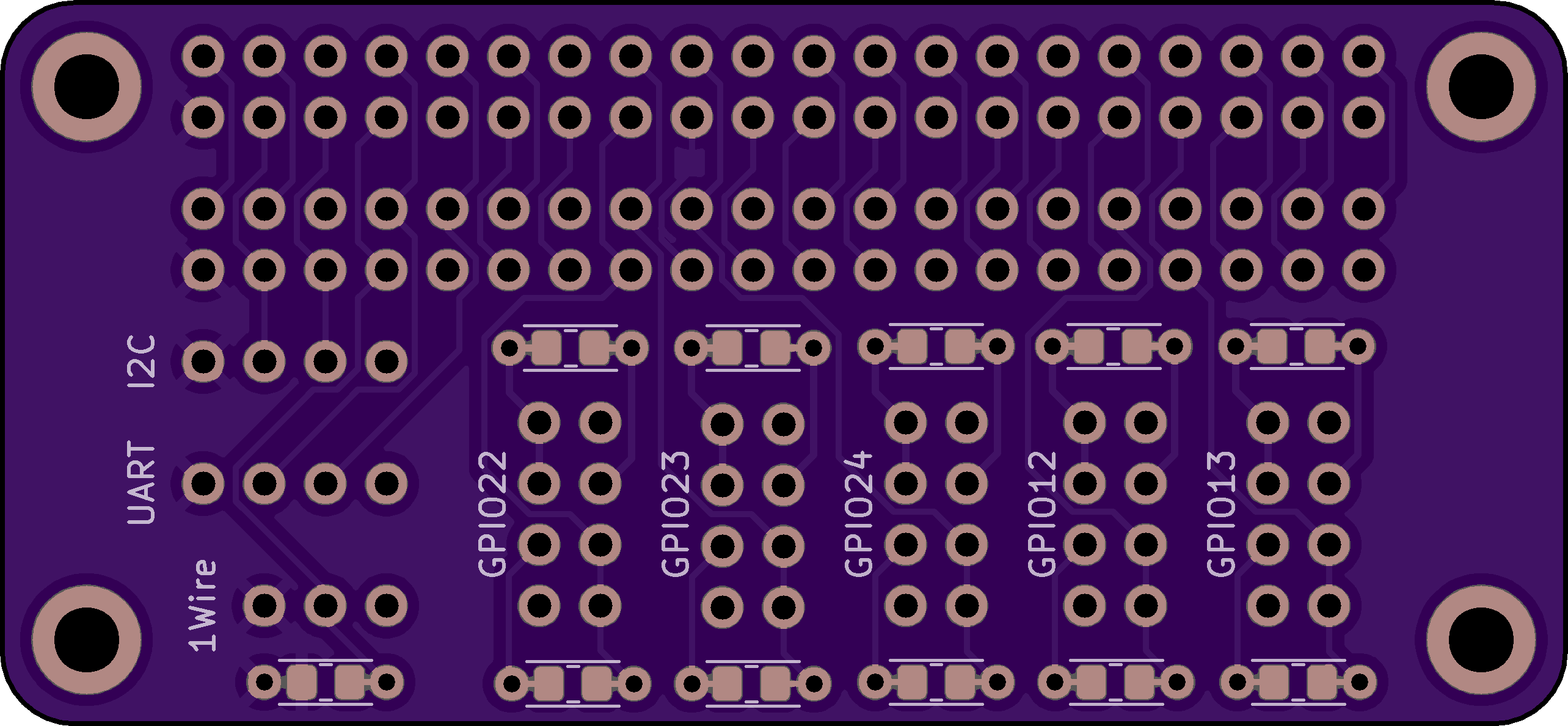
A simple Raspberry Pi pHAT to break out common interfaces & GPIO, with allowances for several common IO setups:
- Pinouts for I2C, UART, and 1-Wire (pullups included where needed)
- GPIO breakouts for pins 12, 13, 22, 23, 24, with the following options:
- Simple 2-pin setup with GPIO & GND, suitable for input or adhoc use
- LED driving setup with integrated resistor, suitable for smaller LEDs
- Sink-side transistor network with integrated resistor for driving larger LEDs
- Sink-side transistor network with 2-pin output (NPN collector & 5V rail)
All resistor footprints include allowance for either through-hole or 0805 SMD mounting.
Available at OSH Park.
The board provides the following interfaces:
The 40 pin header is duplicated pin-for-pin; use this for one-off access to pins as needed.
Breaks out the RPi's primary I2C interface (ie: not the EEPROM interface). Pinout is (from left to right looking at the top of the board):
- Pin 1: 3.3V
- Pin 2: I2C Data (RPi BCM2)
- Pin 3: I2C Clock (RPi BCM3)
- Pin 4: Ground
Breaks out the RPi's UART. Pinout is (from left to right looking at the top of the board):
- Pin 1: 3.3V
- Pin 2: Tx (RPi BCM14)
- Pin 3: Rx (RPi BCM15)
- Pin 4: Ground
Breaks out the RPi's 1-Wire interface. Pinout is (from left to right looking at the top of the board):
- Pin 1: 3.3V
- Pin 2: Data (RPi BCM4)
- Pin 3: Ground
The 1-Wire spec mandates a 4.7k pullup resistor on the data line; this can be done by populating the resistor below the 1-wire header (there is provision to install either a through hole resistor or an 0805 SMD; both connections are wired in parallel)
Five GPIOs are broken out, corresponding to BCM12-BCM13 and BCM22-BCM24. The pinout for each is as follows (looking at the top of the board):
              o||o <-------- <-- Collector current limiting resistor
              |            |
              1  2 <-- 5V  |
              |            |
              3  4 <--------

   ---------> 5  6 <-- GPIO
   |             |
   |  GND --> 7  8 <-- GPIO
   |             |
   ---------> o||o <-- GPIO current limiting resistor
- Pin 1: Transistor collector output. Common with pin 3
- Pin 2: 5V (Note this is 5V)
- Pin 3: Transistor collector output. Common with pin 1
- Pin 4: Resistor terminal (for upper resistor)
- Pin 5: Resistor terminal (for lower resistor)
- Pin 6: GPIO pin (corresponds to BCMXX). Common with pin 8
- Pin 7: Ground
- Pin 8: GPIO pin (corresponds to BCMXX). Common with pin 6
There are two resistors in each GPIO network. The upper resistor is wired to pin 4 on one end and pins 1&3 on the other. It is intended as a current limiting resistor when a transistor is used to drive a large LED. The lower resistor is wired to pins 5 on one end and 6&8 on the other. It is intended as a current limiting resistor when driving a small LED or a switching transistor directly from the GPIO pin. Both resistor footprints include allowance for either through-hole or 0805 SMD mounting.
Pin 6 is always unpopulated and exposes the GPIO directly. This is useful for probing during development.
This layout looks a bit odd but allows each pin to be conveniently used in a variety of ways. See below for instructions on how to wire up each mode; I promise this will make sense once you use it.
- Wire your sensor between pins 7 and 8 of the relevant GPIO column, and set the GPIO to use a pullup resistor in software.
- The GPIO will be high when the sensor is open, and go low when the sensor closes.
In pictures:
   1  2

   3  4

   5  6

   7  8
   |  |
   |__|  <-- switch
This comes with the usual caveats about driving LEDs directly off GPIO pins; so long as you're driving small LEDs in a non-continuous manner you should be fine, but caveat emptor etc.
- Wire an appropriate resistor (~ 330Ω) in the lower resistor position of the relevant GPIO column (there is provision to install either a through hole resistor or an 0805 SMD; both connections are wired in parallel).
- Wire your LED with the anode (longer leg) in pin 5 and the cathode (shorter leg) in pin 7.
- You can now turn the LED on by driving the relevant GPIO output high.
In pictures:
                      1  2

                      3  4

           /|-------- 5  6
 LED ->   | |
           \|-----    7  8

 ~330Ω resistor ->    o||o
- Wire an appropriate resistor (~ 100Ω) in the lower resistor position of the relevant GPIO column (there is provision to install either a through hole resistor or an 0805 SMD; both connections are wired in parallel). This resistor will be wired between the GPIO output and transistor base and serves to limit the current (sourced from the GPIO pin) that will drive the base of the transistor.
- Wire an NPN transistor such as a 2N2222 with the emitter in pin 7, the base in pin 5, and the collector in pin 3. For the common D-shaped 2N2222 packaging, this will correspond to the flat side being to the right
- Wire an appropriate resistor (exact value will depend on what kind of LED you're driving; NOTE that pin 2 supplies 5V) in the upper resistor position of the relevant GPIO column (there is provision to install either a through hole resistor or an 0805 SMD; both connections are wired in parallel). This resistor will be wired serves to limit the current into the LED.
- Wire your LED with the anode (longer leg) in pin 2 and the cathode (shorter leg) in pin 4.
In pictures:
  LED resistor   ->    o||o

                       1  2 ---------|\
                                     | | <-- LED
            /|C------  3  4    ------|/
           / |
2N2222 -> |  |B------  5  6
           \ |
            \|E------  7  8

  ~100Ω resistor ->    o||o
This is pretty similar to the previous case of driving a larger LED, but accesses the switching transistor's collector directly. This comes with the usual caveats about transistor / sink sizing etc. It's assumed that you know what you're doing in this scenario.
- Wire an appropriate resistor (~ 100Ω) in the lower resistor position of the relevant GPIO column (there is provision to install either a through hole resistor or an 0805 SMD; both connections are wired in parallel). This resistor will be wired between the GPIO output and transistor base and serves to limit the current (sourced from the GPIO pin) that will drive the base of the transistor.
- Wire an NPN transistor such as a 2N2222 with the emitter in pin 7, the base in pin 5, and the collector in pin 3. For the common D-shaped 2N2222 packaging, this will correspond to the flat side being to the right.
- Wire your load to pin 1. If useful to your situation, you can also access 5V via pin 2 as needed
In pictures:
              Load --> 1  2 <-- 5V if needed

            /|C------  3  4
           / |
2N2222 -> |  |B------  5  6
           \ |
            \|E------  7  8

  ~100Ω resistor ->    o||o
MIT