
Do you like this software? Star the project and become a ⭐ Stargazer



This is the actively maintained fork of CoinCashew’s EthPillar .
If you installed EthPillar from https://github.com/coincashew/ethpillar (or before April 18, 2026) and have never switched to this fork, your installation is still pointing to the original (inactive) repo.
Switch once with these two commands:
cd ~/git/ethpillar
git remote set-url origin https://github.com/mjkeating/EthPillar.git
After switching, use System Administration → Update EthPillar inside the TUI to pull the latest changes. New users can skip this step — the installer below already points to this fork.
Glamsterdam-ready. Adds ePBS migration and native ePBS installs on Sepolia, Obol Charon DV, Web3Signer, and per-client Grafana dashboards.
- ePBS / Gloas: migration for Prysm, Lodestar, Teku v26.9.0+, Lighthouse v8.3.0+, Nimbus v26.10.2+, and Caplin. Native ePBS at install time on Sepolia (no MEV-Boost sidecar). Prepare stages relays; complete drops MEV-Boost after the fork. Guide
- Obol Charon DV: middleware + CDVN migration. Guide
- Web3Signer: localhost remote signer for validator keys. Guide
- Monitoring: per-client Prometheus scrape jobs and Grafana dashboards
- CLI:
ethpillar status|start|stop|restart|check-updates|upgrade|logs(ethpillar --help) - Reliability: download verification, non-root Python venv writes, known-CI-failure tracking
EthPillar is a free, open-source tool to set up and manage your Ethereum node with just a few commands. Whether you’re home solo staking, using Lido CSM, defending cypherpunk ethos with Aztec L2 sequencer node, or running your own RPC node, EthPillar makes everything easy—from installing clients to monitoring your system—all via a friendly text user interface (TUI).
Highlights:
- Supports ARM64 & AMD64 hardware
- Native Lido CSM Integration
- Native Aztec L2 Integration
- Solo staking, full node, and testnet configurations
- Fast updates and troubleshooting
- Plugins for monitoring and performance

Open a terminal and run:
/bin/bash -c "$(curl -fsSL https://raw.githubusercontent.com/mjkeating/EthPillar/main/install.sh)"- Beginner Friendly: No need to memorize complex commands
- Fast Setup: Deploy minority consensus/execution clients in minutes (Nimbus-Nethermind, Teku-Besu, Lodestar-Besu, Lighthouse-Reth, MEVboost included)
- Easy Updates: Find and install the latest releases quickly
- Compatibility: Works with Coincashew’s V2 staking setups
Already running a validator? EthPillar works with Coincashew’s Staking Guide.
- Testnet Support: Ephemery & Hoodi testnets for risk-free practice
- Lido CSM Integration: Stake with as little as 2.4 ETH via Lido CSM (Learn more)
- Plugins: Aztec, Lido CSM, Node-checker, validator tools, monitoring, stats, and more
- Grafana Dashboards: Built-in Ethereum node monitoring, including per-client scrape jobs
- Troubleshooting Tools: Built-in checks for common node issues with Node Checker
- Flexible Deployment Configurations: Solo staking node, Full Node, CSM, Validator-only, Failover, or Obol Charon DV setups
- ePBS / Gloas migration: Two-step MEV-Boost cutover under MEV-Boost → ePBS migration (Prysm, Lodestar, Teku v26.9.0+, Erigon-Caplin, and Lighthouse v8.3.0+ TUI; Charon DVT hidden until Obol ships support; guide)
- Obol Charon DV: DVT middleware + CDVN migrate (guide)
- Web3Signer: Remote signer for validator keys (guide)
When Gloas lands, builder relays move from the MEV-Boost sidecar onto the validator client. EthPillar splits that into prepare (copy relays to the VC, keep MEV-Boost running) and complete (stop MEV-Boost and drop the BN sidecar URL after the fork).
See docs/ePBS-migration.md for the TUI/CLI steps, what each client changes, Obol Charon notes, and when it is safe to complete.
Main Menu
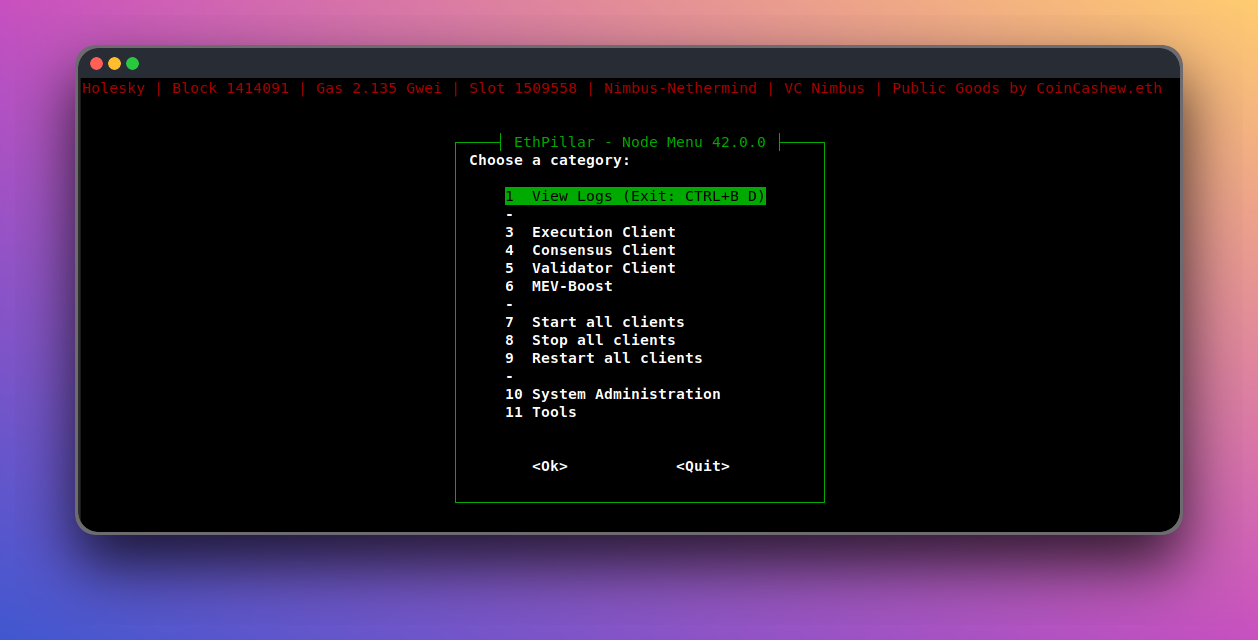
- Review Staking for Beginners
- Learn staking basics & hardware requirements
- Linux (Ubuntu recommended, tested on 24.04 LTS, also compatible with Armbian, Linux Mint, Debian)
- AMD64 or ARM64 hardware (16GB RAM recommended for ARM64 single-board computers)
/bin/bash -c "$(curl -fsSL https://raw.githubusercontent.com/mjkeating/EthPillar/main/install.sh)"sudo apt-get update && sudo apt-get install git curl ccze bc tmux
mkdir -p ~/git/ethpillar
git clone https://github.com/mjkeating/EthPillar.git ~/git/ethpillar
sudo ln -s ~/git/ethpillar/ethpillar.sh /usr/local/bin/ethpillar
ethpillarCongrats! You’ve installed EthPillar and are ready to set up your node.
Recommended next key steps:
- Configure network, port forwarding, and firewall (Security & Node Checks > UFW Firewall)
- Enable monitoring (Logging & Monitoring > Monitoring)
- Benchmark your node (Toolbox > Yet-Another-Bench-Script)
- Set up validator keys (Validator Client > Generate / Import Validator Keys)
- Finally, run the automated Node Checker to verify everything is up to spec (Security & Node Checks > Node Checker)
Charon is Obol’s DVT middleware between your beacon node and a signer VC. EthPillar installs charon.service and points the VC at http://127.0.0.1:3600.
See docs/charon.md for install, CDVN migrate (ethpillar --migrate_cdvn), beacon-node notes, and Grafana/Prometheus wiring.
Web3Signer is Consensys' remote signer. EthPillar installs web3signer.service and points the VC at http://127.0.0.1:9000.
See docs/web3signer.md for install, key import, how each validator client finds keys, and the slashing-protection database.
- Visit the FAQs
Support public goods! Find us on Giveth || Gitcoin Grants or donate to 0xCF83d0c22dd54475cC0C52721B0ef07d9756E8C0 (coincashew.eth)
TUI Update:
System Administration > Update EthPillar, then restart.
Manual Update:
cd ~/git/ethpillar
git pull- Star the project on GitHub
- Share your experience on X or Reddit
- Give feedback (GitHub Issues)
- Submit PRs to improve EthPillar!
Thanks to accidental-green for inspiring this tooling!
