

A pixel creature that lives on your website.
It stands on your real headings, text and buttons, and points at your call to action.
Website · Quick start · Browser extension · Options · Report a bug


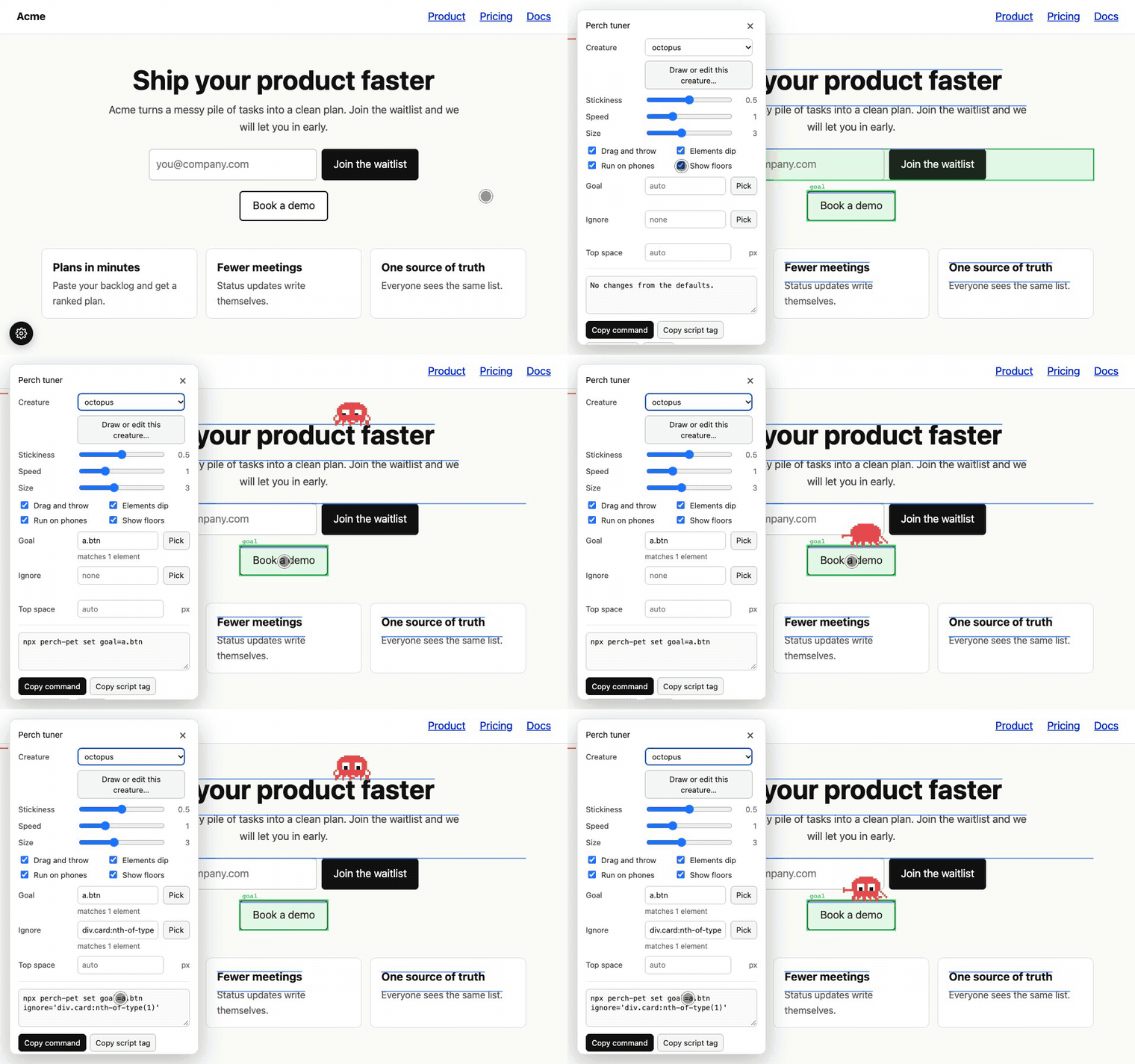
Pick the goal by clicking it, pick a card to ignore, copy the command that saves both.
npx perch-petContents
- Stands on your page. It uses headings, lines of text, cards, buttons and forms as floors. It reads their positions from the DOM, so it follows them when the layout changes or the page scrolls.
- Goes to your call to action and points at it. It finds a submit button or a "Book a demo"-style button on its own. You can pick a different one with a click.
- Reacts. It jumps to what you click, looks at the cursor, gets squashed when the page pushes it into the top of the screen, and can be dragged and thrown.
- Is set up with one command and tuned in a panel on localhost. No config file. Six creatures are built in, and you can draw your own.
It runs in the visitor's browser. No model, no tracking, no network requests.
npx perch-petThen start your dev server and click the gear button at the bottom left. That is the tuner.
| Situation | What to do |
|---|---|
| A project with a repo (Next.js, Astro, SvelteKit, Nuxt, Vite, plain HTML) | npx perch-pet |
| Site builder or no repo (WordPress, Webflow, Shopify, Squarespace) | Paste <script src="https://unpkg.com/perch-pet@0.1/dist/perch.js" defer></script> before </body> |
| Bundler, no script tag | import "perch-pet/auto"; |
| A coding agent is doing it | Jump to "For AI coding agents" |
Every 300 ms, and again when the DOM changes or the window resizes, Perch scans the page and builds two lists.
Floors: where it can stand
| Counts as a floor | Skipped |
|---|---|
h1–h6, p, li, blockquote, figure, img, video, table, pre, form, button, input, textarea, select, [role=button], [data-perch] |
Hidden elements (display: none, visibility: hidden, opacity 5% or less) |
Links that look like buttons: more than 60 × 24 px, and filled, bordered, or with a class containing btn, button or cta |
Elements covered by something else (a modal, a cookie banner, a menu), checked with elementFromPoint |
Anything matching your platforms option |
Anything matching ignore, or inside [data-perch-ignore] |
Elements inside a fixed or sticky bar at the top of the screen (found automatically, or set topOffset) |
|
| Floors narrower than 60% of the creature (about 50 px at the default size) |
For text, it stands on the first line of the letters, not on the box around them. It keeps at most 300 elements, from half a screen above the viewport to half a screen below.
Goal: what it points at
An element is a goal when it is a button, link or [role=button] with at most 40 characters of text, and it scores 3 or more:
| Signal | Points |
|---|---|
Submit button inside a <form> |
3 |
| Text matches sign up, get started, join, subscribe, buy, book, try, start, demo, contact, waitlist, download, pricing, free, request, talk to, get access, early access | 2 |
Class contains btn, button or cta |
1 |
If the goal is inside a form, it stands on the form and points at the button. data-perch on an element marks it as a goal. The goal option replaces the automatic rules (elements marked data-perch still count). If a selector matches several elements, all of them are goals and it goes to the one nearest the middle of the screen.
What it does
| Trigger | Reaction |
|---|---|
| Page loads, or options change | Falls from the top onto a floor, then goes to the goal |
| Idle | Walks along its floor, hops to a nearby floor, stretches, waves, turns, looks around. It taps buttons it lands on |
| You click | Jumps to the floor you clicked, or the nearest floor if you clicked empty space |
| You hover an element | Sometimes jumps there (about 35% at the default stickiness, at most once every 2.5 s) |
| You hover the goal button | Points at it and smiles |
| You focus the goal's field or button | Jumps to the goal |
| Cursor still for 3 s | Looks at the goal |
| You scroll fast | Squashes and braces. If the page pushes it into the top, it is knocked off and falls to the next floor |
| You drag it | It is held. On release it is thrown with your mouse speed |
celebrate() |
Jumps three times with a happy face |
| A question is showing (Ask) | Stands still until the bubble closes. Scrolling closes it at once |
Output. It adds one <div data-perch-root> with one <canvas> to <body>: position: fixed, pointer-events: none except on the creature itself, aria-hidden. When it lands on a floor it plays a short 3–7 px transform animation on that element, unless the element already has a transform (turn off with bounce: false). It writes nothing else to your page.
npx perch-pet            # find the place, install
npx perch-pet --dry      # same, but only show what would change
npx perch-pet --remove   # undo
What the command changes
- Copies
perch.js(andperch-tuner.js, unless--no-tuner) into your public folder. - Adds one script tag to one file. It prints the file and the line.
| Framework | File it edits | Public folder |
|---|---|---|
| Next.js, app router | Every root layout, at any depth: app/layout.tsx, app/(site)/layout.tsx, src/app/…. Adds <Script strategy="afterInteractive"> |
public/ |
| Next.js, pages router | pages/_document.* (created if missing) |
public/ |
| Astro | A .astro file with </body>, layouts first. Adds <script is:inline> |
public/ |
| SvelteKit | src/app.html |
static/ |
| Nuxt 3 | Adds plugins/perch.client.ts |
public/ |
| Vite, plain HTML | index.html, public/*.html, other .html files with </body> |
public/, or next to the file |
It searches the folder you run it in. If that folder is not a project (a monorepo root), it searches the folders below it.
When there is more than one place
One clear place is used straight away. Several (for example one root layout per Next.js route group): in a terminal it asks.
Found 2 places to add the creature:

  1) Next.js layout (route group)       app/(marketing)/layout.tsx   (recommended)
  2) Next.js layout (route group)       app/(app)/layout.tsx

Pick a number (several: 1,2), paste a file or folder path, or press Enter for 1:
Without a terminal it prints one ready-to-run command per place and exits with code 2.
Commands and flags
| Command | Does |
|---|---|
npx perch-pet [dir] |
Install. dir is the project folder (default: current) |
--file <path> |
Install into this exact file. Repeat for several |
--yes, -y |
Do not ask, use the recommended place |
--public <dir> |
Put perch.js in this folder instead of the framework default |
--no-tuner |
Do not copy the localhost tuner |
npx perch-pet set key=value … |
Change options on every installed tag. Values are checked against schema.json. --reset clears all |
npx perch-pet creature file.json |
Use a creature drawn in the tuner |
npx perch-pet detect |
Every place found, as JSON |
npx perch-pet options |
All options as JSON Schema |
Exit codes: 0 done, 1 nothing found, 2 a choice is needed and there is no terminal.
On localhost, 127.0.0.1, *.local, *.localhost, *.test and 192.168.* / 10.* addresses, perch.js loads perch-tuner.js from the same folder and shows a gear button at the bottom left. Anywhere else it does not load, unless you add ?perch=tune to the URL (?perch=off clears it) or set data-tuner="true" on the script tag. npx perch-pet never writes data-tuner, so a site you set up with it never shows the panel to visitors. gettheperch.com sets it on purpose, so you can try the tuner there. A page can open the panel with window.dispatchEvent(new Event("perch:tuner")).
Pick the goal and the elements to ignore
- Switch on Show floors. Blue lines are floors, green boxes are goals.
- Press Pick next to Goal. Move over the page: the element under the cursor is outlined, and the bar at the top shows its selector and how many elements it matches.
- Press ↑ to select the parent, ↓ to go back down. Click to choose. Esc cancels.
- Do the same with Pick next to Ignore. Picks are added to the list, so you can ignore several things.
- The matches N elements line under each field shows how many elements the selector hits. For a goal, several matches are all treated as goals.
- Copy the command at the bottom, for example
npx perch-pet set goal=a.btn ignore='div.card:nth-of-type(1)', and run it in your project folder.
Selectors are built to match exactly the element you picked, as short as possible: #id, [data-testid=…], then class and tag paths, then :nth-of-type. Classes that look generated (hashes, CSS modules) are never used.
 |
 |
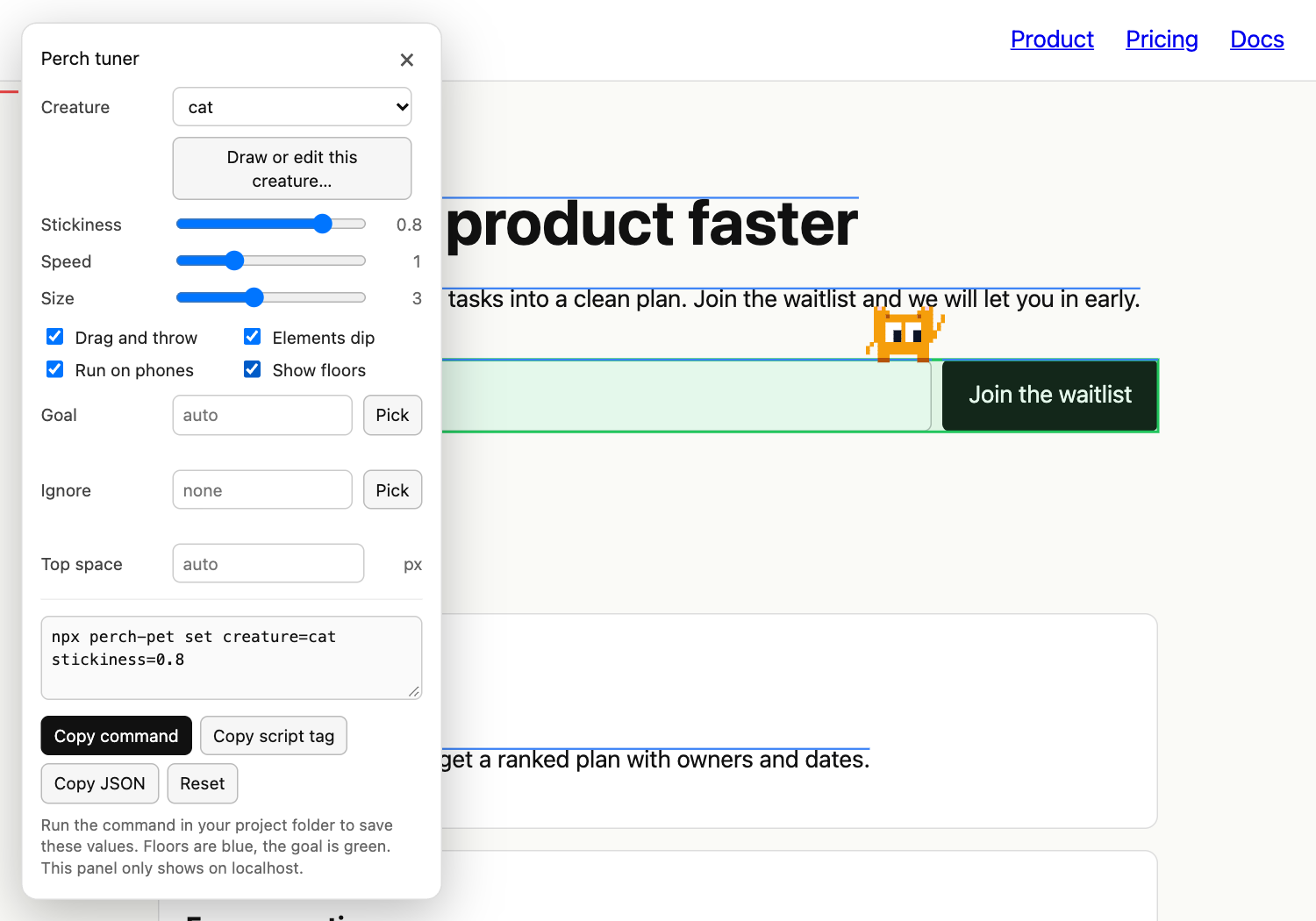
Everything in the panel
| Control | Does |
|---|---|
| Creature | Swap between the six built-in creatures, live |
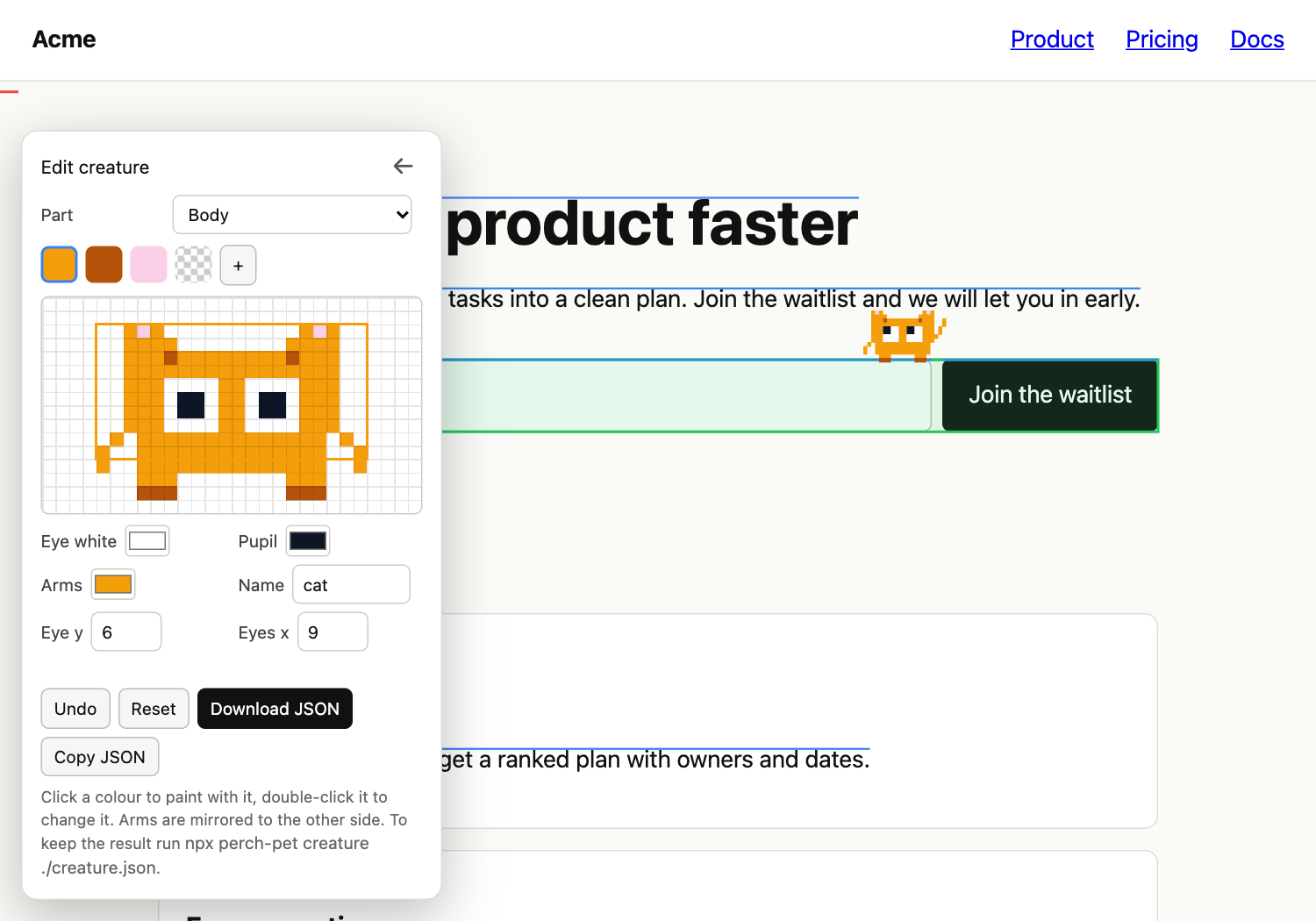
| Draw or edit this creature | Pixel editor: body, both leg frames, five arm poses, palette, eye colors and position, undo. Edits survive a reload while you tune |
| Stickiness, Speed, Size | Sliders for stickiness, speed, scale |
| Drag and throw, Elements dip, Run on phones | Toggles for draggable, bounce, mobile |
| Show floors | The overlay described above |
| Goal, Ignore, Top space | Selectors and pixels, with Pick buttons |
| Ask visitors a question | Question text, up to three buttons and what each does, delay, how often. Applies live, with a Preview button |
| Copy command / script tag / JSON | Three ways to save the result |
| Reset | Back to the defaults |
Want the creature on any website you visit, not only your own? The Perch extension (Chrome and other Chromium browsers) runs the same script on the pages you choose. Click the toolbar icon, or press Alt+Shift+P. Alt+Shift+T opens the tuner on the page, so you can swap creatures, draw your own, and pick the goal and the things to ignore for that site. The creature and sliders are saved for every site, goal and ignore per site. By default it only touches the tab you click (activeTab). Access to all sites is optional, and asked for only if you switch on "On every site".
Source and build: extension/. Release steps and store listing: extension/README.md.
Set them as data-* attributes on the script tag, with npx perch-pet set key=value, or in JS. Types and limits: schema.json.
| Option | Default | What it does |
|---|---|---|
creature |
octopus |
octopus, blob, cat, ghost, robot, alien |
creatureUrl |
none | URL of a creature JSON file. npx perch-pet creature file.json sets it |
stickiness |
0.5 |
0 to 1. How long it stays on a spot. Idle waits are multiplied by 0.4 at 0, 1 at 0.5 and 1.6 at 1, and the stickier it is, the less often it hops away |
speed |
1 |
Walk speed, 0.2 to 4 |
scale |
3 (2 on phones) |
Pixel size of one sprite pixel, 1 to 8 |
goal |
automatic | CSS selector of the call to action |
platforms |
none | Extra CSS selector for floors |
ignore |
none | CSS selector for elements to avoid |
topOffset |
automatic | Pixels to keep free at the top |
mobile |
true |
false turns it off on touch screens and under 640 px wide |
draggable |
true |
Drag and throw |
bounce |
true |
Landing animation on the element |
zIndex |
9999 |
Layer order |
ask |
none | A question in a speech bubble: text, buttons, delay. JSON on the script tag: data-ask='{"text":"..."}' |
tuner |
automatic | Script tag only: true or false forces the panel on or off |
<script src="/perch.js" data-creature="robot" data-stickiness="0.8" data-goal=".hero a.cta" defer></script>The creature can ask a question in a speech bubble: your text, up to three buttons, and what each button does. Two rules apply to every question, wherever it comes from: the creature stands still while the bubble is up, and the bubble goes away as soon as the visitor scrolls. Dragging the creature or pressing Esc closes it too.
<script src="/perch.js" defer
  data-ask='{"text":"Want a quick demo?","buttons":[
    {"label":"Book a demo","action":"link","value":"/demo"},
    {"label":"Copy promo code","action":"copy","value":"PERCH10"},
{"label":"No thanks"}],"delay":8}'></script>| Field | Meaning |
|---|---|
text |
The question, up to 200 characters |
buttons |
Up to 3. The first one is highlighted. Each has a label (up to 40 characters) and an action |
delay |
Seconds on the page before it shows. Default 6, at most 60 |
once |
session (default): once per browser session. forever: once ever. always: on every visit |
id |
Name used to remember that it was seen. Default: made from the text and buttons |
Button action |
value |
Does |
|---|---|---|
link |
URL (http, https, mailto, tel or a relative path). javascript: and data: are refused |
Opens it. "newTab": true opens a new tab |
copy |
The text | Copies it, shows "Copied", then closes |
scroll |
CSS selector | Scrolls to the element |
click |
CSS selector | Clicks the element, for example to open your chat widget |
event |
Event name | Dispatches it on window, with detail.label: addEventListener("open-chat", ...) |
close (or no value) |
none | Just closes |
Set it in the tuner (section "Ask visitors a question", live preview), or with the command: npx perch-pet set ask='{"text":"Want a demo?","buttons":[{"label":"Yes","action":"link","value":"/demo"}]}'. npx perch-pet set ask= removes it. In JS: Perch.init({ ask: { ... } }). The command and the panel check the JSON against schema.json. Seen questions are remembered in sessionStorage (or localStorage for once: "forever"), and only when a question is set. This site's own creature uses this feature for its question about the extension.

A creature is plain data: ASCII rows and a palette (. is empty), two leg frames, five arm poses, eye positions. Draw one in the tuner and press Download JSON, or copy src/creatures/blob.ts. Then:
npx perch-pet creature ./creature.jsonIt validates the file (equal row widths, a color for every character, all five arm poses), copies it to your public folder as perch-creature.json and sets creatureUrl.
import { init, update, destroy, celebrate, debug } from "perch-pet";

init({ creature: "cat", stickiness: 0.8 });
update({ speed: 1.5 });   // change options while it runs
celebrate();              // for example after a signup
debug(true);              // show floors and goals
destroy();
window.dispatchEvent(new Event("perch:celebrate")) is the same as celebrate(). Types are included. In a script-tag setup the same functions are on window.Perch.
Do not write the integration by hand and do not add a skill file. The setup is a deterministic command: no network, no model, plain file edits inside the project folder.
npx perch-pet detect                  # JSON: candidates[], recommended, needsChoice, installed, options
npx perch-pet --dry                   # preview the exact change
npx perch-pet                         # install
npx perch-pet --file app/layout.tsx   # when detect says needsChoice (repeat --file for several)
npx perch-pet set goal=".hero a.cta"  # change options
npx perch-pet --remove                # undo
detect output (shortened):
{ "framework": "next-app", "layoutFile": "app/(site)/layout.tsx", "installed": false, "needsChoice": false,
  "candidates": [{ "id": 1, "kind": "next-app", "file": "app/(site)/layout.tsx", "recommended": true, "installed": false }] }
Prompt: Add the Perch mascot to this site: run npx perch-pet detect, then npx perch-pet (use --file if it lists several places), then open the dev server and check that the creature stands on the page elements and points at the main button.
Machine-readable: llms.txt, llms-full.txt, schema.json, AGENTS.md.
| Size | perch.js 34 kB, 13 kB gzipped, with all six creatures. perch-tuner.js 31 kB, 11 kB gzipped, development only |
| Requests | None. The one exception is a fetch of your own creatureUrl file, if you set it |
| Tracking | None. No cookies. It writes to browser storage only for ?perch=tune (sessionStorage), for "already seen" flags of a question you set (sessionStorage or localStorage), and, in the tuner on localhost, your unsaved creature edits (localStorage) |
| CPU | One canvas, redrawn only when the pose changes. About 60 updates per second at most. Stops in background tabs |
| Layout | position: fixed, so no layout shift. Never blocks clicks |
| Reduced motion | With prefers-reduced-motion, it sits still next to the goal |
| Screen readers | The layer is aria-hidden |
| CSP | The tag loads /perch.js from your own origin, so script-src 'self' is enough |
| Symptom | Fix |
|---|---|
| Nothing appears | Check that /perch.js loads (network tab) and the console for CSP errors. On a phone, check mobile |
| It stands on the wrong thing | Show floors, then Pick the element under Ignore, or use data-perch-ignore |
| It points at the wrong button | Pick the right one under Goal, or npx perch-pet set goal=".selector" |
| It stands behind or on top of a fixed header | topOffset=64 (use your header height) |
| Setup says it cannot tell which place is yours | Pick a number in the menu, or --file <path>, or --yes |
| Setup finds nothing | npx perch-pet --file path/to/layout-or-page, or use the CDN script tag |
- Tested on a handful of real pages. Sticky headers, popups, iframes and canvas-only pages are the weak spots.
- Main document only: it does not enter iframes or shadow DOM.
- The Nuxt and Next pages-router setups are tested on generated projects, not yet on many real ones.
- Floors come from layout, not meaning: a decorative
divwith apinside is a floor like any other. Useignore.
| What it is | Difference | |
|---|---|---|
| page-mascot | A character at the top of the page that watches the cursor and blinks | Perch moves around the page and uses your elements as floors |
| Rive mascots | Animations you build in Rive's editor and play with its runtime | Perch is pixel art with no wiring: one command |
| Neko-style cursor pets | Follow the pointer | Perch lives on the page, not on the cursor |
Issues and pull requests are welcome: CONTRIBUTING.md. bun run demo builds the landing page and opens it, with the tuner on. A new creature is a good first PR.
If Perch saves you time, a star on GitHub helps other people find it.
MIT. Made by Michael Nefedov.