

CLI tool that captures browser traffic and automatically generates production-ready Python API clients.
No more manual reverse engineering—just browse, capture, and get clean API code.
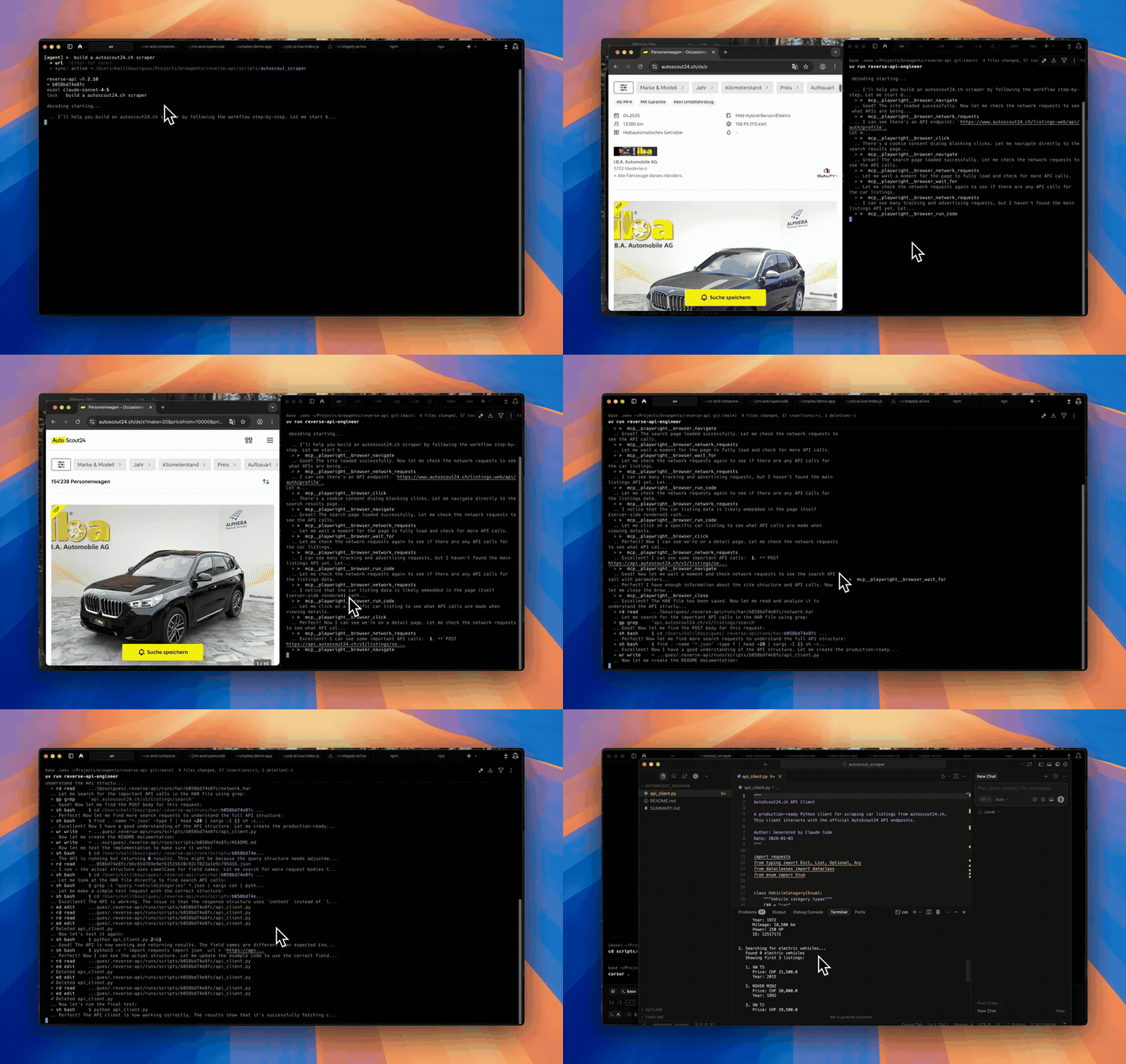
Agent mode
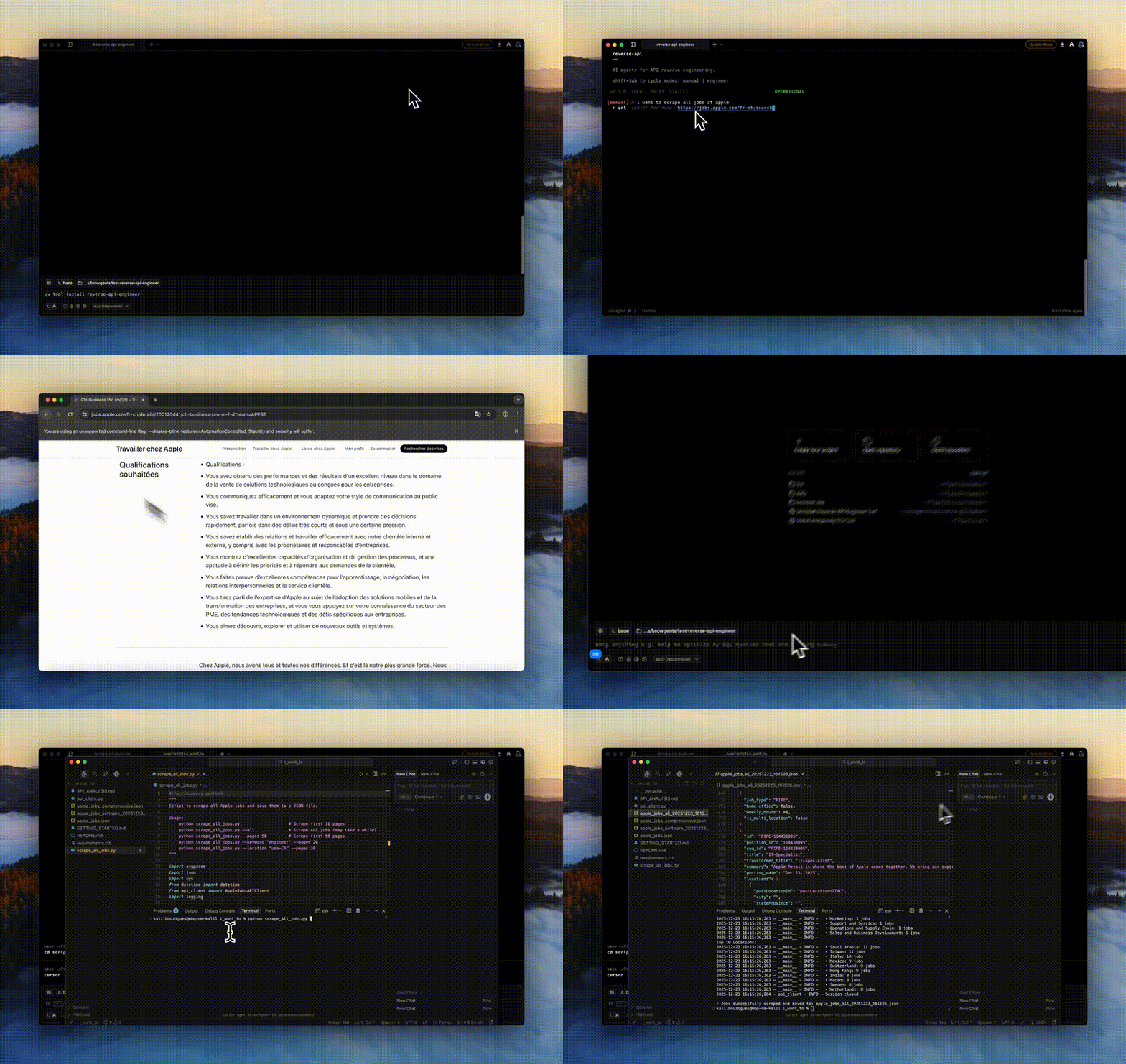
Manual mode
- Features
- Installation
- Quick Start
- Usage Modes
- Configuration
- CLI Commands
- Examples
- Development
- Contributing
- 🌐 Browser Automation: Built on Playwright with stealth mode for realistic browsing
- 🤖 Autonomous Agent Mode: Fully automated browser interaction using AI agents via MCP (Playwright MCP or Chrome DevTools MCP)
- 📊 HAR Recording: Captures all network traffic in HTTP Archive format
- 🧠 AI-Powered Generation: Uses Claude 4.6 to analyze traffic and generate clean Python code
- 🔍 Collector Mode: Data collection with automatic JSON/CSV export
- 🔌 Multi-SDK Support: Native integration with Claude and OpenCode SDKs
- 💻 Interactive CLI: Minimalist terminal interface with mode cycling (Shift+Tab)
- 📦 Production Ready: Generated scripts include error handling, type hints, and documentation
- 💾 Session History: All runs saved locally with full message logs
- 💰 Cost Tracking: Detailed token usage and cost estimation with cache support
- This tool executes code locally using Claude Code—please monitor output
- Some websites employ advanced bot-detection that may limit capture or require manual interaction
uv tool install reverse-api-engineerpip install reverse-api-engineerInstall Playwright browsers:
playwright install chromiumReverse API Engineer includes built-in pricing for the most common models (Claude 4.6, Gemini 3, GPT-4.1/5). Cost tracking uses a 2-tier fallback:
- Local pricing table — built-in pricing for common models
- Default fallback — Claude Sonnet 4.6 pricing for unknown models
If litellm is independently installed in your environment, an extended pricing lookup is auto-detected for 100+ additional models. We no longer ship a [pricing] extra; install litellm directly if you need that coverage.
Launch the interactive CLI:
reverse-api-engineerThe CLI has four modes (cycle with Shift+Tab):
- manual: Browser capture + AI generation
- engineer: Re-process existing captures
- agent: Autonomous AI browser agent (default: auto mode with MCP-based browser + real-time reverse engineering)
- collector: AI-powered web data collection (very minimalist version for now)
Example workflow:
$ reverse-api-engineer
> fetch all apple jobs from their careers page

# Browser opens, navigate and interact
# Close browser when done
# AI generates production-ready API client

# Scripts saved to: ./scripts/apple_jobs_api/Full pipeline with manual browser interaction:
- Start the CLI:
reverse-api-engineer - Enter task description (e.g., "Fetch Apple job listings")
- Optionally provide starting URL
- Browse and interact with the website
- Close browser when done
- AI automatically generates the API client
Output locations:
~/.reverse-api/runs/scripts/{run_id}/(permanent storage)./scripts/{descriptive_name}/(local copy with readable name)
Re-run AI generation on a previous capture:
# Switch to engineer mode (Shift+Tab) and enter run_id
# Or use command line:
reverse-api-engineer engineer <run_id>Fully automated browser interaction using AI agents:
- Start CLI and switch to agent mode (Shift+Tab)
- Enter task description (e.g., "Click on the first job listing")
- Optionally provide starting URL
- Agent automatically navigates and interacts
- HAR captured automatically
- API client generated automatically
Agent Provider Options:
- auto (default): Uses Playwright MCP browser automation with Claude Agent SDK & Opencode. Combines browser control and real-time reverse engineering in a single workflow.
- chrome-mcp: Uses Chrome DevTools MCP to drive your real Chrome browser (with existing sessions, cookies, and auth). Requires Chrome 146+ and Node.js 20.19+.
Change agent provider in /settings → "agent provider".
Web data collection using Claude Agent SDK:
- Start CLI and switch to collector mode (Shift+Tab)
- Enter a natural language prompt describing the data to collect (e.g., "Find 3 JS frameworks")
- The agent uses WebFetch, WebSearch, and file tools to autonomously collect structured data
- Data is automatically exported to JSON and CSV formats
Output locations:
~/.reverse-api/runs/collected/{folder_name}/(permanent storage)./collected/{folder_name}/(local copy with readable name)
Output files:
items.json- Collected data in JSON formatitems.csv- Collected data in CSV formatREADME.md- Collection metadata and schema documentation
Model Configuration:
Collector mode uses the collector_model setting (default: claude-sonnet-4-6). This can be configured in ~/.reverse-api/config.json.
Example workflow:
$ reverse-api-engineer
> Find 3 JS frameworks

# Agent autonomously searches and collects data
# Data saved to: ./collected/js_frameworks/Settings stored in ~/.reverse-api/config.json:
{
  "agent_provider": "auto",
  "claude_code_model": "claude-sonnet-4-6",
  "collector_model": "claude-sonnet-4-6",
  "opencode_model": "claude-sonnet-4-6",
  "opencode_provider": "anthropic",
  "output_dir": null,
  "output_language": "python",
  "real_time_sync": true,
  "sdk": "claude"
}Choose from Claude 4.6 models for API generation:
- Sonnet 4.6 (default): Balanced performance and cost
- Opus 4.6: Maximum capability for complex APIs
- Haiku 4.5: Fastest and most economical
Change in /settings or via CLI:
reverse-api-engineer manual --model claude-sonnet-4-6If you use Opencode, look at the models.
Configure AI agents for autonomous browser automation.
Agent Providers:
- auto (default): Playwright MCP browser automation with real-time reverse engineering. Uses Claude Agent SDK with browser MCP tools. Combines browser control and API reverse engineering in a single unified workflow. Works with Claude SDK (default) or OpenCode SDK.
- chrome-mcp: Drives your real Chrome browser via Chrome DevTools MCP. Useful when you need existing sessions, cookies, or auth. Requires Chrome 146+ and Node.js 20.19+; enable auto-connect at
chrome://inspect/#remote-debugging.
The agent's reasoning model is the same as the SDK model — see Model Selection.
Change in /settings → "agent provider"
- Claude (default): Direct integration with Anthropic's Claude API
- OpenCode: Uses OpenCode SDK (requires OpenCode running locally)
Change in /settings or edit config.json directly.
Control the programming language of generated API clients:
- python (default): Generate Python API clients
- javascript: Generate JavaScript API clients
- typescript: Generate TypeScript API clients
Change in /settings → "Output Language" or edit config.json:
{
  "output_language": "typescript"
}Enable or disable real-time file synchronization during engineering sessions:
- Enabled (default): Files are synced to disk as they're generated
- Disabled: Files are written only at the end of the session
When enabled, you can see files appear in real-time as the AI generates them. This is useful for monitoring progress and debugging.
Change in /settings → "Real-time Sync" or edit config.json:
{
  "real_time_sync": false
}Use these slash commands while in the CLI:
/settings- Configure model, agent, SDK, and output directory/history- View past runs with costs/messages <run_id>- View detailed message logs/help- Show all commands/exit- Quit
The CLI subcommands can be driven by another agent or a wrapper script. Pass --no-interactive (and/or --json) so they fail fast instead of opening questionary prompts, and pipe the structured output into jq.
When --json is set: stdout contains exactly one JSON document (the final result), Rich logs and progress are diverted to stderr, and the process exits with a stable code.
# Run an autonomous agent capture and get a single JSON result on stdout
reverse-api-engineer agent \
  --prompt "capture the public jobs api" \
  --url https://example.com/jobs \
  --json | jq

# List runs / inspect a run as JSON (empty history -> [])
reverse-api-engineer list --json
reverse-api-engineer show <run_id> --json

# Run a generated script non-interactively
#   --no-interactive : never open the script-picker / install confirm
#   --auto-install   : install missing deps on retry without asking
reverse-api-engineer run <run_id> --file api_client.py \
--no-interactive --auto-install -- --org acme| Field | Type | Notes |
|---|---|---|
schema_version |
int |
Currently 1. Bumped on breaking changes. |
status |
"ok" | "error" |
Top-level result. |
run_id |
string | null |
Stable id for follow-up show / engineer / run calls. |
prompt |
string |
The prompt that was passed in. |
url |
string | null |
Optional starting URL. |
mode |
string | null |
Provider used ("auto" for Playwright MCP, "chrome-mcp"). |
har_path |
string | null |
Absolute path to the captured HAR (recording.har). |
script_path |
string | null |
Absolute path to the generated client when reverse engineering ran. |
usage |
object |
Token + cost usage from the engineer SDK ({input_tokens, output_tokens, total_cost}). |
error |
string | null |
Human-readable error message when status == "error". |
| Code | Meaning |
|---|---|
0 |
Success. |
1 |
Runtime error (capture or engineering failed; details in error). |
2 |
Misuse — required arg missing under --no-interactive / --json. |
For run, the exit code is the underlying script's return code on success, or 1 if no script was found, or non-zero if --no-interactive would otherwise have to prompt.
$ reverse-api-engineer
> fetch all apple jobs from their careers page

# Browser opens, you navigate and interact
# Close browser when done

# AI generates:
# - api_client.py (full API implementation)
# - README.md (documentation)
# - example_usage.py (usage examples)

# Scripts copied to: ./scripts/apple_jobs_api/
Generated api_client.py includes:
- Authentication handling
- Clean function interfaces
- Type hints and docstrings
- Error handling
- Production-ready code
git clone https://github.com/kalil0321/reverse-api-engineer.git
cd reverse-api-engineer
uv syncuv run reverse-api-engineer./scripts/clean_build.sh- Python 3.11+
- Claude Code / OpenCode (for reverse engineering)
- Playwright browsers installed
- API key for agent mode (see Agent Configuration)
Contributions are welcome! Please feel free to submit a Pull Request.
This project is licensed under the MIT License - see the LICENSE file for details.