
A Home Assistant integration for the Finnish Meteorological Institute's open data. Observations and forecasts from FMI's stations, a weather forecast for any place, and FMI's weather warnings.




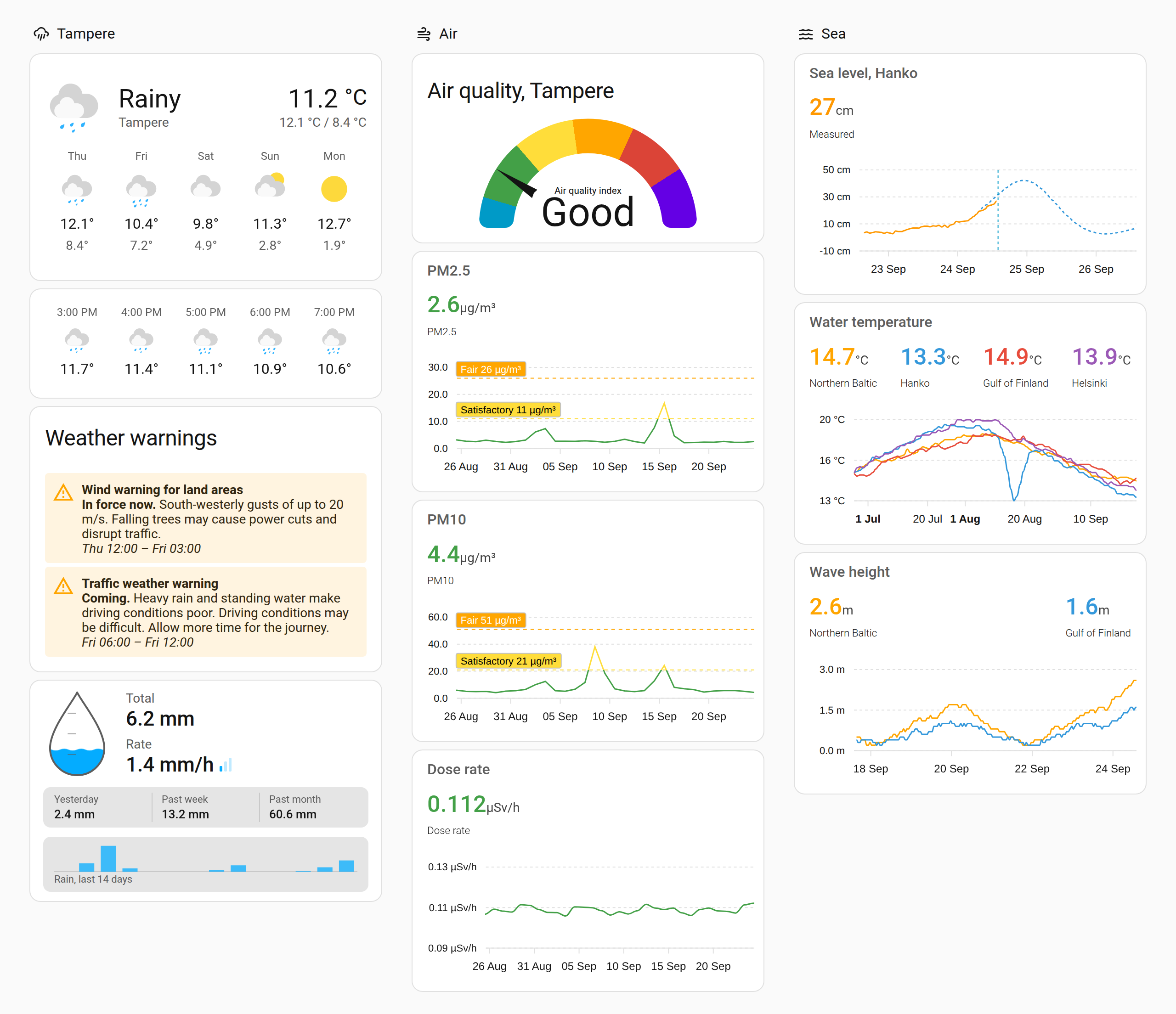
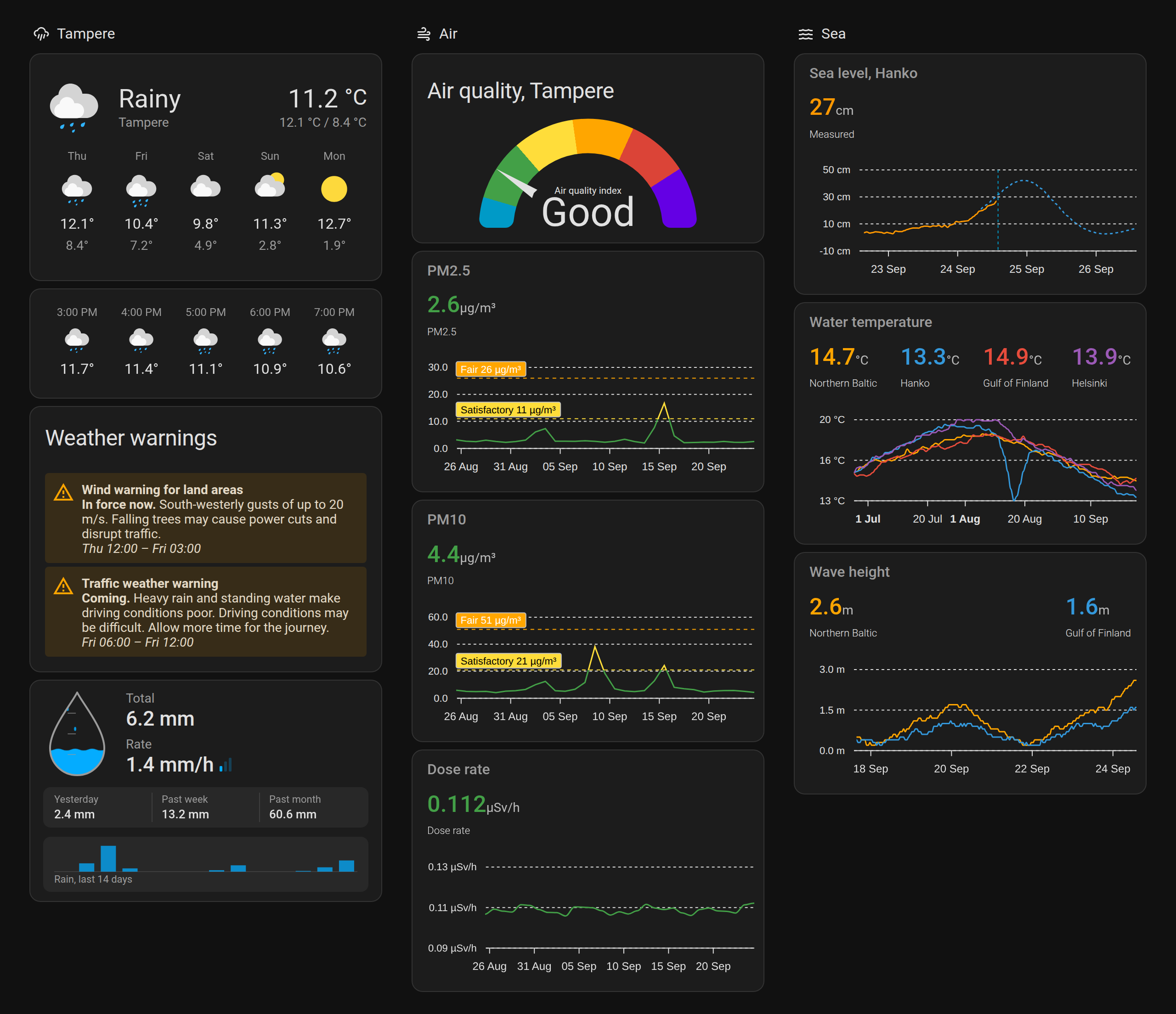
The data in the picture is made up.
FMI publishes almost everything it measures as open data. That is the weather at some 200 stations, rain, snow depth, sea level, waves, water temperature, air quality, solar radiation and STUK's radiation measurements, along with FMI's forecasts and weather warnings. The weather integrations usually give you the temperature and the forecast. This one gives you the rest as well.
You add stations and places to it. A station is one of FMI's stations, with the measurements you want from it, each a sensor. You start from what you want to measure, such as precipitation, and the integration offers the stations that measure it, nearest first. A place is a point on a map with FMI's weather forecast for it, the weather warnings in force there, or both. Each station and place is a device in Home Assistant, so it can be put in an area.
For a one-off chart or a script, an action reads any station's observations over a time range without a sensor.
No account or API key is needed. FMI's open data service is used anonymously.
- Add this repository to HACS custom repositories with type Integration
- Search for FMI Open Data in HACS and download it
- Restart Home Assistant
- Add FMI Open Data in Settings › Devices & services
- Download the source code from the latest release
- Copy the
custom_components/fmi_open_datafolder to your Home Assistant installation'sconfig/custom_componentsfolder - Restart Home Assistant
- Add FMI Open Data in Settings › Devices & services
Adding the integration asks for a language, English or Finnish. FMI's names of queries and parameters, the names of the measurements it suggests, and the warning texts are in that language. Change it later with Reconfigure.
| Name | Type | Description | Default |
|---|---|---|---|
| Language | enum | The language of FMI's names and texts | Home Assistant's, else English |
Configure on the integration sets when a measurement's data counts as stale. The settings apply to every measurement.
| Name | Type | Description | Default |
|---|---|---|---|
| Raise a repair issue | bool | Tell you with a repair issue when a measurement stops getting data | true |
| Hours without new data | int | How old the newest data may be before it counts as stale | 24 |
Daily, monthly and yearly statistics are published only once the day, month or year is over, so for those the limit is never shorter than three days, two months or two years.
Choose Add measurements on the integration page.
- What to measure. Every parameter of FMI's station queries is in one list, about 380 of them, with the query each comes from. Search by name, such as rain or snow, and pick as many as you like.
- A station for each. The stations that have reported the parameter recently, nearest to your home first, with
their distance. The station you chose for the previous parameter is suggested when it has this one too. Switch on
Show all of the query's stations for the ones that have not reported it lately. A parameter nobody has
reported lately, such as wave height while the buoys are ashore for the winter, starts from all of them.
- A model forecast, such as Harmonie or MEPS, is for any point. Pick it on a map and give the place a name.
- STUK's air radioactivity is measured by place, not by station. Type the place's name, such as Kotka.
- Names. Filled in from FMI's description of the parameter, with the period of a daily or hourly query, such as "Sademäärä, tunti". Home Assistant shows the station's name in front of it, so the sensor reads "Lappeenranta lentoasema Sademäärä, tunti".
A measurement at a station that is already there is added to it. A new station becomes a new device. One run can add measurements to several stations.
Reconfigure on a station opens a menu:
-
Add measurements: only what the station has reported is offered.
-
Change a measurement's settings:
Name Type Description Default Unit string The unit to show. Empty uses FMI's own, which FMI does not give for every parameter FMI's Report -1 as 0 bool For parameters that use -1 for no measurable value, such as daily precipitation falseForecast hours int How many hours ahead a forecast shows 36 Forecast past hours int How many hours of the forecast already past it keeps 5 Forecast step int Minutes between two forecast values 30 The forecast settings are only for forecasts.
-
Remove measurements: a station keeps at least one. To remove it altogether, delete it on the integration page.
The station itself does not change, because a different station is a different device. To rename a measurement, rename its sensor in Home Assistant.
Choose Add place on the integration page.
| Name | Type | Description | Default |
|---|---|---|---|
| Place | location | The point, and a radius around it for the warnings | Home, 1 km |
| Name | string | The place's name, shown in front of its entities' names | Home Assistant's location name |
| Weather forecast | bool | A weather entity with FMI's forecast for the place | true |
| Warning types | list | The warnings to follow. Empty follows none | All |
A place follows the forecast, the warnings or both. A warning is included when one of its areas covers the place or comes within the radius. The areas are municipalities for warnings on land and sea areas for warnings at sea, and a sea area includes its islands. On the shore, a radius of a kilometre or two brings in the nearby sea area.
Reconfigure on a place changes any of these. Switching the forecast or the warnings off removes their entities.
Every measurement is a sensor, named after the station and the measurement. An observation's state is the latest value, a forecast's the next one.
| Attribute | Description |
|---|---|
latitude, longitude |
Where the station is |
label |
The measurement's name |
language |
The language of FMI's texts |
query_id |
FMI's query, such as fmi::observations::weather::hourly::simple |
parameter |
FMI's parameter, such as PRA_PT1H_ACC |
location_type, location_id |
How the station is identified (fmisid, geoid, place or latlon), and the value |
no_data_issue, no_data_issue_hours |
The stale data settings that apply, the hours after the minimum for the query |
time, value |
An observation's time and value |
forecast |
A forecast's values, each with time and value |
forecast_hours, forecast_past_hours, forecast_step |
A forecast's settings |
Every measurement also has a diagnostic binary sensor, such as
binary_sensor.lappeenranta_lentoasema_sademaara_tunti_stale_data. It is on while the newest data FMI holds for the
measurement is older than the limit in the options, and it turns off by itself when data comes back. The age comes
from FMI's own timestamps, so restarting Home Assistant does not reset it.
FMI removes parameters from stations, and stations are now and then shut down or renumbered. Neither is an error: the query just returns nothing. A repair issue then tells you whether the station returns nothing at all, or still reports but no longer has your parameter, and lists what it does have. Remove the measurement and add a working one, and the issue clears.
A place with the forecast on has a weather entity named after the place. It shows the hour under way, and Home Assistant's weather cards and voice assistants can use its forecasts:
- Hourly for about nine days, as far as FMI's forecast reaches
- Daily, a day being the local calendar day
- Twice daily, from 6 to 18 and from 18 to 6
A day or a half takes its condition and wind from one hour, 14:00 for a day and a daytime half and 02:00 for a night. Its temperature is the highest and lowest, its precipitation the sum and its precipitation probability and gust the highest. The forecast is FMI's edited one, the same that FMI's own site shows, read every 30 minutes. When FMI cannot be reached, the last forecast is kept for three hours.
A place with warnings has a sensor for the highest warning level in force now, none, yellow, orange or red.
| Attribute | Description |
|---|---|
label |
The place's name |
language |
The language of the warning texts |
latitude, longitude, radius |
The place and the radius in metres |
warning_types |
The warning types followed |
active_warnings |
The number of warnings in force now |
warnings |
Every warning that concerns the place, in force or coming up, earliest first |
Only the level is kept in history, not the warnings attribute.
Each warning, in warnings and in the events below, has these fields:
| Field | Description |
|---|---|
id |
FMI's identifier for this version of the warning |
type |
The warning type, such as seaWind or seaWaveHeight |
level |
yellow, orange or red |
event |
The warning's name, such as Tuulivaroitus merelle |
severity |
Moderate, Severe or Extreme |
onset, expires |
When the warning comes into force and when it ends |
headline, description |
FMI's texts |
impacts |
The typical impacts, such as Mahdollisesti vaarallinen huviveneille. |
probability |
The probability in percent, when FMI gives one |
areas |
The warning's areas that concern the place |
parameters |
The warning type's values, such as windIntensity: 14, windIntensityUom: m/s and windDirection: 180 |
The warning types are wind on land and at sea, thunderstorms on land and at sea, heavy rain, traffic weather, pedestrian weather, forest fire weather, heat, cold, UV, wave height, sea level and ice accretion.
The place's event entity fires when something happens to a warning that concerns it:
| Event type | When |
|---|---|
issued |
A new warning concerns the place |
updated |
A warning's level, validity, texts or values changed |
cancelled |
A warning was withdrawn before it expired |
The event data is the warning, with the fields above. FMI republishes its warnings regularly, and one republished without changes fires nothing. A warning coming into force or running out changes the level instead, and the warnings already in force when Home Assistant starts fire nothing.
One station's observations over a time range, straight from FMI, without a sensor for each value. It returns the station's name and coordinates and one row per time.
| Field | Description | Default |
|---|---|---|
| Query | An FMI observation query, such as fmi::observations::weather::hourly |
|
| Station | The station's FMISID | |
| Parameters | The query's parameters, such as TA_PT1H_AVG |
|
| Start | The start of the time range | 24 hours before the end |
| End | The end of the time range | Now |
| Step | Minutes between values | The query's own |
FMI limits how long a range one request may cover, differently for each query. It is a week for the 10-minute observations, a month for the hourly ones and a year for the daily ones. A longer range is refused with FMI's own reason, which tells the limit. A range with nothing in it returns an empty list.
The water level at a mareograph with FMI's forecast for the same place, in apexcharts-card. Add the mareograph's water level and the sea level forecast from the nearest forecast point as measurements, and give them their units (FMI gives none): millimetres for the observation and centimetres for the forecast.
type: custom:apexcharts-card
graph_span: 4d
span:
  offset: +2d
now:
  show: true
header:
  show: true
  title: Sea level
series:
  - entity: sensor.hanko_pikku_kolalahti_wlevn2k_pt1s_instant
    name: Measured
    transform: return x / 10
    unit: cm
    extend_to: now
  - entity: sensor.hanko_sealeveln2000
    name: Forecast
    data_generator: |
return entity.attributes.forecast.map((entry) => [new Date(entry.time).getTime(), entry.value]);Every warning that concerns a place, in Home Assistant's own markdown card. The warnings in force come first in the
list, so the first active_warnings of them are the ones in force now.
type: markdown
title: Weather warnings
content: |
  {% set warnings = state_attr('sensor.cabin_warning_level', 'warnings') or [] %}
  {% set active = state_attr('sensor.cabin_warning_level', 'active_warnings') or 0 %}
  {% for w in warnings %}
  <ha-alert alert-type="{{ 'error' if w.level == 'red' else 'warning' }}" title="{{ w.event }}">
  <b>{{ 'In force now.' if loop.index <= active else 'Coming.' }}</b> {{ w.description }} {{ w.impacts }}<br>
  <i>{{ as_timestamp(w.onset) | timestamp_custom('%a %H:%M') }} – {{ as_timestamp(w.expires) | timestamp_custom('%a %H:%M') }}</i>
  </ha-alert>
  {% else %}
  <ha-alert alert-type="success">No warnings</ha-alert>
{% endfor %}triggers:
- trigger: state
entity_id: event.cabin_warning
not_from: unavailable
conditions:
- condition: state
entity_id: event.cabin_warning
attribute: event_type
state: issued
actions:
- action: notify.mobile_app_phone
data:
title: "{{ trigger.to_state.attributes.headline }}"
message: "{{ trigger.to_state.attributes.description }}"action: fmi_open_data.get_observations
data:
query: fmi::observations::weather::daily
station: 101124
parameters:
- rrday
start: "{{ now() - timedelta(days=7) }}"
response_variable: rainVersion 4.0.0 is a big change, and the names of all the entities change with it.
The domain is now fmi_open_data instead of fmi, which another integration also uses. After updating, add
FMI Open Data once in Settings › Devices & services and choose to move the existing setup. Its sensors and
warnings places move to the new integration, and Home Assistant then asks you to delete the old
custom_components/fmi folder, which HACS leaves behind.
Sensors become stations and places. On the first start, the sensors are merged into stations by the station they read, and the warnings places into places by their coordinates. Two warnings places at the same point are merged with all the warning types either followed and the larger radius.
The names change. Home Assistant puts a device's name in front of its entities' names, so each measurement is renamed after what it measures, from FMI's description of the parameter, and the station's name comes in front. A place keeps the name it had, and its level sensor and event are called the warning level and the warning. Rename anything you like in Home Assistant afterwards.
What stays: entity IDs, and with them history, long-term statistics, dashboards and automations. Disabled entities stay disabled.
Units: FMI's metadata has no unit for some parameters, such as the water level and STUK's air radioactivity. Give them one in the measurement's settings. Home Assistant may then ask under Developer tools › Statistics what to do with the statistics recorded without a unit. Keep them under the new unit, as the numbers are the same.
The query_name attribute is gone.
The data comes from FMI's open data service under the Creative Commons Attribution 4.0 licence, which also covers the Radiation and Nuclear Safety Authority STUK's radiation data and the air quality data published there. Every entity credits FMI in its attribution.
- Measurements are read from FMI's WFS service every five minutes each.
- The weather forecast is FMI's edited point forecast, read every 30 minutes a place.
- The warnings are FMI's CAP warning feed, read every ten minutes and shared by every place.
- Adding measurements reads every station query once over Finland to see which stations report what, about 40 requests, kept for an hour.
The texts are in custom_components/fmi_open_data/translations/, one JSON file per language, such as en.json and
fi.json. To add a language, copy en.json to the new language's code and translate the values. FMI's own names of
queries, parameters and warnings come from FMI in English or Finnish.
Requires Python 3.14.
python3.14 -m venv .venv
.venv/bin/pip install -r requirements_test.txt
.venv/bin/pytest
.venv/bin/ruff check .
The tests run on made-up data and trimmed real responses from FMI's public stations, without network access.
| Path | What it contains |
|---|---|
__init__.py |
Setup |
config_flow.py |
The language, the options, adding and changing stations and places |
catalogue.py |
What can be measured, and which stations report what |
structure.py |
Stations and places, their devices, and the move from 3.x's subentries |
migration.py |
The move from the old fmi domain |
session.py |
FMI's WFS service |
query_coordinator.py |
Reading a measurement, and noticing stale data |
weather_coordinator.py |
The point forecast, and its days and halves |
warning_coordinator.py, cap.py |
The warning feed and the warnings for a place |
sensor.py, binary_sensor.py, event.py, weather.py |
The entities |
services.py |
The get_observations action |
diagnostics.py |
The diagnostics download, with places left out |
translations/<language>.json |
Home Assistant UI texts |
Hey dude! Help me out for a couple of 🍻 or a ☕!

MIT. The data is FMI's, under CC BY 4.0.