

Click-to-component for React 19. Hover any element to see its React component name and source file, click to open in your editor. The only click-to-source inspector that works with React 19, Next.js 15+, and Turbopack.


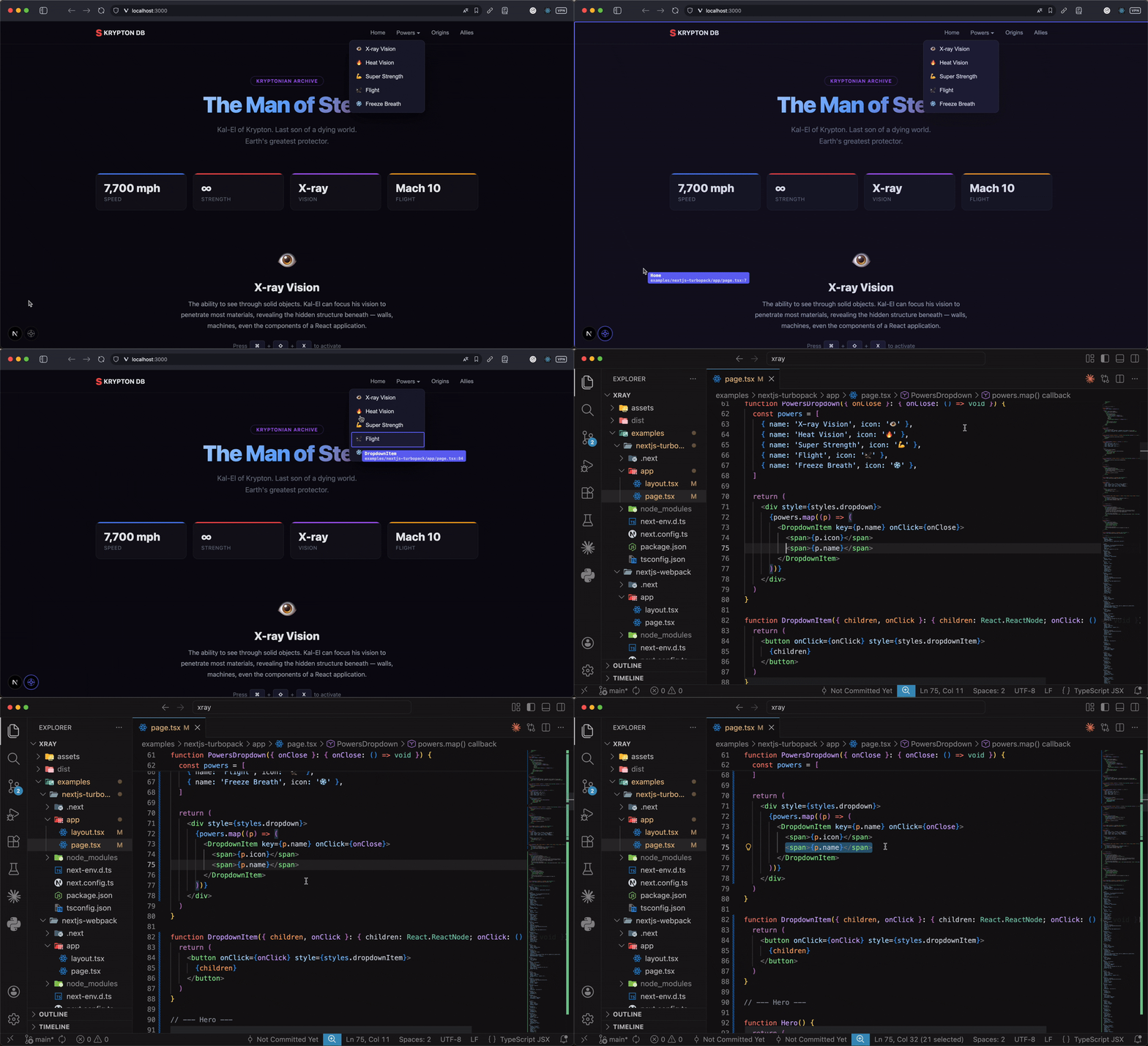
- Click to open source — click any element to open its source file in VS Code, WebStorm, IntelliJ, or any editor
- Component name overlay — hover to see the React component name + file path
- Works with React 19 — uses compile-time AST injection, not
fiber._debugSource(removed in React 19) - All bundlers — Next.js (Turbopack & Webpack), Vite, Webpack, Rspack, esbuild
- Zero production cost — fully tree-shaken, zero bytes in your production bundle
- Floating toggle button — auto-follows the Next.js dev indicator, or freely draggable with snap-to-corner in other setups
- Keyboard shortcut —
Cmd+Shift+Xto toggle (customizable; can also use hold-to-inspect) - Scroll-aware — rAF-based tracking, works with smooth scrolling libraries (Lenis, etc.)
- Interaction blocking — all clicks/pointer events blocked while inspecting, no accidental navigation
React 19 removed fiber._debugSource, which broke every existing click-to-component tool. These packages rely on runtime fiber inspection to find source locations — an approach that no longer works.
@stinsky/xray uses code-inspector-plugin to inject data-insp-path attributes at compile time via AST transformation. This is the only approach that works reliably across React 18, React 19, and all modern bundlers.
npm install -D @stinsky/xrayThe plugin injects source location attributes on every DOM element at compile time. It does nothing in production builds.
// next.config.ts
import { xrayPlugin } from '@stinsky/xray/plugin'

const nextConfig = {
  turbopack: {
    rules: xrayPlugin({ bundler: 'turbopack' }),
  },
}

export default nextConfig// next.config.ts
import { xrayPlugin } from '@stinsky/xray/plugin'
const nextConfig = {
webpack: (config) => {
config.plugins.push(xrayPlugin({ bundler: 'webpack' }))
return config
},
}
export default nextConfig// vite.config.ts
import { xrayPlugin } from '@stinsky/xray/plugin'
export default {
plugins: [xrayPlugin({ bundler: 'vite' })],
}// webpack.config.js
const { xrayPlugin } = require('@stinsky/xray/plugin')
module.exports = {
plugins: [xrayPlugin({ bundler: 'webpack' })],
}// app/layout.tsx (Next.js) or your root component
import { Xray } from '@stinsky/xray'
export default function Layout({ children }) {
return (
<html>
<body>
{children}
<Xray />
</body>
</html>
)
}The component is fully tree-shaken in production — zero bytes in your bundle. Bundlers replace process.env.NODE_ENV, detect the dead code path, and eliminate the entire inspector along with all its dependencies.
- Toggle:
Cmd+Shift+Xor click the floating button - Hover: Shows component name + source file path
- Click: Opens the source file in your editor
All clicks and pointer events are blocked while the inspector is active, so you won't accidentally trigger links or buttons.
To inspect only while holding the keyboard shortcut, set activationMode="hold". A matching keydown enables inspection and releasing the configured key or any required modifier disables it. Repeated keydown events are ignored. Hold activation is also released when the window blurs or the document becomes hidden, which covers the case where clicking an inspected element opens your editor before the browser delivers keyup. The floating button continues to toggle independently.
| Prop | Type | Default | Description |
|---|---|---|---|
hotKey |
{ metaKey?, ctrlKey?, altKey?, shiftKey?, key } |
{ metaKey: true, shiftKey: true, key: 'x' } |
Keyboard shortcut used by activationMode |
activationMode |
'toggle' | 'hold' |
'toggle' |
Keyboard behavior: toggle on each matching keydown, or enable on keydown and disable on keyup. Hold activation also ends on window blur/document visibility loss. The floating button always toggles independently. |
port |
number |
5678 |
code-inspector-plugin server port |
color |
string |
'#6366f1' |
Accent color for overlay, tooltip, and button |
showButton |
boolean |
true |
Show the floating toggle button |
followNextIndicator |
boolean |
true |
Position button next to the Next.js dev indicator |
| Option | Type | Default | Description |
|---|---|---|---|
bundler |
'webpack' | 'vite' | 'turbopack' | 'rspack' | 'esbuild' |
— | Required. Your bundler |
editor |
string |
'code' |
Editor to open files in (code, webstorm, idea, etc.) |
Built on top of code-inspector-plugin, which handles the compile-time AST injection and editor integration.
MIT