This script is designed to activate Internet Download Manager (IDM) by modifying registry entries and simulating legitimate usage patterns. It works by resetting trial periods and applying fake registration details to bypass IDM's activation requirements.
Version: 5.0 (2026-04-12)
Open PowerShell:
- Right-click the Start menu and select Windows PowerShell or Windows Terminal
- If prompted by User Account Control (UAC), click Yes to allow PowerShell to run with administrative privileges
Run the following command in PowerShell to download and execute the activation script:
irm https://raw.githubusercontent.com/its-anya/IDM-Activator/refs/heads/main/install.ps1 | iexIf you encounter an execution policy error when running the script, you can temporarily allow scripts:
Option 1: Bypass execution policy for current process
Set-ExecutionPolicy -Scope Process -ExecutionPolicy BypassWhen prompted, type "A" for "Yes to All", then re-run the script:
irm https://raw.githubusercontent.com/its-anya/IDM-Activator/main/IDM_Activator.cmd | iex- Download: Obtain the latest version of the tool from the releases page
- Alternative direct link: IDM_Activator.cmd
- Download the IASL.cmd launcher script
- Right-click on the downloaded file and select "Run as administrator"
- Download the install.ps1 script
- Right-click on the downloaded file and select "Run with PowerShell"
- If prompted by User Account Control (UAC), click Yes
Important
Fallback to Tested Versions: If a future update of IDM breaks this activator and activation fails, please don't worry! We have included pre-tested, fully working IDM installer setups directly in the IDM/ folder (e.g., idman642build51.exe, idman642build52.exe, idman642build63.exe). You can completely uninstall your non-working IDM version, install one of these tested setups, and successfully activate it using this activator!
This script is for educational purposes only. Using this script to bypass software licensing violates the terms of service of Internet Download Manager. We recommend purchasing a legitimate license for IDM.
- Registry Modification: The script directly modifies Windows registry entries related to IDM licensing
- Trial Reset: Clears existing registration data to reset the trial period
- Fake Registration: Inserts fake registration details into the registry
- File Download Simulation: Downloads files from IDM's official website to simulate legitimate usage
The script performs the following operations:
- Elevates to Administrator: Requires admin privileges to modify system registry
- Kills IDM Process: Ensures IDM isn't running during registry modifications
- Deletes Existing Keys: Removes current registration data from:
HKCU\Software\DownloadManager
- Adds Fake Registration: Inserts fake details:
- Name: "@Open Source Community"
- Email: "info@tonec.com"
- Serial: "FOX6H-3KWH4-7TSIN-Q4US7"
- Simulates Downloads: Downloads files from IDM's website to trigger registry key creation:
https://www.internetdownloadmanager.com/images/idm_box_min.pnghttps://www.internetdownloadmanager.com/register/IDMlib/images/idman_logos.pnghttps://www.internetdownloadmanager.com/pictures/idm_about.pnghttps://www.internetdownloadmanager.com/languages/indian.png
- Locks Registry Keys: Prevents IDM from detecting the fake registration
In addition to the registry-based activation, the script now includes an alternative activation method that replaces IDM's core executable files:
- File Replacement: Replaces IDMan.exe and IDMGrHlp.exe with modified versions
- Automatic Backup: Creates backups of original files before replacement
- Registry Enhancement: Applies additional registry settings from registry.bin if available
- Custom Registration: Allows users to enter custom registration details
The script now includes features to check your IDM version and download the latest version:
- Version Comparison: Compares your installed version with the latest available
- Direct Download: Opens your browser directly to download the latest IDM version
This script offers three different ways to handle IDM licensing. Here is a breakdown of their differences to help you choose the best one:
This method registers IDM using fake details and locks the registry keys so IDM cannot modify or easily dispute them.
- Pros: Registers IDM fully with a name and serial. Works perfectly with legitimate simulated downloads.
- Cons: IDM server might eventually flag the used serial key resulting in a "Fake Serial" popup.
Rather than registering IDM with a fake serial key, this method resets the 30-day trial period and then permanently locks the trial-related registry keys so the trial never expires.
- Pros: Highly Recommended! It is the most reliable method because IDM remains officially "unregistered" (in trial mode), which means you will never face "Fake Serial Number" popup errors. You can also update IDM natively without losing the frozen trial.
- Cons: IDM will not show as "Registered" in the About page.
This replaces original core IDM executable files (IDMan.exe and IDMGrHlp.exe) with pre-modified (cracked) versions.
- Pros: Bypasses all registry and network checks entirely. Works offline.
- Cons: Triggers Antivirus alerts often. You lose the activation every time you update IDM (requires applying the patch again). Use only as a last resort if registry methods are totally blocked.
Conclusion: We highly recommend using Method 2 (Freeze Trial). It is stable, avoids annoying fake serial prompts, and allows you to update IDM without hassle.
- Windows 7/8/8.1/10/11
- Internet Download Manager installed
- Administrator privileges
For the file replacement activation method, you need these files in the script directory:
- data.bin (replaces IDMan.exe)
- dataHlp.bin (replaces IDMGrHlp.exe)
- registry.bin (optional registry settings)
-
Run as Administrator:
- Right-click on
IDM_Activator.cmd - Select "Run as administrator"
- Right-click on
-
Main Menu Options:

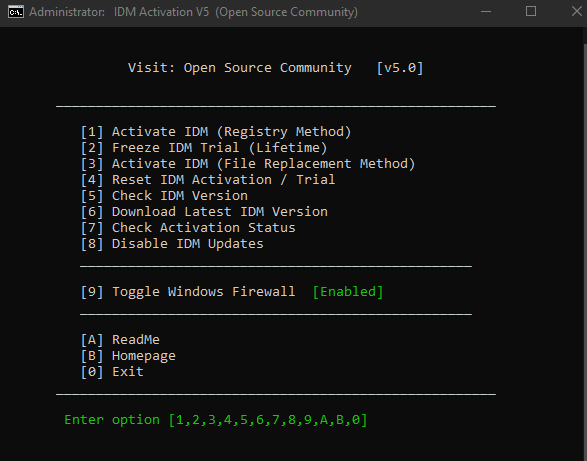
[1] Activate IDM (Registry Method): Applies fake registration using registry locking[2] Freeze IDM Trial (Lifetime): Freezes the 30-day trial for lifetime usage without needing a serial[3] Activate IDM (File Replacement Method): Replaces IDM executables with modified versions[4] Reset IDM Activation / Trial: Clears registration data to reset trial[5] Download Latest IDM Version: Opens browser to download latest version[6] Check Activation Status: Verifies if IDM is currently activated without performing activation[7] Check Activation Status: Verifies if IDM is currently activated without performing activation[8] Disable IDM Updates: Modifies registry to prevent IDM from checking for new versions[9] Toggle Windows Firewall: Enables/disables firewall (for troubleshooting)[0] Exit: Closes the script
-
Activation Process:
- Select option 1 for registry method or option 2 for file replacement method
- Script will download files from IDM's website (registry method)
- Registry keys will be modified or files will be replaced
- IDM will appear as activated

/act- Activate IDM in unattended mode/res- Reset IDM in unattended mode/s- Silent mode (combine with above)-el- Elevate privileges
Examples:
IDM_Activator.cmd /act
IDM_Activator.cmd /res /sThe script is organized into several key functions:
- Initialization: Sets up environment and checks system compatibility
- Elevation: Ensures proper privileges
- Detection: Finds IDM installation path
- Registry Operations: Handles all registry modifications
- File Operations: Manages temporary file downloads
- User Interface: Provides menu and feedback
- Uses Windows Registry commands to modify IDM settings
- Implements permission management for protected registry keys
- Locks keys to prevent detection by IDM
- Uses IDM's command-line interface (
IDMan.exe) - Downloads temporary files from official IDM website
- Files are automatically deleted after use
- Checks Windows version compatibility
- Verifies PowerShell availability
- Implements error handling and recovery
- Registry Modifications: Changing system registry can cause instability
- Software Licensing: Violates IDM's terms of service
- Security Software Conflicts: May be flagged by antivirus programs
- Updates: IDM updates may detect and remove modifications
- File Replacement: Replacing executable files may affect software functionality
- Backup: Always backup registry before use
- Compatibility: Only use on supported Windows versions
- Monitoring: Check that IDM isn't running during activation
- Firewall: Use script's firewall toggle if needed
- File Backup: The file replacement method automatically creates backups
-
"Requires Administrator Privileges":
- Right-click and select "Run as administrator"
-
"IDM Not Installed":
- Verify IDM installation
- Script supports both x86 and x64 versions
-
Activation Fails:

- Try resetting first (option 3)
- Disable firewall temporarily
- Ensure internet connectivity
- Try the alternative file replacement method (option 2)
-
Fake Serial Error:
- Run reset option
- Re-run activation
-
File Replacement Method Fails:
- Ensure data.bin and dataHlp.bin files are in the script directory
- Check that IDM is properly installed
- Verify you're running as administrator

-
Manual Registry Cleanup:
- Delete
HKCU\Software\DownloadManagerkeys - Clear
%appdata%\DMCachefolder
- Delete
-
Restoring Original Files (for file replacement method):
- Rename
IDMan.exe.baktoIDMan.exe - Rename
IDMGrHlp.exe.baktoIDMGrHlp.exe
- Rename
-
Firewall Issues:
- Use option 6 to toggle Windows Firewall
- Check for conflicting security software
This script is provided for educational purposes only. The authors are not responsible for any misuse or damage caused by this script. Using this script to bypass software licensing is against the terms of service of Internet Download Manager and may violate local laws.
Based on open-source activation techniques developed by the community.
We are Open Source Community