

This is my Navigation project for the Deep Reinforcement Learning Nanodegree.
For this project I trained an agent to navigate (and collect bananas!) in a large, square world.

A reward of +1 is provided for collecting a yellow banana, and a reward of -1 is provided for collecting a blue banana. Thus, the goal of your agent is to collect as many yellow bananas as possible while avoiding blue bananas.
The state space has 37 dimensions and contains the agent's velocity, along with ray-based perception of objects around agent's forward direction. Given this information, the agent has to learn how to best select actions. Four discrete actions are available, corresponding to:
0- move forward.1- move backward.2- turn left.3- turn right.
The task is episodic, and in order to solve the environment, the agent was required to get an average score of +13 over 100 consecutive episodes.
-
Download the environment from one of the links below. You need only select the environment that matches your operating system:
- Linux: click here
- Mac OSX: click here
- Windows (32-bit): click here
- Windows (64-bit): click here
(For Windows users) Check out this link if you need help with determining if your computer is running a 32-bit version or 64-bit version of the Windows operating system.
(For AWS) If you'd like to train the agent on AWS (and have not enabled a virtual screen), then please use this link to obtain the environment.
-
Place the file in this GitHub repository and unzip (or decompress) the file.
To set up your python environment to run the code in this repository, follow the instructions below.
-
Create (and activate) a new environment with Python 3.6.
- Linux or Mac:
conda create --name drlnd python=3.6 source activate drlnd- Windows:
conda create --name drlnd python=3.6
activate drlnd
-
Follow the instructions in this repository to perform a minimal install of OpenAI gym.
-
Clone the repository (if you haven't already!), and navigate to the
python/folder. Then, install several dependencies.
git clone https://github.com/ianormy/UdacityNavigationProject.git
cd UdacityNavigationProject
cd python
pip install .- Create an IPython kernel for the
drlndenvironment.
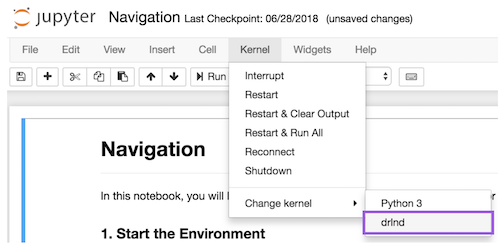
python -m ipykernel install --user --name drlnd --display-name "drlnd"- Before running code in a notebook, change the kernel to match the
drlndenvironment by using the drop-downKernelmenu.
I initially trained the agent using DQN and saved the training results in the file dqn_results.npy. I then used a Double DQN (DDQN) and found it did a lot better. I saved the training results in the file ddqn_results.npy. Both these files have been included in this repository. To see the results of this training which includes a comparison of the two different methods, please look at Results.
If you want to train your own agent then use the Training Jupyter Notebook from within the Udacity Workspace. This will train the model using DDQN and save it to the file ddqn_checkpoint.pth. It will also save the training results to in the file ddqn_results.npy. I have included these files in this repository.