
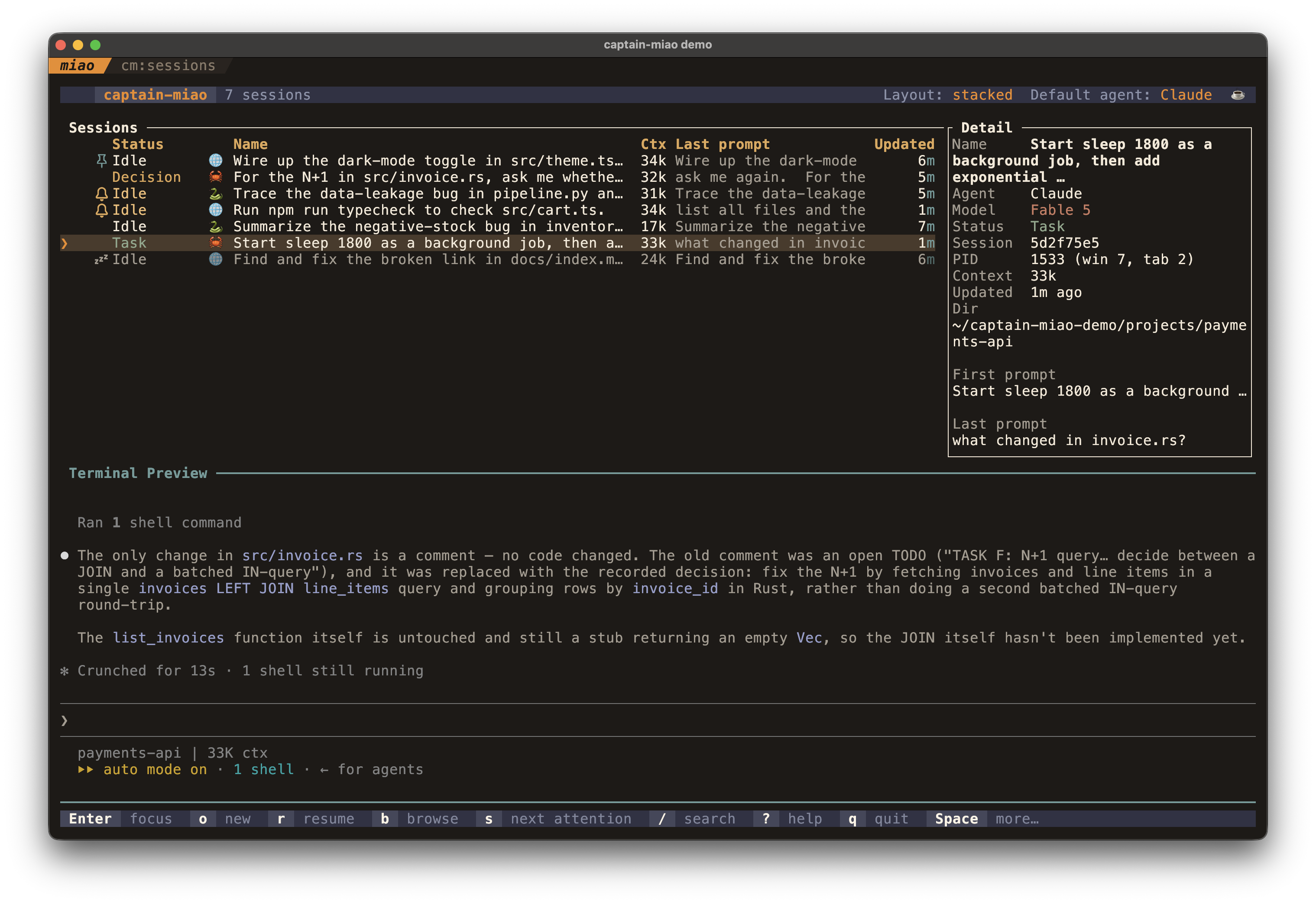
A TUI dashboard for managing multiple AI coding sessions running in the terminal emulator or multiplexer of your choice, such as Kitty and zellij.
captain-miao.demo.mp4
When you run several agent sessions at once, it's hard to tell which is working, which is waiting on you, and which has already finished. captain-miao watches every session and shows the whole fleet at a glance (status, working directory, context usage, and a live preview), and lets you start, focus, fork, or kill any of them without leaving the dashboard.
Unlike herdr or cmux, captain-miao embeds no terminal of its own. It drives the Kitty or zellij you already run (every session is a native window or pane, controlled through the terminal's own protocol), so it stays one small, focused tool and the rest of your workflow is yours to compose.
- The whole fleet at a glance: every session in one table, with status, working directory, model, context usage, git branch, and a live transcript preview.
- Never miss a prompt: sessions waiting on your approval or an answer are flagged.
- Full session lifecycle: launch, resume, fork, and kill sessions from the dashboard, with a filterable picker for recent working directories.
- Support Claude Code and Codex today, behind a backend abstraction built to extend to other coding agents.
- direnv-aware: a session started in a directory with an
.envrcpicks up that environment automatically (viadirenv exec). - r3 integration: when a session's running background task is an
r3 watchwaiting for your review, it flags as Review and surfaces as needing your attention. - Keep-awake: prevents your machine from sleeping while any session is still working (
caffeinateon macOS,systemd-inhibiton Linux). - Pin, mute, mark: pin important sessions to the top, mute the ones you don't need right now, and flag the ones to follow up on.
- A supported terminal: Kitty with remote control enabled (see Kitty setup), or zellij ≥ 0.44 (run captain-miao inside the zellij session; no extra setup needed).
- Claude Code and/or Codex on your
PATH.
cargo install --git https://github.com/hyperlogue/captain-miaoBuilding needs a Rust toolchain and a C compiler (for the statically-bundled SQLite that reads Codex session titles).
No Rust toolchain, no build:
npx @hyperlogue/captain-miao          # run it once
npm install -g @hyperlogue/captain-miao   # or install the `captain-miao` command
bunx @hyperlogue/captain-miao works too. The npm package is a small launcher
that execs a prebuilt native binary shipped as a per-platform optional
dependency, so your package manager downloads only the one binary matching your
machine; nothing is fetched at runtime. Prebuilt binaries cover macOS (Apple
silicon + Intel) and Linux (x86-64 + arm64), and are also attached to every
GitHub Release as a
.tar.gz if you'd rather download one directly.
A flake is provided; run it straight from GitHub:
nix run github:hyperlogue/captain-miaocaptain-miao drives Kitty over its remote-control protocol, so your kitty.conf must allow it. Remote control is a real privilege (a program that has it can read your terminal and run commands), so the tightest setup kitty offers pairs a password with an authorization script:
allow_remote_control password
remote_control_password "i-am-the-captain-miao" captain_miao_rc.py
listen_on unix:/tmp/mykitty
Kitty resolves that filename against your config directory, so put the script at ~/.config/kitty/captain_miao_rc.py:
# The only remote-control commands captain-miao issues.
ALLOWED_COMMANDS = frozenset({
    "ls", "get-text", "launch", "focus-window",
    "focus-tab", "close-window", "detach-window", "goto-layout",
})

def is_cmd_allowed(pcmd, window, from_socket, extra_data):
    # Reject the in-terminal escape-code channel; only the listen_on socket gets in.
    return from_socket and pcmd["cmd"] in ALLOWED_COMMANDS
Every request must now clear three checks: arrive over the socket (not the escape-code channel that a shell, even one across ssh, could otherwise use), carry the password, and name one of the commands above. i-am-the-captain-miao is captain-miao's built-in default, so this works as written; to use your own secret instead, set remote_control_password (above) and [kitty] rc_password in captain-miao's config to match. Keep the script the last item after the password; command names listed alongside it are allowed without ever calling your function.
Looser alternatives: allow_remote_control socket-only (off the escape-code channel, but no password and no allowlist) or allow_remote_control yes (no checks at all; avoid it). captain-miao verifies remote control at startup and exits with a diagnostic if it can't connect.
Keep the stack layout enabled. captain-miao's default Stacked session layout puts every session in one kitty tab and shows one at a time via kitty's stack layout. The default enabled_layouts * already includes it; if you've narrowed that list, add stack or sessions tile instead of stacking. (The alternate Per-tab layout, toggled with Space l, needs no particular layout.)
Run the dashboard inside a supported terminal (Kitty or zellij):
captain-miaocaptain-miao must be launched from within Kitty or a zellij session; it exits with an error otherwise. When run inside a zellij session it auto-selects the zellij backend (override with
[terminal] backendin the config).
From the dashboard, o / O start new sessions and r resumes existing ones. You can also drive captain-miao from the shell:
| Command | What it does |
|---|---|
captain-miao |
Run the TUI dashboard (the default). |
captain-miao claude [dir] [args…] |
Launch Claude Code in dir (default .) with tracking hooks. Args starting with - (e.g. --resume) are forwarded straight to claude. |
captain-miao codex [dir] [args…] |
Launch Codex in dir with tracking hooks; extra args are forwarded to codex. |
captain-miao focus [--window-id <id>] |
Focus the running dashboard window; with --window-id, also ring the session running in that Kitty window. |
captain-miao hook <event> |
Internal: forwards an agent hook event to the launcher. You won't run this yourself; it's wired up automatically. |
Sessions launched via claude / codex are wrapped by a launcher process that injects the tracking hooks, so they show up in the dashboard automatically. Hooks are injected per-session and torn down on exit; nothing is written to your global ~/.claude/settings.json.
Press ? in the dashboard for the complete list. Highlights:
| Key | Action |
|---|---|
j/k, ↑/↓, Ctrl-n/p |
Navigate sessions |
gg / G |
Jump to top / bottom |
1..9 / Ctrl-1..9 |
Select Nth session / select and focus its window |
Enter |
Focus the selected session's window |
o / O |
New session (same tab / prompt for cwd) |
r / f |
Resume picker / fork (resume selected in place) |
b |
Browse every running and resumable session in one list |
x |
Kill the selected session |
s |
Jump to the next session needing attention |
m / p / i |
Mute / pin / toggle needs-input on the selected session |
y |
Copy the selected session id to the clipboard |
t / w |
Move window to tab (Kitty only) / switch to or open the cwd's work tab |
h/l, ←/→ |
Scroll the preview horizontally |
Ctrl-u / Ctrl-d |
Scroll the preview up / down |
R |
Refresh the preview now |
Space v / Space d |
Toggle the preview / detail panel |
Space i |
Edit the selected directory's icon + color |
Space e / Space E |
Restart the selected / all idle sessions |
Space z |
Toggle keep-awake (inhibit OS sleep while sessions work) |
Space a |
Set the default backend for new sessions (Claude / Codex) |
Space l |
Switch session layout (stacked in one tab / one tab per session) |
? |
Show the full key list (help overlay) |
/ |
Search |
q / Ctrl-c |
Quit |
Pressing Space (the leader) shows a which-key strip of the available follow-up keys in the footer.
In the cwd picker, Ctrl-t switches the backend for that one launch and Ctrl-d drops the highlighted recent directory.
Custom keybindings. Every Normal-mode command above is remappable via a [keybinds] table in ~/.config/captain-miao/config.toml. Map a command id to a key (or list of keys); an empty list unbinds it:
[keybinds]
kill = "X"                      # move kill from x to X
jump_attention = ["s", "n"]     # bind two keys to one command
restart = "space r"             # remap a leader sequence
toggle_detail = []              # unbind a command
Keys parse forms like "ctrl+u", "O" (= "shift+o"), "space e", "enter", "f5", and arrow names. Ctrl-c, g g, and the 1..9 / Ctrl-1..9 selectors are fixed.
Command ids are the string in each Command::id(); the authoritative list lives in the DEFAULTS table in src/app/keymap.rs, and they match the actions in the key-bindings table above.
captain-miao reads an optional TOML file at ~/.config/captain-miao/config.toml (or $XDG_CONFIG_HOME/captain-miao/config.toml). Every key is optional and falls back to the default shown below; an unparseable file falls back to defaults rather than crashing. The complete set of options:
[terminal]
backend = "kitty"            # "kitty" | "zellij"; unset auto-detects (zellij inside a zellij session, else Kitty)
sessions_layout = "stacked"  # "stacked" | "per-tab" (the runtime Space l toggle overrides this)

[kitty]
rc_password = "i-am-the-captain-miao"   # the built-in default, and a published constant; set your own (see Kitty setup)

[launcher]
default_agent = "claude"     # backend for new sessions: "claude" | "codex" (Space a overrides)
approval_grace_secs = 2      # grace window after a permission dialog before a transcript change reads as "dismissed"
max_recent_cwds = 50         # entries kept in the workdir picker's recent list
resume_list_limit = 200      # max sessions listed in the resume picker
new_tab_title = "{agent}: {basename}"     # new-session tab title; placeholders: {agent} {basename} {cwd}
resume_tab_title = "{agent}: {basename}"  # resumed-session tab title

[thresholds]
context_warning_tokens = 175000    # context usage turns to the warning color here
context_critical_tokens = 400000   # …and to the critical color here
preview_stale_secs = 20            # show "updated Ns ago" once the preview is older than this (0 = always)

[polling]
fs_reload_debounce_ms = 100        # debounce for filesystem-watch reloads
preview_debounce_ms = 200          # debounce before re-fetching the preview
event_poll_ms = 100                # input poll interval (floored at 10)
preview_auto_refresh_secs = 10     # auto-refresh the preview while focused + busy + unscrolled (0 disables)

[ui.panels]
preview_auto_min_height = 16       # min body height before the preview auto-shows
detail_auto_min_width = 70         # min body width before the detail panel auto-shows
detail_default_width = 36          # detail panel column width
narrow_max_width = 90              # at/below this body width the layout stacks vertically

[ui.table]
name_truncate = 35                 # max characters of a session name before truncation

[colors.ui]
title_fg = "cyan"
header_fg = "cyan"
attention_fg = "yellow"
error_fg = "red"
highlight_bg = "dark_gray"
selection_fg = "blue"
selection_symbol = "❯ "

[colors.picker]
highlight_bg = "dark_gray"
chevron_fg = "blue"

[debug]
enabled = false                    # verbose logging; also enabled by CAPTAIN_MIAO_DEBUG=1
log_file = "debug.log"
keybind_log_file = "keybinds.log"

[keybinds]
# Remap any Normal-mode command: command-id = "key" or ["key", "alt"]; [] unbinds.
# command-ids are the Command::id() strings in src/app/keymap.rs (DEFAULTS table).
# e.g. kill = "X"  /  jump_attention = ["s", "n"]  /  restart = "space r"
Colors accept named values (cyan, dark_gray, …) or #rrggbb hex. The command ids for [keybinds] are the ones in the key-bindings table above (kill, jump_attention, restart, toggle_preview, …).
captain-miao is built around a strict unidirectional data flow:
- The launcher wraps each agent process and is the single source of truth for that session's state. It receives hook events over a Unix socket and writes a JSON state file.
- Hooks are thin forwarders: they parse the agent's hook payload from stdin and send it to the launcher socket.
- The dashboard is a pure viewer. It watches the session state directory and per-backend transcript dirs with
notify(FSEvents on macOS, inotify on Linux) and re-reads files when they change. It performs no IPC of its own.
State lives under ~/.local/state/captain-miao/ and runtime sockets under $XDG_RUNTIME_DIR/captain-miao/, both owner-only: session state files record your prompt text, so they are written 0600 under a 0700 directory. For a deeper tour of the architecture, module layout, hook wiring, and data files, see AGENTS.md.
- Remote hosts over SSH: one dashboard federating sessions across several machines, with per-host pty pools so remote sessions survive ssh drops, laptop sleep, and dashboard restarts. The full lifecycle (open / resume / attach / detach / kill / browse across hosts) is implemented behind the
remotecargo feature (cargo build --release --features remote), but it isn't yet verified end-to-end against a real host, and restart and fork stay local-only. Design notes: docs/remote-sessions.md. - More agent backends: the per-session backend is an abstraction, so other coding agents (Kimi Code, opencode, Grok, …) can slot in alongside Claude Code and Codex.
- More terminal backends: the terminal layer is an abstraction (Kitty and zellij today), so other terminals and multiplexers (tmux, WezTerm, …) can slot in.
MIT. See LICENSE.