


CanDoItAll is a local-first .NET 10 Blazor application for governed project delivery, durable process execution, workforce coordination, and AI-agent automation. Product information is available at aicandoitall.com; this repository focuses on the implementation and its engineering contracts.
This repository owns:
- the Blazor host, HTTP API, application composition, and product modules
- project, workflow, process, CRM/HR, plugin, Memory, and automation behavior
- provider-neutral AgentFramework contracts and Microsoft Agent Framework adapters
- PostgreSQL persistence, migrations, runtime templates, tests, and repository tooling
This repository does not own:
- development MCP servers from CanDoItAll.Mcp
- shared Blazor components from CanDoItAll.Components
- reusable file, browser, and desktop adapters from CanDoItAll.FileTools
- family standards and reusable Codex assets from CanDoItAll.SharedInfo
- native Cognitive Memory from CanDoItAll.CognitiveMemory
| Entry point | Responsibility |
|---|---|
CanDoItAll.Web |
Blazor host, HTTP API, OpenAPI, and runtime endpoints |
CanDoItAll.Composition |
Dependency injection and application runtime composition |
src/Modules |
Product-facing bounded modules, including the AgentFramework-hosted Simple Chats experience |
src/Processes |
Durable process model, execution, projections, and persistence |
src/Memory |
Provider-neutral Memory contracts, drivers, and persistence |
src/MAF |
AgentFramework and Microsoft Agent Framework integration |
src/UI |
Application-wide shell components and the feature rendering libraries |
src/Sandboxes |
Small hosts that render a feature's real components from deterministic scenarios, without a database |
Templates |
Repository-owned runtime seed and template packs |
CanDoItAll.slnx is the canonical product solution. Test projects are intentionally
kept out of that build graph and have suite-specific entry points under
tests/Solutions.
Simple Chats provides provider-neutral ordinary conversations without creating agents or agent runs. The AgentFramework workspace hosts definition and conversation views, floating conversations, Prompt Gallery composer actions, and combined Agent/Simple Chat usage analytics. Its asynchronous HTTP contract remains available to remote clients: turn admission returns a durable operation, a hosted dispatcher owns provider execution, and clients follow status or replayable SSE. See LLM Chats product and API.
Existing PostgreSQL installations: migrate before updating. Give your coding agent the PostgreSQL 16-to-18 preservation runbook before running an installer or changing an image. Preserve and restore existing data into a separate PostgreSQL 18 cluster. Changing the tag or
PG_VERSIONis not a migration.
- the .NET SDK selected by
global.json - Windows, Linux, or macOS for a direct source build; supported publish targets are described in Installing instances
- sibling
CanDoItAll.ComponentsandCanDoItAll.FileToolssource repositories for the default local-development dependency mode, or an explicit package-mode build - PostgreSQL 18 (the provisioned and tested baseline), or a compatible externally managed server
- Docker Desktop or another Compose v2 runtime when using the development application stack
- Node.js and npm when rebuilding application Tailwind output
- PowerShell 7 on Windows, Linux, or macOS for repository automation; the dedicated Windows installer and generated launcher remain compatible with Windows PowerShell 5.1
Local development uses source projects from the Components and FileTools repositories by default. Clone all three repositories with these exact sibling names; casing matters on case-sensitive filesystems:
<parent>/
  CanDoItAll/
  CanDoItAll.Components/
  CanDoItAll.FileTools/
Directory.Build.targets replaces matching package references
with project references from those roots. A non-sibling layout must pass both root
properties to every restore, build, test, and publish command:
dotnet restore ./CanDoItAll.slnx `
  -p:CanDoItAllComponentsRepositoryRoot="D:\work\CanDoItAll.Components" `
  -p:CanDoItAllFileToolsRepositoryRoot="D:\work\CanDoItAll.FileTools"
dotnet restore ./CanDoItAll.slnx \
-p:CanDoItAllComponentsRepositoryRoot=/source/CanDoItAll.Components \
-p:CanDoItAllFileToolsRepositoryRoot=/source/CanDoItAll.FileToolsCI checks out the Components and FileTools repositories at the commits declared in
.github/workflows/ci.yml, places all three repositories beside each other, and uses the
same direct project-reference graph. Docker receives those sibling repositories as named
build contexts. Reproducible local validation must record the three source commits and
keep the repository roots identical across restore, build, test, and publish.
git -C ../CanDoItAll.Components rev-parse HEAD
git -C ../CanDoItAll.FileTools rev-parse HEAD
dotnet restore ./CanDoItAll.slnx -p:UseLocalCanDoItAllLibraries=true
dotnet build ./CanDoItAll.slnx --configuration Release --no-restore -p:UseLocalCanDoItAllLibraries=true /m:1
Do not substitute unavailable NuGet packages for the current sibling-source contract.
The package declarations remain the portable project metadata, while
Directory.Build.targets removes matching declarations and
adds direct project references for the active build graph.
All supported deployment choices, common prerequisites, default data locations, and platform-specific settings are collected in Installing instances:
Temporary alpha-upgrade notice: installations that retained experimental data from before the August 2026 portability changes may need a one-time manual data repair after reinstalling. If project structure pages return HTTP 500, give the portable-path alpha repair prompt to Codex, Claude, or another coding agent. Do not add legacy fallback behavior to the application for this retired alpha state.
Windows has a dedicated self-contained per-user installer with a managed PostgreSQL backend. Linux and macOS use framework-dependent artifacts and the immutable Unix release installer, with systemd and launchd service templates respectively. The same framework-dependent headless Web host can also be published for Windows. Container-based development is available on any host with a Linux Compose engine.
Run from the repository root:
Copy-Item .env.example .env
New-Item -ItemType Directory -Force .secrets | Out-Null
Set-Content -NoNewline .secrets/db-password "replace-for-local-development"
docker compose up -d --build --wait
Open http://localhost:8080. Compose builds the Linux application image, starts its own
private PostgreSQL service, applies migrations, and preserves application and database
state in project-scoped named volumes. The ignored password file is granted only to the
app and database services.
To run the web host directly on the workstation while keeping only PostgreSQL in
Compose, copy compose.override.yaml.example to ignored compose.override.yaml, start
db, then run the project. See container operations.
The following commands use the default sibling-source dependency mode. A normal product build does not compile the test suites:
dotnet restore ./CanDoItAll.slnx
dotnet build ./CanDoItAll.slnx --configuration Release --no-restore /m:1
During local or bundle work, build the affected production project and run only the owning topic or exact test. Confirm discovery before treating the result as proof. This example expects exactly one discovered test case:
$testFilter = "FullyQualifiedName=CanDoItAll.Tests.Unit.AgentFramework.OpenAiRequestCompatibilityPolicyTests.Luna_chat_completions_function_tools_require_explicit_none"
$expectedDiscovery = 1

dotnet build ./src/MAF/Common/CanDoItAll.AgentFramework.Providers/CanDoItAll.AgentFramework.Providers.csproj --configuration Release /m:1
dotnet test ./tests/Solutions/CanDoItAll.Tests.Unit.slnx --configuration Release --list-tests --filter $testFilter /m:1
# Verify that discovery reports $expectedDiscovery test case before executing it.
dotnet test ./tests/Solutions/CanDoItAll.Tests.Unit.slnx --configuration Release --no-build --no-restore --filter $testFilter /m:1
Run the documentation validator when maintained documentation or source-truth claims change:
./tools/Validation/Test-Documentation.ps1On Windows, also validate the dedicated installer when its boundary or documentation changes:
./tools/install/tests/Test-CanDoItAllWebAppInstallScripts.ps1The broad stable gate is reserved for CI, release or merge closure, a frozen checkpoint, or an invalidation trigger explicitly named by the work plan. It is not a routine per-change or per-subbundle loop. Suite entry points, filters, discovery rules, and environment-dependent lanes are documented in Testing. GitHub CI runs the sibling-source stable and actual-host portability gates on Windows x64, Ubuntu x64, and macOS arm64, plus the Linux container gate.
The base Compose model owns a complete local development instance: the Linux web app, its private PostgreSQL service, and separate named volumes for application and database state. It is not the installed Windows web app database.
docker compose --env-file .env.example config --quiet
docker compose --env-file .env.example up -d --build --wait
docker compose down
See container operations and backup and restore.
The main dependency direction is:
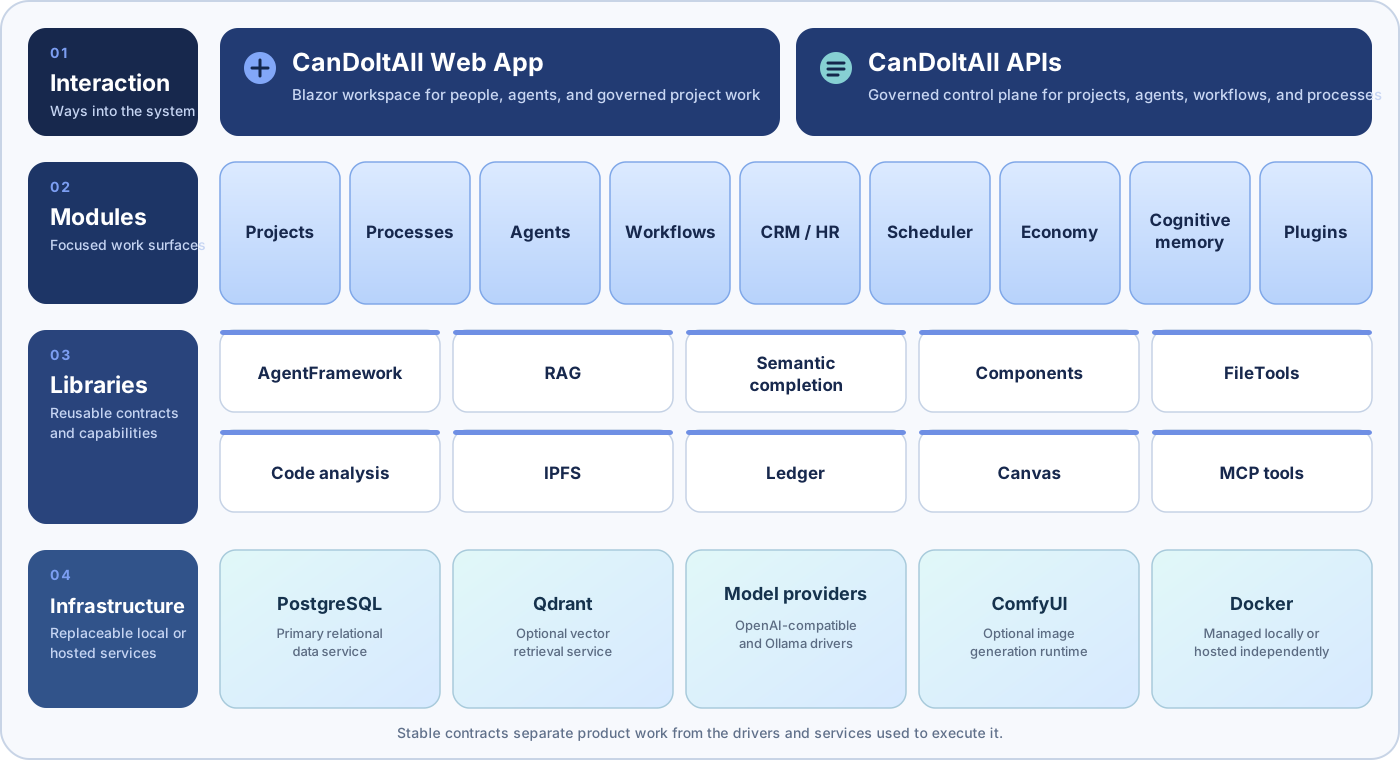
Start with:
- Architecture overview
- UI component seams
- Storage, paths, and host portability
- Runtime execution and shell portability
- Internal communication
- Module map
- Documentation index
- Shared providers
- Provider request history
Several modules keep their rendering in a feature UI library while the routed host keeps the state, the reads and the writes. Each has a small sandbox host that renders those same components from deterministic scenarios, with no module implementation, no production runtime registration and no database, so a rendering change can be seen without starting the application:
| Library | Sandbox | Started with |
|---|---|---|
CanDoItAll.CrmHr.UI |
CRM / HR UI sandbox | dotnet watch --project ./src/Sandboxes/CanDoItAll.CrmHr.UiSandbox --launch-profile "CrmHr sandbox" |
CanDoItAll.Prompts.UI |
Prompt Gallery UI sandbox | dotnet watch --project ./src/Sandboxes/CanDoItAll.Prompts.UiSandbox --launch-profile "Prompts sandbox" |
CanDoItAll.AgentFramework.UI |
Agent catalog sandbox | dotnet watch --project ./src/Sandboxes/CanDoItAll.AgentFramework.UiSandbox --launch-profile "Catalog sandbox" |
Each sandbox has two asset modes. The default profile links the real production stylesheet, so what
the sandbox shows is what the application shows; the ... Fast profile generates a small stylesheet
that scans only the sandbox and its rendering library, which starts faster while iterating on markup.
Each sandbox README describes its own modes and ports.
The shared record browser, picker and selection family lives in
CanDoItAll.AppComponents.RecordBrowsing
and the application-wide shell in CanDoItAll.AppComponents.
This separation is being applied module by module. CRM / HR and the Prompt Gallery are done; the
other modules keep their rendering in the module itself, which is a supported state and not a defect.
UI component seams is the guidance, and each completed
slice has its own record under docs/architecture.
Application-specific Tailwind assets live under Tailwind.
npm install --prefix .\Tailwind
npm run tailwind:build
Shared component structure and styling belong to CanDoItAll.Components.
NuGet packaging and publishing are disabled for this repository. Directory.Build.props
sets IsPackable to false for every project. Package metadata and release tooling will
be introduced only with an explicit package contract and validation gate.
The root npm package is private and exists only to run Tailwind commands.
This repository is licensed under the MIT License. The third-party notices preserve the copyright and license terms for external material redistributed by the application.
Code contributions are limited to partners approved by the maintainer. See
CONTRIBUTING.md and contact the fyziktom account on LinkedIn before
opening a pull request.