This fork is Chrome Manifest V3 (MV3) compatible only. This version has been fully migrated to Manifest V3 and is optimized specifically for Chrome and Chromium-based browsers that support MV3. Manifest V2 is not supported in this fork.
Make sure you are using a Chrome/Chromium browser version that supports MV3 (Chrome 88+) before installing or building this extension.
The official test page (test.clearurls.xyz) may show errors even when this extension is working correctly. This is because the test page was designed for the older webRequest API (Manifest V2), which is no longer available in Manifest V3 for Chrome/Chromium browsers.
This fork uses Chrome's modern declarativeNetRequest API, which works differently but provides the same privacy protection. To verify the extension is working, test with real URLs like https://example.com/?utm_source=test&fbclid=123 - the tracking parameters should be automatically removed.
If you experience issues, please open an issue with your browser version and the URL that isn't being cleaned.





ClearURLs is a browser extension that automatically removes tracking elements from URLs to help protect your privacy when browsing the Internet.
This fork is optimized for Chrome and Chromium-based browsers using Manifest V3.
The tracking rules database is regularly updated and can be found here.
Many websites use tracking elements in URLs to monitor your online activity. For example:
https://example.com?utm_source=newsletter1&utm_medium=email&utm_campaign=sale
These tracking parameters are not necessary for websites to function correctly and can be safely removed—that's exactly what ClearURLs does automatically.
Amazon URLs often contain extensive tracking code. Before cleaning:
https://www.amazon.com/dp/exampleProduct/ref=sxin_0_pb?__mk_de_DE=ÅMÅŽÕÑ&keywords=tea&pd_rd_i=exampleProduct&pd_rd_r=8d39e4cd-1e4f-43db-b6e7-72e969a84aa5&pd_rd_w=1pcKM&pd_rd_wg=hYrNl&pf_rd_p=50bbfd25-5ef7-41a2-68d6-74d854b30e30&pf_rd_r=0GMWD0YYKA7XFGX55ADP&qid=1517757263&rnid=2914120011
After ClearURLs cleans it:
https://www.amazon.com/dp/exampleProduct
- ✅ Automatic URL cleaning - Removes tracking elements from URLs in the background
- ✅ Ad domain blocking - Optionally blocks common ad domains
- ✅ Bulk URL cleaning tool - Clean multiple URLs at once with the built-in tool
- ✅ Direct redirection - Redirects to destinations without tracking services as middlemen
- ✅ Context menu integration - Quick access to copy clean links via right-click menu
- ✅ Hyperlink auditing protection - Blocks ping tracking (see specification)
- ✅ ETag tracking prevention - Prevents ETag-based tracking
- ✅ History API protection - Prevents tracking injection via history API (see replaceState() method)
- ✅ Search engine protection - Prevents Google and Yandex from rewriting search results with tracking elements
For detailed information about required permissions and why they are needed, please see this documentation.
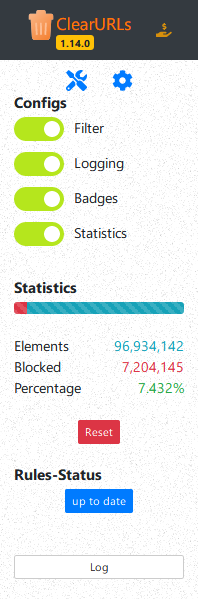
This fork is designed for Chrome and Chromium-based browsers (Manifest V3). You can build the extension from source or download pre-built artifacts.
CI/CD Artifacts:
To verify that ClearURLs is working correctly, try these real-world tests:
-
Test with tracking parameters:
- Visit:
https://example.com/?utm_source=test&utm_medium=email&fbclid=123456 - The URL should automatically clean to:
https://example.com/
- Visit:
-
Test with Google search results:
- Perform a Google search and click on any result
- The tracking parameters should be removed automatically
-
Check the extension popup:
- Click the ClearURLs icon in your browser toolbar
- You should see statistics showing blocked tracking elements
Note: The official test page at test.clearurls.xyz may show errors due to Manifest V3 API differences (see notice at the top of this README).
We welcome contributions! If you have suggestions or encounter issues, please create an issue.
Note: For suggestions or issues regarding the tracking rules database, please create an issue in the rules repository or email us at rules.support (at) clearurls.xyz (this will automatically create a new issue in the rules repo).
Help translate ClearURLs into more languages! You can contribute translations in two ways:
- Open
_locales/en/messages.json - Translate the English terms into your language
- Create a pull request with your translation
- Place your translation file in
_locales/{language code}/messages.json
Note: The description field in translation files is informational only and does not need to be translated (it's usually empty).

The following projects use parts of ClearURLs:
- Uroute - Filters/cleans URLs before launching browser
- Scrub - Red Discord bot cog for filtering/cleaning URLs
- Unalix - Small, dependency-free, fast Python package for removing tracking fields from URLs
- Unalix-nim - Small, dependency-free, fast Nim package and CLI tool for removing tracking fields from URLs
- UnalixAndroid - Simple Android app that removes link masking/tracking and optionally resolves shortened links
- pl-fe - Fediverse client that uses ClearURLs code to clean URLs from displayed posts
- ghacks-user.js
- Awesome Humane Tech List
- PrivacyTools
- New York Times Wirecutter
- ClearURLs is part of Mozilla's recommended extensions program
For detailed information about permissions and why they are needed, see this documentation page.
This extension uses the following third-party libraries:
| Library | Copyright | License |
|---|---|---|
| WebExtension browser API Polyfill | Mozilla | MPL-2.0 |
| Bootstrap | Twitter, Inc. (2011-2016) | MIT |
| jQuery | JS Foundation and contributors | MIT |
| DataTables | SpryMedia Limited (2008-2015) | MIT |
| Pickr | Simon Reinisch (2018-2020) | MIT |
| Font Awesome | @fontawesome | Font Awesome Free License |