
Always have a fresh Claude session when you start working.
Stop hitting usage limits mid-flow. claude-shift aligns your Claude Max 5-hour windows with your actual schedule — automatically, in the background.
Claude Max runs on a 5-hour usage window. The moment you send a message, a 5-hour timer starts. When it expires, you get a fresh window. Simple enough — until you realize you don't control when the timer starts.
A casual question at 7am means your window expires at noon. If you're deep in work from 9am to 2pm, your session resets right in the middle of it.
Without claude-shift:

  7:00 AM   Quick Claude question                ← 5h timer starts
  9:00 AM   Deep work begins                     ← only 3h left
 12:00 PM   Window expires mid-work              ← flow broken ✗
This happens every day. Your window boundaries drift based on whenever you last used Claude, and they inevitably land at the worst possible moment.
You're paying $100-200/month for Claude Max. Random resets shouldn't dictate when you can use it.
claude-shift pings Claude automatically during your downtime — while you sleep, commute, or sit in meetings. This burns through a window cycle during hours you don't care about, so a fresh 5-hour window is ready when you actually sit down to work.
With claude-shift:

  4:00 AM   Auto-ping fires (you're asleep)      ← starts a window cycle
  9:00 AM   Old window expired, fresh one starts  ← full 5h available ✓
  2:00 PM   Uninterrupted deep work
Tell it your work hours. It calculates the optimal ping times. Your OS runs them automatically.
npm install -g claude-shiftRequires Node.js 18+ and Claude CLI.
Interactive setup:
claude-shift initOr configure directly — tell it when you work, and let it do the math:
# Set your work schedule
claude-shift smart --slots "09:00-14:00,20:00-23:00" --days weekdays

# Register with your OS scheduler
claude-shift install

# See your weekly timeline
claude-shift week
Done. Pings fire automatically every day before your work blocks.
- You define when you work — provide your work windows (smart mode) or exact ping times (manual mode)
- claude-shift calculates when to fire pings so that fresh 5h windows line up with your work blocks
- Your OS scheduler runs the pings — each one briefly opens Claude CLI, sends a message, and exits
That's it. No daemon, no background process. Just your OS's native scheduler doing its job:
- Windows — Task Scheduler (
schtasks) - macOS — launchd (
~/Library/LaunchAgents) - Linux — cron (
crontab)
Tell claude-shift when you work. It figures out the rest:
claude-shift smart --slots "06:30-08:00,09:00-11:00,20:00-23:00" --days weekdaysSmart mode calculation:
Slot duration: 5h | Burn rate: 2h
Your work windows:
6:30am – 8am on weekdays
9am – 11am on weekdays
8pm – 11pm on weekdays
Calculated pings:
Ping at 04:00 → slot 04:00–09:00 for your 06:30–11:00 window
Ping at 17:00 → slot 17:00–22:00 for your 20:00–23:00 window
✓ 2 smart trigger(s) configured.
ℹ Run `claude-shift install` to activate with your OS scheduler.
Your two morning blocks (6:30–8am and 9–11am) are close together, so one ping at 4am covers both. The slot runs 4–9am, then a fresh one kicks in at 9am for your second block. Your evening window gets a pre-burn ping at 5pm — the slot ticks through your downtime so a fresh window renews at 10pm.
Options:
-s, --slots— Work windows (HH:mm-HH:mm, comma-separated)-d, --days— Days to apply (weekdays,weekends,daily,mon-fri,mon,wed,fri)-b, --burn-rate— How long a window typically lasts for you, in hours (default: 2)-y, --yes— Skip confirmation prompt
Set exact ping times yourself:
claude-shift add 03:00 --days weekdays
claude-shift add 16:30 --days mon,wed,fri
claude-shift add 06:00 --once             # One-time trigger for today
claude-shift add 06:00 --once 2025-01-15 # One-time trigger for a specific dateclaude-shift today # Today's timeline
claude-shift week # Full week view
claude-shift list # All configured triggers
claude-shift status # Scheduler status + ping logsWeekly timeline output:
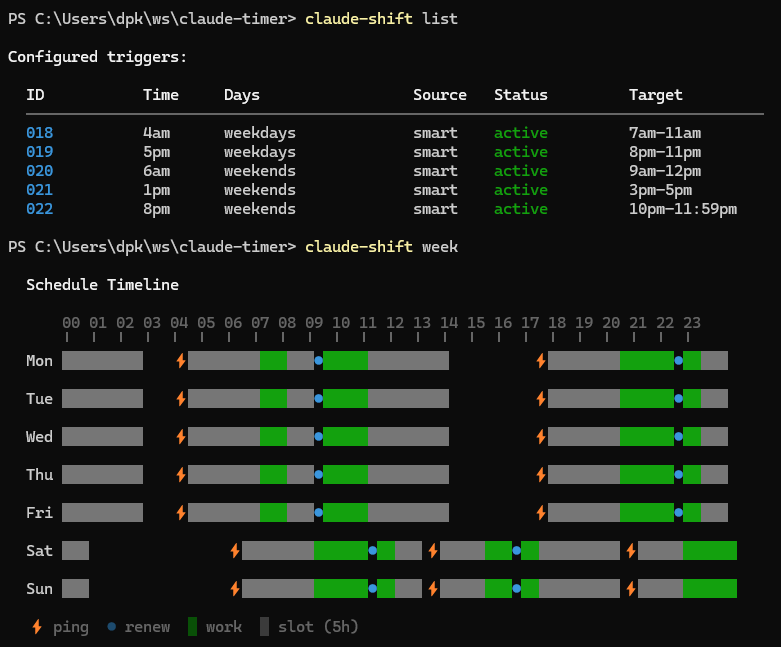
  Schedule Timeline

      00 01 02 03 04 05 06 07 08 09 10 11 12 13 14 15 16 17 18 19 20 21 22 23
      ╵  ╵  ╵  ╵  ╵  ╵  ╵  ╵  ╵  ╵  ╵  ╵  ╵  ╵  ╵  ╵  ╵  ╵  ╵  ╵  ╵  ╵  ╵  ╵

  Mon █████████   ⚡██████████████●██████████████         ⚡██████████████●█████

  Tue █████████   ⚡██████████████●██████████████         ⚡██████████████●█████

  ⚡ ping  ● renew  █ work  █ slot (5h)
Colors in your terminal distinguish work windows (green) from slot coverage (gray).
claude-shift remove 001   # Remove a trigger by ID
claude-shift uninstall    # Remove all from OS scheduler
claude-shift ping # Test a ping right nowConfig is stored at ~/.claude-shift/config.json. Logs at ~/.claude-shift/ping.log.
claude-shift config get             # Show all settings
claude-shift config set burnRate 3 # Update a setting| Setting | Default | Description |
|---|---|---|
slotDuration |
5 |
Claude Max window duration in hours |
burnRate |
2 |
How long a window typically lasts for you (hours) |
claudePath |
claude |
Path to Claude CLI binary |
nodePath |
(auto-detected) | Path to Node.js binary |
pingMessage |
ping |
Message sent to start the session |
Windows — Tasks run when you're logged in. For overnight pings (e.g., 4am), your machine must be awake. Consider disabling sleep or using wake timers.
macOS — launchd fires missed pings on next wake. Overnight pings work even if your Mac was asleep.
Linux — cron uses absolute paths to avoid PATH issues in the cron environment.
MIT