










The supply chain attack defense CLI — Cooldown gates, multi-source threat intelligence, command wrappers, CI/CD interception, and lock file dependency auditing for all major package managers.
- Unified Command Wrapper:
pkgd [OPTIONS] MANAGER SUBCOMMAND [PACKAGE...] [MANAGER_OPTIONS...]- Wrap any supported "dangerous" package manager
command (
pkgd pip install requests,pkgd npm install express,pkgd brew upgrade tree, etc.) - "Dangerous Commands" are defined as any package manager command that has
the potential to put software on your machine (
install,update,download,add,sync, etc.)
- Wrap any supported "dangerous" package manager
command (
- Auto-Detect Manager: automatically detects package manager from project files or system packages
- Version Detection:
get_installed_version()for all 18 package managers across 10 ecosystems enables version comparison - Fail-Closed Security: any failure blocks installation with warning and options for informed manual override
- Alternative PM Coverage:
python -m pip,pipx,yarn,pnpmand other alt manager calls all supported - Cooldown Gates: configurable time-since-release hold window with per-package, tracked and auditable overrides (ships with a default of 7 days)
- Multi-source Threat Intelligence: OSV.dev, GHSA, Socket.dev, npm advisories, and more all synced and stored locally (with automatic staleness detection)
- Social Intelligence Feeds: Mastodon, Reddit, RSS, X/Twitter - free sources shipped / B.Y.O.K. options available (informational only — non-blocking)
- Lock File Auditing: all major formats:
package-lock.json,poetry.lock,requirements.txt,yarn.lock,pnpm-lock.yaml,uv.lock,Pipfile.lock(currently supported formats) - Background Daemon: automated background intelligence feed sync with OS-native launchd / systemd / Task Scheduler
- CI/CD Integration:
--fail-on-threatexits on CRITICAL/HIGH for secure pipeline gating
See Full Documentation Index →
The overwhelming frequency of recent supply chain attacks have shown how quickly malicious packages can spread. The threat landscape has changed significantly. Four of the most significant open-source supply chain attacks ever recorded all happened within the last few months of writing:
- TanStack Router (May 2026): A self-propagating worm
compromised 42
@tanstack/*packages and spread to 160+ others across npm and PyPI. The malicious versions carried valid SLSA Build Level 3 provenance attestations, meaning the supply chain controls that the industry spent years building offered zero protection. - Axios (March 2026): A North Korea-linked threat actor compromised the lead maintainer's account of the most popular JavaScript HTTP client (~100M weekly downloads) and published a cross-platform RAT targeting macOS, Windows, and Linux. The poisoned versions were live for under 3 hours. Thousands of installs happened anyway.
- LiteLLM (March 2026): Using tokens stolen via the Trivy compromise, attackers published backdoored releases of a widely-deployed AI gateway (~95M monthly downloads). The payload ran a three-stage attack: harvest SSH keys, AWS/GCP/Azure credentials, and Kubernetes secrets → move laterally across clusters → install a persistent systemd backdoor.
- Trivy (March 2026): The world's most popular container security scanner was weaponized. Attackers spoofed maintainer commits, pushed a malicious release, and used Trivy's own CI/CD runner access to steal publishing tokens from every downstream project that scanned with it — kicking off a cascade of follow-on attacks.
These incidents succeed because fresh packages are often installed based on trust alone. PKG-Defender adds a practical and secure defense layer: local threat intelligence and dependency auditing combined with a configurable cooldown window to catch the latest threats before they land on your machine, your dependency tree, or your production pipelines.
# Recommended with uv
uv pip install pkg-defender

# Alternative with pip
pip install pkg-defenderbrew tap divisionseven/pkg-defender
brew install pkg-defenderTap Trust (Homebrew 6.0.0+)
As of Homebrew 6.0.0, brew's automatic trust evaluation requires explicit trust confirmation for taps. If needed, users may be prompted to run:
brew trust divisionseven/pkg-defenderTip
The tap formula is available at the homebrew-pkg-defender repository.
View Tap →
Pre-built standalone binaries are attached to every GitHub Release:
- macOS (arm64):
pkgd-darwin-arm64 - macOS (x86_64):
pkgd-darwin-amd64 - Linux (x86_64):
pkgd-linux-amd64 - Windows (x86_64):
pkgd-windows-amd64.exe
Each binary has a matching .sha256 checksum file. Download, verify, and run:
# Example for macOS arm64
curl -LO https://github.com/divisionseven/pkg-defender/releases/latest/download/pkgd-darwin-arm64
curl -LO https://github.com/divisionseven/pkg-defender/releases/latest/download/pkgd-darwin-arm64.sha256
shasum -a 256 -c pkgd-darwin-arm64.sha256
chmod +x pkgd-darwin-arm64
./pkgd-darwin-arm64 --helpgit clone https://github.com/divisionseven/pkg-defender
cd pkg-defender
# Using uv (recommended)
uv sync --dev
# Using pip
pip install -e ".[test,lint]"# Simple setup wizard to configure settings,
# add optional secrets, sync intelligence feeds
pkgd setup
# Start the background daemon to keep your threat intel
# feeds up to date 24/7 (optional)
pkgd daemon start
# Use the command wrapper pattern to intercept supported commands:
pkgd pip install requests
pkgd npm install express
pkgd brew install tree
# ...and so on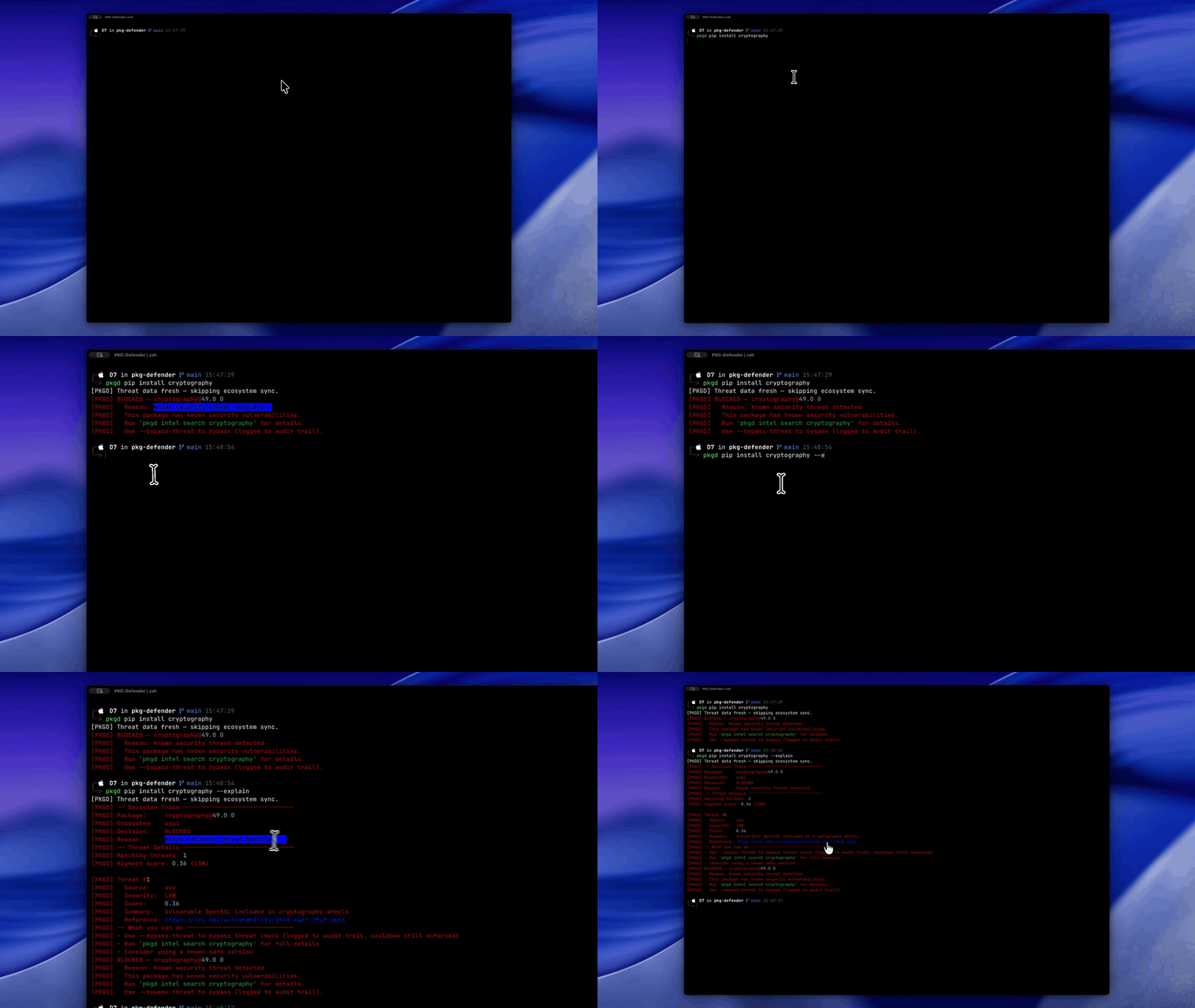
Wrap dangerous package manager commands to seamlessly check for threats before every install



PKG-Defender integrates into automated pipelines via non-interactive CI mode:
# Use --ci flag to skip all prompts
pkgd --ci pip install axios

# Or set the environment variable
export PKGD_CI=1
pkgd pip install axios
CI mode is auto-detected in many CI environments — see the full CI/CD guide for details.
The pkg-defender-action
is the easiest way to add threat auditing to GitHub Actions workflows. It's a
thin wrapper that installs pkgd, discovers lock files, and runs the audit.
Inputs:
| Input | Default | Description |
|---|---|---|
fail-on |
high |
Minimum severity to fail: critical, high, medium, low, none. CRITICAL and HIGH trigger exit code 4. |
lock-files |
**/package-lock.json,**/yarn.lock,… |
Glob pattern for lock files to scan (default covers all 7 supported formats). |
Outputs:
| Output | Description |
|---|---|
findings |
JSON array of threats with package, version, ecosystem, and severity |
summary |
Human-readable summary (e.g., "3 threats found: 1 CRITICAL, 2 HIGH") |
exit-code |
Exit code from pkgd audit (0 = pass, 4 = threat detected) |
Minimal usage:
steps:
  - uses: actions/checkout@v4
  - uses: divisionseven/pkg-defender-action@v1
With custom threshold and lock file filter:
steps:
  - uses: actions/checkout@v4
  - uses: divisionseven/pkg-defender-action@v1
    with:
      fail-on: critical
      lock-files: "**/package-lock.json"
The action passes --fail-on-threat to pkgd audit when fail-on is
critical or high. For medium, low, or none, the audit runs
informational-only (exit always 0).
For non-GitHub CI platforms (GitLab CI, Azure Pipelines, Jenkins, CircleCI,
etc.) or when you need full control over the install, use pkgd directly.
The CLI offers two approaches to prepare the threat database:
| Approach | Command | Time | Freshness | Best for |
|---|---|---|---|---|
| Fast path | pkgd db snapshot --download |
~5–10s | Up to 6h old | Frequent CI runs, cache-friendly |
| Current path | pkgd intel sync |
~30–60s | Always fresh | One-off audits, post-deploy checks |
# Fast path: download pre-built snapshot (cacheable)
pkgd db snapshot --download
pkgd audit --fail-on-threat --output json

# Current path: sync from all threat feeds (always fresh)
pkgd intel sync
pkgd audit --fail-on-threat --output json
Use the fast path for routine PR checks where ~6-hour-old threat data is acceptable. Use the current path for release gates or post-deployment verification where the absolute latest intelligence matters.
For local development, pkgd can also be used as a pre-commit hook.
A "snapshot" is a pre-built threat intelligence database published to
GitHub Releases: snapshot-latest
every 6 hours. It contains known threats from our Tier 1 feeds — OSV.dev,
GitHub Security Advisories (GHSA), and OSSF Malicious Packages —
covering npm, PyPI, Cargo, RubyGems, Go, Maven, NuGet, and Packagist.
Safety guarantees:
- SHA256 verification — Every snapshot ships with a
.sha256checksum file;pkgd db snapshot --downloadverifies the hash before use - Integrity check — The snapshot CI pipeline runs
PRAGMA integrity_checkon the database before publishing - Anomaly detection — Record count is compared against the previous build; suspicious inflation (>5x) or drops (<0.01x) abort the publish
The snapshot is built by a scheduled GitHub Actions workflow
(.github/workflows/snapshot.yml, cron 0 */6 * * *) that runs
scripts/build_snapshot.py. The result is an always-available download
that's safe to use in automated pipelines.
The CI/CD integration has three layers:
- Threat intelligence feeds → Snapshot builder — Tier 1 feeds (OSV, GHSA,
OSSF) are synced every 6 hours by a scheduled GitHub Actions workflow
(
scripts/build_snapshot.py), producing a compressed, verified SQLite database published to GitHub Releases. - CI pipeline — The GitHub Action runs
pkgd --ci setup(writes config, initializes the database, and syncs all feeds). The manual CLI can also download a pre-built snapshot with SHA256 verification viapkgd db snapshot --download. - pkgd CLI → Audit results — The CLI scans discovered lock files against
the local database, produces JSON or rich output, and exits with code 4 if
threats exceed the
--fail-on-threatthreshold.
┌─────────────────────────────────────────────────────────────────┐
│                     CI/CD USAGE ARCHITECTURE                    │
├─────────────────────────────────────────────────────────────────┤
│                                                                 │
│  PATH A: divisionseven/pkg-defender-action@v1                   │
│      │                                                          │
│      ├──▶ read inputs (fail-on, lock-files)                     │
│      │                                                          │
│      ├──▶ pip install pkg-defender                              │
│      │                                                          │
│      ├──▶ pkgd --ci setup                                       │
│      │        │                                                 │
│      │        ├──▶ write config file                            │
│      │        ├──▶ initialize threat DB                         │
│      │        └──▶ intel_sync -- ALL 9 feeds, LIVE              │
│      │                  (snapshot release not used)             │
│      │                                                          │
│      ├──▶ glob lock files                                       │
│      │        └──▶ none found? exit 0 (empty findings)          │
│      │                                                          │
│      ├──▶ for each lock file:                                   │
│      │        └──▶ pkgd --ci audit <file> --json                │
│      │                  [--fail-on-threat if high/critical]     │
│      │                  └──▶ merge findings into one array      │
│      │                                                          │
│      ├──▶ set outputs (findings, summary, exit-code)            │
│      │                                                          │
│      └──▶ any non-zero evit code? ──▶ core.setFailed()          │
│                                                                 │
│ ······························································· │
│                                                                 │
│  PATH B: pkgd CLI (compatible with any CI platform)             │
│      │                                                          │
│      ├──▶ SNAPSHOT PATH (~5-10s, cacheable)                     │
│      │        └──▶ pkgd db snapshot --download                  │
│      │                  ├──▶ fetch db.gz + .sha256              │
│      │                  └──▶ verify SHA256 (64KB chunks)        │
│      │                            ├──▶ FAIL: return False       │
│      │                            └──▶ MATCH: atomic DB swap    │
│      │                                                          │
│      ├──▶ FEED SYNC PATH (~30-60s, always fresh)                │
│      │        └──▶ pkgd intel sync -- ALL 9 feeds, LIVE         │
│      │                                                          │
│      └──▶ pkgd audit --fail-on-threat                           │
│                ├──▶ CRITICAL/HIGH found? exit 4                 │
│                └──▶ clean? exit 0                               │
│                                                                 │
└─────────────────────────────────────────────────────────────────┘
         │                                             ▲
         │          GitHub Snapshot Releases           │
         │      ┌───────────────────────────────┐      │
         └─────▶│  threats-latest.db.gz         │──────┘
                │  threats-latest.db.gz.sha256  │
                └───────────────────────────────┘
                                ▲
             Published          │    Fetched
             every 6 hours      │    only by PATH B
             (GitHub Actions)   │    (fastest path)
                                │

       ⚠  PATH A never reaches this release — it always
          live-syncs all 9 feeds directly for latest data

┌─────────────────────────────────────────────────────────────────┐
│                  SNAPSHOT BUILD & DISTRIBUTION                  │
├─────────────────────────────────────────────────────────────────┤
│                                                                 │
│ GH Action cron: "0 */6 * * *"  (always running, independent)    │
│     │                                                           │
│     └──▶ build_snapshot.py                                      │
│               │                                                 │
│               ├──▶ fetch Tier 1 feeds                           │
│               │        ├──▶ OSV.dev        (7 ecosystems)       │
│               │        ├──▶ GHSA           (last 365 days)      │
│               │        └──▶ OSSF Malicious Packages             │
│               │                                                 │
│               ├──▶ run safety checks (ALL must pass)            │
│               │        ├──▶ F1  integrity_check == "ok"         │
│               │        ├──▶ F3  >= 3 ecosystems have data       │
│               │        └──▶ F2  count within 0.01x-5x prior     │
│               │                                                 │
│               └──▶ gzip + sha256sum ──▶ publish                 │
│                                                                 │
└─────────────────────────────────────────────────────────────────┘
Fig 1: End-to-end data flow from threat feeds through snapshot distribution to CI pipeline audit.
| Variable | Description |
|---|---|
PKGD_CI |
Enable non-interactive CI mode (1 to enable) |
PKGD_GITHUB_TOKEN |
GHSA API token for higher rate limits; alternatively set feeds.ghsa_token in pkgd.toml |
PKGD_FEEDS_SOCKET_API_KEY |
Socket.dev API key for real-time threat signals |
PKGD_DATABASE_PATH |
Custom path for the threat database (overrides default data directory) |
PKGD_CONFIG_FILE |
Alternative name for PKGD_CONFIG_PATH — path to config file override |
- Intercept — Command wrappers (
pkgd pip install,pkgd npm install) wrap package manager commands across 18 package managers in 10 ecosystems. - Check —
check_package()queries the local SQLite threat database (zero network I/O). - Inform — social intelligence feeds add community-sourced early warnings (never blocks).
- Cooldown — Package age is checked against the configured window (default: 7 days).
- Decide — Threats scoring ≥ 0.3 are blocked; social feed findings are informational only.
- Sync — Background daemon periodically refreshes threat intelligence from 9 feeds.
See Full Threat Scoring Concepts →
PKG-Defender syncs from 9 feeds: 6 structured (OSV.dev, GHSA, npm advisory, OSSF Malicious Package List, RSS, Homebrew) and 3 social (Mastodon, Reddit, X/Twitter). Socket.dev is also available as a point-query source (not bulk sync). Structured feeds can block installs; social feeds are informational only. Feeds sync on configurable intervals with staleness detection.
Sync and query the latest threat intelligence data
Scan 7 lock file formats for known threats and cooldown-pending packages. Output
in rich terminal, JSON, or CSV. Use --fail-on-threat for CI/CD pipeline gating
(exits 4 on CRITICAL/HIGH only).

Audit project lock files and get threat reports in rich, JSON, or CSV formats
Automatic tab completion for pkgd commands in bash, zsh, and fish. Generated
via pkgd completion generate.
Note
PowerShell and Nushell are accepted as CLI arguments for consistency with other shell commands, but Click's built-in completion only supports bash, zsh, and fish natively. Custom completion scripts for PowerShell/Nushell will be added in a future release if demand is proven.
# Bash (one of):
pkgd completion generate bash > /etc/bash_completion.d/pkgd  # system-wide
pkgd completion generate bash > ~/.local/share/bash-completion/completions/pkgd  # user

# Zsh
pkgd completion generate zsh > ~/.zsh/completions/_pkgd

# Fish
pkgd completion generate fish | source
Restart your shell after installation to enable completion.
See Full Tab Completion Guide →
Configuration is loaded in this order (later sources override earlier):
- Built-In Defaults
- System Config (
/etc/pkgd/pkgd.toml) — loaded first, can be overridden - User Config (
~/.config/pkg-defender/pkgd.toml, platform equivalent) — overrides system - Project Config (
./pkgd.tomlor nearest parent) — highest file priority PKGD_CONFIG_PATHenvironment variable — only consulted ifconfig_path paramisNonePKGD_*environment variable overrides — highest priority, always applied
Default global config file with all values — automatically generated during pkgd setup for
effortless customization. Generated at project-level with cd path/to/project && pkgd setup --init
[cooldown]

# Minimum age in days before a new package version is allowed.
# Default: 7
default_days = 7

# Whether cooldown checking is active. Set false to disable entirely.
# Default: True
enabled = true

# If True, audit exits non-zero when threats are found during cooldown enforcement.
# If False, audit exits zero even with threats (weakened security posture).
# Default: True
strict_mode = true

# If True, a reason must be provided when bypassing the cooldown.
# Default: True
bypass_require_reason = true

# Number of days to retain bypass audit log entries.
# Note: Displayed in config listings only — no auto-prune enforcement code.
# Default: 90
bypass_log_retention_days = 90

[cooldown.overrides]
# Per-package cooldown days override (package name → days).
# Package names must be quoted to avoid TOML parsing errors.
# Examples:
#   "react" = 14
#   "@babel/core" = 21
#   "some-package" = 7

[cooldown.per_ecosystem]
# Per-ecosystem cooldown window overrides (ecosystem → days).
# Examples:
#   npm = 7
#   pypi = 14

# …continued
See Complete Default Config TOML File →
See Full Configuration Reference Guide →
| Base Command Group | Description |
|---|---|
pkgd audit |
Scan lock files for threats and cooldown-pending packages |
pkgd status |
Show recent threats, bypasses, and feed state |
pkgd bypass |
Create bypass for a blocked package |
pkgd health |
Check system health |
pkgd reset |
Reset all data (database, config, feeds) |
pkgd setup |
Interactive first-run setup wizard |
pkgd audit-logs |
Query and manage audit event logs |
pkgd logs |
View and manage pkg-defender logs |
pkgd completion |
Generate shell completion scripts |
pkgd hooks |
Generate shell functions for wrapped manager commands |
pkgd intel sync |
Sync all threat intelligence feeds |
pkgd intel search |
Search local threat database |
pkgd intel report |
Threat intelligence dashboard |
pkgd config view |
Display current configuration |
pkgd config list |
List all configuration values with sources |
pkgd config set |
Set a config value (dot notation) |
pkgd config set-secret |
Set a secret configuration value with hidden input |
pkgd config get |
Get a specific configuration value |
pkgd config reset |
Reset to defaults |
pkgd config options |
List all configurable options with descriptions |
pkgd daemon |
Background daemon for periodic sync |
pkgd db snapshot |
Download/verify database snapshots |
pkgd db verify |
Verify local database integrity and report summary |
These flags apply to every pkgd command:
| Flag(s) | Description |
|---|---|
--version, -V |
Show version information |
--help |
Show help message and exit |
--config, -c |
Path to configuration file (default: platform-dependent) |
--quiet, -q |
Suppress all non-error output |
--verbose, -v |
Increase verbosity (-v=INFO, -vv=DEBUG) |
--no-verbose |
Disable verbose output (overrides PKGD_OUTPUT_VERBOSE) |
--debug, -d |
Show full tracebacks for unexpected errors |
--no-color |
Disable colored terminal output |
--ascii |
Force ASCII-only output (useful on Windows or CI) |
--yes, -y |
Auto-confirm all prompts |
--force, -f |
Force operations (skip confirmations, overwrite files) |
--dry-run, -n |
Show what would happen without making changes |
--ci, --non-interactive |
Run in non-interactive CI/CD mode (reads PKGD_CI) |
--explain |
Show detailed explanation of why packages were blocked |
--json |
Output results as JSON |
| Command | Flag(s) | Description |
|---|---|---|
pkgd audit |
--deep, -d |
Perform deep scan (include cooldown status checks) |
pkgd audit |
--fail-on-threat, -f |
Exit with code 4 if CRITICAL or HIGH threats detected (CI/CD) |
pkgd audit |
--since |
Only flag threats seen within duration (e.g., 7d, 24h) |
pkgd audit |
--output, -o |
Output format: rich, json, csv (default: rich) |
pkgd status |
--feeds |
Show per-feed health status |
pkgd health |
--output, -o |
Output format: rich, json (default: rich) |
pkgd setup |
--init, -i |
Create pkgd.toml with defaults |
pkgd setup |
--shell, -s |
Override auto-detected shell |
pkgd bypass |
--manager, -m |
Package manager (default: npm) |
pkgd bypass |
--reason |
Reason for bypass (required) |
pkgd bypass |
--expires |
Bypass expiry duration (e.g., 24h, 7d, 30m) |
pkgd intel sync |
--exclude-feed |
Exclude a specific feed (repeatable) |
pkgd logs view |
--lines, -n |
Number of lines to show (default: 100) |
pkgd db snapshot |
--download, -d |
Download latest threat intelligence snapshot |
pkgd db snapshot |
--verify, -v |
Verify local database integrity |
pkgd reset |
--teardown, -t |
Full teardown (remove database and config) |
pkgd audit-logs query |
--ecosystem |
Filter audit log entries by ecosystem |
pkgd audit-logs query |
--verdict |
Filter by verdict (PASS, PARTIAL_PASS, FAIL, BLOCKED, WARN, ERROR) |
| Variable | Affects | Description |
|---|---|---|
PKGD_DRY_RUN |
--dry-run default |
When set to 1, enables dry-run mode by default |
PKGD_OUTPUT_VERBOSE |
--no-verbose |
Override verbose output at the environment level |
PKGD_CI |
--ci mode |
When set to 1, forces CI mode (non-interactive) |
PKGD_CONFIG_PATH |
Config loading | Path to configuration file (alternative to --config) |
See Full CLI Reference Guide →
The ecosystem's package publication timestamp source/availability (for use in cooldown calculation) determines the tier assignment:
FULL: Threat check runs, cooldown check runs, verified publish timestamps availablePARTIAL: Threat check runs, cooldown check runs, proxied publish timestamps availableAUDIT: Threat check runs, cooldown check is SKIPPED (no reliable registry publish timestamp source available)
FULLandPARTIALare functionally identical in terms of what checks run. The difference is in the quality of the timestamp source:
FULLmeans the timestamps are cryptographically verified/authoritative (PyPI native API, npm registry, etc.)PARTIALmeans they're proxied/approximate but still usable for cooldown (GitHub Releases/Tags API, Libraries.io, etc.)
| Ecosystem | Manager | Registry Adapter | Coverage Tier | Lock File | Wrapper |
|---|---|---|---|---|---|
| npm | npm, yarn, pnpm, bun | Yes | FULL / PARTIAL |
package-lock.json, yarn.lock, pnpm-lock.yaml | Yes |
| PyPI | pip, pipx, poetry, pipenv, uv | Yes | FULL / PARTIAL |
requirements.txt, poetry.lock, Pipfile.lock, uv.lock | Yes |
| Cargo | cargo | Yes | FULL |
— | Yes |
| RubyGems | gem, bundler | Yes | FULL / PARTIAL |
— | Yes |
| Packagist | composer | Yes | FULL |
— | Yes |
| Homebrew | brew | Yes | PARTIAL |
— | Yes |
| APT | apt | Yes | AUDIT |
— | Yes |
| Yum | yum | Yes | AUDIT |
— | Yes |
| DNF | dnf | Yes | AUDIT |
— | Yes |
| Conda | conda | Yes | FULL |
— | Yes |
Important
Each dependency below includes a pre-crafted audit link: a Google-dorking search query scoped to supply chain attacks, compromises, and security advisories for that package, filtered to the past year.
This is intentional. PKG-Defender exists because developers install packages on trust alone; we think that habit should stop, including with tools like ours. Before installing PKG-Defender in a sensitive environment, we encourage you to click through and do a 30-second check on each of our dependencies. That's exactly the kind of scrutiny this project was built to promote.
| PyPI Link | Purpose | Audit Link |
|---|---|---|
| aiohttp | Async HTTP for feed sync and registry lookups | AUDIT ME → |
| click | CLI framework | AUDIT ME → |
| defusedxml | Safe XML parsing for RPM repodata | AUDIT ME → |
| feedparser | Atom/RSS feed parsing | AUDIT ME → |
| packaging | Python version spec parsing | AUDIT ME → |
| platformdirs | Platform-appropriate config/data directories | AUDIT ME → |
| pyyaml | YAML parsing for pnpm-lock.yaml lock files | AUDIT ME → |
| rich | Terminal output formatting | AUDIT ME → |
| tomlkit | TOML config file read/write (setup wizard) | AUDIT ME → |
| zstandard | Zstandard decompression for RPM repodata | AUDIT ME → |
For common development tasks, you can use the Makefile:
| Command | Description |
|---|---|
make install |
Install all dependencies |
make lint |
Check code style |
make typecheck |
Type checking |
make test |
Run tests |
make check |
Run lint, typecheck, and tests |
make build |
Build the package |
make clean |
Clean build artifacts |
make man |
regenerate the man page troff file |
Use uv directly:
uv run pytest
uv build
# continued...

Note
PKG-Defender is free and open-source software, built and maintained independently. If the tool provides value to your workflow or organization, consider supporting its continued development, and starring the project so that others can find it.
Your support helps fund ongoing maintenance, feature development, and infrastructure costs — keeping the project available to everyone at no cost. Thank you.


Caution
While PKG-Defender aims to provide practical defense against supply chain threats, no tool can ever guarantee complete protection. Threats may evolve faster than intelligence feeds, and sophisticated attacks may evade public detection. This tool is intended to be used as one layer of a broader security strategy — not as a silver bullet.
PKG-Defender is in active development and we strive to continually evolve in response to the modern threat landscape.
See SECURITY.md →
See DISCLAIMER.md →
PKG-Defender is a practical defense layer, not a guarantee. Understanding its architectural boundaries helps you calibrate expectations and deploy it where it adds the most value for you and your organization.
PKG-Defender protects interactive pip install, npm install, and similar CLI
commands by wrapping package manager invocations via shell functions, or via direct
invocation. If you do not directly wrap manager commands in non-interactive
environments (pkgd [OPTIONS] MANAGER SUBCOMMAND [PACKAGE...] [MANAGER_OPTIONS...]),
your configured shell functions will not protect:
- Dockerfiles / container builds —
RUN pip installinside a Dockerfile does not pass through pkgd shell functions. - CI/CD scripts — Unless explicitly configured to use
pkgd <manager>instead of the bare manager command. - Automated / headless installs — Scripts, Makefiles, or system package operations that call the package manager directly.
After clearing a command, os.execvp() replaces the pkgd process with the real
package manager, leaving zero runtime overhead.
pkgd audit currently inspects top-level packages only. Transitive dependency
scanning is planned for a future release.
PKG-Defender records its pre-install assessment in the audit log — the verdict,
config state, and threat analysis at decision time. However, because
os.execvp() replaces the process, pkgd cannot verify whether the install
actually succeeded or whether the package manager encountered an error. To
confirm outcomes, cross-reference pkgd's audit log (pkgd audit-logs) with your
package manager's actual installed state.
Package managers on the AUDIT coverage tier (apt, yum, dnf) receive
threat-detection-only protection — the threat database IS queried, but cooldown
verification is skipped (these ecosystems lack reliable publish timestamps).
The block threshold (0.3 in checker.py) is a starting value chosen through
reasoned defaults, not empirical validation against real-world attack data. It
may produce false positives (blocking legitimate packages) or false negatives
(allowing malicious packages whose threat signals don't reach the threshold).
Users deploying in sensitive environments should test and adjust this value.
PKG-Defender cannot protect against attacks that are already in motion at install time. The tool assesses threat signals from intelligence feeds, not runtime behavior.
The v1 release provides signal-based cooldown escalation where threat severity
can dynamically extend cooldown windows. Verified advisories trigger an
immediate block, and Tier 3 social signals extend the cooldown window. However,
users cannot configure per-signal thresholds or escalation policies directly;
the behavior is hard-coded in the step_check_cooldown() pipeline.
PKG-Defender is distributed under Apache-2.0 →
PKG-Defender would not be possible without the following external projects, services, data sources, libraries, and tools. Thank you for your contributions.
- OSV.dev — Open Source Vulnerability database (Google)
- GitHub Security Advisories — GHSA database
- Socket.dev — Supply chain security signals
- OpenSSF Malicious Packages — OpenSSF malicious package database
- npm — npm registry (npm, Inc.)
- PyPI — Python Package Index (Python Software Foundation)
- RubyGems — Ruby gem server
- crates.io — Rust package registry
- Packagist — PHP/Composer package repository
- Homebrew — macOS/Linux package manager (formulae.brew.sh)
- Anaconda — Python/R data science distribution (Anaconda Inc.)
- conda-forge — Community-led conda package channel
- libraries.io — Package metadata and release timestamps
- Fedora Koji — Fedora build system hub
- Fedora Bodhi — Fedora updates system
- Ubuntu Archive — Ubuntu package archive
- Debian Snapshot Archive — Debian snapshot archive
- Mastodon / infosec.exchange — Decentralized social platform
- Reddit / PullPush.io — Reddit comment and submission archive
- X/Twitter API v2 — Social media platform (opt-in, BYOK)
Security intelligence aggregated from blog RSS feeds:
- Socket.dev blog, Snyk blog, OpenSSF blog, GitHub Security blog, GitGuardian blog, Sonatype blog
PKG-Defender's runtime dependencies are listed in the Dependencies table above with full transparency audit links.
- aiohttp — Async HTTP for feed sync and registry lookups
- click — CLI framework
- defusedxml — Safe XML parsing for RPM repodata
- feedparser — Atom/RSS feed parsing
- packaging — Python version spec parsing
- platformdirs — Platform-appropriate config/data directories
- PyYAML — YAML parsing for pnpm-lock.yaml lock files
- rich — Terminal output formatting
- tomlkit — TOML config file read/write (setup wizard)
- zstandard — Zstandard decompression for RPM repodata
- Hatchling — Python build backend
- pytest — Testing framework
- ruff — Python linter and formatter (Astral)
- mypy — Static type checker
- pre-commit — Git hook framework
- PyInstaller — Standalone binary packaging
- aioresponses — Async HTTP test mocking
- GitHub Actions — CI/CD and snapshot automation
- Codecov — Code coverage reporting
- shields.io — Badge generation service
- Trivy — Container image vulnerability scanner (Aqua Security)
- Docker — Container runtime and image distribution
- Contributor Covenant — Code of conduct
- Conventional Commits — Commit message standard
- no-color.org — NO_COLOR standard
- artty — ASCII art generation for the PKG-Defender logo banner (used offline in development for asset generation)
Last Updated: 2026-07-08
Every project has a story before it reaches you, thanks for reading ours all the way through.
These days, people trust software blindly by default. Reading this far means you don't. That's rarer than it should be.
Traditionally this is the part where I'm supposed to ask you to star the repo, and... I'm not above tradition.
— Division 7
