An end-to-end, high-performance local AI voice interaction suite that runs natively on Windows, Linux, and macOS. This project demonstrates real-time streaming Speech-to-Text (ASR), client-side Voice Activity Detection (VAD), Large Language Model (LLM) speech-to-command transformation, and Text-to-Speech (TTS) voice responses across 15 languages—all operating completely offline.





Watch the complete end-to-end demo showing service orchestration, real-time streaming Hindi ASR, Silero VAD turn detection, local LLM confirmation, and neural TTS:
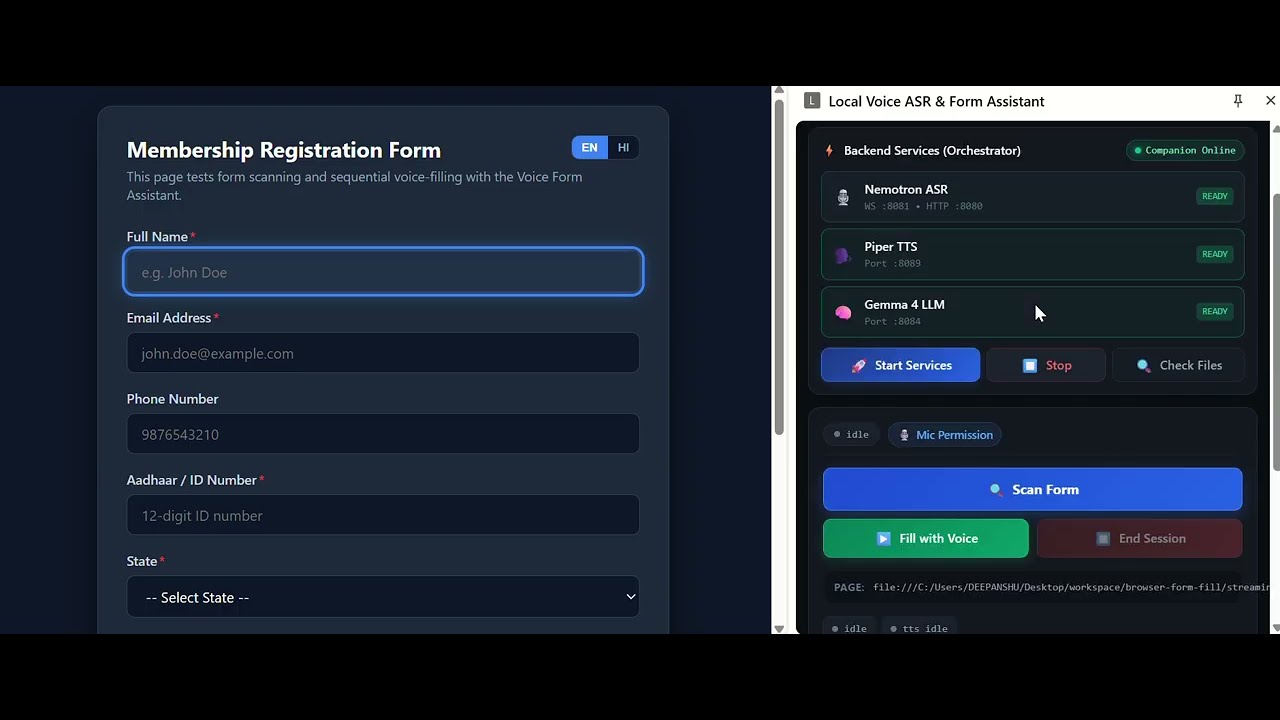
🔗 Watch Video on YouTube: https://youtu.be/OhwYXN5-U4U?si=09XclHlTsWhWUbKv
streaming_demos/
├── README.md                     # Main repository documentation (this file)
├── commands.md                   # Scratchpad reference for CLI commands & testing scripts
├── LICENSE.txt                   # Project license (MIT)
├── extension/                    # Chrome Extension (Manifest V3 Side Panel Voice Assistant)
│   ├── README.md                 # 📖 Comprehensive Chrome Extension manual
│   ├── manifest.json             # Manifest V3 extension configuration & permissions
│   ├── sidepanel.html            # Side Panel user interface
│   ├── sidepanel.css             # Glassmorphism dark-mode UI styling
│   ├── sidepanel.js              # Voice capture, VAD, WebSocket streaming, and LLM correction
│   ├── form-field-scanner.js     # DOM form field extraction & sequential voice filler
│   ├── scanner-highlight.css     # Webpage focus outline & active field indicator
│   ├── i18n.js                   # Dynamic multi-language localization manager
│   ├── locales/                  # 15 Language dictionary modules
│   │   ├── ar.js                 # 🇸🇦 Arabic (ar-AR)
│   │   ├── de.js                 # 🇩🇪 German (de-DE)
│   │   ├── en.js                 # 🇺🇸/🇬🇧 English (en-US, en-GB)
│   │   ├── es.js                 # 🇪🇸/🇲🇽 Spanish (es-ES, es-US)
│   │   ├── fr.js                 # 🇫🇷/🇨🇦 French (fr-FR, fr-CA)
│   │   ├── hi.js                 # 🇮🇳 Hindi (hi-IN)
│   │   ├── it.js                 # 🇮🇹 Italian (it-IT)
│   │   ├── ja.js                 # 🇯🇵 Japanese (ja-JP)
│   │   ├── ko.js                 # 🇰🇷 Korean (ko-KR)
│   │   ├── nl.js                 # 🇳🇱 Dutch (nl-NL)
│   │   ├── pt.js                 # 🇧🇷/🇵🇹 Portuguese (pt-BR, pt-PT)
│   │   ├── ru.js                 # 🇷🇺 Russian (ru-RU)
│   │   ├── tr.js                 # 🇹🇷 Turkish (tr-TR)
│   │   ├── uk.js                 # 🇺🇦 Ukrainian (uk-UA)
│   │   └── vi.js                 # 🇻🇳 Vietnamese (vi-VN)
│   ├── permission.html / .js     # One-time microphone permission request handler
│   ├── launch.html / .js         # Protocol launch fallback helper
│   ├── background.js             # Service worker for side panel lifecycle
│   ├── scanBackground.js         # Tab coordination for DOM scanner injection
│   ├── silero_vad.onnx           # Silero VAD v5 neural speech detector model
│   ├── worklet-processor.js      # AudioWorklet for low-latency 16 kHz PCM conversion
│   ├── lib/                      # Bundled ONNX Runtime WebAssembly SIMD/threaded runtime
│   ├── icons/                    # Extension action icons (16px, 48px, 128px)
│   └── docs/images/              # UI walkthrough screenshots
├── companion/                    # Companion Orchestrator & Proxy Server
│   ├── server.js                 # Reverse proxy & REST API endpoints (:8000)
│   ├── process_manager.js        # Spawns, monitors & stops local AI processes
│   ├── downloader.js             # Binary and model verification & automated downloader
│   ├── config.json               # Language models, ports & binary download registry
│   ├── cleanup_ports.js          # Utility to release occupied network ports
│   ├── start_companion.bat / .sh # 1-click companion launcher (Win / Linux / macOS)
│   ├── register_protocol.bat/.sh # Registers voice-companion:// protocol handler
│   └── unregister_protocol.*     # Protocol deregistration scripts
└── commands_demo/                # Standalone Web-based Streaming Voice Commands Demo
    ├── README.md                 # Detailed setup & architecture documentation
    ├── index.html                # Web frontend layout
    ├── styles.css                # UI styling
    ├── script.js                 # Complete client logic & WebSocket streaming
    ├── server.js                 # Static file server
    ├── sample_form.html          # Sample HTML form for local testing
    └── file.wav                  # Audio test asset
An offline, privacy-first Chrome Extension that runs in the Chrome Side Panel, automatically coordinates with the local companion daemon to manage backend services, performs real-time streaming ASR, carries out LLM intent verification, and speaks voice feedback across 15 languages.
- 📖 Read the Full Chrome Extension Instructional Manual with visual screenshots, setup instructions, and troubleshooting tips.
A browser-based interactive web client that captures real-time microphone audio, performs low-latency streaming ASR via native WebSockets, transforms raw recognized speech into structured commands using a local LLM, and plays synthesized voice responses.
- 📖 Read the Full Voice Commands Demo README for detailed installation steps, model downloads, architecture diagrams, and service ports.
| Component | Technology / Model | Role / Description |
|---|---|---|
| Browser Engine | Web Audio API / ONNX Runtime Web | 16 kHz PCM audio recording & client-side VAD |
| VAD Engine | Silero VAD v5 (ONNX) | Real-time speech/silence detection in browser |
| Streaming ASR | CrispASR + Nemotron 3.5 0.6B (GGUF) | Low-latency streaming Speech-to-Text over WebSocket (ws://127.0.0.1:8081 / 8082) |
| LLM Engine | llama-server + Google Gemma 4 E2B (GGUF) | Real-time speech transcript correction & intent extraction (http://127.0.0.1:8084) |
| TTS Engine | CrispASR (Piper Backend) + Piper Voice Models (GGUF) | Multi-language neural voice speech synthesis (http://127.0.0.1:8089) |
| Web Server | Node.js + Express | Serves companion orchestrator, process manager & proxy (http://localhost:8000) |
The system supports end-to-end localization across UI elements, conversational TTS dictation prompts, Gemma 4 LLM intent classification/value extraction prompts, and speech heuristics:
| Language | Locales | TTS Voice Model (GGUF) |
|---|---|---|
| Hindi | hi-IN (Default) |
hi_IN-rohan-medium.gguf |
| English | en-US, en-GB |
piper-en_US-lessac-medium-f16.gguf / piper-en_GB-cori-medium-f16.gguf |
| Spanish | es-ES, es-US |
piper-es_ES-davefx-medium-f16.gguf / piper-es_MX-ald-medium-f16.gguf |
| French | fr-FR, fr-CA |
piper-fr_FR-siwis-medium-f16.gguf / piper-fr_FR-tom-medium-f16.gguf |
| Italian | it-IT |
piper-it_IT-paola-medium-f16.gguf |
| Portuguese | pt-BR, pt-PT |
piper-pt_BR-faber-medium-f16.gguf / piper-pt_PT-tugão-medium-f16.gguf |
| Dutch | nl-NL |
piper-nl_NL-alex-medium-f16.gguf |
| German | de-DE |
piper-de_DE-thorsten-medium-f16.gguf |
| Turkish | tr-TR |
piper-tr_TR-dfki-medium-f16.gguf |
| Russian | ru-RU |
piper-ru_RU-denis-medium-f16.gguf |
| Arabic | ar-AR |
piper-ar_JO-kareem-medium-f16.gguf |
| Japanese | ja-JP |
Multilingual ASR & LLM prompts |
| Korean | ko-KR |
Multilingual ASR & LLM prompts |
| Vietnamese | vi-VN |
piper-vi_VN-vais1000-medium-f16.gguf |
| Ukrainian | uk-UA |
piper-uk_UA-lada-x_low-f16.gguf |
The companion is a Node.js server that manages all 3 local AI processes (ASR, TTS, LLM) and proxies their APIs to the browser extension.
companion\start_companion.batAuto-installs Node.js via
wingetif not found. No admin required.
chmod +x companion/start_companion.sh
./companion/start_companion.sh
Requires Node.js v18+ installed. The script checks for it and prints install instructions if missing.
The companion starts at http://127.0.0.1:8000 and keeps running in that terminal window.
This lets the Chrome Extension launch the companion with a single click when it detects it is offline.
| Platform | Command |
|---|---|
| Windows | Double-click companion\register_protocol.bat |
| Linux | chmod +x companion/register_protocol.sh && ./companion/register_protocol.sh |
| macOS | chmod +x companion/register_protocol.sh && ./companion/register_protocol.sh |
After registration, the ⚡ Launch Companion button in the extension side panel will auto-start the companion from within Chrome.
- Open Chrome and navigate to
chrome://extensions. - Enable Developer mode (toggle in the top-right corner).
- Click Load unpacked and select the
extension/folder. - The Local Voice ASR & Form Assistant extension will appear in your extensions list.
- Click the puzzle-piece icon → pin the extension → click it to open the Side Panel.

Chrome Side Panels cannot render microphone permission bubbles directly:
- In the Side Panel, click
🎙️ माइक अनुमति(Mic Permission). - A dedicated browser tab opens requesting microphone access → click Allow.
- The tab displays
✅ अनुमति मिल गई!and closes automatically. Permission is permanently granted to the extension origin.
Select your preferred language from the Language Selector dropdown at the top of the Side Panel. The assistant supports 15 languages / 19 locales.
Important
Selecting a new language automatically hot-restarts the ASR and TTS backend services (the LLM remains running). Expect a ~5–15 second transition period while the new language's voice models are initialized. If selected for the first time, the companion automatically fetches the corresponding Piper TTS voice GGUF model (~50–150 MB).
How language switching works under the hood:
- The extension sends a request to
POST /api/languageon the companion server. - The companion persists your choice in the user data directory (
user_config.json) and triggers a hot-restart of only the ASR + TTS processes (leavingcompanion/config.jsonclean in git). - Service indicators in the Side Panel briefly transition to STARTING before returning to READY.
- Your language preference is saved across sessions and automatically restored whenever you restart the companion.
- In the Side Panel, click 🚀 स्टार्ट सर्विसेज (Start Services).
- All three service cards (Nemotron ASR, Piper TTS, Gemma 4 LLM) will turn green (READY).
- Open any webpage containing form fields (contact form, registration, survey, etc.).
- Click 🔍 फ़ॉर्म स्कैन करें (Scan Form) — the extension maps and lists all detectable input fields.
- Click
▶️ वॉइस से भरें (Start Voice Filling) — the assistant prompts each field in your selected language via local TTS and listens for your spoken response. - The assistant populates the input, verifies ("क्या यह सही है?"), and advances to the next field.
- Click ⏹️ सत्र समाप्त करें (Stop Session) anytime to halt all listening, playback, and form-filling activities.

With the companion running, open http://localhost:8000/ in your browser for the voice commands web demo.
📖 See the Voice Commands Demo README for details.
For running individual native binaries directly without the companion, or for CLI tests (curl, ffmpeg), refer to commands.md.
We would like to express our sincere gratitude to the open-source projects, model creators, and research teams that made this local AI voice suite possible:
- Piper Voices (Rhasspy) — High-quality, fast, and lightweight local neural text-to-speech voice models and dataset tools.
- CrispASR — High-performance native streaming Speech-to-Text server and embedded Piper TTS engine.
- llama.cpp — State-of-the-art C/C++ inference engine for large language models, powering our local
llama-server. - NVIDIA Nemotron 3.5 ASR Streaming — Exceptional streaming Speech-to-Text architecture providing low-latency transcription.
- Google Gemma 4 E2B — High-efficiency open language model powering real-time intent extraction and conversational slot filling.
This repository is distributed under the terms of the MIT License.