For this you need:
- arduino uno (or arduino compatible board)
- 16 male-female wires
- usb 2.0 A-B(to connect arduino to com port)
- computer with com-port
Pip:
- aiogram
- pySerial
Scheme for matrix 8x8:
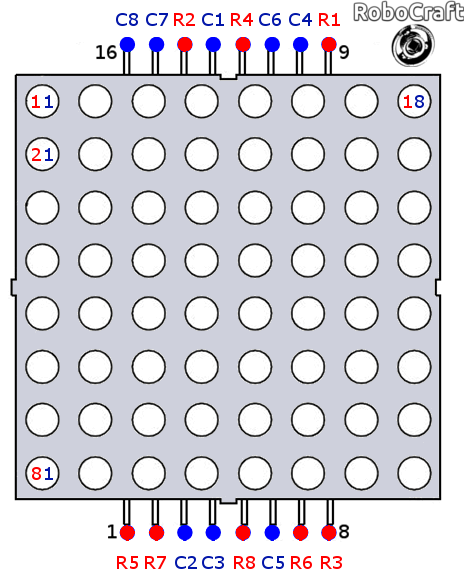
Scheme for connection to arduino board(for example: digital port 2 - R1):
- ROW_1 2
- ROW_2 3
- ROW_3 4
- ROW_4 5
- ROW_5 6
- ROW_6 7
- ROW_7 8
- ROW_8 9
- COL_1 10
- COL_2 11
- COL_3 12
- COL_4 13
Analog connection:
- COL_5 A0
- COL_6 A1
- COL_7 A2
- COL_8 A3
- Open file "config.py" at "LedMatrixTBot\python" and enter bot token(how to get bot-token: https://www.siteguarding.com/en/how-to-get-telegram-bot-api-token), COM-port(the port to which the board is connected. For example: "COM3")
- Install arduino IDE (https://docs.arduino.cc/software/ide-v1/tutorials/Windows) and upload the sketch to the board from LedMatrixTBot\arduino\ard
If you have done everything above, connect the arduino to the correct COM port and run main.py
My friend on discord
example-2.mp4
Me