| type | Repository Guide |
|---|---|
| title | StyleGallery |
| description | Governed gallery of portable interface knowledge organized by domain. |
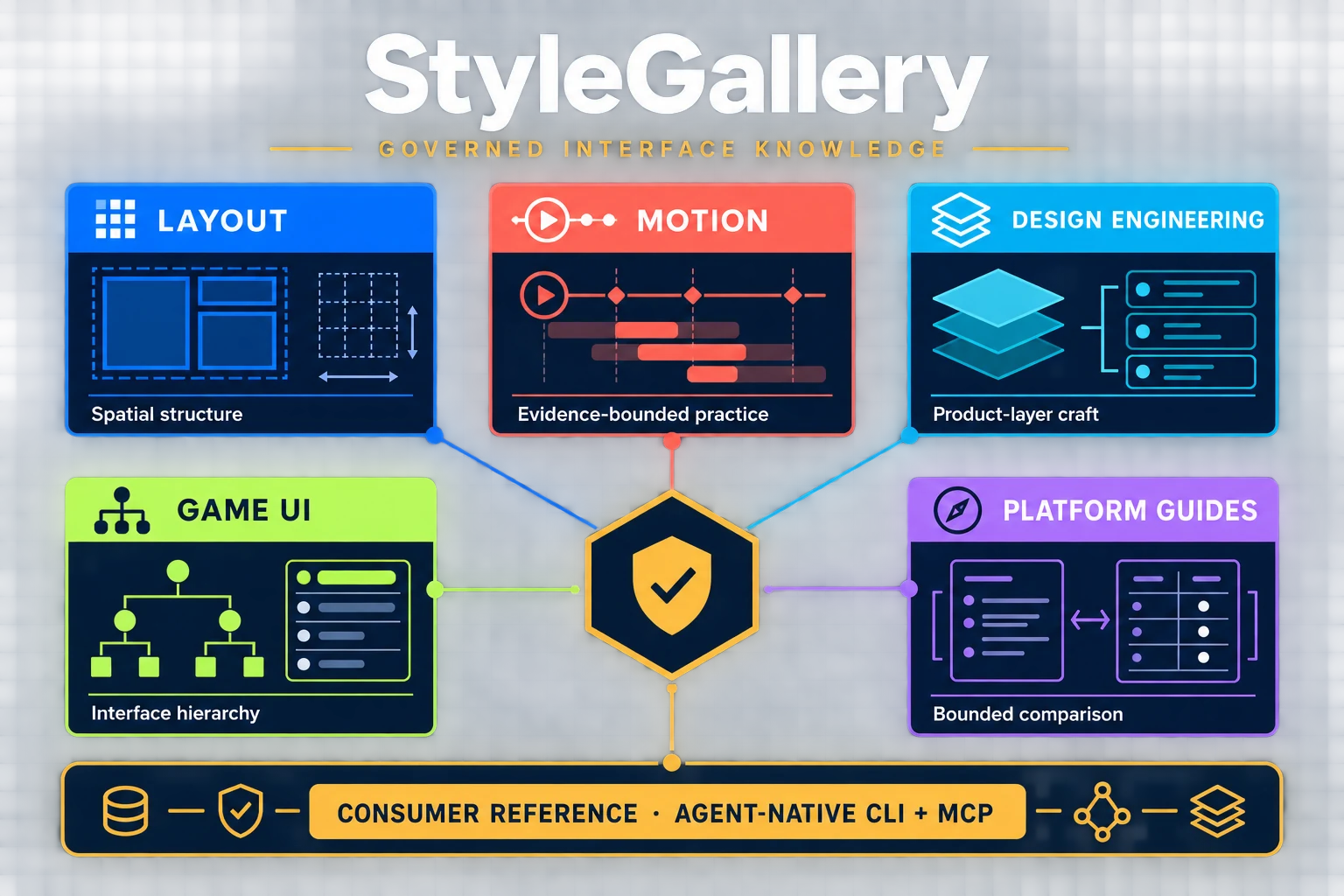
StyleGallery is a governed gallery of portable interface knowledge. It separates reusable spatial patterns, product-layer motion guidance, design-engineering practice, and platform-specific references into explicit domains with different evidence and ownership boundaries.
Primary role: repository guide.
The existing Layout corpus remains a gallery of minimal, portable CSS layout patterns at its current paths. Each pattern documents one primary spatial problem and the smallest robust HTML/CSS structure that solves it. Motion, visual treatment, and platform guidance do not expand reusable Layout pattern CSS; they live in their own domains and carry explicit evidence boundaries.
Consumer Reference is shared non-domain infrastructure for optional consumer-owned reference handoffs. It carries schema, routing, provenance, and evidence metadata without owning profiles, visual values, components, or a sixth domain.
Agent-Native StyleGallery is the machine-facing entry point over that governed knowledge. Frozen v1 provides claim/evidence/governance records through sg and its MCP; isolated material v2 indexes admitted Markdown and exposes sg-material plus a separate read-only MCP. Lifecycle records own extension and archive dispositions. These material, trust/conformance, transport, and extension planes do not create a sixth domain, replace the Markdown corpus, permit mutation, or feed visual defaults back into Layout.
StyleGallery requires Node.js 22 or newer. Run a command without installing anything globally:
npx stylegallery discover --format jsonOr install the CLI globally:
npm install --global stylegallery
sg discover --format json
The npm package includes the pinned @chenglou/pretext@0.0.8 browser text-layout engine. StyleGallery uses it as a measurement and verification dependency for text-fit QA; the Node CLI and MCP servers do not execute browser Canvas APIs.
Common read-only commands:
sg resolve sg:profile/editorial-reference-profile --format json
sg claims sg:profile/editorial-reference-profile --format json
sg context sg:profile/editorial-reference-profile --format json
sg ops --format json
Every command writes deterministic JSON to stdout. Invalid input returns an error object and a nonzero exit status. See Agent-Native StyleGallery for the command contract, StableRef and VersionID model, MCP resources, and trust boundaries.
Material v2 searches the admitted Markdown corpus and returns JSON without an additional format flag:
sg-material discover
sg-material search --query "sticky layout" --paths-only --limit 5
sg-material context --query "responsive sidebar" --budget-tokens 4096
For a coding agent with repository filesystem access, local guided traversal is the default: read AGENTS.md and this README, follow the narrowest relevant task route or domain index, and inspect the selected Markdown files directly. Use search --paths-only only when the path is unclear; it returns a deterministic paths array of repository-relative candidates without full result metadata. Reserve context for environments that cannot read repository files or for transferring a bounded, provenance-linked package.
The StyleGallery homepage example was planned from a clean install of the published npm package. It demonstrates the Homepage recipe, selected layout patterns, agent-native CLI access, responsive behavior, and Chrome CDP verification in a standalone product-layer implementation.
Launch the packaged stdio server with:
npx --package stylegallery stylegallery-mcpExample MCP client configuration:
{
  "mcpServers": {
    "stylegallery": {
      "command": "npx",
      "args": ["--yes", "--package", "stylegallery", "stylegallery-mcp"]
    }
  }
}
The MCP surface exposes governed read operations only. It cannot modify repository knowledge.
The separate Material v2 MCP server is available as stylegallery-material-mcp.
StyleGallery는 Node.js 22 이상에서 실행됩니다. 전역 설치 없이 바로 사용하려면 다음 명령을 실행하세요.
npx stylegallery discover --format json자주 사용한다면 전역으로 설치할 수 있습니다.
npm install --global stylegallery
sg discover --format jsondiscover는 사용 가능한 인터페이스를 보여주고, resolve는 하나의 레코드를 조회하며, claims는 관련 주장과 근거를 분리해서 보여줍니다. context는 에이전트에 전달할 수 있는 제한된 컨텍스트 패키지를 만들고, ops는 지원하는 작업 목록을 반환합니다. 저장소를 직접 읽을 수 있는 에이전트는 AGENTS.md와 이 README의 작업 경로에서 시작해 로컬 Markdown을 따라가는 방식이 기본입니다. 경로가 불명확할 때만 sg-material search --query "검색어" --paths-only --limit 5로 후보 경로를 좁히고, context는 파일에 직접 접근할 수 없거나 제한된 패키지를 전달해야 할 때 사용합니다. 모든 결과는 자동화에 바로 사용할 수 있는 JSON입니다.
CLI와 MCP의 상세 사용법은 Agent-Native StyleGallery 가이드를 참고하세요. 사람이 문서를 탐색하려면 아래의 도메인 표에서 목적에 맞는 진입점을 선택하면 됩니다.
| Domain | Owns | Does not own |
|---|---|---|
| Layout | Semantic spatial structure, flow, sizing, alignment, containment, scrolling, and composition. | Brand, typography, color, shadow, animation, and product decoration. |
| Motion | Motion terminology, review procedure, and evidence-bounded practice guidance. | Universal timing/easing rules or permission to add motion to reusable Layout CSS. |
| Design Engineering | Product-layer craft decisions and verification questions. | A second universal principle set or taste as evidence. |
| Game UI | Game-interface classification, hierarchy, reference records, and engine-specific implementation guides. | Reusable Layout CSS or claims that one engine structure is universal. |
| Platform Guides | Bounded comparison with named platform conventions. | Affiliation, imitation, or authority over web and accessibility contracts. |
The canonical domain manifest and provenance policy are in StyleGallery Domains.
Use each root hub for one primary job.
| Entry | Primary role | Use when |
|---|---|---|
| README | Repository guide | You need the library purpose, policies, and task routes. |
| OKF index | OKF bundle map | You need a compact knowledge-bundle table of contents. |
| Layout Planning Guide | Planning workflow | You need to classify a screen before choosing patterns. |
| Layout Pattern Catalog | Pattern lookup | You already know the spatial problem or pattern name. |
| Governance, Lifecycle, And Docs-As-Code | Governance reference | You need the source of truth, lifecycle, generated-file, ownership, or stale-audit rule. |
| StyleGallery Domains | Domain manifest | You need domain ownership, scope, lifecycle, page membership, or provenance. |
| Consumer Reference | Shared infrastructure contract | You need to declare a consumer-owned record or explain why one is not applicable. |
| Agent-Native StyleGallery | Machine interface guide | A person or agent needs to discover, resolve, retrieve, or inspect governed StyleGallery knowledge through CLI or MCP. |
| Layout | Layout domain hub | You need reusable spatial patterns, recipes, or planning routes. |
| Motion | Motion domain hub | You need motion terminology, review procedure, or practice evidence. |
| Design Engineering | Design Engineering domain hub | You need product-level interface-craft decision guidance. |
| Game UI | Game UI domain hub | You need to classify a game interface or understand its screen hierarchy. |
| Platform Guides | Platform Guides domain hub | You need a bounded platform comparison. |
Each common task has one primary route. Use secondary links only after the primary route answers the first decision.
| Task | Primary route | Why |
|---|---|---|
choose a StyleGallery domain |
StyleGallery Domains | It separates domain ownership before a reader applies domain-local guidance. |
browse reusable spatial guidance |
Layout | It preserves the existing pattern, recipe, and planning routes. |
name or review interface motion |
Motion | It routes to bounded terminology and review guidance. |
review product-level interface craft |
Design Engineering | It separates practitioner heuristics from shared quality gates. |
compare adversarial consumer identities |
Reference Profiles | It keeps non-default product values in related Design Engineering examples over one pinned Layout source. |
classify a game interface or map it to an engine |
Game UI | It separates engine-neutral roles from implementation-specific guidance. |
compare a named platform convention |
Platform Guides | It requires platform and evidence boundaries before adaptation. |
turn raw content into a homepage or ordinary webpage |
Webpage Generation Workflow | It starts with use case, content-to-layout fit, harmony, and handoff. |
plan a screen before the layout problem is obvious |
Layout Planning Guide | It sequences task, content, scroll, recipe, and verification choices. |
choose a pattern when the name is unknown |
Decision Tree | It routes from constraints to pattern categories. |
fill in requirements before selecting a pattern stack |
Layout Brief Template | It captures content, constraints, and verification inputs. |
stabilize repository terminology |
Controlled vocabulary | It defines canonical terms, aliases, deprecated terms, and scannability rules. |
compose a full screen from primitives |
Layout Recipes | Recipes map screen models to pattern stacks. |
inspect which primitives a recipe depends on |
Primitive To Recipe Matrix | It names essential, helper, and substitutable slots. |
look up a known layout primitive |
Layout Pattern Catalog | It is the generated pattern lookup surface. |
browse pattern categories |
Pattern Categories | It groups generated patterns by spatial family. |
check whether a layout or design claim is admissible |
Quality Gates | It routes claims to gates and evidence boundaries. |
prove repository checks and evidence coverage |
Executable Evidence Coverage | It maps validators, fixtures, CI commands, and their boundaries. |
declare consumer reference applicability |
Consumer Reference | It provides the required handoff field without moving consumer values into Layout. |
use StyleGallery from an agent or automation |
Agent-Native StyleGallery | It routes frozen v1 trust queries, material v2 discovery/search/get/context, both read-only MCPs, extensions, lifecycle dispositions, and archive boundaries. |
prove an existing consumer migration |
Consumer Migration Readiness | It requires thirteen explicit behavior classifications, runtime proof, adoption mappings, and source-bound page evidence when applicable. |
change generated patterns, catalog, or governance policy |
Governance, Lifecycle, And Docs-As-Code | It identifies source files, generated artifacts, validators, lifecycle state, and review ownership. |
run findability QA |
Tree-Test Findability QA | It tests whether task routes are discoverable, not just linked. |
- Navigation links move a reader to the next decision point in the repository. Root hubs, indexes, parent links, and next-step links are navigation links.
- Citation links identify source lineage or evidence boundaries. They support a claim but should not be the only way to continue a task.
- Dependency links identify generated, validation, or composition relationships. They explain what must stay in sync, such as
scripts/pattern-data.mjs, generated pattern files, catalog entries, and validator fixtures.
- Start with StyleGallery Domains when the owning domain is not already clear.
- Use Layout, Motion, Design Engineering, Game UI, or Platform Guides as the domain-local entry point.
- Start with Layout Planning Guide when you are designing a screen before a layout problem is obvious.
- Use the Webpage Generation Workflow when raw content needs to become a homepage or ordinary webpage before a layout recipe is obvious.
- Use the Documentation Mode Taxonomy when adding or reviewing docs so each page has a clear primary reading mode.
- Use the Controlled vocabulary when a term affects routing, metadata, search, claim records, workflow handoff, or review decisions.
- Use the Decision Tree when you do not know the pattern name yet.
- Fill out the Layout Brief Template before choosing a pattern stack.
- Use Layout Recipes when you need screen-level composition.
- Use Layout Pattern Catalog when you already know the spatial problem.
- Use Quality Gates when a claim needs principle-backed evidence, visual QA boundaries, accessibility precedence, or design rationale.
- Use Consumer Reference when an implementation handoff must declare one repository-local JSON reference or a sentence explaining non-applicability.
- Use Agent-Native StyleGallery when a person, script, or agent needs deterministic JSON discovery, StableRef/VersionID resolution, bounded context, operation metadata, or read-only MCP access.
- Use Consumer Migration Readiness only for a migration that declares a consumer-local conformance record; ordinary handoffs keep the existing
not_applicablepath. - Use Governance, Lifecycle, And Docs-As-Code before changing generated artifacts, validators, lifecycle state, or ownership policy.
Layout patterns solve one primary spatial problem with semantic structure, robust plain HTML/CSS, explicit constraints, named scroll ownership, and no decorative debt. The detailed principles live in the Layout domain contract.
Reusable Layout CSS favors low specificity, intrinsic sizing, logical properties, and responsiveness at the correct container or viewport boundary. See the detailed CSS authoring policy.
Layout class names describe stable spatial responsibilities and relationships rather than appearance or DOM depth. See the detailed class naming policy.
Tokens represent stable shared design intent; browser and context mechanics remain explicit CSS values. See the detailed value and token policy.
Every pattern documents its primary problem, structure, constraints, scroll ownership, accessibility, fallbacks, composition, and failure boundaries. See the detailed pattern contract, and use the generated Pattern Categories as the category inventory.
Pattern verification covers the relevant viewport, container, content, direction, writing-mode, interaction, overflow, focus, and sticky/scroll cases. See the detailed verification matrix.