



Key Features • Upcoming • How To Use • Download • How It Works • For Layer Developers • Building From Source • License
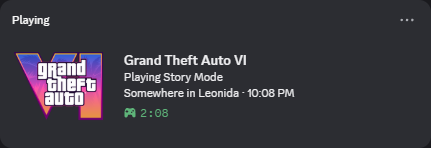
- Works with every VIctory-based build - VIctory, victory-fork, Belobug, DexNom, AvatarManz, CGBJ, Flamingo, VItoriaBr and their forks
- Live game state - Menus, loading and the world, with the in-game clock read from the game itself
- Conditional - Shows up when the game is running, clears when it closes
- Tray icon - Lives in the system tray; its menu pauses the presence, starts it with Windows, shows the console, checks for updates
- Pause presence - One click hides what you are doing without closing the tool
- Start with Windows - Optional, from the tray menu
- Nothing touched - No injection, no patches, no game files; it reads the layer's window and the game's memory
- Auto-update - Fetches new releases itself (on start, every six hours, or from the tray), checks their size and SHA-256 against GitHub, and keeps the previous exe as
vi-rpc.old.exeuntil the new one has run for two minutes - Logging - What it does goes to
%LOCALAPPDATA%\i-rpc\i-rpc.logand to the console the tray can show - Lightweight - One small exe, nothing to configure, no runtime to install
- Street and area from the game itself ("Standing near Port Gelhorn")
- Other layers (XCL) and other game builds
Run vi-rpc.exe, play... done! It sits in the system tray; right-click the icon for Pause presence, Start with Windows, Show console, Check for updates, About and Quit. Hover it to see what is being shown. Start it before or after the game; the presence appears once the game runs and clears when it closes. No account, no setup: the Discord application is the project's own.
Note A layer's launcher can start it for you: add
start "" "C:\path\to\vi-rpc.exe" --exit-with-gameabove thevictory.exe run ...line; with that flag it quits when the game does.
Settings go in vi-rpc.toml next to the exe; every key is optional (see vi-rpc.example.toml): app_id for your own Discord application (your name and art), auto_update, hide_console, interval.
You can download the latest version for Windows.
Requirements: Windows 10/11, Discord running on your PC, a VIctory-based layer.
The layer names its window <title> | VIctory <fps> fps <ms> ms/frame <draws> draws/frame; the draw count tells menus from the world. For a known game build, a few values are read from the running process: the clock (day, month, year, hour, minute, second) and the camera position, at fixed offsets in the game's image. The offsets are keyed by the build's hash, which the layer puts in the image's module name, so other builds can be added in src/title.rs.
The same exe contains the scanner that found those offsets (vi-rpc clock, scan, snap, diff, ...). The scripts in tools/ drive it; PLAN.md has the notes.
Three ways to support it, from nothing to full:
- Bundle it. Ship
vi-rpc.exenext to your launcher and start it before the game:start "" vi-rpc.exe --exit-with-gamein a batch file, orCommand::new("vi-rpc.exe").arg("--exit-with-game").spawn()in Rust. It runs once at a time and quits with the game. It updates itself from this repository's releases, so you never rebuild for it. Make it opt-in or opt-out as you prefer. - Keep the window title. All the tool needs from the layer is the title
<name> | VIctory <fps> fps <ms> ms/frame <draws> draws/frame. Keep that format and you are supported. - Tell it more. Things the layer knows (the scene, the mission, the street) can go into
%LOCALAPPDATA%\vi-rpc\state.json, rewritten whenever they change; the tool prefers that file over its own readings. Fields, all optional:{ "scene": "world", "mission": "Gone Fishing", "street": "Sunset Dr", "area": "Key Lento", "activity": "driving" }missionreplaces "Playing Story Mode"; the others make the second line. A file older than ten minutes is ignored.
# Prerequisites: Rust (stable), Windows

git clone https://github.com/c4k3ss/GTA-VI-RPC.git
cd GTA-VI-RPC
cargo build --release
# target\release\vi-rpc.exeMIT. VIctory and its forks are GPL-3.0; this tool contains none of their code.