
An easy-to-use WoW addon for managing visual raid assignments on maps.
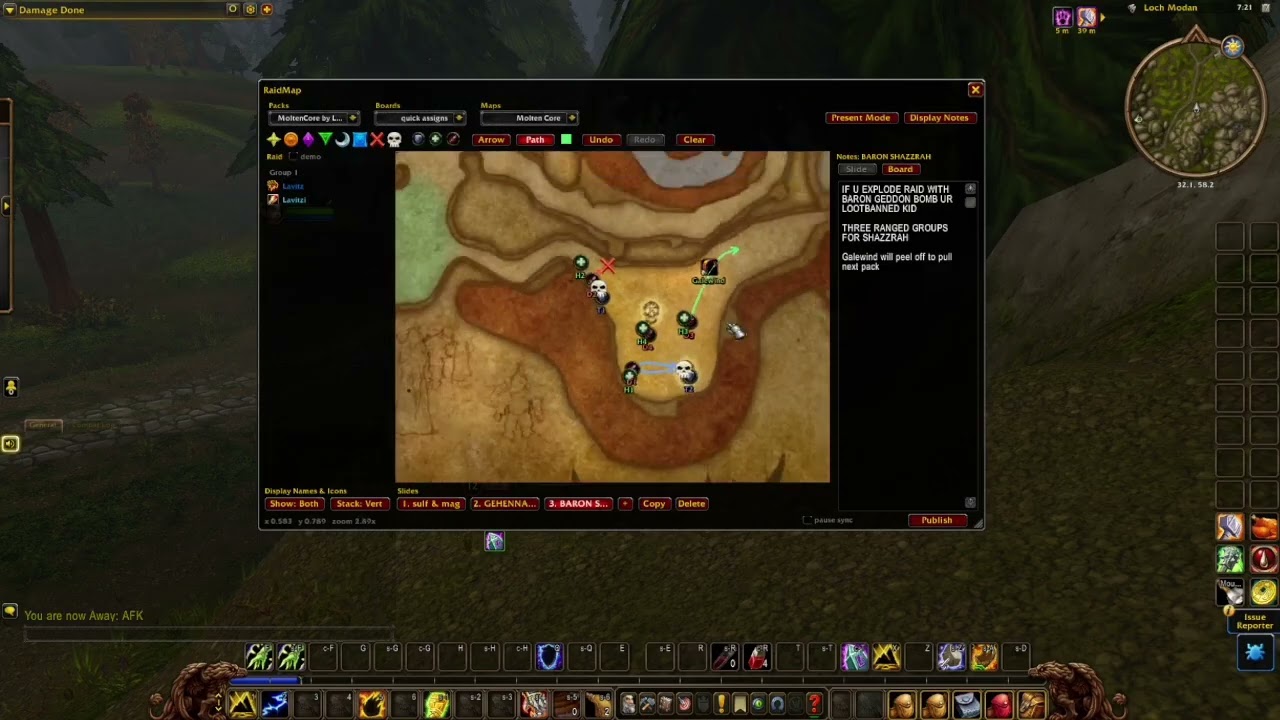
Put markers, role tokens and your raiders' names on the game's own maps, split a fight into slides, write notes beside them, and share the pack to your raid (or export online).
Works on WoW Forever (1.60.x), TBC Anniversary (2.5.x), and Classic Era (1.15.x), from the same download. Retail and progression Classic (currently Mists of Pandaria) are outside this addon's scope.
Also submitting to Wago.io to host strings for packs.
Still testing heavily. Please submit bugs here! Or press Report a bug at the top of the editor, which writes up a report to copy and email.
Quickie video I'll re-make later:

- On the releases page, download
RaidMap.zipfrom the newest release. Not "Source code (zip)", which is listed right beside it: that one unpacks to a folder the game will not load. - Unzip it into your AddOns folder. The zip already contains a folder named
RaidMap, so you should end up with:- WoW Forever beta:
World of Warcraft\_classic_beta_\Interface\AddOns\RaidMap\RaidMap.toc - TBC Anniversary:
World of Warcraft\_anniversary_\Interface\AddOns\RaidMap\RaidMap.toc - Classic Era:
World of Warcraft\_classic_era_\Interface\AddOns\RaidMap\RaidMap.toc
- WoW Forever beta:
- Restart the game. A
/reloaddoes not pick up a newly installed addon.
The folder has to be called exactly RaidMap and sit directly in AddOns. If
yours is called RaidMap-main or RaidMap-<something>, you have one of
GitHub's source downloads; rename it to RaidMap. If Windows' "Extract All"
wrapped it in a second folder, move the inner RaidMap up into AddOns.
Forever's path above is for its beta. When it launches, install into that
client's own Interface\AddOns folder. RaidMap detects the client at runtime;
it does not depend on the installation folder being named _classic_beta_.
Type /rm (or /raidmap) to open the editor, or left click the minimap icon.
Right click the icon for a quick menu; Options > AddOns > RaidMap shows or
hides it.
- Pack > Board > Slide. A pack is what you share ("BT guild"), a board is one boss, a slide is one phase. The three dropdowns across the top pick the pack, the board and the map; the strip under the map holds the slides. When there are more slides than fit, the arrows at either end of the strip (or the mouse wheel over it) scroll through the tabs. A board made inside a dungeon, raid or battleground starts on that place's map.
- Tokens. Click a raid marker or a role icon in the toolbar to add it at the centre of the view, or drag it onto the map. Drag names out of the raid list on the left the same way. Role tokens number themselves (T1, T2, H1...) and mean the same thing to anyone you share with; names only mean something to your own raid. The Numbered / Plain button beside the role icons chooses the style of new placements. Plain icons have no number. Both styles can share a slide, and existing tokens keep their style.
- TBC boss rooms. On Anniversary, the Maps dropdown offers TBC boss rooms > Raid > Boss. Pick one to load its floor and zoom into the room. There are 50 indoor encounter presets plus Kazzak and Doomwalker. Pan and zoom normally after choosing; new phases keep the room's framing.
- Arrows and paths. Click Arrow or Path in the toolbar, then drag on the map: an arrow runs straight from where you press to where you let go, a path follows the pointer. The tool stays on until you click it again, and the swatch beside it picks the colour of the next one. Drag the end with the arrowhead to move one, right-click there to delete it.
- Text. Click Text, then click on the map where the text should start and type. It is one line of up to 50 letters, in the swatch's colour. Enter or a click anywhere else keeps it, and Escape drops it. Click text to change it, with or without the tool, drag it to move it, and right-click it to delete it. Raiders need this version or later to see text.
- Mouse. Left-drag moves a token, right-click deletes it. Right-drag pans the map and the wheel zooms. Each slide remembers its own framing.
- Notes sit beside the map, per slide or for the whole board.
- Present Mode opens a compact read-only view, which is what raiders want open: it cannot be edited by accident and it follows whoever is presenting. It is also where you present from: changing slide or board in it moves everyone else's Present Mode window to match. The editor moves nobody and follows nobody, so you can look through a pack, or keep working on one, while someone else presents. Its top edge contains only the close button and a drag area. Board and slide navigation sit below the map; the navigation menu also lists Boards.
- Group status. Click Present: x/y at the top of the editor to see each member's RaidMap version and whether Present Mode is open on this pack, another pack, or closed. The count uses actual group members and includes you. Older versions are compared with the newest version reported in the group. No reply and Unknown mean status is unavailable; older clients can still exchange packs without reporting viewer status.
- In your raid or party: the leader and assistants press Publish. Everyone with the addon receives the pack, and with Present Mode open follows along as the presenter changes slides in theirs.
- Anywhere else: the pack menu has Export string and Import string for pasting through Discord, and Link in chat for a clickable link that fetches the pack from you.
| Command | What it does |
|---|---|
/rm |
Open or close the editor |
/rm present |
Open or close the read-only view |
/rm publish |
Send the current pack to your group |
/rm restore |
Bring back the pack that the last incoming update replaced |
/rm bug |
Write up a bug report to copy and email |
/rm minimap |
Show or hide the minimap icon |
/rm reset |
Put the window back in the middle of the screen at its default size |
Lavitz Starlove designer & developer. Corwynn and Blacklisted helping test.
TBC boss-room framing adapted from RaidWhiteboard's arena coordinates (TheLaw).
RaidMap bundles these libraries, each under its own licence: LibStub and ChatThrottleLib (public domain), CallbackHandler-1.0, AceDB-3.0 and AceComm-3.0 (Ace3), LibSerialize (MIT), LibDeflate (LGPL 3), LibUIDropDownMenu, LibDataBroker-1.1 and LibDBIcon-1.0.