



A Java desktop application implementing Rock Paper Scissors, featuring both the classic 3-symbol version (👊 ✋ ✌️ * Regular mode*) and the expanded Rock Paper Scissors Lizard Spock version with 5 symbols (👊 ✋ ✌️ 🤏 🖖 * Extra mode*).
The project relies exclusively on Java's native GUI libraries:
- ☕ Java
- 🖥️ AWT
- 🪟 Swing
The human player 👦 challenges a computer-controlled opponent 🤖, which randomly selects its move.
Upon launch, the application prompts for:
- 👦 Player name
- 🎯 Game mode (Regular / Extra)
Two modes are available:
| Mode | Symbols | Rules |
|---|---|---|
| 🟢 Regular | 3 | Rock ✊, Paper ✋, Scissors ✌️ |
| 🔵 Extra | 5 | Rock ✊, Paper ✋, Scissors ✌️, Lizard 🤏, Spock 🖖 |
The selected mode automatically determines:
- the symbols available to the player;
- the symbols available to the robot 🤖;
- the number of elements used by the modulo logic;
- the rules used to decide the winner.
The classic mode uses three symbols:
- ✊ Rock
- ✋ Paper
- ✌️ Scissors
The win conditions are:
| 👦 Player | 🤖 Robot | Outcome |
|---|---|---|
| ✊ Rock | ✌️ Scissors | 👦 WIN |
| ✋ Paper | ✊ Rock | 👦 WIN |
| ✌️ Scissors | ✋ Paper | 👦 WIN |
| same symbol | same symbol | 🤝 DRAW |
| ✊ Rock | ✋ Paper | 👦 LOSE |
| ✋ Paper | ✌️ Scissors | 👦 LOSE |
| ✌️ Scissors | ✊ Rock | 👦 LOSE |
In compact form:
The expanded mode introduces:
- ✊ Rock
- ✋ Paper
- ✌️ Scissors
- 🤏 Lizard
- 🖖 Spock
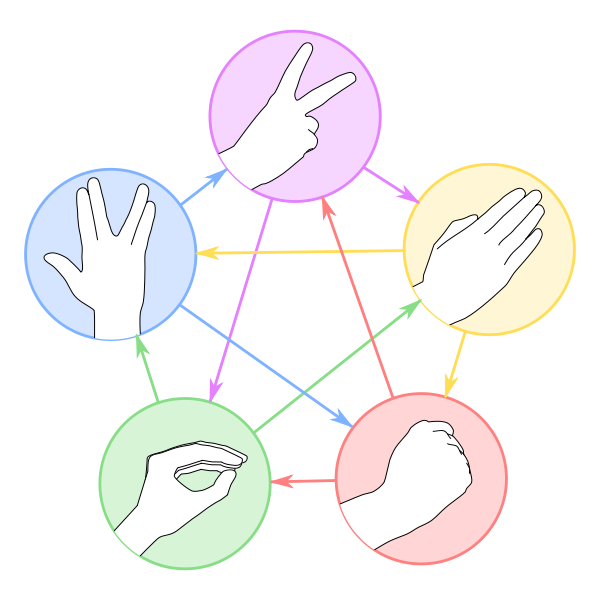
Each symbol defeats exactly two of the other four.
| Symbol | Beats |
|---|---|
| ✊ Rock | ✌️ Scissors, 🤏 Lizard |
| ✋ Paper | ✊ Rock, 🖖 Spock |
| ✌️ Scissors | ✋ Paper, 🤏 Lizard |
| 🤏 Lizard | ✋ Paper, 🖖 Spock |
| 🖖 Spock | ✌️ Scissors, ✊ Rock |
The complete rule set can also be represented as a matrix:
| 👦 vs 🤖 | ✊ | ✋ | ✌️ | 🤏 | 🖖 |
|---|---|---|---|---|---|
| ✊ Rock | 🤝 | ❌ | ✅ | ❌ | ❌ |
| ✋ Paper | ✅ | 🤝 | ❌ | ❌ | ✅ |
| ✌️ Scissors | ❌ | ✅ | 🤝 | ✅ | ❌ |
| 🤏 Lizard | ✅ | ✅ | ❌ | 🤝 | ❌ |
| 🖖 Spock | ✅ | ❌ | ✅ | ✅ | 🤝 |
Legend:
- ✅ player victory
- ❌ player defeat
- 🤝 draw
In compact form
The most interesting part of the implementation goes beyond the UI.
The rules of the game can be modeled mathematically using:
- the declaration order of the
enumvalues; - their respective
ordinal()values; - the modulo operator
%.
The Choice enum is declared in a specific order, assigning the following indices to its elements:
ordinal() |
Symbol | Value |
|---|---|---|
| 0 | ✌️ Scissors | 0 |
| 1 | ✋ Paper | 1 |
| 2 | ✊ Rock | 2 |
| 3 | 🤏 Lizard | 3 |
| 4 | 🖖 Spock | 4 |
This sequence is not random: it was designed specifically to enable a mathematical representation of the game rules.
🎯 Modulo arithmetic allows us to encode win conditions cleanly without resorting to long chains of if or switch statements.
The project follows a simple separation of concerns:
src/
├─ controller/
│   └── Round.java
│
├─ model/
│   ├── Choice.java
│   └── Status.java
│
└─ view/
    └── WinApp.java
Contains the core domain elements.
Represents the available moves:
- ✊ Rock
- ✋ Paper
- ✌️ Scissors
- 🤏 Lizard
- 🖖 Spock
It also handles random selection for the robot 🤖, restricted to the active game mode.
Choice.rand(isExtra)Represents the outcome of a match:
- WIN
- DRAW
- LOSE
Represents a single match between: 👦 Human 🆚 🤖 Robot
It handles:
- evaluating the result;
- updating statistics;
- storing the moves played;
- applying the mathematical logic based on
ordinal()and modulo operations.
Manages the Swing graphical user interface.
The Round controller tracks cumulative match statistics:
| Metric | Description |
|---|---|
| 🎮 Matches | Games played |
| 🏆 Wins | Player victories |
| 🤝 Draws | Draws |
| 💀 Loses | Defeats |
After each match, the relevant counters are updated and win percentages are displayed.
Rock Paper Scissors Lizard Spock serves as a neat Java Swing showcase, as well as a practical example of how enums, data structures, modular arithmetic, and algorithm design can work together to produce a simple, compact, and elegant solution. ☕🧠⚙️🚀
Applicazione desktop Java che implementa il gioco Rock Paper Scissors, con possibilità di scegliere tra la versione classica a 3 simboli (👊 ✋ ✌️ mode Regular) e la versione estesa Rock Paper Scissors Lizard Spock, composta da 5 simboli (👊 ✋ ✌️ 🤏 🖖 mode Extra).
Il progetto utilizza esclusivamente le librerie grafiche native di Java:
- ☕ Java
- 🖥️ AWT
- 🪟 Swing
Il giocatore umano 👦 sfida un avversario controllato dal computer 🤖, che seleziona casualmente il proprio simbolo.
All'avvio l'applicazione richiede:
- 👦 Nome del giocatore
- 🎯 Modalità di gioco (Regular / Extra)
Sono disponibili due modalità:
| Modalità | Simboli | Regole |
|---|---|---|
| 🟢 Regular | 3 | Rock ✊, Paper ✋, Scissors ✌️ |
| 🔵 Extra | 5 | Rock ✊, Paper ✋, Scissors ✌️, Lizard 🤏, Spock 🖖 |
La modalità selezionata determina automaticamente:
- i simboli disponibili per il giocatore;
- i simboli disponibili al robot 🤖;
- il numero di elementi utilizzato dalla logica del modulo;
- le regole con cui viene determinato il vincitore.
La modalità classica utilizza i tre simboli:
- ✊ Rock
- ✋ Paper
- ✌️ Scissors
Le relazioni di vittoria sono:
| 👦 Giocatore | 🤖 Robot | Risultato |
|---|---|---|
| ✊ Rock | ✌️ Scissors | 👦 WIN |
| ✋ Paper | ✊ Rock | 👦 WIN |
| ✌️ Scissors | ✋ Paper | 👦 WIN |
| stesso simbolo | stesso simbolo | 🤝 DRAW |
| ✊ Rock | ✋ Paper | 👦 LOSE |
| ✋ Paper | ✌️ Scissors | 👦 LOSE |
| ✌️ Scissors | ✊ Rock | 👦 LOSE |
In forma compatta:

La modalità estesa introduce:
- ✊ Rock
- ✋ Paper
- ✌️ Scissors
- 🤏 Lizard
- 🖖 Spock
Ogni simbolo sconfigge esattamente due degli altri quattro.
| Simbolo | Sconfigge |
|---|---|
| ✊ Rock | ✌️ Scissors, 🤏 Lizard |
| ✋ Paper | ✊ Rock, 🖖 Spock |
| ✌️ Scissors | ✋ Paper, 🤏 Lizard |
| 🤏 Lizard | ✋ Paper, 🖖 Spock |
| 🖖 Spock | ✌️ Scissors, ✊ Rock |
La struttura completa può essere rappresentata anche come matrice:
| 👦 vs 🤖 | ✊ | ✋ | ✌️ | 🤏 | 🖖 |
|---|---|---|---|---|---|
| ✊ Rock | 🤝 | ❌ | ✅ | ❌ | ❌ |
| ✋ Paper | ✅ | 🤝 | ❌ | ❌ | ✅ |
| ✌️ Scissors | ❌ | ✅ | 🤝 | ✅ | ❌ |
| 🤏 Lizard | ✅ | ✅ | ❌ | 🤝 | ❌ |
| 🖖 Spock | ✅ | ❌ | ✅ | ✅ | 🤝 |
Legenda:
- ✅ vittoria del giocatore
- ❌ sconfitta del giocatore
- 🤝 pareggio
In forma compatta
La parte più interessante dell'implementazione non è soltanto grafica.
Le regole del gioco possono essere rappresentate matematicamente sfruttando:
- l'ordine dei valori dell'
enum; - il relativo
ordinal(); - l'operatore modulo
%.
L'enum Choice viene dichiarato secondo un ordine prefissato e di conseguenza gli elementi assumono i seguenti indici:
ordinal() |
Simbolo | Valore |
|---|---|---|
| 0 | ✌️ Scissors | 0 |
| 1 | ✋ Paper | 1 |
| 2 | ✊ Rock | 2 |
| 3 | 🤏 Lizard | 3 |
| 4 | 🖖 Spock | 4 |
Questo ordinamento non è casuale: è stato scelto in modo da rendere possibile una rappresentazione matematica delle regole.
🎯 L'algebra del modulo permette quindi di codificare le relazioni di vittoria senza costruire una lunga serie di if o switch.
Il progetto segue una semplice separazione delle responsabilità:
src/
├─ controller/
│	└── Round.java
│
├─ model/
│	├── Choice.java
│	└── Status.java
│
└─ view/
	└── WinApp.java
Contiene gli elementi fondamentali del dominio.
Rappresenta le possibili scelte:
- ✊ Rock
- ✋ Paper
- ✌️ Scissors
- 🤏 Lizard
- 🖖 Spock
Fornisce inoltre la generazione casuale della scelta del robot 🤖, limitata alla modalità selezionata.
Choice.rand(isExtra)Rappresenta l'esito di una partita:
- WIN
- DRAW
- LOSE
Rappresenta una singola partita tra: 👦 Human 🆚 🤖 Robot
Si occupa di:
- determinare il risultato;
- aggiornare le statistiche;
- conservare le scelte effettuate;
- applicare la logica matematica basata sull'
ordinal()e sul modulo.
Gestisce l'interfaccia grafica Swing.
Il controller Round mantiene le statistiche cumulative delle partite:
| Statistica | Descrizione |
|---|---|
| 🎮 Matches | Partite giocate |
| 🏆 Wins | Vittorie del giocatore |
| 🤝 Draws | Pareggi |
| 💀 Loses | Sconfitte |
Al termine di ogni partita vengono aggiornati i relativi contatori e visualizzate le percentuali.
Rock Paper Scissors Lizard Spock diventa così un piccolo esercizio di Java Swing, ma anche un esempio concreto di come enumerazioni, strutture dati, aritmetica modulare e progettazione algoritmica possano lavorare insieme per ottenere una soluzione semplice, compatta ed elegante. ☕🧠⚙️🚀


