


Ever wondered which of your peers actually brings you new blocks first? Bitcoin Lab measures it on your node.
Your node may have hundreds of connections. Bitcoin Lab notes for every new block which peer delivered it first and ranks them by it – and if you want, helps you keep the best ones. If you run your own mining pool, the optional Stratum Race compares when fresh work arrives from your pool and public pools.
Built for Bitcoin enthusiasts who enjoy understanding their setup, trying things out and seeing what makes a difference on their own node.
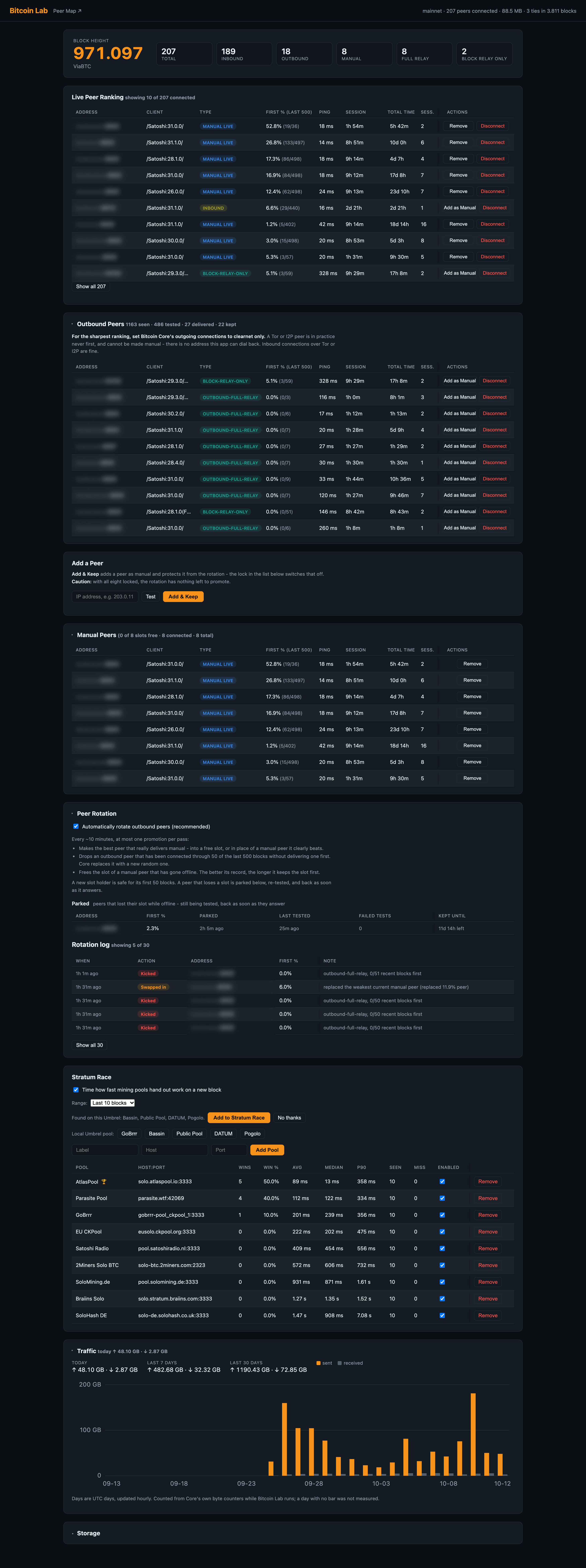
Your peers decide how soon your node hears about a new block. Core's peer list shows addresses and ping, but not which of them deliver first; Bitcoin Lab does. If you mine solo, it matters even more: your pool can only hand out new work once your node has the block.
When I started measuring, I ran Core as it comes; then I switched on rotation, which keeps proven outbound peers in the manual slots. On 25 September I restarted the node with the eight manual peers it had found:
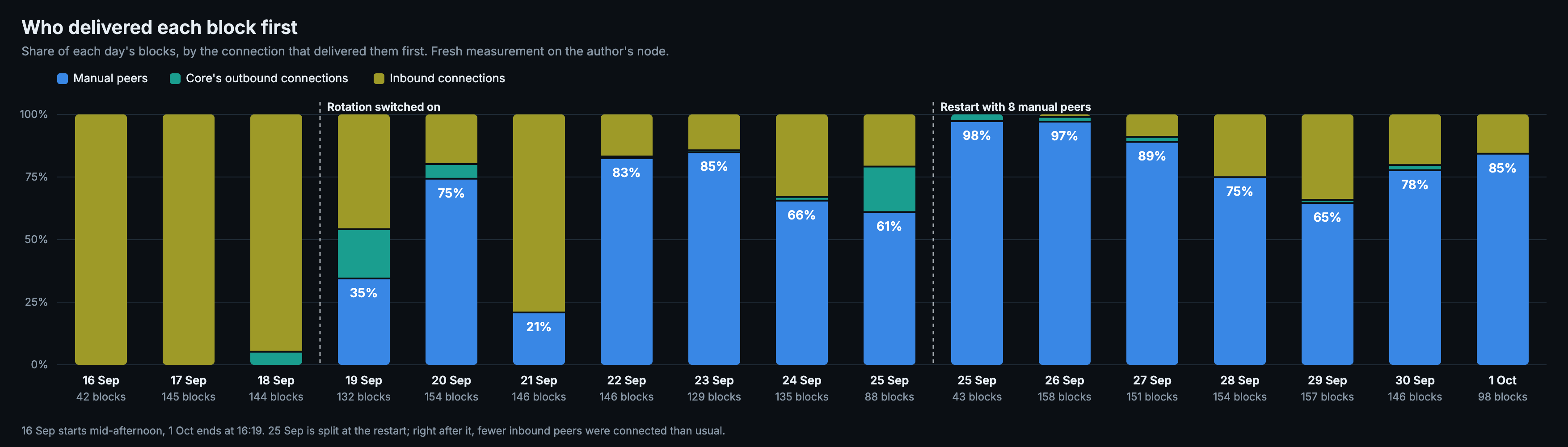
| Period | Blocks | Manual peers¹ | Core's outbound | Inbound |
|---|---|---|---|---|
| Before rotation, 16–18 Sep | 331 | 0% | 2% | 98% |
| Rotation on, 19 Sep to the restart on 25 Sep | 930 | 61% | 6% | 33% |
| Restart with 8 manual peers, 25 Sep – 1 Oct | 907 | 82% | 1% | 16% |
¹ Every manual peer was found by rotation among Core's own automatic outbound connections. None is an inbound connection turned into a manual one – rotation never promotes inbound peers.
Before rotation, inbound connections brought 98% of blocks first. With eight manual peers, the inbound share fell to 16%, and the manual peers delivered 82% of blocks first. A restart does not throw that away: Bitcoin Lab puts the saved manual peers straight back, so the node started strong right away. That is the discovery behind the project: a small set of connections can matter far more than its size suggests. The full story and measurements.
Bitcoin Core chooses automatic outbound peers from its address book. Bitcoin Lab
uses those connections to discover candidates for the eight manual connections
available through Core's addnode interface. Core never fills these slots on its
own, so on most nodes they sit empty. Filled, your node has 18 outbound
connections, eight of them chosen by you.
The loop is straightforward:
- Observe. See which peers deliver each new block first.
- Keep good candidates. Add proven peers to your manual selection so Core maintains connections to them. Bitcoin Lab remembers your selection across restarts and restores it when Core comes back online, so it can reconnect to your chosen peers straight away.
- Keep looking. Disconnect an automatic full-relay outbound peer that has been connected through 50 blocks without delivering one first. Core immediately looks for another candidate to take its place.
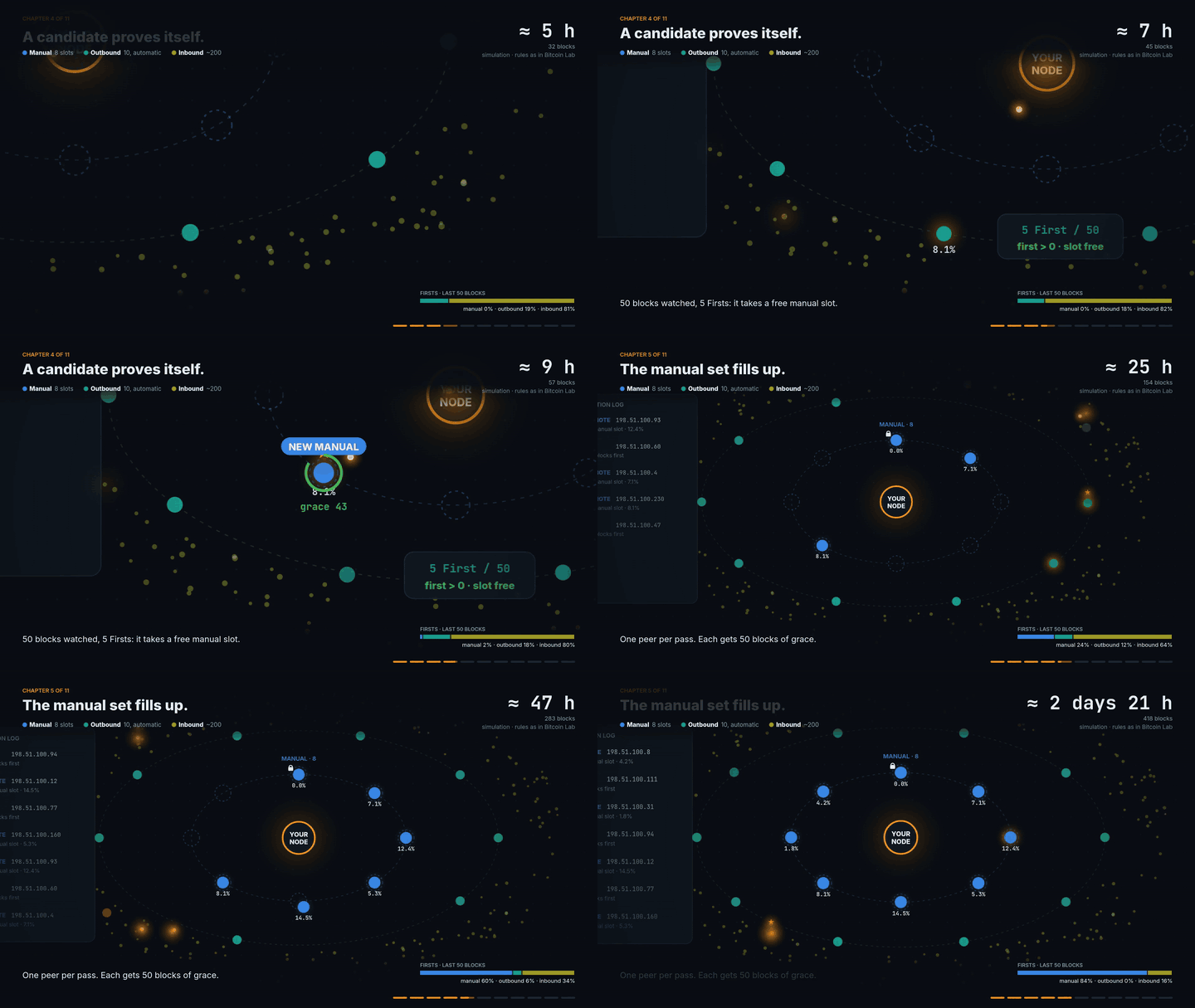
Rotation as an animation, from a single kept peer to a full manual set. Simulated peers, the real rules. Watch the full video.
You can manage peers yourself or enable rotation to run this loop automatically. Rotation is off by default. Peers you type in are protected from automatic replacement; the padlock lets you change that protection.
The ranking favours recent blocks and discounts small samples. A newly promoted peer gets a grace period. Good peers that go offline are parked and tested again later, with their history kept.
Rotation only works with 8 of Core's 10 automatic outbound connections – the full-relay ones. The two block-relay-only connections and all inbound peers are measured and ranked, but never promoted or replaced automatically. Wondering whether this makes an eclipse attack easier? Not that I can see – rotation even adds a hurdle.
Bitcoin Lab can only keep clearnet peers as manual connections. If Core makes its outgoing connections over clearnet only, every one of its eight full-relay slots holds a possible candidate, and rotation finds good peers faster. On Umbrel: Bitcoin Node → Settings → Outgoing Peer Connections. Incoming Tor and I2P connections are fine.
See how peers are judged and why the rotation works this way.
Under the newest block, Bitcoin Lab names the pool that mined it. It matches the coinbase against a bundled pool list (bitcoin-data/mining-pools, MIT) on your node, without asking any service. A miner that is not on the list is shown by the text it wrote into the coinbase.
How much your node sent and received: today, the last 7 and 30 days, and a bar per day, counted from Core's own byte counters. Worth a look with an open port – in one week my node sent 543 GB to other nodes and received only 25 GB.
Enable Stratum Race to compare new mining jobs as they arrive from your own pool and eight preconfigured public solo pools. If GoBrrr, Bassin, Public Pool, DATUM or Pogolo is installed on your Umbrel, Bitcoin Lab offers to add it; buttons for all five stay available below.
For each new block hash reported in a job, the first pool sets the reference time and the others are measured against it – not a ping, but how quickly each pool switches to the new block. The dashboard shows wins, latency statistics and missed races, giving you a way to follow whether your own pool improves as you change your setup.
Stratum Race is off by default on a fresh install. It subscribes to the pools without submitting mining shares, so you can observe the race without directing any mining work to them.
On Umbrel, add the
Bitcoin Peer Lab community store
and install Bitcoin Lab. It requires the official Bitcoin Node app.
Tested with Bitcoin Core 31.1.
Open it from Umbrel or at <your-umbrel>:8790.
Let Bitcoin Lab just measure for a day or so first: you'll see who delivers blocks to your node as it is, so you can better judge improvements later. Once you switch rotation on, it judges a peer after 50 blocks – roughly eight hours.
Bitcoin Lab communicates with Core through RPC and ZMQ. Peer-management actions change live connections and the runtime addnode list. It does not edit bitcoin.conf or access wallet files, private keys or Core's block files. Remove the app and Core continues running like before, with its configuration untouched.
It is light on the node: on my Umbrel, with around 200 peers connected, its four processes use about 310 MB of RAM together and almost no CPU, and its database grows by about 4 MB a day.
Peer Map shows the same peers on a world map: where they are, who runs them and what they are – nodes, pool nodes, wallets or crawlers. With both apps installed, it follows each new block across your node: who mined it and which peer delivered it first. If Stratum Race includes your own pool, it takes the block's route apart step by step – your peer, Core, the block template, your pool's job – with the time each step takes.
| Guide | What you will find |
|---|---|
| Records from my node | Peer-selection results and the experience of solo mining |
| Peer scoring | First, Eligible, recent history and sample size |
| Rotation | Selection, grace periods, parking and connection handling |
| Architecture | Processes, storage and resource use |
| Configuration | Environment variables and defaults |
| Limitations | Measurement, networking and storage constraints |
| Security | Access boundaries and vulnerability reporting |
MIT — see LICENSE.