
License / 许可: Original code authored by bennix: GPL-3.0-only. Upstream and third-party material retain their original terms and notices. See LICENSE and LICENSING.md for the current licensing scope.
The world's first full-featured open-source AI Office suite.



ZenOffice is a free, open-source alternative to Microsoft Office for macOS,
Windows, and Linux, built around AI editing as a first-class workflow rather
than a bolted-on chat box. It opens and saves the real Microsoft Office
formats — Word (.docx), Excel (.xlsx), PowerPoint (.pptx) — and edits
PDF and Markdown too: a word processor, spreadsheet, presentation editor,
PDF editor, and Markdown editor as six Electron apps sharing one engine
layer.
This repository is a derivative of the upstream
genspark-ai/genoffice project and
preserves the upstream Apache-2.0 terms and notices. Original code authored by
bennix in this branch is GPL-3.0-only (see LICENSING.md). This branch replaces the AI integration with
ZenMux, adds encrypted local API-key/model settings, cross-editor AI workflows
and source-preserving message copy, expands equations, Mermaid, review and
spreadsheet-analysis features, and provides rebuilt macOS, Windows, Ubuntu DEB, and Linux RPM releases.
Compared with the upstream edition, this derivative offers a user-controlled ZenMux model gateway without a Genspark login, consistent AI context/attachment workflows across Word, Excel, PowerPoint and Markdown, stronger academic review, formula/Mermaid and data-analysis capabilities, encrypted local credentials, and ready-to-download desktop installers (with Developer ID signing and Apple notarization on the current macOS release).
AI 适配与修改 / AI adaptation and modifications
由复旦大学计算与智能创新学院徐志平完成 AI 适配与修改,并重新制作 macOS、Windows、Ubuntu DEB 与 Linux RPM 安装包。
AI adaptation and modifications by Zhiping Xu, College of Computer Science and Artificial Intelligence, Fudan University; macOS, Windows, Ubuntu DEB, and Linux RPM installers rebuilt for this release.
Apple Silicon Mac 用户可从 最新正式 Release 下载 Developer ID 签名并已完成 Apple 公证的 DMG。 Windows 10/11 x64 用户可下载 ZenOfficeSetup-0.6.103-x64.exe;当前 Windows 安装包未做 Authenticode 签名,SmartScreen 可能显示“未知发布者”。 Ubuntu 22.04/24.04 x86_64 用户可下载 zenoffice_0.6.103_amd64.deb。 Fedora、RHEL、Rocky Linux、AlmaLinux 与 openSUSE x86_64 用户可下载 zenoffice-0.6.103.x86_64.rpm。 AI 功能依赖网络,网络或代理状态可能影响可用性、速度与生成结果。
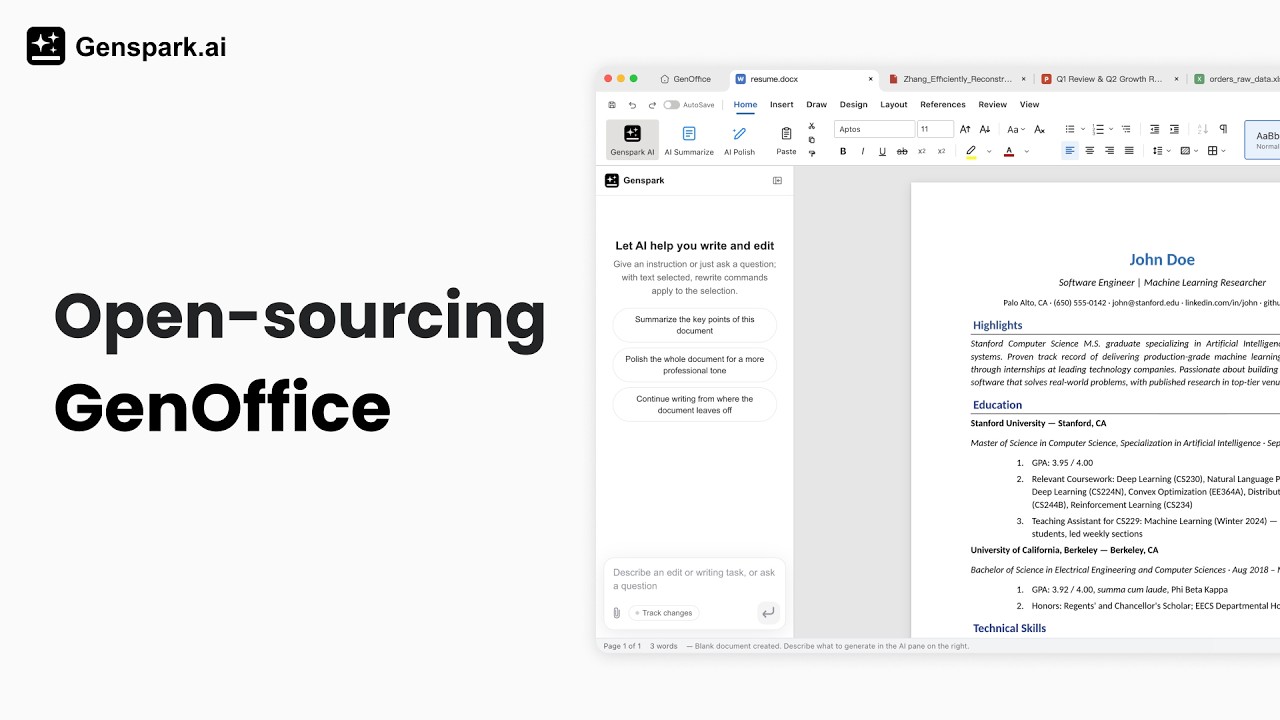
Watch the demo video on YouTube
- Microsoft Word–compatible, byte-preserving
.docxediting — only what you touched changes; Word never notices. - Word-faithful pagination — page breaks land where Word puts them.
- Complete Word picture layout — inserted pictures support inline, square, tight, through, top-and-bottom, behind-text and in-front-of-text layouts, plus free movement, proportional resizing and position presets; the selected layout is saved as native DOCX anchoring rather than flattened artwork.
- Persistent Word picture edits — picture replacement and AI image cleanup now overwrite the original DOCX media relationship in place, remove stale image relationships, and preserve the original display size, so Word, WPS, and LibreOffice reopen the same edited picture shown in ZenOffice.
- ZenMux high-fidelity scan restoration — use the native ZenMux
images/editsroute withopenai/gpt-image-2, high input fidelity, and before/after confirmation. Handwriting can be removed from blank areas or from directly over printed text, equations, tables, charts, and diagrams; visible printed pixels are preserved and occluded strokes are repaired conservatively without semantic invention. Black-and-white enhancement preserves both printed and handwritten source content. - PDF editing with portable font fallback — open PDFs from the dedicated AI PDF home card, Finder, or Explorer; edit selected text through the ribbon while preserving the original run whenever possible. When the source font is unavailable or subset-only, ZenOffice resolves a local equivalent or embeds a bundled Noto/Liberation subset for Latin, Simplified/Traditional Chinese, Japanese, and Korean text. Page operations, images, annotations, signatures, stamps, password opening, and AES-128 protected copies remain available.
- Reliable PDF watermarks — paste plain or multiline clipboard text into the watermark field, replace the current selection, preview color/angle/opacity/size, and embed the resulting watermark onto every PDF page when saving. Headers, footers and page numbering remain available in the same dialog.
- Preview-matched Word PDF export — every PDF export now prints the same pagination-preview snapshot shown on screen instead of asking Chromium to paginate the live editor again, so resized, centered, full-width and floating pictures retain their visible page position and physical size. Editor zoom is reset only for export, and selection chrome is omitted.
- Stable in-page Word pictures — side-wrapped picture containers now use the declared picture width, so right-aligned images stay inside the paper in Page View, Read Mode and pagination preview. Switching to in-front-of-text or behind-text clears stale hidden offsets while preserving the visible alignment, and the corrected anchor survives DOCX save/reopen. Width/height fields and proportional corner dragging remain fully responsive.
- PDF AI attachments — the PDF assistant now matches Word, Excel and Markdown with up to five local files per prompt, file picking and drag-and-drop, clipboard image paste, removable image thumbnails, local text extraction and direct ZenMux multimodal image input. Failed requests retain their original attachments for retry.
- PDF region-aware AI — drag a rectangle over any rendered PDF page to capture that exact region as the primary ZenMux visual context; preview or remove the thumbnail before sending, press Escape to cancel, and retry failed network requests without losing the captured region.
- Strict PDF AI review committee — launch the same 3-reviewer + 1-chair workflow used by Word and Markdown directly from the PDF ribbon. ZenMux models are randomly assigned across Science, Nature, Cell, Elsevier, IEEE, grant and proposal profiles; page-labelled extracted text and up to five representative page previews let the committee inspect formulas, charts, tables and figures without modifying the PDF. Every individual opinion and the complete report can be copied or sent through
@Connectto Word, Excel, PowerPoint or Markdown. - Reliable complete-report actions — the PDF review dialog makes the entire “Connect report” control clickable, handles target-list and delivery failures, and shows explicit copied/sent/failed feedback for the complete committee report.
- Excel-compatible spreadsheets — in-house engine with a Rust
.xlsxsidecar, own charts, pivot tables, slicers. - Resilient third-party XLSX display — when an exported workbook contains real rows and columns but incorrectly declares its used range as only
A1, ZenOffice verifies the sheet and recovers the actual extent instead of showing only the title or a blank grid. Existing values, Chinese fonts, borders, row heights, and column widths remain untouched. - Selectable AI slide beautification — AI Beautify now opens three visual design proposals in the side panel before changing the slide. Each proposal previews its font pairing and palette, with an optional large-type presentation mode; regenerated slides enforce readable title and body-size floors and retry outputs that fail the typography audit.
- Reliable AI slide layers — regenerated slides preserve explicit CSS stacking and automatically move late-emitted background panels behind the text, images, labels and cards they contain, preventing large decorative objects from covering smaller editable content.
- Office/WPS-compatible PPTX saves — presentations saved by ZenOffice now use broadly compatible ZIP headers and repair missing OOXML namespace declarations, preventing generated or AI-beautified decks from opening as blank pages in other office suites.
- Reliable PowerPoint print preview and PDF export — image-heavy or long presentations are loaded from a temporary local HTML file instead of being embedded in an oversized Chromium data URL, preventing
ERR_INVALID_URLwhile preserving every slide through native printing and PDF export. - Excel data analysis and editable visualization — selection-aware descriptive statistics, correlation, regression, time series, grouped analysis, outliers and forecasting; field-driven recommendations across nine native chart families with Chinese labels and interactive point tooltips.
- Resilient Excel AI formatting — neutral left/center/right alignment is translated safely to the spreadsheet runtime, so a right-aligned AI format no longer aborts an otherwise valid data-generation batch.
- Encrypted ZenMux credentials — API Keys are encrypted with the operating system credential service before being saved locally; legacy plaintext settings migrate automatically.
- ZenMux-first onboarding — the first screen accepts an encrypted local API Key, selects the default model, and links directly to the ZenMux invitation page.
- One language setting for every AI workflow — General Settings offers the same complete 19-language list used by the Word, Markdown and PDF review committees. The selected language becomes the default for AI replies and reviews across Word, Excel, PowerPoint, Markdown and PDF; when the user clearly asks in another language, the reply follows that question without being misled by attachments, selected context or RAG memories.
- Live 19-language UI synchronization — newly added ribbons, dialogs and AI tools in Word, Excel, PowerPoint, Markdown and PDF now subscribe to the same General Settings language state instead of the operating-system locale. Infographics, review, composition scoring, scholarly search, translation, charts, SQL, data analysis,
@Connectand formula-image recognition update consistently when the application language changes. - Open-file
@mentionsin AI prompts — type@in the Word, Excel, PowerPoint, Markdown, or PDF AI composer to choose another saved file already open in ZenOffice. The selected file is attached through the same local parsing and five-attachment pipeline, while the menu, empty state, and errors follow all 19 application languages. - PowerPoint typography lock for AI edits — slide regeneration and editable HTML write-back preserve the deck's designed title/body scale instead of baking an autofit-reduced display size back into PPTX. Explicit font-size edits disable stale shrink-to-fit metadata so the requested size remains visible and editable.
- PowerPoint-compatible presentations — in-house
.pptxengine with masters, layouts, smart guides, non-destructive crop. - Presentation recording and proportional MP4 playback — start recording directly from the Slide Show or Insert ribbon; macOS mixes microphone narration with media played inside the ZenOffice presentation, while Windows can also capture system loopback; pause or resume and export a local H.264/AAC MP4. Video playback follows the inserted slide frame and preserves its aspect ratio in both editing preview and slide show.
- Native drag-and-drop media — drop video or audio directly onto a PowerPoint slide at the intended position, or drop local images into PowerPoint, Word, and Markdown; inserted content remains editable, movable, and resizable.
- Markdown to Word, fully local — the same OOXML engine, no Pandoc, no cloud.
- Markdown review, translation, images and AI Mermaid — the same strict multi-model review committee as Word, selection/full-document translation through ZenMux, local image assets, and standard fenced Mermaid with live rendering, source editing, and ZenMux-powered natural-language generation/modification.
- Pretty Mermaid and editorial diagram studio — choose six common diagram starters, 15 visual themes, or restrained publication-style templates; generate or revise the still-editable Mermaid source with the configured AI gateway.
- Source-preserving infographics across editors — Word, Excel, PowerPoint, and Markdown share the AntV infographic studio. DOCX, XLSX, and PPTX save both the rendered PNG and editable source metadata, so a reopened infographic can be double-clicked, revised with ZenMux AI, and replaced in place without changing its frame or position. Markdown source editing returns to the live preview when focus leaves the block.
- Markdown → WeChat rich-text export — preview multiple article themes and layout densities, then copy both inline-styled HTML and a plain-text fallback for direct pasting into the WeChat Official Account editor.
- Configurable OpenAI-compatible gateway — ZenMux remains the default at
https://zenmux.ai/api/v1, while advanced users may persist another compatible Base URL in Settings; API keys stay masked in the UI and stored locally. - Scholarly search and citations in Word, PowerPoint, and Markdown — query OpenAlex, Crossref, Semantic Scholar, Europe PMC/PubMed, and arXiv; import BibTeX, RIS, or CSL-JSON into a reusable local library; deduplicate by DOI/PMID/arXiv ID; distinguish preprints; insert editable citations and bibliography lists in GB/T 7714, APA 7, IEEE, Nature, or Vancouver style. Restricted services such as Google Scholar and Baidu Scholar open as official browser searches instead of being scraped.
- AI that edits documents — block-level edits with snapshots and diffs, document-aware agents.
- Selection-aware AI editing — select Word text, Excel cells, or PowerPoint objects and ask AI to modify only that content.
- Anchored Markdown AI context — a visible selection card freezes the exact Markdown passage when a prompt is sent. Ask questions without changing the file, rewrite only the selected text, or insert editable AI content immediately before or after the selected anchor; stale anchors are rejected after user edits to prevent misplaced write-back.
- Copyable, file-specific AI conversations — copy prompts and AI replies from current or restored conversations in Word, Excel, PowerPoint, Markdown, and PDF while preserving Markdown, LaTeX, Mermaid, and code source. Conversation history is saved locally under the document's absolute path; reopening the same file restores up to the latest 200 messages without uploading history to GitHub.
- Local personal knowledge base and RAG memory — successful AI question-and-answer pairs from Word, Excel, PowerPoint, Markdown, and PDF are automatically stored on the current device with file, project, chat, time, and topic provenance. Later prompts retrieve a bounded set of related Chinese or English memories, prioritizing the current file and project, and clearly label them as potentially outdated reference material rather than instructions. Settings provide independent capture/retrieval switches, result limits, search, per-entry deletion, and full clearing; only matched excerpts—not the complete library—are sent with the current ZenMux request.
- Recoverable WeChat text-and-image diary — bind WeChat 8.0.70+ through its official ClawBot flow, then send text or images while ZenOffice is running. Images are decrypted from WeChat's official CDN into a local companion asset folder and embedded by relative path in the three-day Markdown diary. Image-only messages stay silent until five images are collected; a fifth image, or a question sent after any smaller batch, invokes the current ZenMux multimodal model. A durable outbox verifies iLink business success and writes the AI block only after WeChat confirms delivery; stable client IDs retry interrupted or chunked long replies without duplicating diary blocks or repeating the AI call.
记:…,撤回,结束, and帮助remain available; credentials are OS-encrypted and token-bearing requests stay on official WeChat HTTPS hosts. - WeChat PDF multi-round review — send one encrypted PDF attachment from WeChat and ZenOffice saves it beside the three-day Markdown diary, asks for the same Science/Nature/Cell/Elsevier/IEEE/grant/bid profile exposed by the desktop review UI, and asks whether the report should be Chinese or English. After selection, ZenMux performs chunked evidence extraction, three independent reviewer calls, and a separate chair synthesis. Every completed stage is persisted for network-resumable review; the long final report is delivered to WeChat in stable chunks and written back to Markdown. Downloads are restricted to the official WeChat CDN, limited to 50 MB, decrypted locally, and validated by the PDF signature.
- GitHub Release automatic updates — packaged macOS and Windows apps check this repository's latest stable GitHub Release shortly after launch and every four hours, then offer an in-app download and restart/install flow. Signed macOS updates use the notarized ZIP feed; Windows uses the matching NSIS installer. DEB/RPM users continue updating through apt/dnf or the GitHub download page.
@Connectcross-editor flow — send the latest AI reply—including replies produced while reviewing a PDF—to any open Word, Excel, PowerPoint, or Markdown tab through a local-only channel; the destination receives editable rich text, cells, text boxes, or Markdown rather than a flattened image.- Editable equations everywhere — Word, PowerPoint, Excel, and Markdown accept LaTeX, multi-line environments, and ZenMux formula OCR from clipboard screenshots or image files. Markdown normalizes both
$...$/$$...$$and standard\(...\)/\[...\]delimiters into rendered, editable equation nodes while preserving literal delimiters inside code. - KaTeX-rendered AI replies — inline, display and multiline LaTeX now render directly in every Word, Excel, PowerPoint and Markdown AI response, including formulas inside lists, bold text and GFM tables; parenthesized formulas retain commands such as
\cos,\times,\mathrmand\circ, while mhchem renders chemical equations such as\ce{2H2 + O2 -> 2H2O}; incomplete streaming delimiters remain readable until complete. - Fault-tolerant AI Markdown rendering — review and chat responses repair missing math delimiters around unmistakable LaTeX, malformed bold endings, escaped Markdown markers and invisible zero-width characters before rendering. Multiline
$$...$$equations and fenced code remain distinct, and source inside inline or fenced code is never rewritten. - Agent tools built in — web/image search, image generation, media analysis.
- Light / dark / system themes.
- macOS, Windows, Linux.
- Free & open-source (Apache-2.0).
| Platform | Requirements | Download |
|---|---|---|
| macOS — Apple Silicon (arm64) | macOS 11+ | ZenOffice-0.6.103-arm64.dmg |
| macOS — Intel (x64, upstream compatibility build) | macOS 11+ | GenOffice-0.6.101.dmg |
| Windows (x64) | Windows 10/11; unsigned, SmartScreen may warn | ZenOfficeSetup-0.6.103-x64.exe |
| Ubuntu — DEB (amd64) | Ubuntu 22.04/24.04 x86_64 | zenoffice_0.6.103_amd64.deb |
| Linux RPM — Fedora / RHEL / Rocky / Alma / openSUSE | x86_64, glibc 2.34+ (RHEL-compatible 9+) | zenoffice-0.6.103.x86_64.rpm |
| Linux — AppImage — other distributions | x86_64, glibc 2.34+, FUSE 2 | ZenOffice-0.6.103.AppImage |
All builds come from main. The current macOS DMG is Developer ID signed and Apple-notarized; the Windows installer is not Authenticode-signed.
Published installers are on this project's Releases page.
The deb installs with apt — it pulls in the dependencies and adds ZenOffice to the applications menu:
sudo apt install ./zenoffice_0.6.103_amd64.debOn Fedora / RHEL-family / openSUSE, install the rpm instead:
sudo dnf install ./zenoffice-0.6.103.x86_64.rpm     # Fedora / RHEL / Rocky / Alma
sudo zypper install ./zenoffice-0.6.103.x86_64.rpm  # openSUSE
The AppImage instead runs in place: install the FUSE 2 runtime
(sudo apt install libfuse2; on Ubuntu 24.04 the package is libfuse2t64),
make the file executable, then run it:
chmod +x GenOffice-0.6.103.AppImage
./GenOffice-0.6.103.AppImage| App | Product | What it is |
|---|---|---|
apps/docs |
ZenOffice Docs | .docx word processor. Byte-preserving round trip: only dirty paragraphs are regenerated (paragraph patch), everything else in the original file is kept byte-for-byte, so opening and saving never breaks layout in Word. Paginated view whose line metrics reproduce the original document's layout, tracked changes, comments, styles, equations, ink. |
apps/sheets |
ZenOffice Sheets | .xlsx spreadsheet. UI built on the open-source Univer core (Apache-2.0) with a large layer of in-house extensions; .xlsx import/export runs through an in-house Rust sidecar (calamine + IronCalc), charts are rendered in-house (Konva), plus pivot tables, slicers, conditional formatting, and formula tracing. |
apps/slides |
ZenOffice Slides | .pptx presentations. In-house .pptx parse/render/edit engine with masters, charts, cropping, ink, and text shaping (HarfBuzz metrics). |
apps/pdf |
ZenOffice PDF | .pdf viewer/editor on pdf.js (Apache-2.0) + pdf-lib (MIT): annotations, forms, outlines, stamps, signatures, page operations, and printing support. True text editing — paragraph selection with in-block reflow, alignment restoration, original-font preservation — and content-stream image insert/edit, all rewriting page content streams through PDFium wasm (BSD-3-Clause) with subset-embedded fonts — no cover-up annotations. |
apps/markdown |
ZenOffice Markdown | .md / .markdown editor: Tiptap block editor over plain Markdown files — headings, lists, tables, images, code blocks — saved back as plain Markdown, hosted in shell tabs. |
apps/shell |
ZenOffice | The suite shell: home screen, tabbed hosting of the five editors, light/dark/system theme, auto-update. |
Every app embeds the same AI panel: block-granular AI editing with version snapshots and diffs in docs, a tool-calling agent over workbook/slide/PDF state in the others.
The whole suite ships light / dark / system UI themes built on shared design
tokens (packages/ui), with a CI guard that keeps chrome colors on the token
system. Document surfaces stay light in dark mode — Word-style dark chrome
around white paper — so files render and export identically in both themes.
AI backend (ZenMux). All document, spreadsheet, presentation, Markdown, review, image-generation, media-understanding, and formula-recognition AI calls use the ZenMux OpenAI-compatible endpoint. The API Key is configured in Settings, masked in the UI, and stored persistently on the local Mac. AI features require a network connection and may be affected by network or proxy conditions.
All pure TypeScript, no Electron dependency, unit-tested (except the UI kit):
packages/docx-engine— docx parsing → block tree (withdocxIndexanchors and passthrough), OOXML fragment generation, byte-level paragraph patching.packages/pptx-engine/packages/pptx-render— pptx model and rendering.packages/file-parse— text extraction for AI attachments (office formats, text formats).packages/agent-core— the AI agent loop and skill composition shared by every app.packages/ai-provider— provider abstraction and streaming for the model backends.packages/ai-search— Genspark auth + web/image search tools.packages/i18n,packages/ui,packages/project-store,packages/electron-utils— shared i18n core, React UI kit, recent-files store, and Electron main-process helpers.
npm install
npm run fixtures     # generate test .docx fixtures
npm test             # engine + app unit tests (docs/sheets/slides need no display)
npm run typecheck    # tsc --noEmit across every workspace
npm run dev          # all five editors + shell against Vite dev servers
npm run dev:docs     # a single app (same pattern works per workspace)
npm run dist:mac     # package macOS dmg (regenerates third-party notices)
npm run dist:win     # package Windows nsis installer
npm run dist:linux   # package Linux AppImage + deb + rpm
The sheets app additionally needs a Rust toolchain for its xlsx sidecar
(cargo on PATH); npm run build -w @genoffice/sheets compiles it
automatically.
Local UI/e2e driver scripts (Playwright + Electron, for local acceptance, not
committed by default) live in scripts/drivers/.
open docx ─► archive original by hash (never touched)
          ─► docx-engine parses word/document.xml top-level elements (w:p / w:tbl / …)
          ─► Block tree, each block anchored by docxIndex + original XML slice
          ─► Tiptap streaming editor (manual + AI editing, dirty tracking)
save      ─► dirty blocks → OOXML fragments (referencing existing styles only)
          ─► splice into original document.xml (untouched blocks keep original bytes)
          ─► repack zip; all other entries copied byte-for-byte
The same philosophy holds in sheets and slides: the original file is the source of truth, edits are applied as narrow patches, and everything the editor didn't touch survives the round trip untouched.
Is ZenOffice free? Yes. ZenOffice is free and open-source. Original code authored by bennix is GPL-3.0-only; upstream and third-party components retain their own terms. There is no trial, no paid tier for the apps themselves.
Can ZenOffice open Microsoft Word, Excel, and PowerPoint files?
Yes. ZenOffice opens and saves native .docx, .xlsx, and .pptx files.
Saving is byte-preserving: parts of the file you didn't touch are written
back byte-for-byte, so documents keep working in Microsoft Office.
Does ZenOffice work offline? Document editing is fully local — files never leave your machine to be opened, edited, or saved. ZenMux AI features need an API Key and network connection.
Can ZenOffice edit PDF files? Yes — real PDF text and image editing that rewrites the page content stream with the original fonts preserved, not cover-up annotations.
See SECURITY.md for the process security posture (renderer sandboxing, IPC validation, external-link gating) and the threat models for AI-generated content. ZenMux API Keys are encrypted at rest through Electron safe storage (macOS Keychain / Windows DPAPI), and are never embedded in the app.
ZenOffice would not be possible without these open-source projects:
- Electron — the desktop runtime for every app.
- Univer (Apache-2.0) — the spreadsheet UI core that Sheets extends.
- PDFium (BSD-3-Clause, bundled via @embedpdf/pdfium) — the content-stream engine behind true PDF text and image editing.
- pdf.js (Apache-2.0) and pdf-lib (MIT) — PDF rendering and document assembly.
- Tiptap / ProseMirror — the block editors in Docs and Markdown.
- Konva — canvas rendering for Slides and Sheets charts.
- HarfBuzz (wasm) — text-shaping metrics for complex scripts.
- calamine and IronCalc — the read and calc layers of the Rust xlsx sidecar.
- Liberation, Carlito, Caladea, and Noto CJK fonts (OFL/Apache-2.0) — bundled document fonts.
npm run notices regenerates the bundled third-party license summary
(tools/gen-third-party-notices.mjs); all runtime dependencies are
MIT/Apache-2.0/BSD-3-Clause/OFL, and the bundled fonts (Liberation, Carlito,
Caladea, Noto CJK subsets) are OFL/Apache.
- Open Source: Original code authored by Xu Zhiping (bennix) is licensed under GNU General Public License v3.0 only (GPL-3.0-only) for personal, academic, open-source, and commercial usage, subject to the applicable GPL terms. See LICENSE and LICENSING.md.
- Commercial License: For enterprise deployment, SaaS embedding, or proprietary integration where you seek permission beyond the GPL terms for code Xu Zhiping has the right to license, please contact macdevsh@gmail.com to discuss a separate commercial license agreement.
The GPL permits commercial use; enterprise or SaaS use alone does not require a commercial license. A separate commercial agreement applies only when agreed in writing and only to rights the licensor controls. Upstream and third-party code, dependencies, assets, and separately licensed directories retain their own terms; this offer does not grant proprietary rights to them or waive their requirements.
Original code authored by bennix is licensed under GPL-3.0-only.
See LICENSING.md for scope. Upstream GenOffice code retains its
Apache-2.0 terms and copyright notice.
The upstream ee/ directory retains the separate terms stated in
its license; this GPL declaration does not relicense that directory.
The upstream GenOffice and Genspark names and logos are trademarks of Mainfunc, Inc. ZenOffice uses its own name and visual identity for this derivative distribution.