

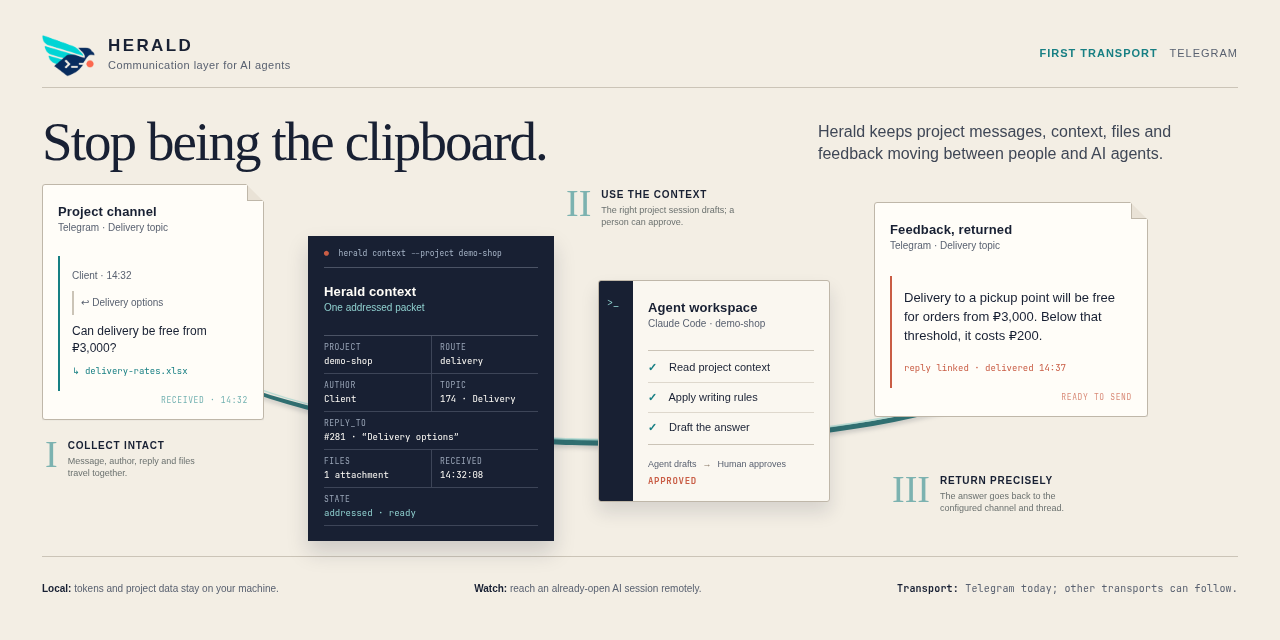
Stop being the clipboard.
A local communication layer between project channels and AI agents.




Русское руководство · Configuration · Changelog
Herald moves project messages, context, files and feedback between people and already-running AI coding sessions. Its core uses a transport adapter, with Telegram as the first and currently only implementation. Herald runs on your machine: you bring the bot, approve the destinations, and keep the token and project data local.
| Send | Capture | Watch |
|---|---|---|
| Telegram HTML, files, albums, named batches, replies, and delivery receipts | Project-scoped messages, attachments, reply context, and verified archive handoff | Address an open Claude Code or Codex session from the bot DM and reply through its fixed project route |
Ask naturally:
Send the result to the demo project through Herald.
Send these screenshots as an album with a short caption.
Read this project's Herald inbox.
The default batch is clean client text followed by a separate provenance reply.
Use herald-draft to prepare client-ready text without sending. Named batches can
combine text, files, albums, replies and durable delivery receipts. See
drafts and batches.
Watch is an optional bridge to sessions that are already open. It does not launch
an agent or bypass the host's wake-up model. /status exposes real poll activity,
monitor liveness and stale duties. See Watch runtime.
Requires uv and Claude Code or Codex with plugin support. Use one installation method per client to avoid duplicate tools.
Claude Code:
claude plugin marketplace add ZenonEl/herald
claude plugin install herald@herald --scope user
Codex:
codex plugin marketplace add ZenonEl/herald
codex plugin add herald@herald
These commands install Herald from the marketplace's default branch. For local
development, use a checkout, run uv sync --locked, and register an MCP server
that runs uv run --directory /absolute/path/to/herald herald. The shared skills
are in skills/. Do not mix checkout registration with a marketplace installation
of the same server.
Create ~/.config/herald/config.toml from config.example.toml
if you do not already have a config. Set your bot token file, routes, and projects.
Keep the token and actual chat IDs outside this repository. Restrict token-file
permissions to the owning user. Use HERALD_CONFIG for another config location.
Start a new AI session and ask “Show Herald destinations.” Sending does not require the Capture daemon.
Claude Code:
claude plugin marketplace update herald
claude plugin update herald@herald --scope user
Codex:
codex plugin marketplace upgrade herald
codex plugin add herald@herald
Open a new AI session after a code or tool-description update. Local writing-style
changes are reread by get_writing_rules, without restarting the server.
send_file sends one attachment. send_files accepts a list of absolute paths:
| Mode | Behavior |
|---|---|
album (default) |
2–100 files, split into linked Telegram groups of ten |
separate |
1–100 files, ordered and linked to the first message |
kind=auto sends supported small images as photos and other files as documents.
An album must contain either photos or documents; use kind=document to send
mixed file types together as originals. Native video/audio album types are not
implemented yet; these files can be sent as documents.
All paths are checked against files.allowed_roots before sending. One logical
pack carries its caption and provenance once; later groups reply to the first.
The caption must fit 1024 visible characters including provenance. Batches stop
on a failed send and return confirmed receipts, unconfirmed files, and files not
attempted. There is no automatic retry of uncertain sends.
Album constraints follow Telegram's sendMediaGroup contract.
See Customization for global and project writing styles,
server instructions, and tool descriptions. Defaults live in
src/herald/prompts/, are included in the Python package,
and can be overridden without editing Python or the installed plugin.
Enable Capture and list sources in [[capture.chats]], then run from a stable
checkout:
uv run herald-capture --once
uv run herald-capture
Run only one poller per bot token. A user systemd unit is provided in herald-capture.service; adjust its checkout path before enabling it. Bot permissions and privacy settings must allow receiving the messages you want.
Capture is a temporary buffer, not a complete archive or a history reader.
inbox_status and inbox_fetch require a project by default. Explicit source/all
reads remain available: this is a filter for trusted local sessions, not an
access-control boundary between users. Export is source-scoped.
inbox_fetch is a read, not an archive import. Use inbox_export, import and
verify the bundle, then call inbox_done with an opaque archive_ref. Status
flags rows left taken but unconfirmed for more than 24 hours.
For optional Watch, configure an allowed private source and profiles, start the same
Capture daemon, and ask an open AI session to activate a profile. Send
#example Your request in the bot DM. Addressed documents, images, voice notes
and audio are downloaded into the local Watch delivery. A voice note has no normal
caption: reply it to a tagged command, or send a captioned audio file. Herald does
not require a transcription engine; an agent may use an available local one.
Use /help for configured profiles and commands. See
Watch runtime for the exact Claude/Codex duty model.
MCP tools call an application service; domain objects and a messenger protocol keep Telegram HTTP details in the adapter. Local configuration defines projects, routes, and allowed file roots.
Herald can send to every destination you configure. For review-before-forwarding, configure a private hub rather than a client chat. The skill requires an explicit send request; transport code cannot verify the intent behind an AI tool call.
Herald does not host an LLM, guarantee writing quality, or provide a full remote terminal. Your local config, inbox, token, and custom prompts belong outside Git.
See CONTRIBUTING.md. Bug reports with a minimal, sanitized reproduction are welcome. Report whether you used a marketplace install or checkout, the Herald version, the tool called, and the expected result. Remove tokens, private paths, actual chat IDs, and client material.
Code and executable skill instructions use AGPL-3.0-or-later. The README documentation and editorial reference material use CC BY-SA 4.0. User messages and attachments keep their own licenses.