
Turn an API description into a CLI your agent can use in Claude Code, Codex or any app that speaks MCP. One command gives you the CLI with an MCP server, and a test for every operation of the API. When the template improves, its upgrade command merges the change into the CLI you already edited.


- Your agent gets the whole API on day one. Every operation of an OpenAPI 3, Swagger 2.0 or Google Discovery description becomes a command that the MCP server and the agent skill run, with a page in the skill.
- You stay in charge of what it does. Each command and each API operation has a permission, every delete has its own, and the token stays in your system keyring.
- The CLI keeps up after you edit it.
upgrademerges the template's CI, release and agent files into your copy, and updates of cli-core bring the fixes to the code. Your own commands are never touched.
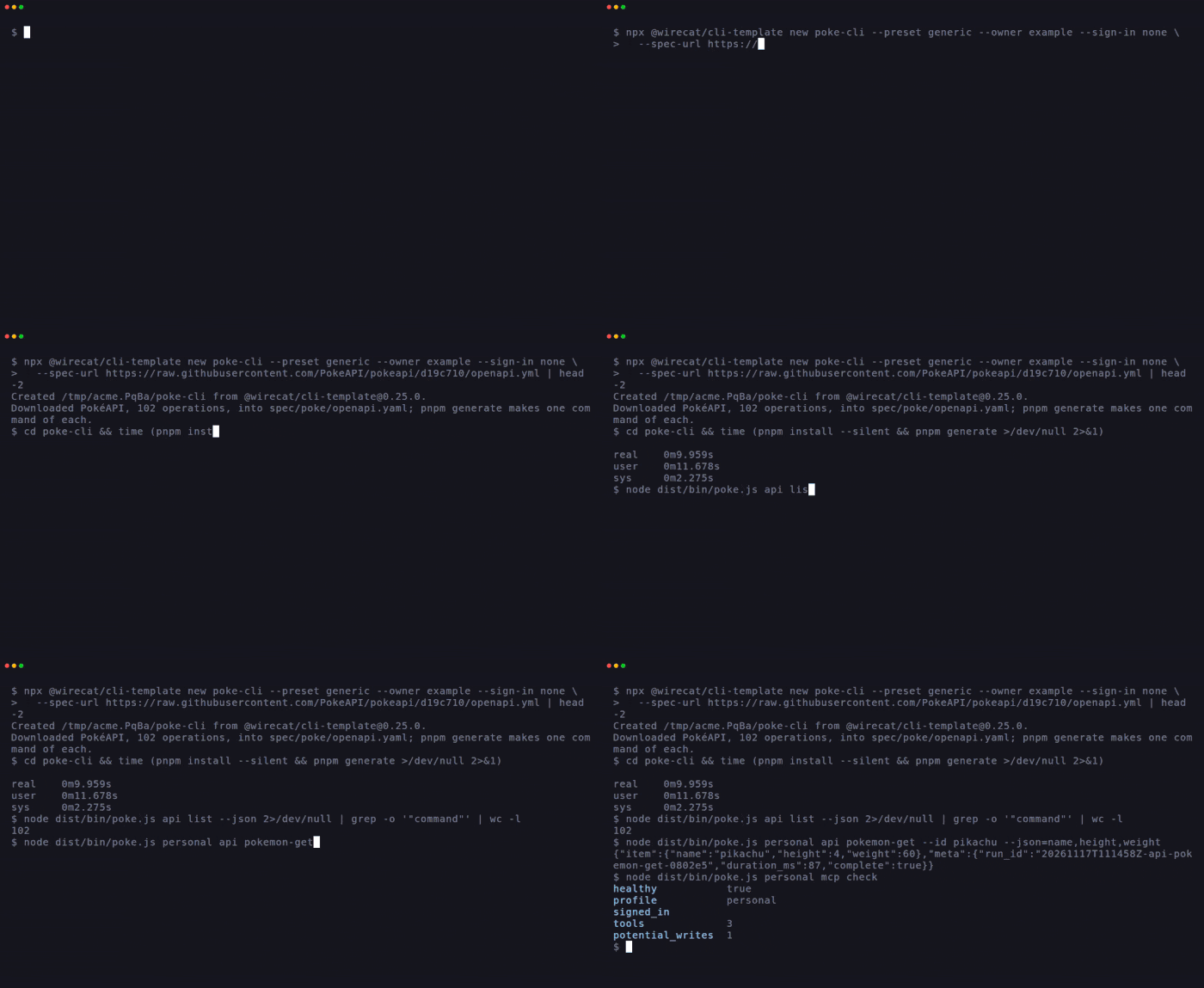
From PokeAPI's published description to 102 commands, a real answer and a working MCP server took 16 seconds with an empty pnpm store and 12 with a warm one, not counting npx's own download. Nine of WireCat's own CLIs are made from the template, see CLIs built with it.
There are two ways in. Pick the one that fits what you have.
| You have | Start with | You get |
|---|---|---|
| The address of the service's API description | new --spec-url <url> |
A CLI with one command per operation, the MCP server and the skill |
| An API description and a few lines saying how its records map to people and companies | new --from-config wirecat.config.ts |
The same, plus sign-in, sync into a local copy and the category's contract tests (CRM today) |
| An agent and no time | npx skills add WireCatLabs/cli-template |
Your agent finds the description and runs new --spec-url for you |
npx @wirecat/cli-template new poke-cli --preset generic --owner example --sign-in none \
  --spec-url https://raw.githubusercontent.com/PokeAPI/pokeapi/d19c710/openapi.yml
cd poke-cli && pnpm install && pnpm generate
node dist/bin/poke.js personal api pokemon-get --id pikachu --json=name,height,weight
node dist/bin/poke.js personal mcp add claude-code --allow-writes
Put your own GitHub name in --owner and the address of your service's description in --spec-url, JSON or YAML.
--preset generic answers the questions only WireCat's own tools need, and any flag you give wins. Without it, new
asks for every missing answer and never guesses one. --allow-writes is there because the template's sample
comments commands can write, and mcp add refuses a profile with writes until you say so.
npx @wirecat/cli-template remove-sample drops the sample.
One file says which service it is, where its API description lives, how to check a token, and how the service's
records map to people, companies and deals. new builds the CLI from it, and the CLI keeps the file as the one place
to edit.
import { defineCli } from "@wirecat/cli-core/manifest"

export default defineCli({
  identity: { command: "acme", package: "@wirecat/acme-cli", prefix: "WCACME", service: "Acme", owner: "WireCatLabs" },
  spec: { kind: "openapi", from: "https://acme.example/openapi.json" },
  auth: { preset: "token", verify: { operation: "getMe", id: "workspace.id", name: "workspace.name" } },
  category: "crm",
  source: { provider: "acme", kinds: ["person"], entities: { person: { … } } },
})
npx @wirecat/cli-template new --from-config wirecat.config.ts
cd acme-cli && pnpm install && pnpm generate
node dist/bin/acme.js work session start # takes the token and checks it with auth.verify
node dist/bin/acme.js work sync # copies the records in, then only what changedIn a terminal, new asks for the answers the config does not hold, such as the content languages. A script or an
agent passes them as flags, listed in the kit reference. Outside WireCat, use your own
scope in package and your own name in owner. This path needs a real account and its token, since
session start checks the token against the service. The shape of source is CrmManifest in
@wirecat/cli-core/manifest.
- An agent with a terminal runs it like you do. Claude Code or Codex read
--help, ask--json=name,heightfor only the fields they need, and chain commands in a script. - An app without a terminal gets the same commands over MCP. Claude Desktop, Cursor and others connect to
mcp serve, and ChatGPT or Claude in the browser throughmcp serve --httpbehind your own tunnel. - You can repeat what the agent did. It is the same command, with the same permissions, so you check a result by
running it yourself. A command that fails is kept as a run, and
runs showtells you what was run.
| Agent | How to connect |
|---|---|
| Claude Code, Codex | <cli> <profile> mcp add claude-code or mcp add codex (--allow-writes for a profile that may write), and <cli> skill install |
| Claude Desktop, Cursor | <cli> <profile> mcp config prints the entry to paste |
| ChatGPT, Claude in the browser | <cli> <profile> mcp serve --http --public-url <your tunnel> |
| Gemini CLI, OpenClaw, Hermes | <cli> skill install --for agents (or --for hermes) |
| What goes wrong with an API wrapper | What the template does |
|---|---|
| A one-time generator leaves you to copy its later fixes by hand | upgrade merges each template change file by file and asks before it touches a file you changed. src/, scripts/ and docs/ are yours and never touched |
| An agent deletes something you did not mean it to | Each profile sets allow, ask, readonly or deny per command and per API operation. A delete needs its own permission key, and the api group refuses to start without one. --dry-run shows what would run. Over MCP nobody can answer ask, so it runs: give the profile you serve readonly or deny where it matters |
The token sits in a .env file |
It stays in the OS keyring, under a profile you name, such as personal or work. No profile is ever assumed: a command without one stops and lists the profiles |
| The service changes its API | pnpm spec:sync downloads the description again, and pnpm generate follows |
| "It worked on my machine" | src/api.test.ts sends every operation to a fake built from the description, which refuses a request the description does not allow |
poke-cli/
├── spec/poke/openapi.yaml       the API description, and where it came from
├── wirecat.config.ts            with --from-config: the one file to edit
├── src/generated/               types, schemas and a manifest of every operation
├── src/commands/                the api group, the sign-in and your own commands
├── src/hooks.ts                 yours to add, named by `hooks` in the config: what the config cannot say
├── src/api.test.ts              every operation sent to a strict fake of the API
├── src/crm-contracts.test.ts    with a CRM config: cli-core's contracts for the category
├── contracts/wirecat.json       what WireCat Desktop reads to show and run the tool
├── skills/                      the agent skill, with pages for the API
├── .github/workflows/           CI, the release and a monthly check
└── bin/release                  publishes each version to npm through GitHub
A CLI with a source, such as a CRM made from a config, also gets what cli-core gives every WireCat tool. It keeps a
local copy that sync updates with only the changes, so its lists and search can answer from the copy, also
offline. A contact joins a person from your other WireCat tools by the same email, and search all finds them
together. A CLI made only from a description has no store and no search. It calls the service live.
flowchart LR
  spec["API description<br/>OpenAPI 3, Swagger 2.0<br/>or Google Discovery"] --> config["wirecat.config.ts<br/>sign-in, category,<br/>field map"]
  config --> hooks["src/hooks.ts<br/>what the config<br/>cannot say"]
  hooks --> ready["cli-dev ready<br/>every check,<br/>with its evidence"]
  ready --> live["live check<br/>on a test account"]
  live --> release["bin/release<br/>npm"]
- The description.
new --spec-urldownloads an OpenAPI 3 or Swagger 2.0 description (https, or http from localhost, at most 20 MB), puts its servers into the hosts the CLI may reach, and records the address and a hash inspec/<command>/provenance.json.pnpm generatewrites one command per operation, its permission, its test and the skill's page. When the generator stops on part of the description, it names the place. Add a patch with its reason inscripts/spec-model.ts, as the OpenAPI guide shows. A Google Discovery document goes in with--spec discoveryand a line inscripts/sync-spec.ts. - The config.
wirecat.config.tssays how to check a token and how the service's answers map to people, companies and deals.pnpm generateturns it into code that cli-core runs, so paging, cursors, the request budget and the store come from cli-core, not from code you write. - The hooks. What only this service does goes into
src/hooks.ts, such as dropping old values of a field that keeps its history. The config names the file, andpnpm source:checkchecks every operation and path the config reads against the generated API. cli-dev ready. It runs the CLI's checks in a fixed order and says for each one whether it is verified, with the evidence, and the one next step. A row is verified only by a script that passed, or by a live-check record of exactly this code. Nothing is inferred.- The live check and the release.
bin/live <account>runsscripts/live.shagainst a test account and records the pass.bin/releasepublishes to npm through GitHub.
How much of a source a config could cover, we estimated by reading the code of five WireCat CLIs written by hand before the config existed (an estimate, give or take 10 points): between 42% (Bitrix24) and 87% (Google Drive), with HubSpot at about 60%. The rest is the service's own logic, and it stays in hooks. Drive and Yandex Disk are document sources, which a config does not cover yet.
| Layer | What it proves | Where |
|---|---|---|
| Every operation | The request each command sends is one the description allows, and a denied delete stops before anything is sent | src/api.test.ts |
Sign-in, with auth.verify |
session start checks the token with the operation the config names, and keeps nothing when the service refuses it |
src/commands/session.test.ts |
| Category contracts | The source behaves like every CRM in WireCat, faults included. For example "a full list cut after its first page goes on from that page in a new run, nothing lost or repeated" and "a clock off by ten minutes either way loses no change" | src/crm-contracts.test.ts, from cli-core |
| Ready | Every check before a release ran and passed on this code | pnpm exec cli-dev ready |
| Live | The CLI works against the real service | bin/live, on a test account |
cli-core has contracts for CRM, files, calendar, mail and meetings. A config wires CRM's today. For the others you write the source by hand and run the same contracts.
All of them are WireCat's own, public, and made from this template.
| CLI | What it does |
|---|---|
| hubspot-cli | HubSpot CRM: a local copy of deals, contacts and companies, an MCP server and every CRM read of HubSpot's API |
| bitrix24-cli | Bitrix24 CRM: deals and leads in a local store, any REST method, a permission on every write |
| amo-cli | amoCRM and Kommo: deals in a local store, any API v4 operation, a permission on every write |
| notion-cli | Notion pages and databases, searchable on your computer |
| ydisk-cli | Yandex Disk: search the folders you choose, and work with the files live |
| mail-cli | Any IMAP mailbox copied to your computer and searchable offline, sending over SMTP |
| gcal-cli | Google Calendar for you and your agent |
| beeline-cli | Beeline Cloud PBX: call records synced, recordings transcribed on your computer |
| asterisk-cli | Asterisk calls for your agent |
- Nothing is guessed. No account or profile is ever picked for you, and
newasks for every missing answer. A missing profile is an error that lists the choices. - You set what an agent may write. Every command and API operation has a permission key, a delete has its own,
and an MCP server can only make them stricter.
readonlyordenystops a write before anything is sent. - One set of commands, three ways in. The CLI, the MCP tools and the skill come from the same commands, so what you test is what the agent runs.
- Shared work lives in one place. The store, search, MCP and permissions come from cli-core, so a fix there reaches every CLI with its next update. A CLI does not write them again.
- Proven, not assumed. A check counts when its script passed on this code. WireCat's own CLIs also pass the live check on a real account before each release.
npx skills add WireCatLabs/cli-templateThis installs the api-to-cli skill for Claude Code, Codex and other agents. Ask your agent for a CLI for
a service, and it finds the description, runs new, fixes what the generator stops on, and wires the MCP server. It
never runs the CLI against your account without asking. WireCat's own CLIs use the longer
new-cli skill, which also keeps the research and the reviews, and has a fresh agent
review each slice of work.
What we learned building nine CLIs, and wrote into that skill:
- Patch the description, with its reason. A service's description is often wrong in small places. A patch in
scripts/spec-model.tswith a comment beats a fix in generated code that the nextgenerateloses. - One file maps the service's answers. When the service changes a field, one file and one contract test break, not ten commands.
- Two agents never write the same file. notion-cli once ended up with two fakes of the same API that way.
Checked on the tools' own pages in November 2026. "Not documented" means the page does not say.
| What it makes | For agents | After you edit it | Tests in the project | License | |
|---|---|---|---|---|---|
| cli-template | A TypeScript CLI project | MCP server (stdio and HTTP) and a skill, from the same commands | upgrade merges template changes |
One per operation, against a strict fake | Apache-2.0 |
| Speakeasy | A Go CLI, and an MCP server as a separate product | Agent mode for Claude Code, Cursor and others | Not documented | Contract tests, offered as a separate product | Vendor service, the CLI generator labelled alpha in its docs |
| openapi-mcp-generator | A TypeScript MCP server | MCP only | --force writes over your edits |
Not documented | MIT |
FastMCP from_openapi |
An MCP server built at run time, in Python | MCP only | No code is generated | Not documented | Apache-2.0 |
| api2cli | A Commander.js CLI and a skill, written by a Claude Code skill | A Claude Code skill | A one-time result | None shown | MIT |
- Node and TypeScript only. Node 22.16 or 24 and later, with pnpm. It builds no single binary.
- Some of it stays hand-written. What only one service does goes into hooks. Writes to a CRM, OAuth sign-in and
services without an OpenAPI description (Bitrix24's RPC methods, for example) are code you write, with cli-core's
helpers. The CLI signs in with a token by default: OAuth is yours to wire up, from cli-core's
oauthmodule. - A config covers CRM sources today. Other categories need their source written by hand.
- The live check needs a test account. WireCat's own CLIs need it before every release. A CLI made with
--preset genericmay skip it, and you then release without proof the CLI works against the real service. - One base URL. The api group calls one base URL, and the generator stops on a keyword it does not understand, so some descriptions need a patch before they generate.
- GraphQL in
new. cli-base already generates commands from a GraphQL schema, and cli-core's next release sends the calls.newdoes not take a GraphQL schema yet. - Configs for more categories, starting with files and documents, where Drive and Yandex Disk show the most to gain.
- OAuth from the description. The sign-in built from the description's
securitySchemes, not by hand. - RPC services. A config for services like Bitrix24 that have methods in place of paths.
Run npx @wirecat/cli-template upgrade in your CLI, with a clean git working tree. For each file the template
changed it offers to merge the change, take the template's file, skip it or show the diff. --dry-run lists what
each file would get and writes nothing. The files that are yours from the start, such as your commands in
src/commands/, README.md and package.json, are never touched. The details are in the
kit reference.
A CLI made outside WireCat publishes under its own npm scope, such as @example/poke-cli. new --preset generic
sets it up for that, with its own MCP Registry name and its own monthly CI run, and no recorded live check before a
release. bin/setup-github creates the repository, and bin/release --first publishes the first version from your
computer. The steps, with npm trusted publishing, are in Publishing outside WireCat.
new copies this repository into your CLI. Its command word is the placeholder clidev, which new replaces with
yours. It is not cli-dev, the developer tool in cli-base. new writes a fresh README for each new CLI, so this
page never reaches one.
To work on the template itself:
pnpm install
pnpm build
node dist/bin/clidev.js doctor
The skeleton's own pages describe clidev as a user sees it: install,
use it, settings, commands,
when something goes wrong and security. The working rules for people
and agents are in AGENTS.md, how new and upgrade read this repository is in
kit/DEVELOPING.md, and pnpm release:check runs every check before a release.
Report a vulnerability privately as SECURITY.md says. The changes are in CHANGELOG.md.