


Originally created by palfrey. This fork builds on that allowlist work with a live Home Assistant IP ban and allowlist manager UI.
Warning
THIS IS A HACK. USE AT YOUR OWN RISK. Home Assistant does not provide a public integration API for changing the HTTP IP ban manager at runtime, so this integration uses a small internal hook around Home Assistant's built-in ban manager.
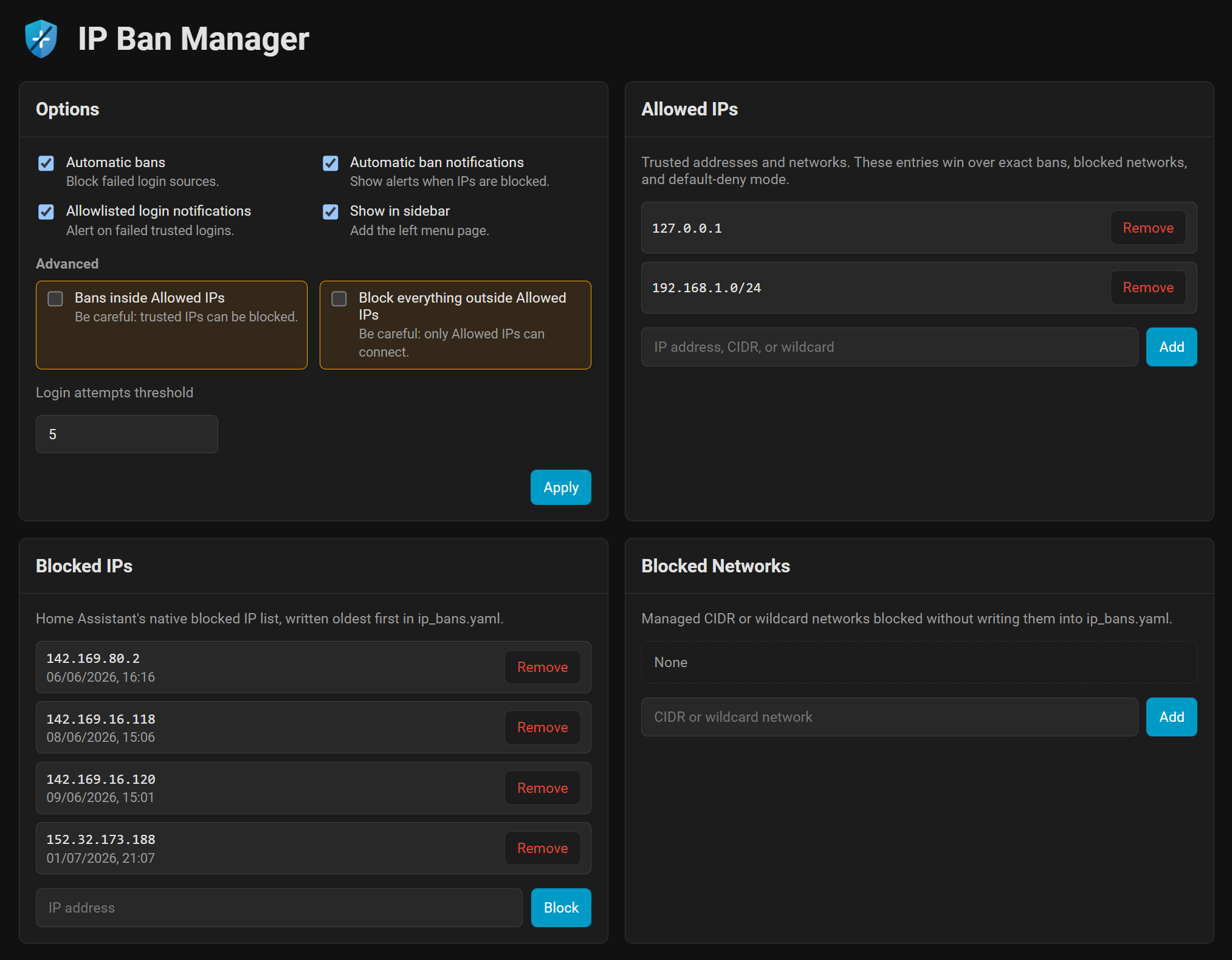
IP Ban Manager gives Home Assistant's built-in IP filtering and banning the management UI it has always needed: trusted IPs and networks, live ban review and removal, managed network blocks, default-deny controls, GeoIP labels, backup/restore, services, diagnostics, and branded notifications.
See the release summary for a quick version-by-version table, or CHANGELOG.md for every release, upgrade note, and full change detail.
- Allowed IPs: trust IPv4/IPv6 addresses, CIDR networks, and IPv4 wildcard networks like
192.168.1.*. - Blocked IPs: add, remove, review, and clear Home Assistant's native exact IP bans without restarting.
- Blocked networks: block CIDR networks and IPv4 wildcard ranges without pretending
ip_bans.yamlsupports ranges. - Default deny: optionally block everything outside Allowed IPs with guardrails to avoid locking out Home Assistant itself.
- Live panel: manage the whole integration from a dedicated page, with optional sidebar access.
- Notifications: replace Home Assistant's raw ban messages with IP Ban Manager notifications, optional allowlisted-login alerts, and stale-notification cleanup.
- GeoIP labels: optionally download a local DB-IP City Lite database for approximate public-IP location labels.
- Backup and restore: save/restore a readable YAML backup under
/config, or download/upload a backup in the browser. - Diagnostics and automation: numeric sensors plus
ip_ban_manager.*services for scripts and automations.
|

If the button does not work:
- Open HACS.
- Add
Wheemer/ip-ban-manageras a custom integration repository. - Install IP Ban Manager.
- Restart Home Assistant once so the custom integration is loaded.
- Add it from Settings > Devices & services > Add integration.
After install or a HACS update, a Core restart is required for new Python code to load. Reloading only the IP Ban Manager config entry is enough to tear down and restore its runtime hooks, services, and panel API for the already-loaded module (for example after disabling/re-enabling the entry), but it does not replace integration files already imported into the Home Assistant process.
Normal setup is done from the UI. The integration name is IP Ban Manager and service calls use ip_ban_manager.*.
Home Assistant's built-in HTTP IP banning must still be enabled:
http:
  ip_ban_enabled: true
The login-attempt threshold is managed by IP Ban Manager after setup. If IP banning is not enabled, IP Ban Manager creates a Home Assistant Repair with the required YAML and a link to Home Assistant's HTTP documentation. It does not edit configuration.yaml automatically, which keeps existing comments, includes, proxy settings, and packages safe.
Existing ban_allowlist: YAML is treated as a one-time migration path. IP Ban Manager absorbs that old allowlist when it first loads; after that, remove the old YAML key and restart Home Assistant. If the old key is left behind, IP Ban Manager ignores it once the UI config entry exists.
Open Settings > Devices & services > IP Ban Manager > Configure to manage:
- Allowed IPs and networks
- Blocked IPs from Home Assistant's native
ip_bans.yaml - Managed blocked networks
- Automatic-ban settings
- Default-deny mode
- Allowlisted-login notification settings
- Local GeoIP database download/update
- Manual on-disk backup, browser download, and browser upload restore
Changes apply immediately. Home Assistant does not need to restart after list edits or option changes.
Allowed IPs are trusted addresses and networks that should not be blocked. Supported entries:
- IPv4 address:
192.168.1.10 - IPv6 address:
2001:db8::10 - CIDR network:
192.168.1.0/24 - IPv6 CIDR network:
2001:db8::/64 - IPv4 wildcard network:
192.168.1.*
Allowed entries win over managed blocked networks and default-deny mode.
Blocked IPs are exact Home Assistant bans. They stay in Home Assistant's native live ban manager and ip_bans.yaml.
Existing rows show IP - local ban time. Leave the timestamp in place to preserve the original ban date. New rows can be entered as just the IP address. When ip_bans.yaml is rewritten, entries stay oldest-first so new bans appear at the bottom, matching Home Assistant's normal file behavior.
Blocked networks are managed by IP Ban Manager. They support IPv4/IPv6 CIDR networks and IPv4 wildcard networks. They are enforced behind Home Assistant's normal request path, but they are not written into ip_bans.yaml because Home Assistant's native file only supports exact IP bans.
IP Ban Manager validates changes before writing them. It rejects malformed entries, all-Internet allowlists or network blocks, exact bans that are also allowed, risky default-deny changes, unsafe local lockout cases, and unconfirmed multi-ban clears.
Home Assistant's own exact interface addresses, IPv6 link-local access paths, Supervisor traffic, and add-on internals are protected internally without exposing those implementation details in Allowed IPs.
The live panel can Save, Restore, Download, and Upload a YAML backup.
Save / Restore use the on-disk file:
/config/ip_ban_manager/ip-ban-manager-backup.yaml
Download builds the same YAML from the current live settings and saves it through the browser. Upload restores from a file you pick on this device.
The backup includes IP Ban Manager settings plus a timestamp-preserving copy of Home Assistant's exact IP bans. If validation fails, nothing is changed.
GeoIP labels are optional. When enabled, IP Ban Manager downloads the free DB-IP City Lite MMDB database to:
/config/ip_ban_manager/geoip/dbip-city-lite.mmdb
Lookups are local only. No live online IP lookup is made while handling logins or bans. Private, loopback, and local-network addresses are not looked up. Location data is approximate and provided by DB-IP.com.
If you accidentally lock yourself out with IP Ban Manager settings, disable only this integration with either emergency path, then restart Home Assistant.
Create this empty file:
/config/ip_ban_manager.disabled
Or add this to configuration.yaml:
ip_ban_manager: disabledWhen either path is active, IP Ban Manager skips its runtime hooks, panel, services, sensors, managed blocked networks, and default-deny handling. Home Assistant will show a Repair warning until you remove the file or YAML key and restart.
This does not uninstall the integration and does not remove Home Assistant's native exact bans from ip_bans.yaml.
IP Ban Manager adds services for scripts and automations:
ip_ban_manager.add_ip_banip_ban_manager.remove_ip_banip_ban_manager.remove_all_ip_bansip_ban_manager.add_allowlist_networkip_ban_manager.remove_allowlist_networkip_ban_manager.export_configip_ban_manager.import_config
Adding a ban updates Home Assistant's live ban manager and persists to ip_bans.yaml. Removing a ban updates the live ban manager, clears that IP's failed-login counter, and rewrites ip_bans.yaml. Clearing every ban requires confirm: true.
IP Ban Manager adds numeric diagnostic sensors with detailed attributes:
sensor.ip_ban_manager_active_banssensor.ip_ban_manager_allowlisted_networkssensor.ip_ban_manager_blocked_networkssensor.ip_ban_manager_failed_login_sources
- Old
ban_allowlistYAML is imported once, then should be removed. - Old
custom_components/ban_allowlistinstalls are cleaned up after IP Ban Manager starts. - HACS installs should contain only
custom_components/ip_ban_manager. - Release details are in CHANGELOG.md.