








An unofficial native Windows port of inFAMOUS First Light (PS4). The game's own x86-64 code runs directly on the PC's processor, a reimplemented PS4 runtime stands in for the console's system libraries, and the graphics are translated to Vulkan. It is not a general-purpose emulator.
You need your own copy of the game, dumped from your own PS4. No game files, firmware, keys or Sony assets are part of this repository or its releases.
 |
 |

Ryzen + RTX 4070 SUPER, 1080p. The launcher shows the art of the player's own game files.
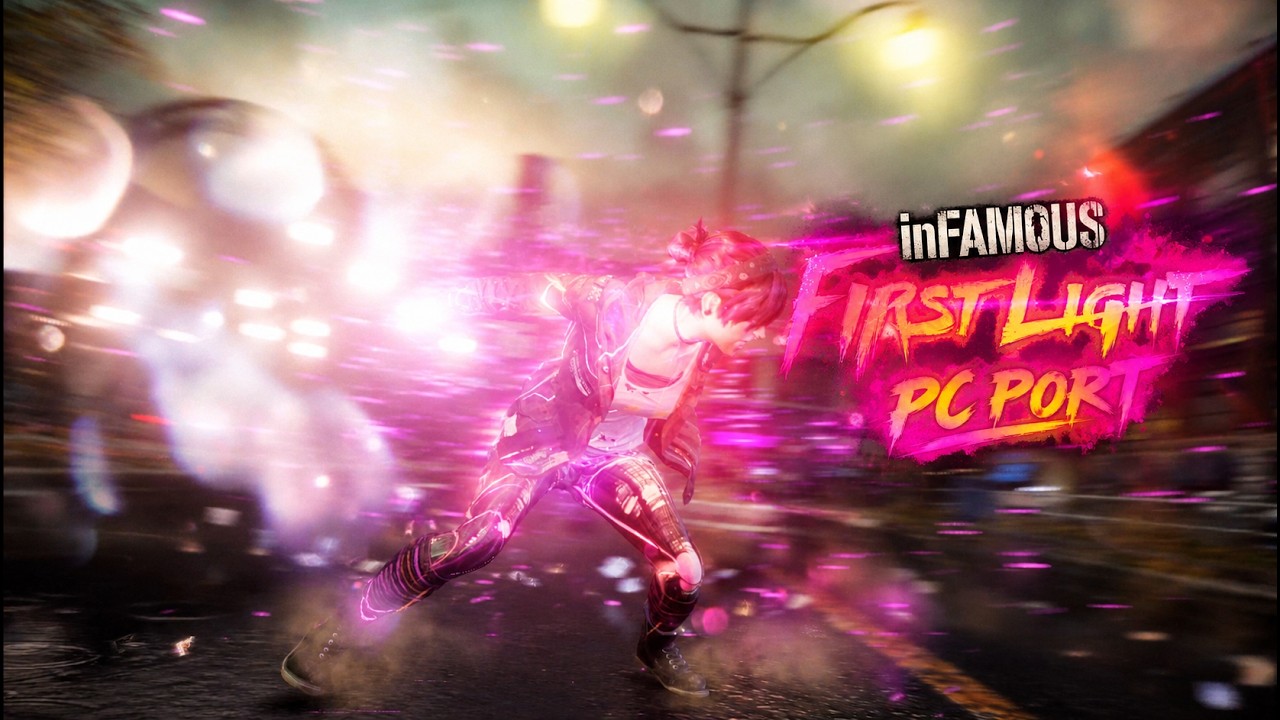
Early, playable. The game boots, reaches the menus and gameplay, saves, and plays through the first missions; Fetch's neon powers, the dash trail, lights and particles render.
| Tested dump | CUSA00897 (EU), base game 1.00 |
| Frame rate | about 35–45 FPS with renderer v2 (the default), 15–25 with the classic one, on a Ryzen + RTX 4070 SUPER; goal: a steady 30 FPS on mid-range PCs |
| Known issues | the first start prepares and compiles shaders (2–3 minutes once); GPU readbacks cost frame rate (work in progress); the classic renderer flashes yellow for a moment while a save loads; some lights pulse in the boat cutscene |
- Download the latest release and unzip it anywhere you can write to (not Program Files).
- Start inFAMOUS First Light.exe and pick your game folder (the one with
eboot.binandsce_sys). - Press Play. F10 shows the performance overlay, F9 the keys and mouse buttons held (for recordings and streams); Insert (or R3 + L2) opens the in-game menu.
From v0.3.2 the launcher checks for a new release when it starts and installs it with one click; your saves and settings stay.
Steam, Playnite, a shortcut: "inFAMOUS First Light.exe" --play starts the game straight away with the launcher's settings, without its window (in Steam: add a non-Steam game, then Properties → Launch options: --play). If the game fails, the launcher opens on its log.
Ultrawide (experimental): launcher → Display → Picture shape: 21:9, 32:9 or "As the screen". The view widens at the sides and the HUD moves to the edges; the movies stay 16:9 with bars at the sides. The render size keeps the chosen resolution's height (at most 4K's pixel count). Environment variables for testing: TLG_RENDER_SIZE=2560x1080 sets the size directly, TLG_MOVIE_FIT=0 stretches the movies as before.
Requirements: Windows 10/11 64-bit, a Vulkan 1.3 GPU, a CPU with AVX (Intel CPUs work: the AMD-only instructions the game uses are emulated).
Dumping your game: on your own PS4 with GoldHEN, dump the game (and its update, if any) with a homebrew dumper such as Itemzflow, and copy the folder to the PC.
Xbox, PlayStation and other controllers work, and so does the keyboard. The touchpad and the motion sensor are simulated on controllers without them:
| In game | Xbox / other controller | Keyboard |
|---|---|---|
| Press the touchpad | View | Tab / Backspace |
| Touchpad swipe | hold View + right stick | hold Tab + arrows |
| Graffiti: controller on its side | L3 + R3 (sensor mode on/off) | hold T or G |
| Graffiti: shake / spray / aim | A / R2 / left stick | Y / F / arrows |
Reports from many different PCs are what the optimisation needs:
- Play 10–15 minutes (the city, running, dashes, a fight). Test builds (with a
TEST_BUILDfile) log extra performance statistics. - In the launcher open Log → Create report: it writes a zip in
data/reports(logs and the PC's specs, no personal paths). - Open a performance report, fill in the form and drag the zip into it. Crashes and glitches go to a bug report.
Never attach game files.
In an MSYS2 CLANG64 shell:
pacman -S --needed git patch \
  mingw-w64-clang-x86_64-{toolchain,cmake,ninja,pkgconf,python} \
  mingw-w64-clang-x86_64-{vulkan-headers,vulkan-loader,vulkan-memory-allocator,glslang} \
  mingw-w64-clang-x86_64-{sdl3,fmt,boost,robin-map,xxhash,ffmpeg,zydis} \
  mingw-w64-clang-x86_64-{spirv-tools,spirv-headers,spirv-cross}
git clone --recursive <this repository> && cd <repository>
cd port && ISS_LTO=OFF TLG_RENDERER_V2=1 bash build.sh && cd ..
The launcher (PySide6): py -m venv .venv, .venv\Scripts\pip install PySide6-Essentials pillow iced-x86, then launcher\start.bat. A release folder: bash dev/package.sh (TEST=1 for a test build). bash dev/export_public.sh shows exactly what a push publishes.
| Folder | What it holds |
|---|---|
port/ |
The core: loader, PS4 runtime (src/), Vulkan renderers (gpu/ classic, gpu_v2/ renderer v2, gpu_v3/ renderer v3, experimental), game preparation scripts |
launcher/ |
The launcher (PySide6 + Qt Quick) |
dev/ |
Packaging, RenderDoc capture, debugging aids |
docs/iss_pc/ |
The documentation of the project the core comes from |
This port is a fork of iss_pc by HayatoG, the native PC port of inFAMOUS Second Son; its core (runtime, loader, GPU translation and many fixes) is the foundation of this project. The GPU translation comes from shadPS4; iss_pc also credits tlg_pc, gr2_pc, gow3_pc, bloodborne_pc, ShadowOfTheColossus-PC and the other projects listed in docs/iss_pc. Renderer v2 (port/gpu_v2, by way of iss_pc) is Castlesea's renderer from infamous-second-son-pc-port, on weshayoub92's shadPS4-perf. Renderer v3 (port/gpu_v3, experimental) is axylpup's multithreaded Second Son build of shadPS4 (second-son, release second-son-v1.1.1). ATRAC9 audio via LibAtrac9.
Licensed under GPL-2.0, like the projects it builds on (LICENSE).
Where Windows' Segoe UI is missing (Linux, the Steam Deck) the launcher and the in-game menus use Open Sans (SIL Open Font License 1.1, port/fonts/OFL-OpenSans.txt) and a subset of Microsoft's Fluent UI System Icons (MIT, port/fonts/LICENSE-FluentSystemIcons.txt).
inFAMOUS is a trademark of Sony Interactive Entertainment. This project is not affiliated with Sony Interactive Entertainment or Sucker Punch Productions.
Неофициальный нативный порт inFAMOUS First Light (PS4) на Windows. Собственный x86-64 код игры выполняется прямо на процессоре ПК, системные библиотеки консоли заменены переписанной средой выполнения, а графика переводится на Vulkan. Это не универсальный эмулятор.
Нужна ваша собственная копия игры, снятая с вашей PS4. Ни файлов игры, ни прошивки, ни ключей, ни материалов Sony в репозитории и релизах нет.
Скриншоты — в начале страницы: неоновая сила Проныры в ночном городе, неоновый рывок с оверлеем производительности и лаунчер. ▶ Видео геймплея на YouTube.
Ранняя версия, игра проходится. Игра запускается, доходит до меню и геймплея, сохраняется, проходятся первые миссии. Неоновые способности Проныры, след рывка, свет и частицы отображаются.
| Проверенный дамп | CUSA00897 (EU), базовая игра 1.00 |
| FPS | около 35–45 на рендере v2 (по умолчанию), 15–25 на обычном, Ryzen + RTX 4070 SUPER; цель — стабильные 30 FPS на средних ПК |
| Известные проблемы | первый запуск готовит и компилирует шейдеры (2–3 минуты, один раз); чтение данных с видеокарты стоит FPS (в работе); на обычном рендере при загрузке сохранения на мгновение мелькает жёлтый; в катсцене с лодкой мигают некоторые огни |
- Скачайте последний релиз и распакуйте в любую папку, куда можно писать (не в Program Files).
- Запустите inFAMOUS First Light.exe и выберите папку с игрой (в ней
eboot.binиsce_sys). - Нажмите «Играть». F10 показывает оверлей производительности, F9 — нажатые клавиши и кнопки мыши (для записи и стримов), Insert (или R3 + L2) открывает меню в игре.
Начиная с v0.3.2 лаунчер при запуске проверяет новые релизы и ставит их в один клик; сохранения и настройки остаются.
Steam, Playnite, ярлык: "inFAMOUS First Light.exe" --play сразу запускает игру с настройками лаунчера, без его окна (в Steam: «Добавить стороннюю игру», затем Свойства → Параметры запуска: --play). Если игра завершится с ошибкой, откроется лаунчер с журналом.
Ultrawide (экспериментально): лаунчер → Экран → «Форма кадра»: 21:9, 32:9 или «Как у экрана». Обзор расширяется по бокам, интерфейс уходит к краям; ролики остаются 16:9 с полосами по бокам. Размер рендера берёт высоту выбранного разрешения (не больше пикселей 4K). Переменные окружения для проверки: TLG_RENDER_SIZE=2560x1080 задаёт размер напрямую, TLG_MOVIE_FIT=0 растягивает ролики, как раньше.
Нужно: Windows 10/11 64-бит, видеокарта с Vulkan 1.3, процессор с AVX (процессоры Intel тоже подходят: инструкции AMD, которые использует игра, эмулируются).
Как снять дамп: на своей PS4 с GoldHEN снимите игру (и обновление, если есть) homebrew-дампером, например Itemzflow, и скопируйте папку на ПК.
Работают геймпады Xbox, PlayStation и другие, а также клавиатура. Тачпад и датчик движения эмулируются на геймпадах без них:
| В игре | Xbox / другой геймпад | Клавиатура |
|---|---|---|
| Нажать тачпад | View | Tab / Backspace |
| Свайп по тачпаду | зажать View + правый стик | зажать Tab + стрелки |
| Граффити: геймпад на боку | L3 + R3 (режим датчика вкл/выкл) | зажать T или G |
| Граффити: встряхнуть / распылять / целиться | A / R2 / левый стик | Y / F / стрелки |
Для оптимизации нужны отчёты с как можно большего числа разных ПК:
- Поиграйте 10–15 минут (город, бег, рывки, бой). Сборки для замеров (с файлом
TEST_BUILD) пишут дополнительную статистику производительности. - В лаунчере откройте «Журнал» → «Собрать отчёт»: в папке
data/reportsпоявится архив (логи и характеристики ПК, без личных путей). - Откройте отчёт о производительности, заполните форму и перетащите в неё архив. Вылеты и графические ошибки — в сообщение об ошибке.
Файлы игры не прикладывайте.
Шаги выше, в разделе Building: MSYS2 CLANG64, bash build.sh в port/, лаунчер через launcher\start.bat, пакет через bash dev/package.sh.
Этот порт — форк iss_pc от HayatoG, нативного порта inFAMOUS Second Son; его ядро (среда выполнения, загрузчик, перевод графики и множество исправлений) — основа этого проекта. Перевод графики взят из shadPS4; остальные проекты, на которых построен iss_pc, перечислены в docs/iss_pc. Рендер v2 (port/gpu_v2, через iss_pc) — рендер Castlesea из infamous-second-son-pc-port на основе shadPS4-perf от weshayoub92. Рендер v3 (port/gpu_v3, экспериментальный) — многопоточная сборка shadPS4 для Second Son от axylpup (second-son, релиз second-son-v1.1.1).
Лицензия GPL-2.0, как у проектов, на которых он основан (LICENSE).
Там, где нет шрифта Windows Segoe UI (Linux, Steam Deck), лаунчер и меню в игре используют Open Sans (SIL Open Font License 1.1, port/fonts/OFL-OpenSans.txt) и часть иконок Microsoft Fluent UI System Icons (MIT, port/fonts/LICENSE-FluentSystemIcons.txt).
inFAMOUS — товарный знак Sony Interactive Entertainment. Проект не связан с Sony Interactive Entertainment и Sucker Punch Productions.