




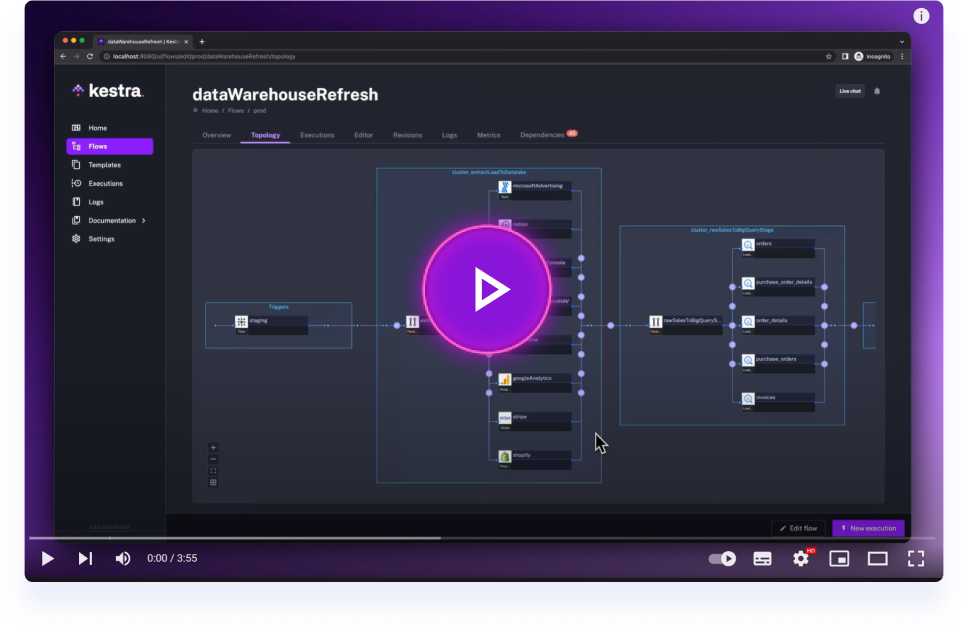
Get started with Kestra in 4 minutes.
Kestra client SDK in various language to interact with a running Kestra instance.
Documention is avaible on https://kestra.io/docs/api-reference/kestra-sdk
The repository currently ships SDKs for Python, Java, JavaScript, and Go. The snippets below show how to install each package, authenticate with either Basic credentials or a service account API key, and perform a basic flow lifecycle: create a flow, update it, then trigger a new execution.
- Install with
pip install kestrapy(Python 3.9+). - Configure
Configuration.hostwith the URL of your Kestra instance. - For Basic authentication set
configuration.usernameandconfiguration.password. For service accounts pass the API key asKestraClient(host=..., token=...)(KestraClientdoes not readconfiguration.access_token).
from kestrapy import KestraClient, Configuration
from kestrapy.exceptions import ApiException

tenant = "main"
namespace = "demo"
flow_id = "hello_from_sdk"

flow_yaml = """id: hello_from_sdk
namespace: demo

tasks:
  - id: log
    type: io.kestra.plugin.core.log.Log
    message: Hello from the SDK
"""

configuration = Configuration()
configuration.host = "https://<kestra-host>"
configuration.username = "user@kestra.io"
configuration.password = "password"  # replace with your Basic auth secrets

client = KestraClient(configuration)
# Service account alternative:
# client = KestraClient(host="https://<kestra-host>", token="<service-account-api-key>")

try:
    client.flows.create_flow(tenant, flow_yaml)

    updated_flow_yaml = """id: hello_from_sdk
namespace: demo

tasks:
  - id: log
    type: io.kestra.plugin.core.log.Log
    message: Hello after update
"""

    client.flows.update_flow(
        id=flow_id,
        namespace=namespace,
        tenant=tenant,
        body=updated_flow_yaml,
    )

    execution = client.executions.create_execution(
        tenant=tenant,
        namespace=namespace,
        id=flow_id,
        wait=True,
    )
    print("Execution ID:", execution.id)
except ApiException as err:
print("Kestra API error:", err)- Add the dependency to your build:
io.kestra:kestra-api-client:2.0.1(Java 25+). - Basic authentication uses the builder method
.basicAuth(username, password). Service accounts call.tokenAuth("<service-account-api-key>")instead.
Maven
<dependency>
  <groupId>io.kestra</groupId>
  <artifactId>kestra-api-client</artifactId>
  <version>2.0.1</version>
</dependency>
Gradle (Kotlin DSL)
implementation("io.kestra:kestra-api-client:2.0.1")Build a client, then perform a basic flow lifecycle:
import io.kestra.sdk.KestraClient;

KestraClient client = KestraClient.builder()
    .url("https://<kestra-host>")
    .basicAuth("user@kestra.io", "password")
    .build();
// Service account alternative:
// KestraClient client = KestraClient.builder()
//     .url("https://<kestra-host>")
//     .tokenAuth("<service-account-api-key>")
//     .build();

String tenant = "main";
The block below is injected from the CI-tested example
java/java-sdk/java-sdk-test/src/main/java/io/kestra/example/BasicSDKUsageExample.java
(issue #144). Do not edit it by hand — change the example and re-run
java test-utils/EmbedSnippets.java --write README.md.
String namespace = "company.team";
String flowId = "hello_from_sdk";

// List the first page of flows in the tenant.
PagedResultsFlow flows = client.flows().searchFlows(tenant, 1, 10, null, List.of());
System.out.println("Found " + flows.getResults().size() + " flows");

// Create a flow from its YAML source.
String flowYaml = """
    id: hello_from_sdk
    namespace: company.team

    tasks:
      - id: hello
        type: io.kestra.plugin.core.log.Log
        message: Hello from the Kestra Java SDK!
    """;
FlowWithSource created = client.flows().createFlow(tenant, flowYaml);
System.out.println("Created flow " + created.getNamespace() + "." + created.getId()
    + " (revision " + created.getRevision() + ")");

// Update the flow — updateFlow takes (namespace, id, tenant, body).
String updatedYaml = """
    id: hello_from_sdk
    namespace: company.team

    tasks:
      - id: hello
        type: io.kestra.plugin.core.log.Log
        message: Hello after update!
    """;
client.flows().updateFlow(namespace, flowId, tenant, updatedYaml);

// Trigger an execution and wait for it to complete.
ExecutionControllerExecutionResponse execution = client.executions()
    .createExecution(tenant, namespace, flowId, null, true, null, null, null, null);
System.out.println("Execution " + execution.getId()
+ " finished in state " + execution.getState().getCurrent());- Install with
npm install @kestra-io/kestra-sdkoryarn add @kestra-io/kestra-sdk. - Configure the shared client once with
configureClient({ baseUrl, auth }), then import the operations of each domain from its module (@kestra-io/kestra-sdk/flows,/executions, ...). - For Basic authentication return
"<username>:<password>"fromauth. For service accounts return the API key for thebearerscheme only — see README_JAVASCRIPT_SDK.md.
import { configureClient } from "@kestra-io/kestra-sdk";
import * as FlowsAPI from "@kestra-io/kestra-sdk/flows";
import * as ExecutionsAPI from "@kestra-io/kestra-sdk/executions";

configureClient({
  baseUrl: "https://<kestra-host>",
  auth: () => "user@kestra.io:password",
  // Service account alternative:
  // auth: (auth) => (auth.scheme === "bearer" ? "<service-account-api-key>" : undefined),
});

const tenant = "main";
const namespace = "demo";
const flowId = "hello_from_sdk";

await FlowsAPI.createFlow({
  tenant,
  body: `id: hello_from_sdk
namespace: demo

tasks:
  - id: log
    type: io.kestra.plugin.core.log.Log
    message: Hello from the SDK
`,
});

await FlowsAPI.updateFlow({
  tenant,
  namespace,
  id: flowId,
  body: `id: hello_from_sdk
namespace: demo

tasks:
  - id: log
    type: io.kestra.plugin.core.log.Log
    message: Hello after update
`,
});

const execution = await ExecutionsAPI.createExecution({ tenant, namespace, id: flowId, wait: true });
console.log("Execution ID:", execution.id);- Pull the module into your project with
go get github.com/kestra-io/client-sdk/go-sdk/v2@latest. - Build a
KestraClientwithNewClient, pointing it at your Kestra host. - Authenticate with Basic credentials via
WithBasicAuth, or with a service-account token viaWithTokenAuth.
Build a client, then perform a basic flow lifecycle:
package main

import (
	"context"
	"fmt"
	"log"

	kestra "github.com/kestra-io/client-sdk/go-sdk/v2/kestra_api_client"
)

func main() {
	client := kestra.NewClient(
		"https://<kestra-host>",
		kestra.WithBasicAuth("user@kestra.io", "password"),
	)
	// Service account alternative:
	// client := kestra.NewClient(
	// 	"https://<kestra-host>",
	// 	kestra.WithTokenAuth("<service-account-api-key>"),
	// )

	if _, err := flowLifecycle(context.Background(), client, "main"); err != nil {
		log.Fatal(err)
	}
}
The flowLifecycle function below is injected from the CI-tested example
go-sdk/test/basic_sdk_usage_example.go (issue #144). Do not edit it by hand —
change the example and re-run java test-utils/EmbedSnippets.java --write README.md.
// flowLifecycle lists the tenant's flows, creates one from YAML, updates it,
// then triggers an execution and waits for it to finish, returning its id.
func flowLifecycle(ctx context.Context, client *kestra.KestraClient, tenant string) (string, error) {
	namespace := "company.team"
	flowID := "hello_from_sdk"

	// List the first page of flows in the tenant.
	flows, err := client.Flows().SearchFlows(ctx, tenant, kestra.PtrInt(1), kestra.PtrInt(10), nil, nil)
	if err != nil {
		return "", err
	}
	fmt.Printf("Found %d flows\n", flows.GetTotal())

	// Create a flow from its YAML source.
	flowYAML := `id: hello_from_sdk
namespace: company.team

tasks:
  - id: hello
    type: io.kestra.plugin.core.log.Log
    message: Hello from the Kestra Go SDK!
`
	created, err := client.Flows().CreateFlow(ctx, tenant, flowYAML)
	if err != nil {
		return "", err
	}
	fmt.Printf("Created flow %s.%s (revision %d)\n", created.GetNamespace(), created.GetId(), created.GetRevision())

	// Update the flow — UpdateFlow takes (namespace, id, tenant, body).
	updatedYAML := `id: hello_from_sdk
namespace: company.team

tasks:
  - id: hello
    type: io.kestra.plugin.core.log.Log
    message: Hello after update!
`
	if _, err := client.Flows().UpdateFlow(ctx, namespace, flowID, tenant, updatedYAML); err != nil {
		return "", err
	}

	// Trigger an execution and wait for it to complete.
	execution, err := client.Executions().CreateExecution(ctx, tenant, namespace, flowID, nil, kestra.PtrBool(true), nil, nil, nil, nil)
	if err != nil {
		return "", err
	}
	state := execution.GetState()
	fmt.Printf("Execution %s finished in state %s\n", execution.GetId(), state.GetCurrent())

	return execution.GetId(), nil
}Every *ByQuery / search endpoint accepts grouped filters (Kestra
#16197). Each SDK ships a small query DSL so you
build AND / OR groups (one level of nesting) without hand-encoding filters[...] strings — and a
plain flat filter list keeps producing the exact same wire format as before.
// Java
List<QueryFilter> filters = where(and(
    eq(QueryFilterField.NAMESPACE, "company.team"),
    or(eq(QueryFilterField.STATE, "SUCCESS"), eq(QueryFilterField.STATE, "WARNING"))));
# Python
filters = where(and_(
eq(F.NAMESPACE, "company.team"),
or_(eq(F.STATE, "SUCCESS"), eq(F.STATE, "WARNING"))))// Go
filters := kestra.Where(kestra.And(
kestra.Eq(kestra.FilterNamespace, "company.team"),
kestra.Or(kestra.Eq(kestra.FilterState, "SUCCESS"), kestra.Eq(kestra.FilterState, "WARNING"))))See README_JAVA_SDK.md, README_PYTHON_SDK.md and
README_GO_SDK.md for the full helper list. The shared serialization contract is
pinned by golden vectors in test-utils/query-filter-golden.json,
asserted by every SDK's offline test. (JavaScript support is tracked separately — it lives in the
@kestra-io/hey-api-plugin package.)
- Generate openapi from Kestra-EE:
./gradlew clean build updateOpenapiVersion -xtest - Move
kestra-ee.ymlfromwebserver-ee/build/classes/java/main/META-INF/swaggerto the root of the SDK repository - Generate the JavaScript SDK using
./generate-sdks.sh javascript 1.0.12(change the version to SDK-current-version + 1). JavaScript is the only generated SDK — Java (#222), Go (#230) and Python (#237) are hand-written, andgenerate-sdks.shrefuses to run for them because generating would delete and overwrite hand-written code. Add the equivalent code to those three by hand. - Tags can be excluded from every SDK via
tagsToSkipinconfigurations/kestra-openapi-sdk-customizer.json - Create the tests for the added functionality in each SDK tests folder
- Run tests of all SDKs:
TMP=~/IdeaProjects/client-sdk && cd $TMP/java/java-sdk && chmod 755 gradlew && ./run-tests.sh develop && cd $TMP/go-sdk && bash ./run-tests.sh develop && cd $TMP/javascript && bash ./run-tests.sh develop && cd $TMP/python/python-sdk && bash ./run-tests.sh develop - ⚠ If an existing test fails, you're probably introducing a breaking change (or someone's prior commit did). If that's the case, make sure it's safe to introduce that before merging
- Commit and make a PR
The per-PR pipelines test each SDK against the Kestra version resolved for the
branch and only run when that SDK's files change. To catch upstream API
breaking changes early, .github/workflows/sdk-freshness-check.yml runs every
day (05:00 UTC) — and on manual workflow_dispatch — exercising all four
SDK test suites against a Kestra server built from the latest line
(develop).
The job is non-blocking: it only runs on a schedule / manual trigger, never
on PRs, and must not be added to branch-protection required checks. A red run is
an early-warning signal, not a merge gate. On failure it posts to Slack
(#_int_alert-plugins-build, via the SLACK_WEBHOOK_URL secret) naming the
SDK that broke, the Kestra version under test, and a link to the run.
Triaging an alert — when a leg goes red, decide which case applies:
- The committed spec is stale —
developadded/changed an endpoint the SDK doesn't know about yet. Regenerate from the latest spec (see How to update the SDK above) and update tests. - A real upstream breaking change —
developremoved or altered behaviour the SDK relies on. Surface it to the plugin squad / upstream; the SDK (and downstream consumers likekestractl) will need to absorb it before the next major.
Apache 2.0 © Kestra Technologies
We release new versions every month. Give the main repository a star to stay up to date with the latest releases and get notified about future updates.