A set of notes on the topics that are going to be present on the exam.
WARNING: May contain humor, profanities and palm oil. For allergens see ingredients in bold.
- Diagrams
- Objected Oriented Concepts
- Relationships Between Objects
- Access Modifiers
- Data Types
- Abstract Data Structures
- Search
- Sorting
- Memory Allocation
- Characters Encoding
- Compression
- Lifecycle Models
The class diagram shows the relationships between classes, the attributes and methods, and their visibility, of each class. The structure of the packages is introduced as well. That's part of UML, btw.
The use case diagram is a UML tool that shows how the user interacts with the system, with a list of use cases that fulfils the functional and non-functional requirements.
The sequence diagram is an interaction diagram part of the UML tools, that shows in what order the objects cooperate in function of time.
The activity diagram is a UML tool to describe the logic flow between activities, that represents an operation of the system. Basically a flowchart, but don't say this around a UML fan.
RTFG! Read the fucking glossary: http://asch.org.uk/programming/oop/glossary.html.
And while you're there happily clicking links, you can have a read at this too: http://datastruct.hnd-computing.info.
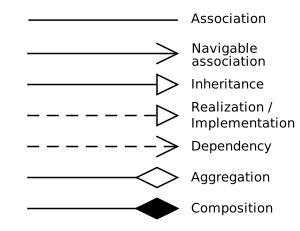
The implementation/realisation of an interface by an object. The arrow points the interface.
In case it is an external interface, the lollipop 🍭 notation is used.
Connects the sub-type to the super-type class, and reflects the extends keyword in Java.
The arrow points the super-type.
A dependency represents a unidirectional relationship between two classes, implying that the change of functionality of one may cause side effects in the second.
An association represents the relationship between two objects of equal magnitude. It can be both unidirectional and bidirectional (in that case no arrowheads are used). An example of bidirectional association can be Flight – Plane.
An aggregation represents the "has" relationship between two objects. It is a stronger relationship than the association. It is generally used for objects that are collection of others. An example is Crew -> Pilot. It is to note that the Pilot can exist without being part of the Crew. The British Airline Pilots Association commends this statement.
A composition is a relationship representing an object being strictly part of another, that cannot exist separately. This is used to represent real-life relationships between things that cannot be separated, like an Engine being part of only a Plane. What's the matter with all these aeronautical examples? Did you want to be a pilot or something? Make up your mind, seriously.
Access modifiers let the developer chose the scope of methods and attributes.
Methods and attributes marked as private can be seen only by implementations of the same class. It is useful to prevent uncontrolled access to class-specific methods and attributes.
Methods and attributes that have no visibility modifiers explicitly declared, are treated as package-private, and they are visible only by classes in the same package. It can be used to share the access of methods and attributes only to a subsystem placed in a package.
Methods and attributes marked as protected are visible only by subclasses and classes in the same package. Why they are visible for classes in the same package remains a mystery to mankind.
Methods and attributes marked as public are globally visible. This access modifier should be used only for the API of your classes.
-
Primitive data types are basic types that can be stored in a CPU register. Integers, floats and characters are examples of primitive data types.
-
Compound or Composite data types are data types that can be constructed using primitive types and other compound types. Arrays, Struct and Classes are examples of compound data types.
| Type | bytes | bits |
|---|---|---|
| byte | 1 | 8 |
| short | 2 | 16 |
| int | 4 | 32 |
| long | 8 | 64 |
| Type | bytes | bits |
|---|---|---|
| float | 4 | 32 |
| double | 8 | 64 |
| Type | bytes | bits |
|---|---|---|
| char | 2 | 16 |
The size of a Boolean is not defined, and is left to the implementation of the Java Virtual Machine. After some digging around, it seems that the JVM treats a boolean as an integer (4 byte), because CPU are optimised for working with integers, but is able to pack an array of booleans to use 1 byte per element. Smart, innit?
In Java it possible to create classes and method that accepts a generic type instead of a specific one. For instance, a Collection is designed to work with every type, so an instance of collection is able to store an arbitrary data type. The following example shows how a generic class is implemented in Java.
/**
 * Generic Box class.
 * @param <T> the type of the value being boxed
 */
public class Box<T> {
    // T stands for "Type"
    private T t;

    public void set(T t) { this.t = t; }
    public T get() { return t; }
}
Note that it is not possible to store primitive data type as a generic, on the other hand you can to use one of the available wrapper classes.
Java offers a set of wrapper classes that contains primitives. They add a few utility methods as well.
| Primitive | Wrapper |
|---|---|
| boolean | Boolean |
| char | Character |
| byte | Byte |
| short | Short |
| int | Integer |
| long | Long |
| float | Float |
| double | Double |
Additionally, Java compilers automatically box the generic to the wrapper class, and vice versa (unbox).
For instance, thw following will compile successfully:
class test {
  public static void main(String args[]){
     // Boxing
     int a = 42;
     Integer b = a;

     b = 40 + 2;

     // Unboxing
     int c = b;

     c = b - 2;
  }
}
Santa's elves could use some wrapper classes too! 🎁
A collection is an Abstract Data Type that contains elements of the same type. The order in which the elements are returned is not guaranteed to be the same in which the collection was populated.
An array is a contiguous chunk of memory containing a directly indexed collection of objects of the same type. The position is memory is calculated multiplying the size of the element by the index and summed with the index of the first element in the array. Nearly all programming languages offer native support for arrays. Their size is defined at cannot change dynamically. On the other hand indexed access is very fast and does not depend on the size of the array. Adding an element mid-way or deleting an element causes the rest of the elements to be shuffled.
A list is an Abstract Data Type that represents a countable collection of ordered elements of the same type.
An Array List is a data structure that is meant to work like a standard array, i.e. offering indexed access, but with dynamic allocation, removing the limitation of the fixed size. It offers very good performances when reading and appending, but removing an element or inserting mid-way requires all the other elements to be shuffled.
A linked list is an ordered Abstract Data Type that has no indexed access, but every node has a reference to the next element. A train basically, choo-choo!. The first element of the linked list is called head. The last element is called tail, and usually points to null in most of the implementations. Reaching a given element in the linked linked requires to traverse the whole structure until that point, but removing and or adding an element is very quick, because only one pointer manipulation is required. They are generally less efficient than arrays on reading, but performs better if there are a lot of insertions and deletions.

A queue is an ordered data structure where it is only possible to add an element at the bottom of the structure (enqueue) and remove one from the top (dequeue). This makes the Queue a First-In-First-Out (FIFO). Often a peek operation is added to check the element on top without removing it. More or less like when you queue to get on a bus. Unless you live in Italy, in that case is more like a traversing a tree or something.

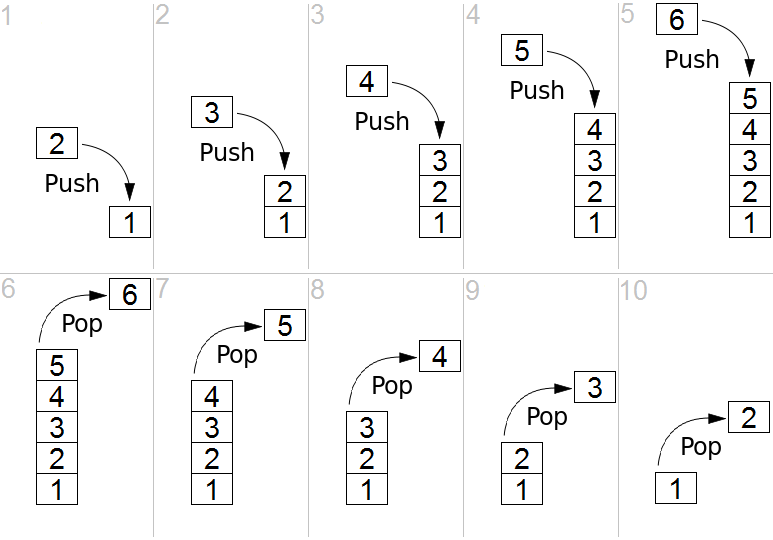
A stack is an ordered data structure where it is only possible to add an element at the top of the structure (push) and removing one fro the top of the stack (pop). This makes the Stack a First-In-Last-Out (FILO). Often a peek operation is added to check the element on top without removing it. Basically a stack of pancakes 🥞.
A set is an Abstract Data Type that can store unique value without a particular order. More or less like a set of cards 🃏. They represent the mathematical concept of a set, and as such have the following mathematical operations:
- Union - Joins two Sets.

- Intersection - Returns the elements that are present in both Sets.
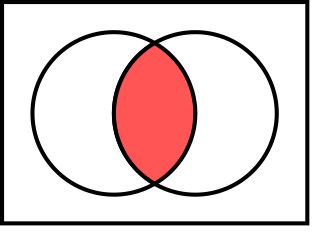
- Difference - Returns the elements in B that are not in A.
- Subset - A predicate that tests whether all the elements in A are in B.
A tree is an Abstract Data Type somewhat similar to a linked list, but has more than one node element and they are called children. The starting element is called root. A node with no children is called leaf. Not sure whether we're talking about computer science or botany. Each node can have just one parent.
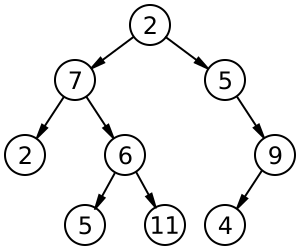
They are particularly useful for storing hierarchic structures.
A Binary Search Tree (BST) is a specific tree structure used to store sorted data. The node to the left contains a smaller value than the current node, and the one on the right a bigger one. For such reason BST can only contain comparable values, and no duplicates. They are very efficient in searching, because they are designed to work well with the binary search.
A BST might not be balanced, i.e. having most of the values on one side, and that degenerates the search performances down to linear search (a linked list can be thought as a degenerated tree). For such reason it's important to rebalance the BST to maximise the benefits. A Red-black tree, not only comes very handy for Christmas, but also self-balances itself when a new item is added to keep search always efficient. The red-black tree is not the only kind of self-balancing binary tree, but it's the only with a fancy name easy to remember.
A map, also known as associative array, symbol table or dictionary, is an Abstract Data Type composed of a collection of (key, values) pairs. Instead of using a numeric index, like an array, you can access the value using a key of generic type.
An Hash Map is an implementation of a Map that uses an hash algorithm to convert the key into a numerical index to be used in an array, that will ultimately store the data. Each element of the array contains a an array of buckets, because the hash function may produce collisions.
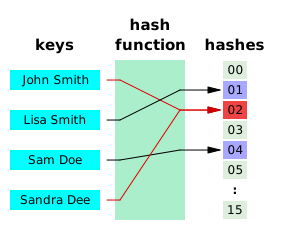
An hash function is a function capable of converting data of arbitrary size to a data of fixed size. One of the most famous hashing function is md5. These are some examples of strings and their md5 hash.
Hello World     b10a8db164e0754105b7a99be72e3fe5
Hello World!    ed076287532e86365e841e92bfc50d8c
Hillu Wirld!    ab14b509ca8337b71a17e5d8a41b92da
42              a1d0c6e83f027327d8461063f4ac58a6
As you can see, very similar strings have totally different hashes and that all the hashes have the same length, regardless of the original string.
Small note: md5 is not cryptographically secure. Do not use it for storing passwords or other sensitive information. Seriously, don't. Don't come cryin' to me if you do.
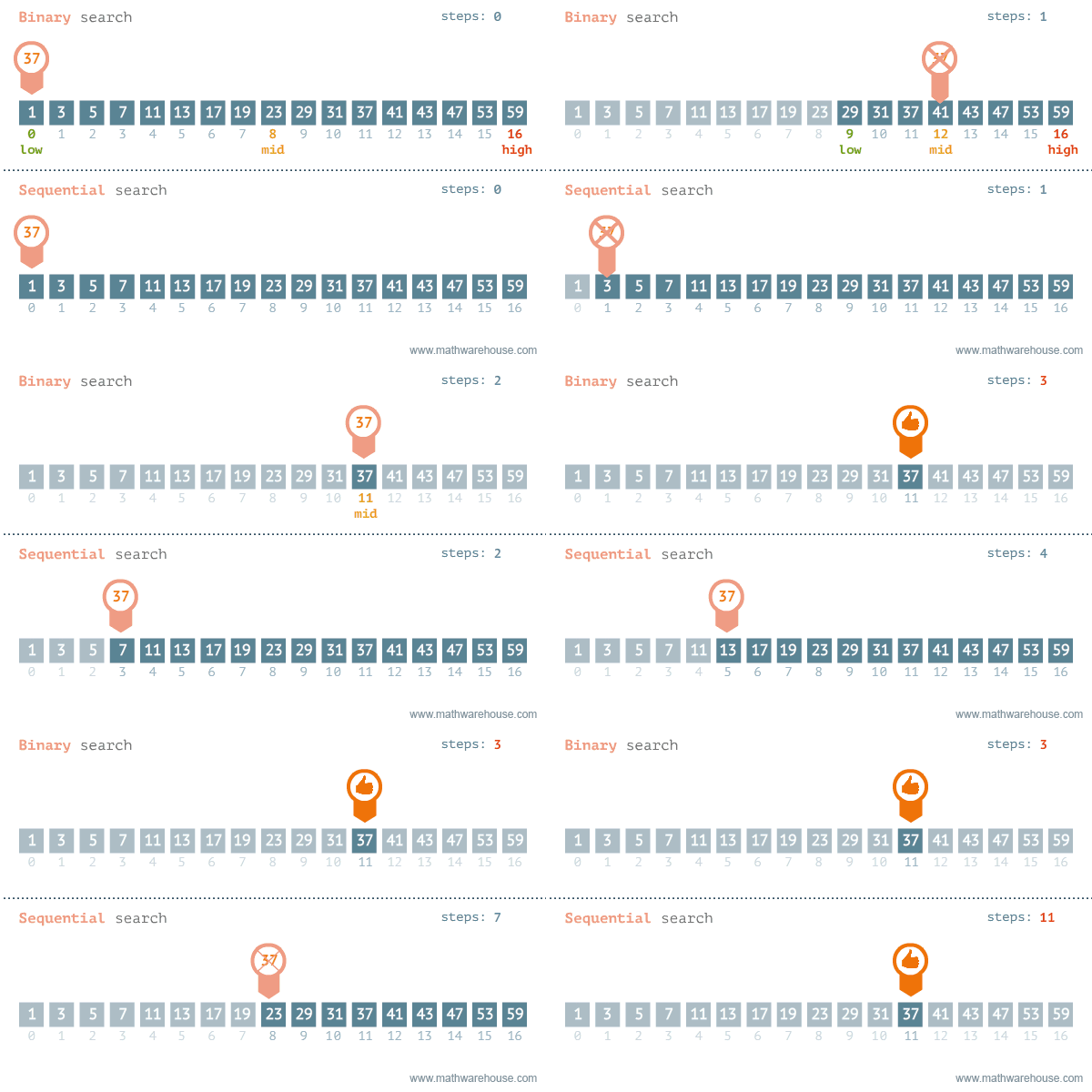
The strategy to find an element in a data set depends on whether the collection is sorted or not. If the collection is not sorted, the linear search is the only option. If the data is sorted, linear search is still viable, but binary search is way more efficient.
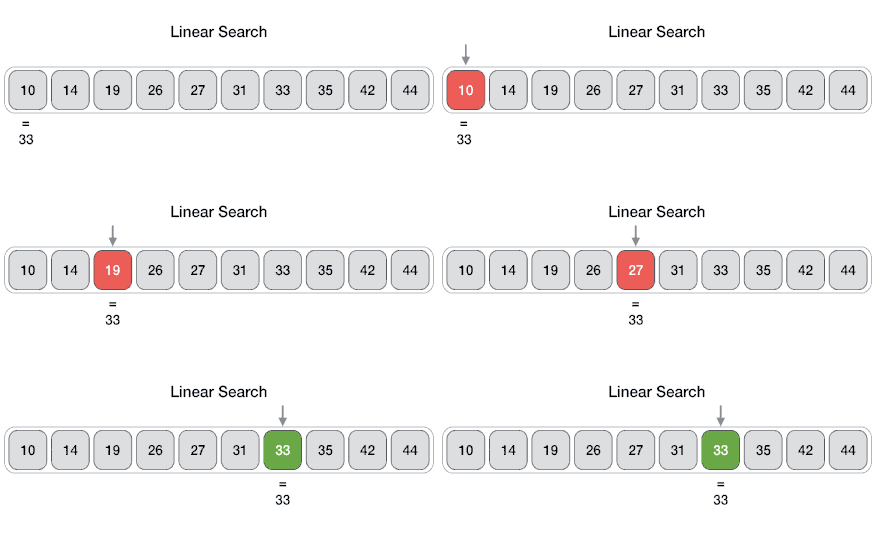
Linear search is an algorithm to find an element in a set, iterating throughout all the elements until the wanted element is found.
Binary search is an optimised search algorithm for sorted data. It starts the process at the middle of the set, and then splits the set in half guessing in what half the value would be, and repeats the process till the element is found (or not). Binary search is extremely efficient to work with binary search tree, where the middle point is be the root of the tree, making it one of the most search-efficient data structure, reason why it is at the core of most database systems.
The classical example for binary search is looking for a name in the phone-book. You can either start looking from the first page until you find it, in that case you would using linear search (and you probably are the village idiot), or you can open the book at the middle, and assuming you know the alphabet, evaluate whether the name is in the right or in the left side. Then split the block again in half and chose the right or the left and so on until you find the right page. It's indeed a shame nobody is using actual phone-books anymore, and this example will soon be meaningless.
As discussed when talking about search, having a sorted set of values, can dramatically improve search performances. Finding the most efficient sorting algorithm is still an open field in computing, mainly because different algorithm performs differently with sorted, almost-sorted, reverse-sorted, duplicate and random data, and because of the accidental deaths caused by alcohol-driven arguments between computer scientists. Some algorithms (notably the merge sort) are stable, i.e. elements with the same key retain the same relative order, while others (most) are unstable.
Consider this list of words that needs to be sorted lexicographically (read alphabetically if you don't know what lexo-thing means) based on their first letter.
peach
straw
apple
spork
This would be a stable sorting (note straw before spork):
apple
peach
straw
spork
... while this would not: (note straw after spork)
apple
peach
spork
straw
Both cases are sorted according to the their first letter, in the stable sorting the relative order between elements with the same letter is retained. I still don't know why you'd want that so desperately, but who am I to disagree? I travel the world an the seven seas. Sorting dreams are made of this... ♫
Accounted among one the worse banes of humanity sent by the flying-spaghetti-monster, the bubble sort is a very inefficient sorting algorithm that sorts two adjacent elements of the set at a time (bubble) until there are no more bubble swaps. Despite being very inefficient, is quicker than other more sophisticated algorithm when sorting almost-ordered sets. Now, do humanity a favor, and forget it exists, thank you.
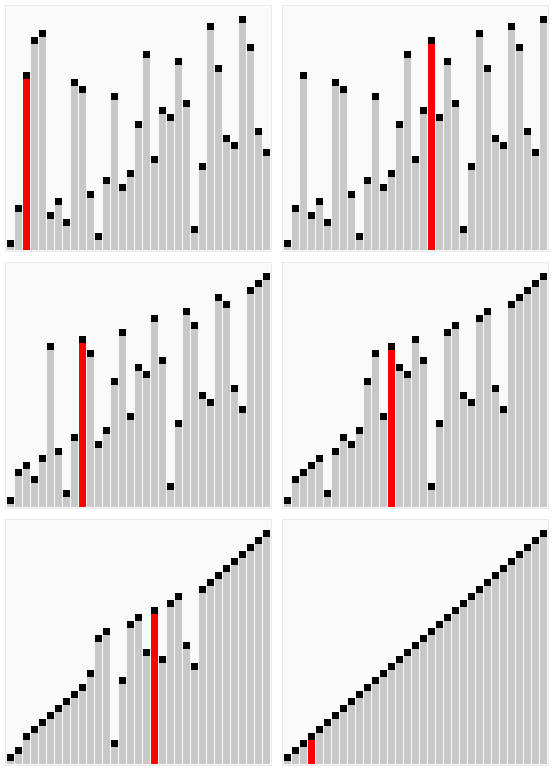
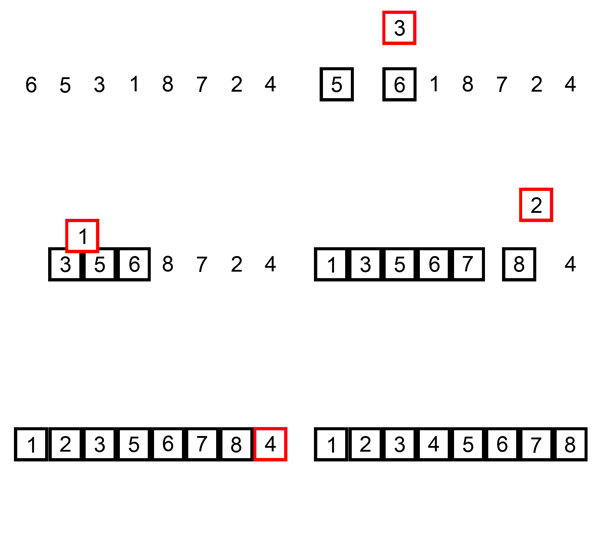
Insertion sort is a sorting algorithm that sorts a collection placing (inserting) the value in its final position. It involves a lot swaps in the array, because it's constantly pushing most of the elements to insert the current one in the correct position. It is similar to the way most of people sort playing cards in their hand, pick every card from left to right, and place it where it should be.
Selection sort is an in-place sorting algorithm that divides the array in two portion, a part already sorted and one still to sort. The algorithm finds the smallest number (hence selection) in the array and places it a the beginning, then shrinks the array by one (because the leftmost first value is already sorted) and does the same on smaller portion recursively until the section to sort is just one element. It reduces the number of swaps, it is easy to implement, but in general is not a very efficient sorting algorithm.
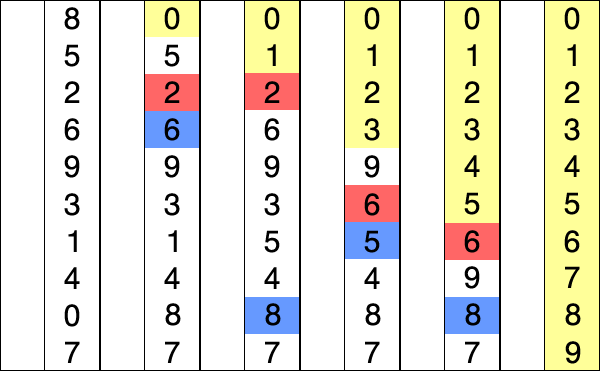
Shell sort seems to be a very stupid idea. With that in mind, the Shell sort is a sorting algorithm that claims to be an improvement of the bubble sort, that instead of comparing adjacent elements it compare element at a given gap and swaps them, then reducing the size of the gap, till it converges to a normal bubble-sort (gap = 1). It seems to have decent performances on semi-sorted data.

Quick sort is an optimised general-purpose sorting algorithm. It works in 3 steps:
- It chooses an element called pivot.
- Reorders the array so that all the elements smaller than the pivot are on one side (partition).
- Recursively applies the steps above in the two partitions.
When efficiently implemented it is one of the fastest sorting algorithm.

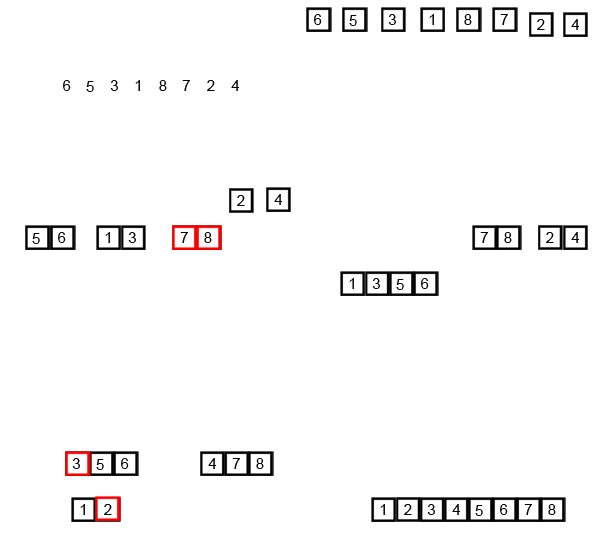
Merge sort is a sorting algorithm that:
- Splits the collection into sub-lists containing just one element;
- Merges the sub-lists in order;
- Recursively merges the sorted sub-lists until there is only one sorted list.
The merge sort if very efficient, but takes a lot of memory, because it needs to create a lot of sub-lists. On the other hand, it is very easy to parallelize, hence it makes full use of modern computer's multithreading capabilities.
- Static - Static allocation prepares the memory for your variables when the program starts. The size is fixed when the program is created. It applies to global variables, file scope variables, and variables qualified with static defined inside functions.
- Automatic - Automatic allocation occurs for (non-static) variables defined inside functions, and is usually stored on the stack. You do not have to reserve extra memory using them, but on the other hand, have also limited control over the lifetime of this memory. E.g: automatic variables in a function are only there until the function finishes.
- Dynamic - These variables are dynamically stored in the heap. You control the exact size and the lifetime of these memory locations, in languages without garbage collection (like C), and if you don't free it, you'll run into memory leaks, which may cause your application to crash, since at some point, it cannot allocate more memory. In Java you need to be careful not to leave any references that could interfere with the garbage collection, making it assume that you are still using them, and causing more memory leaks. Basically, you'll always create memory leaks. That's what stack overflow is for.
In computer science, there are two main ways of encoding a binary digit into an visual character: ASCII and Unicode.
The ASCII, abbreviation for American Standard Code for Information Interchange, is a character encoding standard, defined in 1963 (!) by the ANSI (American National Standards Institute). Is anybody sensing an elevate rate of America patriotism here, or is it just me? Anyways, it uses 7 bits than it can encode 128 characters:
- Digits from 0 to 9
- Lowercase and uppercase Latin letters
- Basic punctuation symbols
- A space
- Various non-printable characters and control symbols
Despite being still very widespread, this encoding is slowly being abandoned for the lack characters used in other languages.
Unicode is a character encoding standard, dated to 1987, that aims to encode all the languages scripts in the world. Now that they are pretty much done with that, even the historical ones, they just keep on adding new useless emojis. 🛴
The Unicode itself does not specify how many bytes it needs, although its current range can fit in 4 bytes, and it's left to the implementation specifications. In all Unicode implementations, the first 128 characters are the ASCII characters for retro-compatibility reasons.
The most common Unicode encoding is UTF-8, that uses just 1 byte (8 bits, hence UTF-8) for characters in the range of ASCII, and is so widespread because it has the same size of a plain ol' ASCII character. It can expand up to 4 bytes in succession, to handle Asian characters and emojis. Keep that in mind next time you'll use an emoji. UTF-8 is the standard encoding for the World Wide Web, and is used for HTML/XML, emails, communication protocols and so on.
Java internally uses UTF-16, a 2 bytes encoding of the Unicode standard. UTF-16 can expand itself to have other 2 bytes in succession to represents all the other less-used characters in the Unicode range.
There is also a UTF-32 encoding, that uses 4 bytes, and differently from the other versions, it's a fixed length encoding. The main disadvantage is that it takes four times more space than UTF-8 with no difference in encoded range.
It's important to note that all the encodings above support the whole range (expanding when necessary), the only difference is in their minimum size.
At the time of writing, the Unicode v9.0 contains 128,237 characters.
Coming soon...
- Lossy vs Lossless
- Image
- Audio
- Video
The key feature of the Agile Methodologies is that they bring the development early on in the process, to create evolutionary prototype, that help fixing the requirements with the client, through cooperative planning. For such reason it is an iterative and incremental** process.
The Unified Process is an iterative and incremental systems development life cycle based on Agile, with an high focus on the project risks. All artifacts of the Unified Process are optional and it can be tailored for the project. The most important artifact in the Unified Process are the Use Case Diagram, making them the central point of the development process.
There are four iterative phases in the Unified Process:
- Inception
- Feasibility evaluation
- Risks assessment
- Top-level use case diagram
- Shortest phase
- Elaboration
- Full use cases driagram
- Design core features
- Creation of:
- Domain Model
- Design Model
- Data Model
- UI Prototypes
- Construction
- Coding
- One release per iteration
- Longest phase
- Transition
- Deployment
- Client feedback
- User training
These phases are repeated for each iteration until the release of the full version.
On the contrary, sequential development goes through one phase only once during the whole life cycle of the system.