A fast and beautiful CLI tool to fetch and display Minecraft server status.
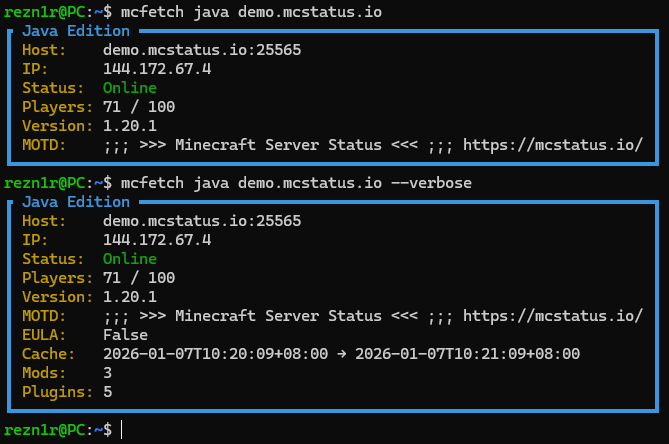
- Support for both Java and Bedrock editions
- Beautiful TUI output
- Verbose mode for detailed server information
- Single binary, no dependencies required
Windows (PowerShell):
irm https://raw.githubusercontent.com/Rezn1r/mcfetch/main/installer.ps1 | iexLinux/macOS:
curl -sSL https://raw.githubusercontent.com/Rezn1r/mcfetch/main/installer.sh | bashgit clone https://github.com/Rezn1r/mcfetch.git
cd mcfetch
go build -o mcfetchmcfetch <java|bedrock> <host> [port] [flags]<edition>: Server edition -javaorbedrock<host>: Server hostname or IP address[port]: Server port (optional, uses edition default if omitted)
--verbose: Display extra details (EULA, cache, mods, plugins, SRV records)--dry-run: Show what would be fetched without making API calls--version: Print version information and exit--no-color: Disable colorized output--update: Update mcfetch to the latest release--uninstall: Uninstall mcfetch from this system
Fetch Java server status (uses default port 25565):
mcfetch java donutsmp.netFetch Bedrock server status with custom port:
mcfetch bedrock demo.mcfetch.io 19132Verbose output with extra details:
mcfetch java donutsmp.net --verboseClean output without colors:
mcfetch java donutsmp.net --no-colorTest without making API call:
mcfetch java donutsmp.net --dry-runCombine multiple flags:
mcfetch bedrock play.example.com 19132 --verbose --no-colorWith --verbose, additional information is displayed:
- IP address
- EULA status
- Cache timestamps
- Number of mods
- Number of plugins
- SRV record (if available)
- Go 1.21 or higher (for building from source)
- box-cli-maker - Terminal box styling
- fatih/color - Color output
- go-mcstatus - Minecraft server status API
MIT License - see LICENSE file for details.
Contributions are welcome! Feel free to open issues or submit pull requests.
- Powered by mcstatus.io API