
Explain an existing chart, diagram, or interface without rebuilding it.
Website · Try placement · Try editing · Documentation · Support development


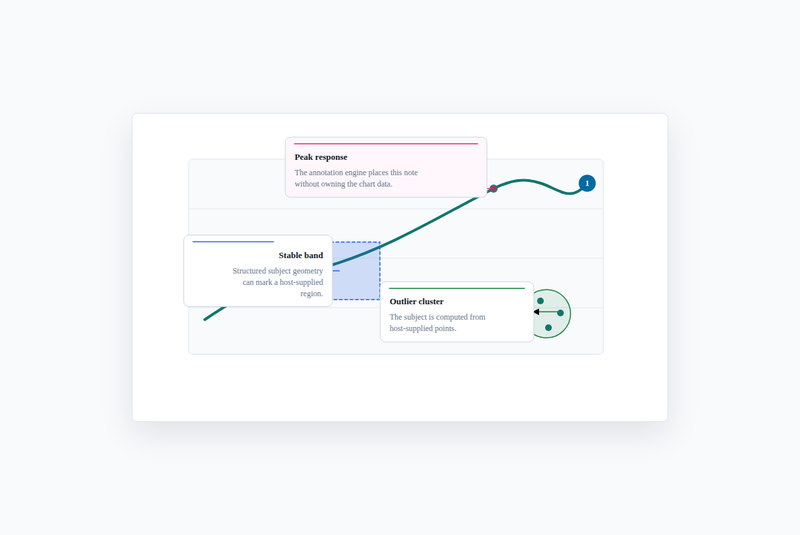
@ponchia/annotations is a headless TypeScript engine for explanatory notes.
Your application supplies points, boxes, paths, or rendered host geometry;
the engine places notes and connectors around it. Render the result as SVG
or through the optional React layer.
It does not render charts or provide a design system. Your app owns graph layout, state, and persistence. For a single fixed label or tooltip, your chart library may already be enough.
npm install @ponchia/annotationsES modules only; the root import is DOM-free with no runtime dependencies.
React and adapter peer packages are optional. See compatibility
for tested versions. The command installs the latest published stable release.
For an exact version, use the version chooser
and its matching release documentation. These docs and demos follow main;
they can be ahead of npm. Upgrading from 0.6?
In a TypeScript browser app with CSS imports, put the code below in main.ts.
To try it in a new project, use Node 22.12.0 or newer:
mkdir annotation-demo
cd annotation-demo
npm init -y
npm install @ponchia/annotations
npm install --save-dev vite@8
Create index.html:
<!doctype html>
<html lang="en">
  <head>
    <meta charset="UTF-8" />
    <meta name="viewport" content="width=device-width, initial-scale=1" />
    <title>My first annotation</title>
    <link rel="icon" href="data:," />
  </head>
  <body>
    <script type="module" src="/main.ts"></script>
  </body>
</html>
Create main.ts beside it:
import {
  resolveAnnotationLayout,
  renderAnnotationsSvg,
  type Annotation
} from '@ponchia/annotations';
import '@ponchia/annotations/bronto.css';

const annotations: Annotation[] = [{
  id: 'peak',
  anchor: { type: 'point', point: { x: 60, y: 120 } },
  note: { title: 'Peak response', body: 'An explanation attached to this point.' },
  placement: { side: 'right' }
}];

const layout = resolveAnnotationLayout({
  annotations,
  bounds: { x: 0, y: 0, width: 400, height: 240 },
  padding: 16
});

const container = document.createElement('div');
container.style.maxWidth = '640px';
container.style.fontFamily = 'system-ui, sans-serif';
container.style.aspectRatio = '400 / 240';
container.innerHTML = renderAnnotationsSvg(layout, {
  title: 'An annotated point',
  markerIdPrefix: 'first-annotation'
});
document.body.append(container);
Run npx vite --host 127.0.0.1 and open the printed URL. You should see a
Peak response note and connector. The point coordinates stand in for the
geometry your chart would supply. Continue with coordinate basics
or attach a note to an existing surface.
Use AnnotationLayer from @ponchia/annotations/react with your application's
react and react-dom. Start with the complete component
or the rendering and editing guide. The
interactive demo
shows host-owned editing, undo/redo, and JSON import/export.
Choose only the entry point you need. Host libraries are not imported by the core.
| Existing surface | Import | Runnable source |
|---|---|---|
| SVG / host geometry | @ponchia/annotations |
SVG |
| React | @ponchia/annotations/react |
React |
| DOM / report regions | @ponchia/annotations/dom |
DOM |
| Vega / Vega-Lite | @ponchia/annotations/vega |
Vega |
| Mermaid | @ponchia/annotations/mermaid |
Mermaid |
| D2 | @ponchia/annotations/d2 |
D2 |
| React Flow | @ponchia/annotations/react-flow |
React Flow |
The adapter chooser explains where each adapter gets its geometry and when to measure it.
Layout and geometry · Presets · Styling · Troubleshooting · API reference · All guides
The example catalog has clone-and-run instructions and every demo's source. No account, API key, or backend is needed.
- Placement scores candidates; crowded notes can still overlap. Reduce notes or position them manually when the surface cannot fit them.
- Dense layouts can be expensive. Incremental layout is experimental; Worker scheduling belongs to the host.
- Anchors, host transforms, and measured text must share a coordinate system. Check accessibility and API stability before shipping.
Contributing covers setup and pull requests; verification and the completion audit describe checks and their evidence. Use Support for questions and Security for private vulnerability reports. See Governance for project decisions and the Code of Conduct for participation expectations.
Maintained by Zeno Trevisan / Ponchia. Support development on Ko-fi; see Funding.
The subject / connector / note grammar is directly inspired by Susie Lu's d3-annotation and react-annotation. This is an independent DOM-free TypeScript implementation, not a wrapper, vendor copy, or drop-in replacement for either library.
BrontoUI is an optional visual companion, not a runtime dependency. MIT licensed.
The documentation website uses cookie-free Cloudflare Web Analytics for aggregate page views and performance. The npm package, standalone examples, and local development contain no analytics. See Cloudflare's privacy policy.