
nanopath is a super lean experimental harness for training tile-level computational pathology foundation models, inspired by nanochat. It trains on up to 1,000,000 TCGA tile presentations on a single GPU and covers the full pretraining pipeline using the public TCGA dataset (12k WSIs) and built-in downstream probes spanning classification, segmentation, slide-level mutation/progression, survival, and robustness. The goal is to easily explore and iterate on research directions to see what works best on small-scale, then scale up the best performing training recipes with more data and larger compute.
This repository is intentionally made to be compatible with autoresearch-style pursuits, and we even have a live autoresearch-style plot in Leaderboard. Nanopath models train until the next full batch would exceed the 1,000,000 tile-presentation cap or until the run reaches the 1e18-FLOP cap.
Want to get involved? Join us in the MedARC Discord (find us in #path-fm)!
Install uv first if you don't have it, then:
git clone https://github.com/MedARC-AI/nanopath.git && cd nanopath
uv sync && source .venv/bin/activate
wandb login  # optional; set WANDB_MODE=offline to keep W&B local

# download pretraining & probe datasets & DINOv2 pretrained ckpt
python prepare.py download=True

# smoke test: very short training, then probe evals to ensure no errors
sbatch submit/train_1gpu.sbatch configs/smoke.yaml
# or directly on a GPU machine: python train.py configs/smoke.yaml

# train and evaluate the current main nanopath recipe
RUN_DIR=/data/$USER/nanopath/main/my-run
sbatch submit/train_1gpu.sbatch configs/main.yaml output_dir=$RUN_DIR
# or directly on a GPU machine: python train.py configs/main.yaml output_dir=$RUN_DIR

# publish a completed full run to the live labless plot
# the submitter will ask you to sign in with GitHub in a browser
./labless/submit_to_labless.py output_dir=$RUN_DIR run_name=kde-crops notes="what changed"
pyproject.toml pins torch / torchvision against the CUDA 12.9 wheel index. If your GPU/driver needs a different CUDA build, edit the torch and torchvision lines in pyproject.toml before uv sync.
A successful model training prints periodic train lines, appends metrics to metrics.jsonl, and writes the final comparison artifact to summary.json. configs/smoke.yaml is simply meant to pretrain briefly and then run the fixed downstream probe suite to ensure everything works without errors.
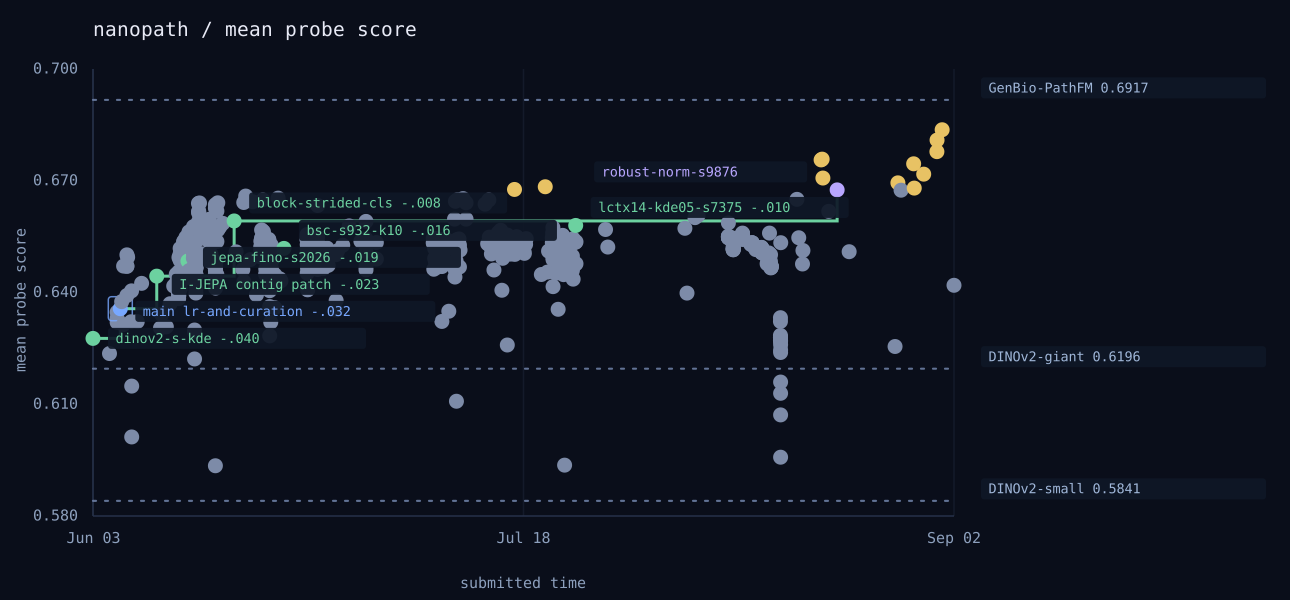
Score is final mean_probe_score, the average of linear, knn, 16-shot, segmentation, progression, mutation, survival, and robustness. These columns summarize a 12-dataset suite derived from THUNDER and PathoBench, with modifications to keep single-GPU evaluation lightweight. See benchmarking/README.md for more information.
| # | Description | final score | linear | knn | 16-shot | segmentation | progression | mutation | survival | robustness | Contributors |
|---|---|---|---|---|---|---|---|---|---|---|---|
| 1 | DINOv2-small/14-reg trained on TCGA w KDE | 0.6164 | 0.7550 | 0.6839 | 0.5890 | 0.3161 | 0.6418 | 0.5994 | 0.4929 | 0.8531 | @PaulScotti |
| # | Name | Description | final score | linear | knn | 16-shot | segmentation | progression | mutation | survival | robustness |
|---|---|---|---|---|---|---|---|---|---|---|---|
| 1 | GenBio-PathFM | GenBio-PathFM ViT-G/16 | 0.6818 | 0.8076 | 0.7626 | 0.6970 | 0.3252 | 0.7680 | 0.6375 | 0.5156 | 0.9412 |
| 2 | H-optimus-0 | H-optimus-0 ViT-G/14-reg | 0.6703 | 0.7995 | 0.7676 | 0.6931 | 0.3244 | 0.7004 | 0.6584 | 0.5266 | 0.8926 |
| 3 | UNI-2-h | MahmoodLab UNI-2-h ViT-H/14 | 0.6680 | 0.7910 | 0.7547 | 0.6961 | 0.3233 | 0.7330 | 0.6463 | 0.5362 | 0.8637 |
| 4 | EXAONE-Path-2.5 | LG AI Research EXAONE-Path-2.5 ViT-B/14 | 0.6537 | 0.8028 | 0.7582 | 0.6872 | 0.2820 | 0.6859 | 0.6494 | 0.5229 | 0.8409 |
| 5 | Virchow | Paige/Microsoft Virchow ViT-H/14 | 0.6444 | 0.7915 | 0.7220 | 0.6114 | 0.3156 | 0.6689 | 0.6350 | 0.5112 | 0.8994 |
| 6 | GigaPath | Prov-GigaPath tile encoder ViT-G/16 | 0.6369 | 0.7977 | 0.7149 | 0.6537 | 0.3212 | 0.7041 | 0.6262 | 0.5322 | 0.7448 |
| 7 | Midnight-12K | Kaiko Midnight-12K ViT-G/14 | 0.6130 | 0.7684 | 0.6807 | 0.5758 | 0.2664 | 0.6840 | 0.6087 | 0.5375 | 0.7823 |
| 8 | DINOv2-giant | Untouched Meta dinov2_vitg14_reg |
0.6079 | 0.7689 | 0.7208 | 0.5834 | 0.2844 | 0.6000 | 0.6174 | 0.4896 | 0.7985 |
| 9 | OpenMidnight | OpenMidnight ViT-G/14-reg | 0.6024 | 0.7926 | 0.7135 | 0.4335 | 0.3099 | 0.6993 | 0.6091 | 0.5175 | 0.7438 |
| 10 | DINOv2-small | Untouched Meta dinov2_vits14_reg |
0.5819 | 0.6968 | 0.6249 | 0.5834 | 0.2663 | 0.5827 | 0.6225 | 0.5244 | 0.7543 |
| 11 | DINOv2-small random | Randomized weights dinov2_vits14_reg |
0.4629 | 0.5282 | 0.5066 | 0.4139 | 0.2673 | 0.6922 | 0.5648 | 0.5399 | 0.1905 |
Baseline rows are frozen reference checkpoints evaluated with the same probe suite. They help calibrate the plot, but pathology-specific baselines are not valid initialization points for nanopath leaderboard submissions. The reference scripts live in baselines/; run Virchow and GigaPath separately with baselines/virchow_baseline.py and baselines/gigapath_baseline.py.
Labless is the public run ledger and live plot for nanopath. You do not need a Labless password or a pull request to make a leaderboard claim; the submitter connects your submission to your GitHub identity through GitHub's no-scope device sign-in flow.
configs/main.yaml is the current nanopath main-branch training recipe. A normal submission is:
RUN_DIR=/data/$USER/nanopath/main/my-run
./labless/submit_to_labless.py output_dir=$RUN_DIR run_name=kde-crops notes="what changed and why"
The pipeline is:
- Train a completed full run with
configs/main.yamlor a copiedconfigs/*.yamlthat keeps the locked probe suite intact. - Let
train.pyfinish the final probe. The run directory must containsummary.json,metrics.jsonl, and the source snapshot written at launch underlabless_source/. - Run
./labless/submit_to_labless.py ...from the repo root. It writeslabless_submission.json, checks the run caps and locked benchmark surface, then prints a GitHub device-login URL and one-time code. - Open the URL on any machine, sign in to GitHub, and enter the code. Labless records that verified GitHub login as the contributor, posts the run to
api.labless.dev, and shows it aspendinguntil maintainer validation.
Public full-run submissions must satisfy:
summary.max_train_samples == 1000000summary.tile_presentations <= 1000000summary.max_train_flops == 1e18- final
mean_probe_score/final_probe_scoreis present - no saved-source changes to
probe.pyor anything underbenchmarking/ - no locked probe config changes except local
probe.dataset_roots
The run_name is the short label shown next to your dot on the Labless plot; keep it under 20 characters and make it describe what changed. Short smoke-sized runs, failed runs, and runs missing the saved source snapshot stay local. Each verified GitHub login can submit at most 10 runs per 24 hours.
To top the leaderboard you must beat the highest validated Labless run on mean_probe_score by at least 0.006. Submit the run to labless; that public submission is the leaderboard claim, with the saved source snapshot, changed files, notes, metrics, hardware, and optional W&B link attached. Public submissions have no wall-clock limit, so train on whatever hardware you have access to. @PaulScotti will inspect promising submissions, independently rerun candidates that pass this threshold on maintainer compute with a different rng seed, and validate them on Labless if training completes within 2 hours and the rerun still improves by at least 0.006. This different-rng replication is intended to weed out lucky runs before validation. If the candidate code is pushed to nanopath main, Labless marks that run separately as main. You don't need an H100 or a PR to submit; labless handles the public record and maintainer validation.
Code-cleanup PRs are still welcome when they simplify the codebase without changing benchmark performance on the main recipe. Leaderboard claims should go through labless instead of a pull request.
Anything not explicitly fixed below (e.g., model architecture, training objective, optimizer, lr scheduler, data augmentations, masking, dataset curation) is fair game for modification.
Training ends at 1,000,000 tile-presentation samples OR 1e18 total FLOPs
Every leaderboard run is bounded by two possible caps:
train.max_train_samples≤ 1,000,000 tile presentations. A training sample is one source TCGA tile emitted as one dataloader item; if the same underlying tile is seen again later, that is another tile presentation. Teacher/student views, global/local crops, masks, or other augmentations derived from that tile do not multiply the sample count, though their compute still counts toward FLOPs.train.pynever starts a batch that would pushsummary.tile_presentationsover the cap.train.max_train_flops≤ 1e18 training FLOPs, measured directly viatorch.utils.flop_counter.FlopCounterModeon the first step (forward + backward + optimizer.step) and reused thereafter since per-step shapes are fixed. This counts everything that touches the GPU during a step (student backbone, EMA teacher forward, projection heads, masking, etc.).
The default LR, weight decay, teacher-temperature, freeze, and KDE schedules are keyed to train_flops / train.max_train_flops, not to tile presentations. With the current small model and augmentations, configs/main.yaml normally reaches the 1,000,000-tile sample cap at about 19% of the 1e18-FLOP budget, so these schedules intentionally stop early unless you change the caps or schedule fractions.
Wall time is logged for diagnostics and standardized reruns, but it is not a public-submission eligibility cap. Maintainer validation is separate: the submitted recipe must complete training on the maintainer's single 80 GB H100 within 2 hours. Intensive preprocessing before model training starts, such as tile extraction, data curation, metadata joins, indexing, or embedding generation, is allowed and is not counted as training time.
TCGA as the only tile source
- Every image tile used for training must be produced exclusively from the 12K TCGA WSIs. You can change tile extraction, filtering, sampling, curation, and preprocessing before the capped model-training run begins.
- Public non-tile information is fair game: metadata, clinical/genomic labels, text, ontologies, annotations, or other non-image-tile signals from any public source may be used however you want.
Probe evaluation must be untouched
- All of
probe.pyandbenchmarking/ - All probe config variables in
configs/main.yaml.
Pretrained models are OK only if not pathology-specific You can use any pretrained model however you want, including for initialization, teachers, data curation, or preprocessing, as long as it was not originally trained on pathology-related data. DINOv2 is allowed; H-optimus-0, OpenMidnight, and other pathology-trained checkpoints are not.
Submit completed full runs to the live tracker:
RUN_DIR=/data/$USER/nanopath/main/my-run
./labless/submit_to_labless.py output_dir=$RUN_DIR run_name=kde-crops notes="what changed and why"
The script reads summary.json and metrics.jsonl, reviews output_dir/labless_source rather than your current working tree, and posts the local payload in labless_submission.json after GitHub device sign-in succeeds. W&B can be online or offline; online runs add a public W&B link, while source review always comes from the local snapshot. The labless website, run log, and plot update automatically. See labless/README.md for the exact payload fields, dry-run mode, baseline submission notes, and validation policy.
Labless publishes the README-facing probe keys linear, knn, few_shot,
seg_jaccard, progression_auc, mutation_auc, survival_cindex, and
robustness.
train.py— main pretraining loopmodel.py— model architecture and training objectivesdataloader.py— TCGA tile loader and data augmentationsconfigs/{smoke,main}.yaml— training recipes (e.g., hyperparameters)
AGENTS.md— guidelines for design philosophy, coding rules, experiment discipline, cluster conventions, etc. Note this is Paul's personalAGENTS.mdfile and has instructions specific to our MedARC cluster—you should modify this file to suit your own setup!benchmarking/— supports probing/downstream evaluation.prepare.py— data prep: verify or download pretraining data + probe datasets + any pretrained weights.probe.py— downstream probes (KNN, few-shot, linear, segmentation, slide AUROC, survival, robustness).submit/train_1gpu.sbatch— SLURM launcher for single-GPU training.labless/submit_to_labless.py— package a run and post it to the live labless tracker.download_TCGA.sh— manual utility, run by hand if you want the full 12K TCGA open-access SVS slide set (~13 TB) for forking the tile-extraction recipe. Not invoked byprepare.pyand not needed for any standard training workflow.pyproject.toml+uv.lock— Python dependencies used byuv sync.
prepare.py prepares the necessary data for pretraining and downstream probing. By default it reads configs/main.yaml; pass a YAML path before the flag to prepare a different config, e.g. python prepare.py configs/smoke.yaml download=True. Flag download=True to fetch/prepare the configured datasets into the folders specified by the YAML; flag download=False to verify that all required paths are already populated.
On the MedARC cluster, the checked-in /data and /block paths are the intended populated shared defaults. On a fresh clone, prepare.py … download=True rewrites any missing or empty checked-in data/probe roots to point into nanopath/data/<name>, preserving comments and formatting. It also moves output_dir and wandb_dir into nanopath/data/ whenever a config's data roots are localized. The rewrite updates the selected config plus the checked-in configs/main.yaml and configs/smoke.yaml, so running prepare once still leaves both smoke and main directly runnable afterward. This happens even if the machine has a /data mount but lacks /data/nanopath_parquet. Populated shared roots are left unchanged. To force a different storage location, edit data.dataset_dir, probe.dataset_roots.*, project.output_dir, and project.wandb_dir to existing writable paths before downloading.
What download=True does
- TCGA tiles:
huggingface_hub.snapshot_download(filtered toshard-*.parquet) pulls the 200 parquet shards (~120 GB total,{path: string, jpeg: binary}rows with 64-row row groups) frommedarc/nanopathintodata.dataset_dir. - Probe datasets: for each empty configured root, fetches/unpacks and, where needed, pre-extracts the probe data. BRACS, BreaKHis, PCam, PanNuke, UCLA Lung, MHIST, CoNSeP, SurGen, and BoehmK PFS use the
medarc/nanopathprobe mirror for portable noninteractive setup; CPTAC-PDA OS downloads the official TCIA PathDB SVS files and builds its cache locally; PathoROB and MoNuSAC come from their official public sources. Before fetching BoehmK PFS, MHIST, or CoNSeP,prepare.pyprints that users must satisfy the official upstream form/access terms first. Slide-level probes cache 20x/512 tissue grids (tiles.parquet,surgen-*.parquet, orpatches.parquet) soprobe.pynever opens raw WSIs during training/probing; SurGen and BoehmK PFS stream deterministic raster-spaced sub-bags for runtime, while CPTAC-PDA OS embeds its full cached grid. - DINOv2 backbone weights:
torch.hub.load_state_dict_from_urlfetches the Meta checkpoint formodel.typefromdl.fbaipublicfiles.cominto~/.cache/torch/hub/checkpoints/.
Prerequisites
- ~120 GB free wherever
data.dataset_dirlives for the parquet shards (cluster default:/data/nanopath_parquet). - Probe data disk varies by suite. Expect that it might take a few hours for one-time downloading and preprocessing of all probe datasets.
prepare.py itself never touches raw SVS files—it always pulls the ready-made parquet shards from HF. If you want, however, you can download the full ~13 TB original SVS files from TCGA and pre-extract different tiles to pretrain on. Two-step workflow (decode SVS → JPEG dir + manifest, then pack into parquet shards):
# 1) Download the full 12K open-access TCGA SVS slide set (~13 TB).
bash download_TCGA.sh /data/TCGA 8

# 2) Decode + pack. prepare_tiles deterministically subsamples the sample list
#    to TARGET_TILE_COUNT (4M, hardcoded in prepare.py — bump it for a bigger
#    dataset) and writes JPEGs + manifest.txt under jpeg_dir; reruns are
#    resumable (existing JPEGs are EOF-validated and reused). pack_from_jpeg_dir
#    then walks the manifest, splits into NUM_SHARDS=200 chunks, and writes
#    shard-NNNNN.parquet files with 64-row row groups (the layout the
#    dataloader expects). Once it's done you can rm -rf the jpeg_dir.
python -c "
from pathlib import Path
from prepare import prepare_tiles, pack_from_jpeg_dir
jpeg_dir = Path('/data/$USER/nanopath/nanopath_jpegs_tmp')
prepare_tiles(Path('/data/TCGA/sample_dataset_30.txt'), jpeg_dir, split_seed=42)
pack_from_jpeg_dir(jpeg_dir, jpeg_dir / 'manifest.txt', Path('/data/$USER/nanopath/nanopath_parquet'))
"
Point data.dataset_dir at the packed parquet directory before training. To publish a new variant of the dataset, you can push the resulting shards to a fresh HF dataset repo and update HF_REPO_ID in prepare.py.
Smoke (short training + full probe):
sbatch submit/train_1gpu.sbatch configs/smoke.yaml
# or directly on a GPU machine: `python train.py configs/smoke.yaml`
Full main nanopath recipe:
sbatch submit/train_1gpu.sbatch configs/main.yaml
# or directly on a GPU machine: `python train.py configs/main.yaml`
configs/main.yaml is sized for an 80 GB H100 at train.batch_size: 128. On smaller cards you can set train.activation_checkpointing: true if you OOM. Smoke fits comfortably on any 24 GB+ GPU.
The /data- and /block-rooted defaults below are the MedARC cluster layout; prepare.py … download=True rewrites missing or empty data/probe defaults in the selected config plus configs/{main,smoke}.yaml to live under nanopath/data/ instead, and it localizes run outputs/W&B logs there too for those rewritten configs.
- run outputs:
project.output_dir(cluster default/data/$USER/nanopath/main/...; auto-localized defaultnanopath/data/main/...). Final probe results log tometrics.jsonl. - wandb:
project.wandb_dir(cluster default/data/$USER/nanopath/wandb; auto-localized defaultnanopath/data/wandb). - parquet tile shards:
data.dataset_dir(defaults to/data/nanopath_parquet). - probe datasets:
probe.dataset_roots(defaults to shared/block/...and/data/...paths on the MedARC cluster). - DINOv2 backbone weights:
~/.cache/torch/hub/checkpoints/for the selectedmodel.type. - SLURM logs:
slurm/<jobid>.{out,err}in the repo. - labless source snapshot:
project.output_dir/labless_source. - labless submission payload:
project.output_dir/labless_submission.json. - checkpoints: rolling
latest.ptwritten everytrain.save_everysteps underproject.output_dir, plus one final save at end of run.save_every: null(smoke) disables both; probes always get their own short-lived checkpoint regardless.
See the live labless nanopath log for submitted completed runs, including low-scoring results. Labless is the source of truth for experiment history so the record updates immediately when contributors submit runs.
Inspired by nanochat. The DINOv2 backbone weights are Meta checkpoints loaded by state-dict into our own clean ViT implementation. Tile-classification and segmentation probes follow the THUNDER benchmark; slide-level probes follow PathoBench.