
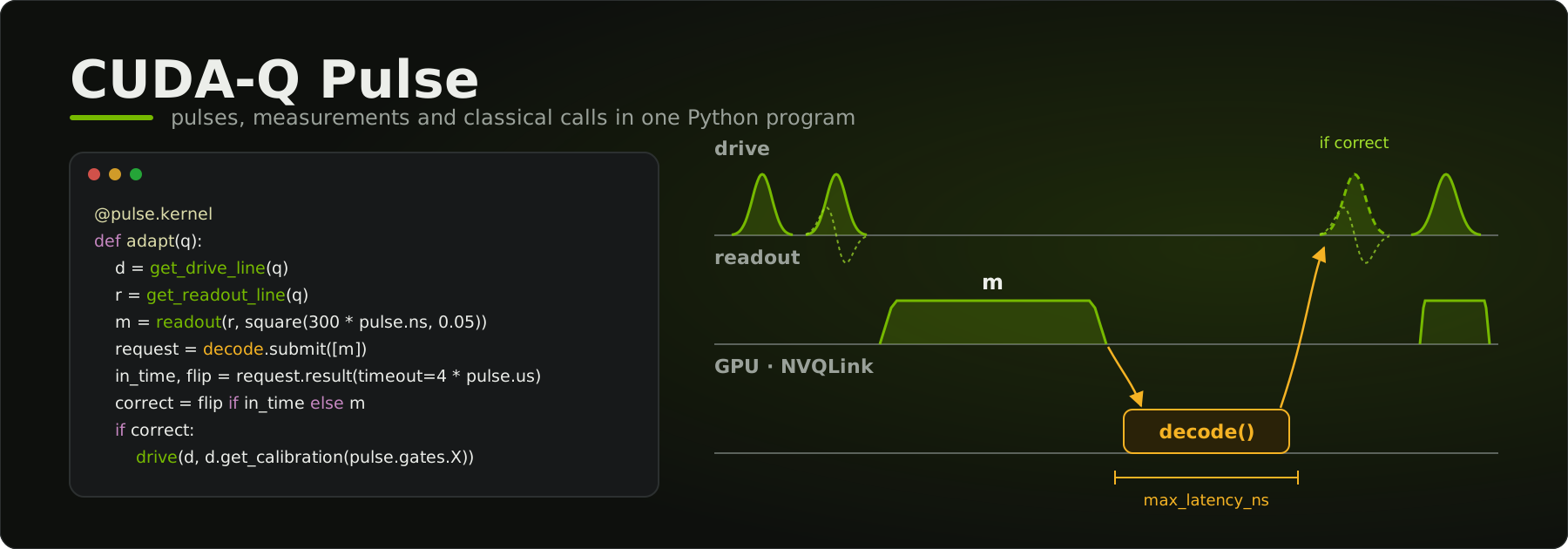
CUDA-Q Pulse (cudaq-pulse) puts the pulses, the measurements and the
classical calls between them in one Python program, compiled to open MLIR,
then simulated, emulated, or exported to your controller. One compiled
program, three destinations:
- Simulate it with
pulse.simulate: a NumPy reference on any machine, or NVIDIA cuDensityMat on a GPU (a preview), over the measurement outcomes, with the classical functions' Python bodies standing in for their services. - Emulate it with
classical.emulation.emulate: the program runs in virtual time against those services, with the request and answer bytes a controller would send, and reports the answers that come late. - Export it with
export_to_controller()to a controller backend, for a control system described as data and checked when the program compiles.
Underneath are a Python kernel DSL, the Pulse, Classical, QOp and
CuDensityMat MLIR dialects, and their compiler passes. cudaq-pulse does not
depend on CUDA-Q. The wheel contains its own statically linked MLIR, so pip
is the only installer you need.
Documentation: https://nvidia.github.io/cudaq-pulse/
Note
CUDA-Q Pulse is an early-stage research project. We are releasing it now because the pulse layer is where much of the open work in quantum control happens, and we want to build it in the open with the people who use it. It is under active development: expect bugs, incomplete features, and incompatible changes to the Python APIs, MLIR dialects and file formats between releases. It is not a supported CUDA-Q product feature. We invite you to try it with your own quantum systems and help shape its direction.
Install from PyPI; pip picks the wheel for your platform:
python -m venv .venv && source .venv/bin/activate

# Compiler and CPU simulation: compile kernels, inspect the MLIR, simulate
# with the NumPy reference, run cudaq-pulse-opt.
pip install cudaq-pulse

# Plus GPU simulation (Linux), with the CUDA 12 or CUDA 13 libraries.
pip install "cudaq-pulse[cu12]"
pip install "cudaq-pulse[cu13]"

# Check what was installed and whether it works.
python -m cudaq_pulse.doctorcudaq-pulse-opt, the MLIR driver, comes along automatically: it is in
cudaq-pulse-tools, a wheel of its own, one per platform for every Python,
which cudaq-pulse requires at the same version. Each release on the
GitHub releases page also
carries the wheels and the source distribution.
[gpu] is an alias for [cu12]. The cu12 and cu13 extras install into
the same directories, so install only one of them per environment.
| Platform | Python | What you get |
|---|---|---|
| Linux x86_64 and aarch64, glibc 2.28+ | 3.12+ | Compiler and CPU simulation; GPU simulation with [cu12] or [cu13] |
| macOS 11+ arm64 | 3.12+ | Compiler and CPU simulation |
GPU execution needs an NVIDIA GPU (compute capability 7.0 or newer) and a driver for the CUDA major you installed:
| Extra | Minimum Linux driver |
|---|---|
[cu12] (or [gpu]) |
525.60.13 |
[cu13] |
580 |
The driver is the only system requirement. The extras install cuDensityMat and the CUDA runtime libraries from PyPI, so no CUDA toolkit, cuQuantum SDK, or container is required.
Run python -m cudaq_pulse.doctor first. It prints the version, the wheel
platform, whether CPU simulation works, which CUDA extra is installed, each
GPU library with its path or load error, and the driver version and device
count. Without a CUDA extra it passes on CPU simulation alone and says how
to enable GPU simulation. With one installed, it exits non-zero if GPU
simulation does not work: a driver too old for the extra, both extras
installed, or a library that does not load.
Without a usable GPU, everything except GPU simulation still works, including
the CPU reference (pulse.simulate(..., backend="cpu"), the default). GPU
simulation fails with a specific error rather than degrading:
| Situation | Error raised by pulse.simulate(..., backend="gpu") |
|---|---|
| Wheel without GPU support (macOS, or a compiler-only source build) | GpuSupportNotBuiltError |
| GPU support built in, but no CUDA extra, both extras, or a library fails to load | GpuRuntimeLoadError |
| Libraries load, but no device, or the driver is too old | GpuDeviceUnavailableError |
All three derive from cudaq_pulse.runtime.GpuRuntimeError. The runtime
for CUDA 12 or 13 is chosen from the installed extra; set
CUDAQ_PULSE_CUDA=12 or CUDAQ_PULSE_CUDA=13 to choose it explicitly.
import cudaq_pulse as pulse

cal = {"duration": 32 * pulse.ns, "sigma": 8 * pulse.ns}


@pulse.kernel
def rabi_oscillation(qubit, amplitude: float):
    drive_line = get_drive_line(qubit)
    drive(drive_line, gaussian(cal["duration"], amplitude, cal["sigma"]))


qs = pulse.quantum_system("transmon_surface17")
qubit = qs.qudits[0]

result = pulse.simulate(rabi_oscillation, qubit, 0.5)  # NumPy reference, no GPU needed
print(f"P(1) = {result.level_population(1):.3f}")  # P(1) = 0.972
print(rabi_oscillation.lower(qubit, 0.5).mlir())  # the scheduled Pulse MLIR
pulse.simulate(kernel, *args) compiles the call for the quantum system of its
qudit handles, with frequencies from the quantum system, and evolves it; this
pulse leaves the qubit almost fully excited. kernel.lower(*args)
compiles the call without running it. Calling the
kernel, rabi_oscillation(qubit, 0.5), compiles and runs it in one step, and
pulse.compile(kernel) compiles ahead of the call. A float
parameter stays symbolic, so a sweep over it compiles once. The compiler
traces the Python kernel, builds Pulse dialect IR, applies the selected
transformations, and emits scheduled MLIR. The wheel also installs
cudaq-pulse-opt, the MLIR driver for the pulse dialects:
cudaq-pulse-opt --pulse-to-qop kernel.mlirThe user guide covers the kernel
model, operations, compilation, custom passes, and GPU execution.
examples/ has runnable programs, and
examples/custom_passes/ shows how to write
passes in Python and as C++ plugins.
Kernels can also call classical functions while the QPU runs
(@pulse.classical, fn.submit(...).result()): decoders, estimators or
calibration updates whose answers the same shot uses, scheduled with their
latency budget and simulated or emulated in virtual time. A compiled kernel
exports to an out-of-tree controller backend with
ScheduledKernel.export_to_controller(), and cudaq_pulse.backends finds the backends
installed beside cudaq-pulse; see the "Classical Calls at QPU Runtime" and
"Writing a Controller Backend" guides.
The tests live in this repository, not in the wheel. They import whichever
cudaq_pulse is installed, so they check exactly what you installed:
git clone https://github.com/NVIDIA/cudaq-pulse.git
cd cudaq-pulse
pip install --group test        # pytest, hypothesis, lit (pip 25.1+)

pytest tests -m "not gpu"       # any installation
pytest tests                    # GPU installations: also runs the GPU suite
Selecting the GPU tests on an installation that cannot run them stops pytest immediately with the reason, instead of skipping them.
See CONTRIBUTING.md. In short,
pip install ./packaging/cudaq-pulse-tools . from a clone builds the two
wheels, cudaq-pulse-tools and cudaq-pulse, locally against the pinned, checksum-verified MLIR
toolchain, which CMake downloads on supported platforms (or set MLIR_DIR to
your own MLIR 22 build). Nothing else is built from source. Each GitHub
release carries the wheels and the source distribution.
NOTICE AND DISCLAIMER: This software automatically retrieves, accesses or interacts with external materials. Those retrieved materials are not distributed with this software and are governed solely by separate terms, conditions and licenses. You are solely responsible for finding, reviewing and complying with all applicable terms, conditions, and licenses, and for verifying the security, integrity and suitability of any retrieved materials for your specific use case. This software is provided "AS IS", without warranty of any kind. The author makes no representations or warranties regarding any retrieved materials, and assumes no liability for any losses, damages, liabilities or legal consequences from your use or inability to use this software or any retrieved materials. Use this software and the retrieved materials at your own risk.
What installing and building retrieve:
- The optional GPU extras install NVIDIA packages from PyPI under NVIDIA's
own licenses.
[cu12](and[gpu], the same set) installs cudensitymat-cu12, nvidia-cuda-runtime-cu12, nvidia-cublas-cu12, nvidia-cusolver-cu12, nvidia-cusparse-cu12, nvidia-curand-cu12 and nvidia-nvjitlink-cu12;[cu13]installs cudensitymat-cu13 and the CUDA runtime and libraries through cuda-toolkit. - Building from source downloads the pinned LLVM/MLIR 22.1.8 toolchain
archive (Apache-2.0 WITH LLVM-exception) from this repository's
mlir-toolchain-22.1.8release. - pip and uv install the Python dependencies listed in
pyproject.toml.
- The compiler, dialects, lowering experiments, and CPU unit tests are the primary research surface.
- GPU evolution models transmons in per-qubit rotating frames, as qubits or
with any number of levels (including their anharmonicity). The quantum system's T1/T2
data, exchange couplings, residual ZZ terms, and calibrated drive-amplitude
scaling are supported. Programs that measure and branch on the result are
evolved between measurements as an exact ensemble over outcomes, on the GPU
or with a NumPy reference (
pulse.simulate). - GPU evolution supports the
rk1,rk2,rk4,magnus, andcrank_nicolsonintegrators. Waveform sums, differences, scaling, and negation are lowered exactly; products are sampled once per clock cycle. Envelopes from Python functions (custom) are sampled once per clock cycle while tracing. Observable evaluation, systems without a simulation model and unspecialized parameters are rejected explicitly by the execution lowering. - GPU numerical results are research regression coverage, with no production compatibility or accuracy commitment.
core/frontend/— Python DSL, compiler pipeline, quantum systems, and runtimecore/mlir/— Pulse, Classical,QOp, and CuDensityMat dialects, transformations, bindings, andcudaq-pulse-optcore/runtime/— cuDensityMat runtime library loaded by JIT-compiled codecmake/— dependency, Python staging, testing, and documentation modulespackaging/cudaq-pulse-tools/— thecudaq-pulse-toolswheel (cudaq-pulse-opt), built from this treetools/— MLIR toolchain build/fetch scripts and CI helperstest/— lit andFileCheckcompiler regression teststests/— pytest unit, workload, and GPU testsexamples/— pulse programming examplesdocs/— user, API, and architecture documentationbenchmarks/— compiler and simulation benchmarks
CONTRIBUTING.md covers building, testing and the versioning policy, SUPPORT.md where to ask for help, and CHANGELOG.md what changed in each release. Everyone taking part follows the Code of Conduct.
cudaq-pulse is licensed under the Apache License 2.0. The wheels also contain third-party software (LLVM and MLIR, nanobind, robin-map) under the licenses listed, with their texts, in THIRD_PARTY_NOTICES; the texts are also in LICENSES/.
Report security vulnerabilities to NVIDIA as described in SECURITY.md, not through GitHub issues.