A lightweight TypeScript library that adds a floating date indicator to chronological timelines while the user scrolls


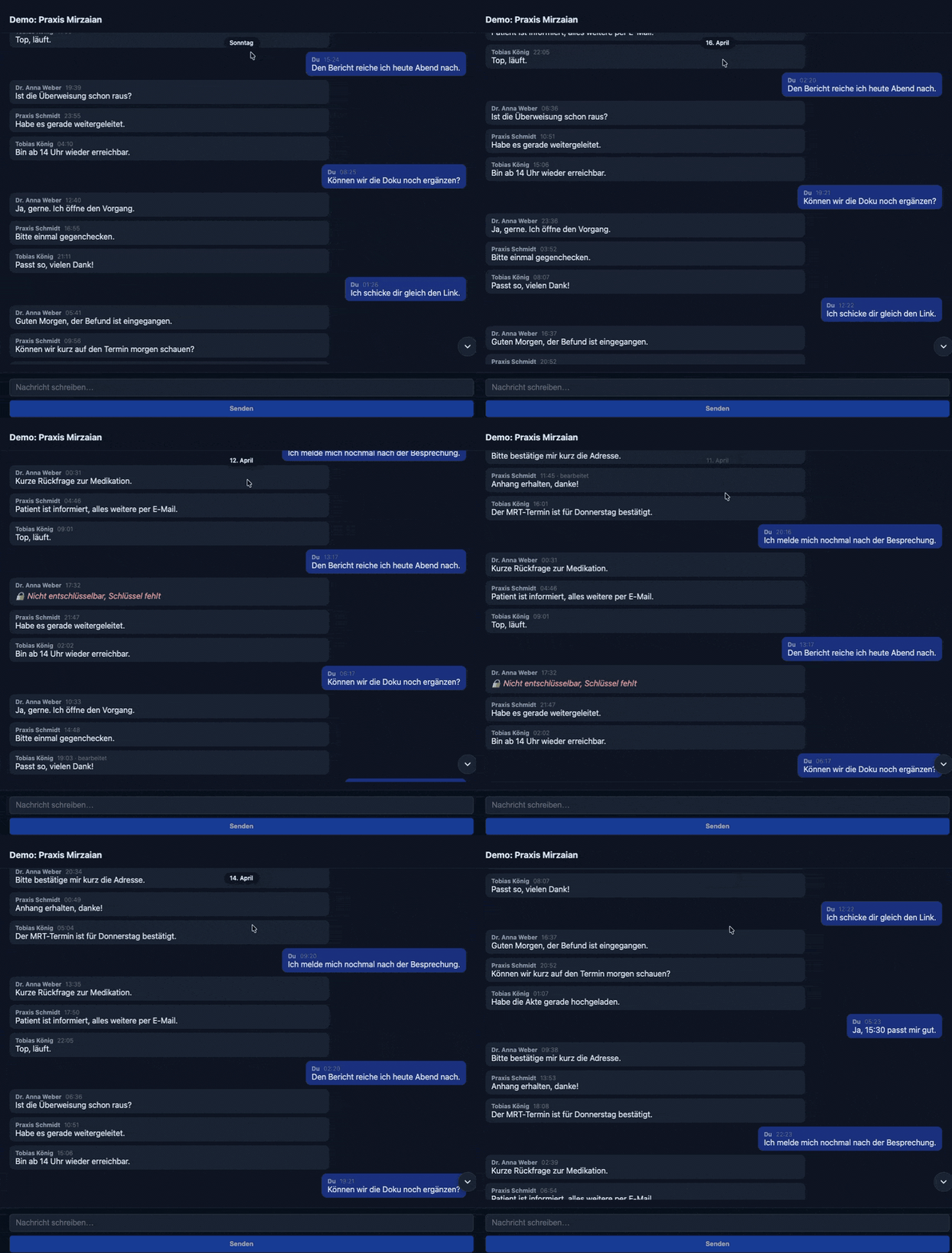
Recorded in a real Matrix client to illustrate the intended use case! The conversation itself is a mock.
Long chat or feed timelines often contain hundreds of items. When the user scrolls quickly, it is easy to lose track of which day they are looking at. This library:
- Shows the current day as a floating pill while the user scrolls.
- Hides the pill automatically after a short idle period.
- Tracks the visible date via
IntersectionObserver, no scroll math. - Stays unopinionated: works with any DOM, optional React bindings.
- Floating date pill with fade in/out
- Framework-agnostic core in pure TypeScript
- Optional React hook (
useScrollDateIndicator) and component (ScrollDateIndicator) - Locale-aware relative day formatting (Today, Yesterday, weekday names, full date)
- Custom timestamp extractors and selectors for any DOM layout
- Tiny, tree-shakable, zero runtime dependencies
- Full TypeScript type definitions
npm install scroll-date-indicator
# or
pnpm add scroll-date-indicator
# or
yarn add scroll-date-indicator
React is an optional peer dependency. If you use the React bindings, install
react and react-dom >=18.
This library is framework-agnostic and works with:
- Vanilla JavaScript/TypeScript (ES2020+)
- React (18+, 19)
- Vue.js, Svelte, Solid, Angular via the vanilla core
- Next.js, Nuxt.js, SvelteKit etc.
- Webpack, Vite, Rollup, esbuild - all bundlers
- Browser environments (requires
IntersectionObserver)
No runtime dependencies - works everywhere modern JavaScript runs.
The library reads timestamps directly from the DOM. Each timeline item must
carry a data-timestamp attribute with a Unix timestamp in milliseconds.
import { createScrollDateIndicator } from "scroll-date-indicator";
import { formatRelativeDay } from "scroll-date-indicator/presets";

const container = document.querySelector("#timeline") as HTMLElement;
const pill = document.querySelector("#pill") as HTMLElement;

const ctrl = createScrollDateIndicator({
  container,
  onDateChange: (date) => {
    pill.textContent = date ? formatRelativeDay(date, { locale: "de-DE" }) : "";
  },
  onVisibilityChange: (visible) => {
    pill.style.opacity = visible ? "1" : "0";
  },
});

// later on cleanup
ctrl.destroy();React:
import { useRef } from "react";
import { ScrollDateIndicator } from "scroll-date-indicator/react";

function ChatRoom({ messages }) {
  const scrollRef = useRef<HTMLDivElement | null>(null);

  return (
    <div style={{ position: "relative", height: "100%" }}>
      <div ref={scrollRef} style={{ height: "100%", overflowY: "auto" }}>
        {messages.map((m) => (
          <div key={m.id} data-timestamp={m.ts}>
            {m.body}
          </div>
        ))}
      </div>

      <ScrollDateIndicator
        containerRef={scrollRef}
        locale="en-US"
        position="top-center"
      />
    </div>
  );
}
Matrix-based clients (matrix-js-sdk, matrix-rust-sdk, hydrogen-sdk, ...):
Each event carries an origin_server_ts (ms). Set it as data-timestamp and
the indicator works out of the box.
{events.map((ev) => (
  <div key={ev.event_id} data-timestamp={ev.origin_server_ts}>
    {ev.content.body}
  </div>
))}
Custom timestamp source:
<ScrollDateIndicator
  containerRef={scrollRef}
  itemSelector=".message"
  getTimestamp={(el) => Number(el.dataset.myTs)}
/>Framework-agnostic core. Returns a controller.
| Option | Type | Default | Description |
|---|---|---|---|
container |
HTMLElement |
required | The scrollable container |
itemSelector |
string |
"[data-timestamp]" |
Selector for timeline items |
getTimestamp |
(el: HTMLElement) => number | null |
reads data-timestamp |
Custom timestamp extractor |
onDateChange |
(date: Date | null) => void |
Called when the visible date changes | |
onVisibilityChange |
(visible: boolean) => void |
Called when the indicator should appear or hide | |
idleHideDelay |
number |
1200 |
Hide delay in ms after the last scroll event |
anchor |
"topmost" | "center" |
"topmost" |
Which visible item to anchor on |
rootMargin |
string |
"0px" |
Forwarded to IntersectionObserver |
Returns ScrollDateIndicatorController:
refresh(): void- rescans items, useful after prepending contentdestroy(): void- removes listeners and observerscurrentDate: Date | nullisVisible: boolean
React hook. Same options as the core, plus:
containerRef: RefObject<HTMLElement>deps?: ReadonlyArray<unknown>- reattaches the controller when changed
Returns { date: Date | null; visible: boolean }
Drop-in React component that renders a styled pill. Hook options plus:
| Prop | Type | Description |
|---|---|---|
locale |
string | string[] |
Locale for the default formatter |
labels |
{ today?: string; yesterday?: string } |
Localized labels for relative-day buckets |
format |
(date: Date) => string |
Override the default formatter completely |
position |
"top-center" | "top-right" | "top-left" | "right-edge" | "left-edge" |
Anchor position. Default "top-center" |
className |
string |
Extra class for the pill |
style |
CSSProperties |
Inline style for the pill |
children |
(state) => ReactNode |
Render override; ignores the built-in style |
Locale-aware day formatter. Returns:
Todayfor the same calendar dayYesterdayfor the previous calendar day- weekday name within the last 6 days
24 Aprilwithin the same year24 April 2024for older dates
formatRelativeDay(new Date(), {
  locale: "de-DE",
  labels: { today: "Heute", yesterday: "Gestern" },
});Convenience preset with chat-friendly defaults (itemSelector,
timestampAttr, idleHideDelay, format).
import { matrixTimelinePreset } from "scroll-date-indicator/presets";

const preset = matrixTimelinePreset({ locale: "de-DE" });
preset.format(new Date()); // "Today"# Install dependencies
pnpm install
# Run tests
pnpm test
# Start the interactive playground
pnpm playground
# Build the library
pnpm buildMIT © Kevin Mirzaian