
A free web-based procedural texture and volume generation toolkit for volumetric rendering, terrain generation.
Currently focused on:
- Pseudo volume texture generation aka. 3D textures
- Terrain / erosion map generation
Originally started as a rework of the older Unity-based tool: https://acetix.itch.io/pseudo-volume-generator
https://texturinator.buttermilch-dev.de
Generate pseudo volume textures (3D texture atlases) for:
- Volumetric clouds
- Nebulae
- Fog
- Smoke
- Raymarching shaders
These textures can be used in:
- Unity
- Unreal Engine
- Godot
- Custom OpenGL/WebGPU/WebGL renderers
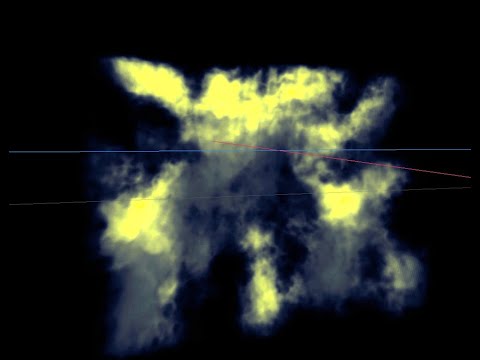
| Generates these textures | Used for rendering volumes |
|---|---|
 |
 |
The project now also includes terrain and erosion texture generation based on the work of Rune Skovbo Johansen:
https://blog.runevision.com/2026/03/fast-and-gorgeous-erosion-filter.html
Used for generating height/erosion maps

The long-term goal is to turn this into a modular procedural graphics toolkit for:
- Volumetrics
- Terrain generation
- Procedural textures
- Shader authoring workflows
- Technical art pipelines
Feel free to create issues or PRs if you have:
- ideas
- feature requests
- bug reports
- optimization improvements
- rendering experiments
Contributions are always welcome.
This project was generated using Angular CLI version 19.2.1.
To start a local development server, run:
ng serveOnce the server is running, open your browser and navigate to http://localhost:4200/. The application will automatically reload whenever you modify any of the source files.
Angular CLI includes powerful code scaffolding tools. To generate a new component, run:
ng generate component component-nameFor a complete list of available schematics (such as components, directives, or pipes), run:
ng generate --helpTo build the project run:
ng buildThis will compile your project and store the build artifacts in the dist/ directory. By default, the production build optimizes your application for performance and speed.
To execute unit tests with the Karma test runner, use the following command:
ng testFor end-to-end (e2e) testing, run:
ng e2eAngular CLI does not come with an end-to-end testing framework by default. You can choose one that suits your needs.
For more information on using the Angular CLI, including detailed command references, visit the Angular CLI Overview and Command Reference page.