
Agent-ready Rust business systems.
Lenso is a Rust-first modular app framework for composing real product shapes, verifying every change, and evolving stable boundaries into services. Start with a runnable host, services, modules, local processes, contracts, migrations, and Runtime Console already connected instead of assembling the surrounding system one library at a time.
Humans and coding agents work from the same explicit model: product blueprints, module and service manifests, reviewable change plans, generated contracts, checks, App Proof, and runtime evidence.
Build modular first. Keep one deployable app while boundaries are changing, then move selected capabilities into independently delivered services when those boundaries are ready.
Read the documentation · Follow the quickstart · Explore the examples
Install the CLI, compose a support application from a product blueprint, and start the generated system:
npm install -g @lenso/cli

lenso app compose ./acme-support \
  --blueprint support-desk \
  --apply
cd acme-support
lenso dev up
The generated application includes:
- a Rust host with API, worker, migrations, and Postgres integration;
- TypeScript or Rust services registered in a local service workspace;
- explicit module, service, system, and contract declarations;
- Launchpad state for services, modules, addons, and next actions;
- Doctor, App Proof, and App Change Plan evidence;
- Runtime Console at
/console.
Use cargo install lenso-cli instead when you prefer the Rust distribution of
the same CLI.
- Compose a real app. Begin with a product blueprint that connects the host, services, modules, local processes, and Launchpad state.
- Extend explicit capabilities. Add modules, services, addons, or reusable capability packs through a reviewable App Change Plan.
- Verify the generated system. Doctor, App Proof, contract checks, smoke checks, and Runtime Console turn generated state into reviewable evidence.
- Evolve stable boundaries. Keep the product modular, then move selected capabilities across process or service boundaries without rewriting the product model.
Axum remains the HTTP layer. Lenso adds the business-system lifecycle around it:
- a runnable host with API, worker, migrations, Postgres, and hosted Console;
- manifests for routes, data, actions, events, lifecycle, dependencies, and operator surfaces;
- product blueprints, capability packs, and safe generated-state change plans;
- Runtime Stories that correlate requests, functions, events, outbox work, and service activity;
- generated contracts, manifest lints, architecture checks, smoke checks, and release gates;
- linked modules today and service-backed modules when a boundary is ready to leave the host.
Lenso Console is the separately installed operator service for one Lenso System. It projects managed-Service state through the System Plane so humans and coding agents can review the same system without putting Console code in a business Host.
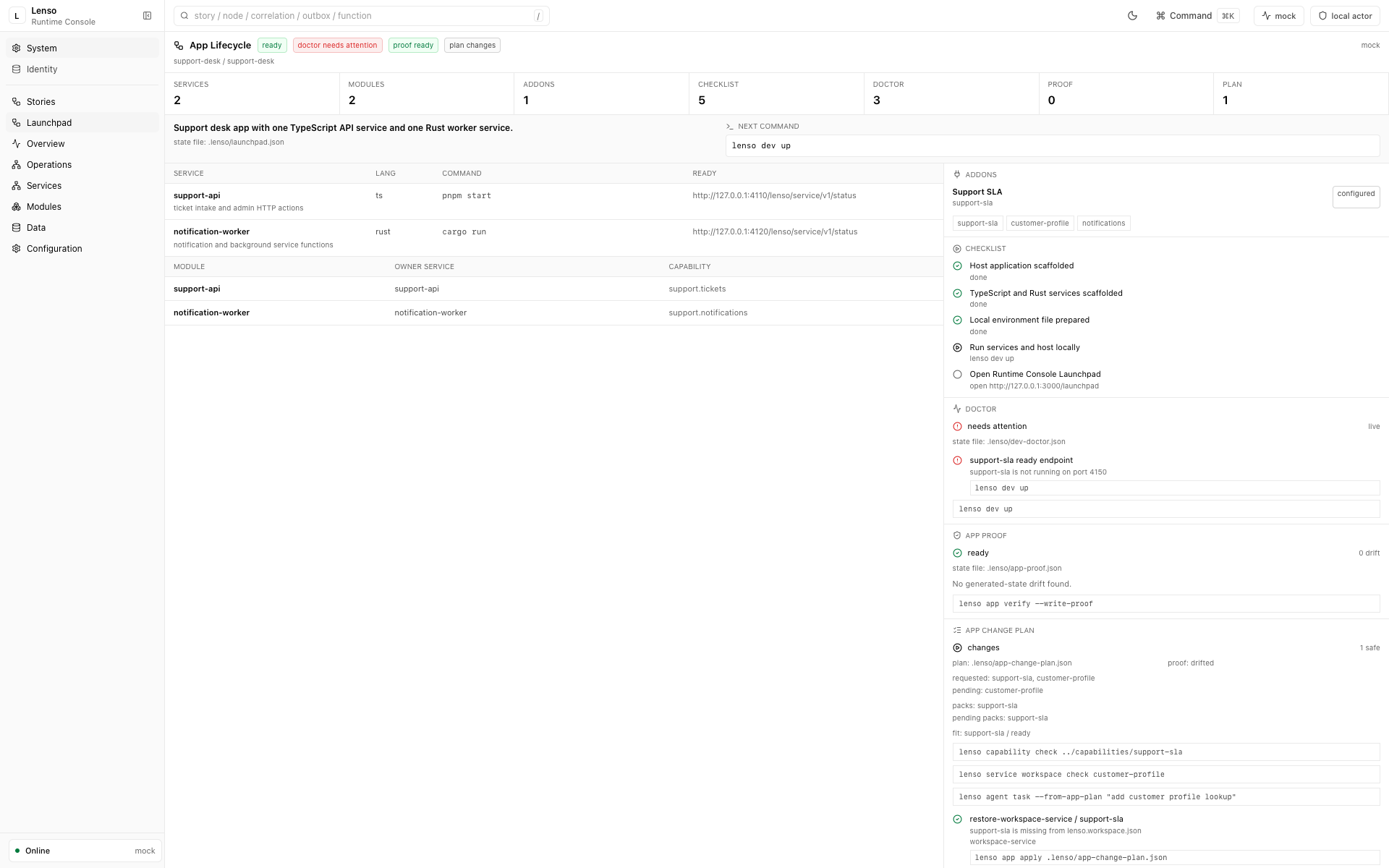
App Lifecycle shows the generated services and modules alongside readiness, Doctor checks, App Proof, change plans, and the next safe command.
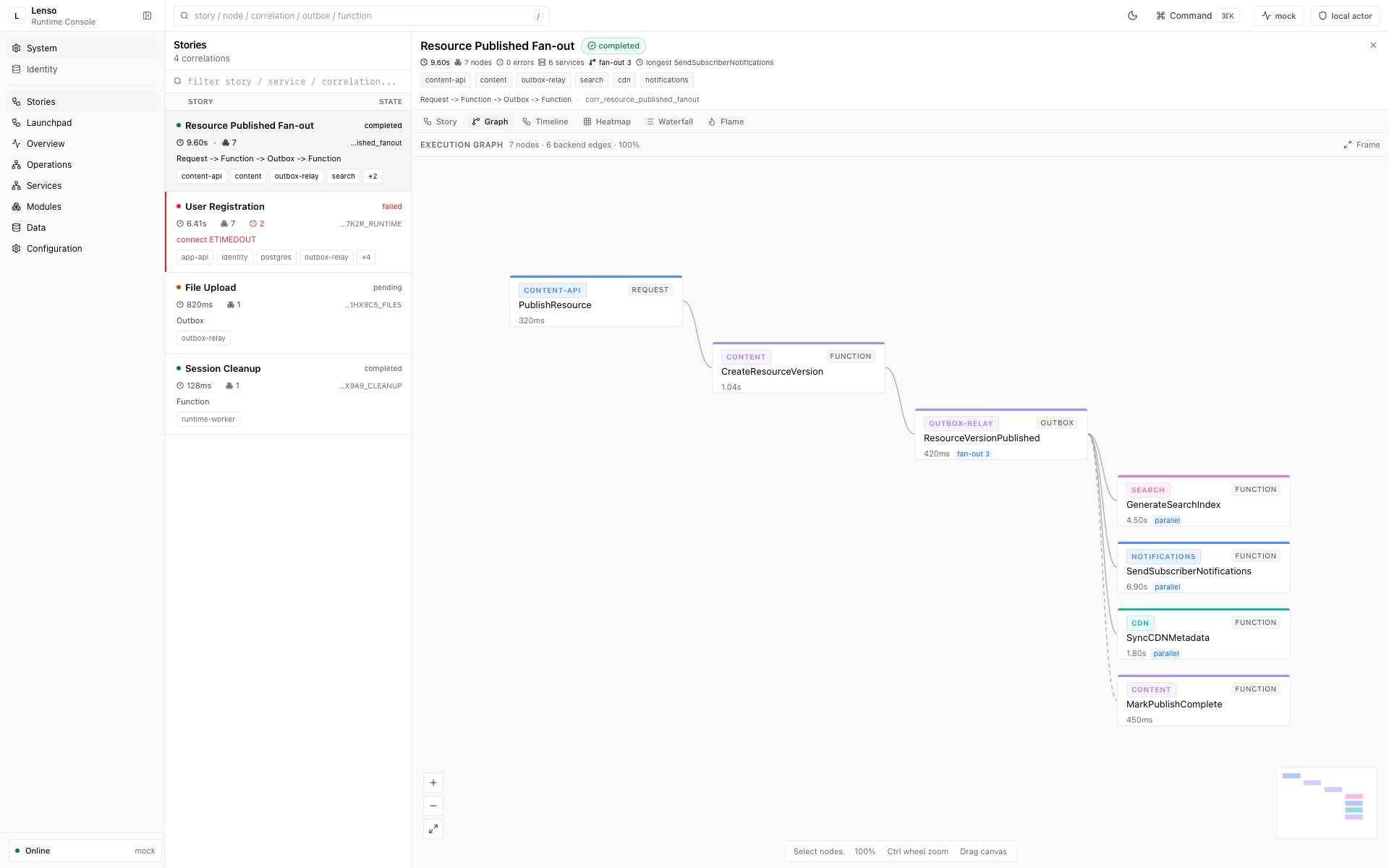
Runtime Stories follows one business flow across requests, functions, events, and services without losing its correlation.
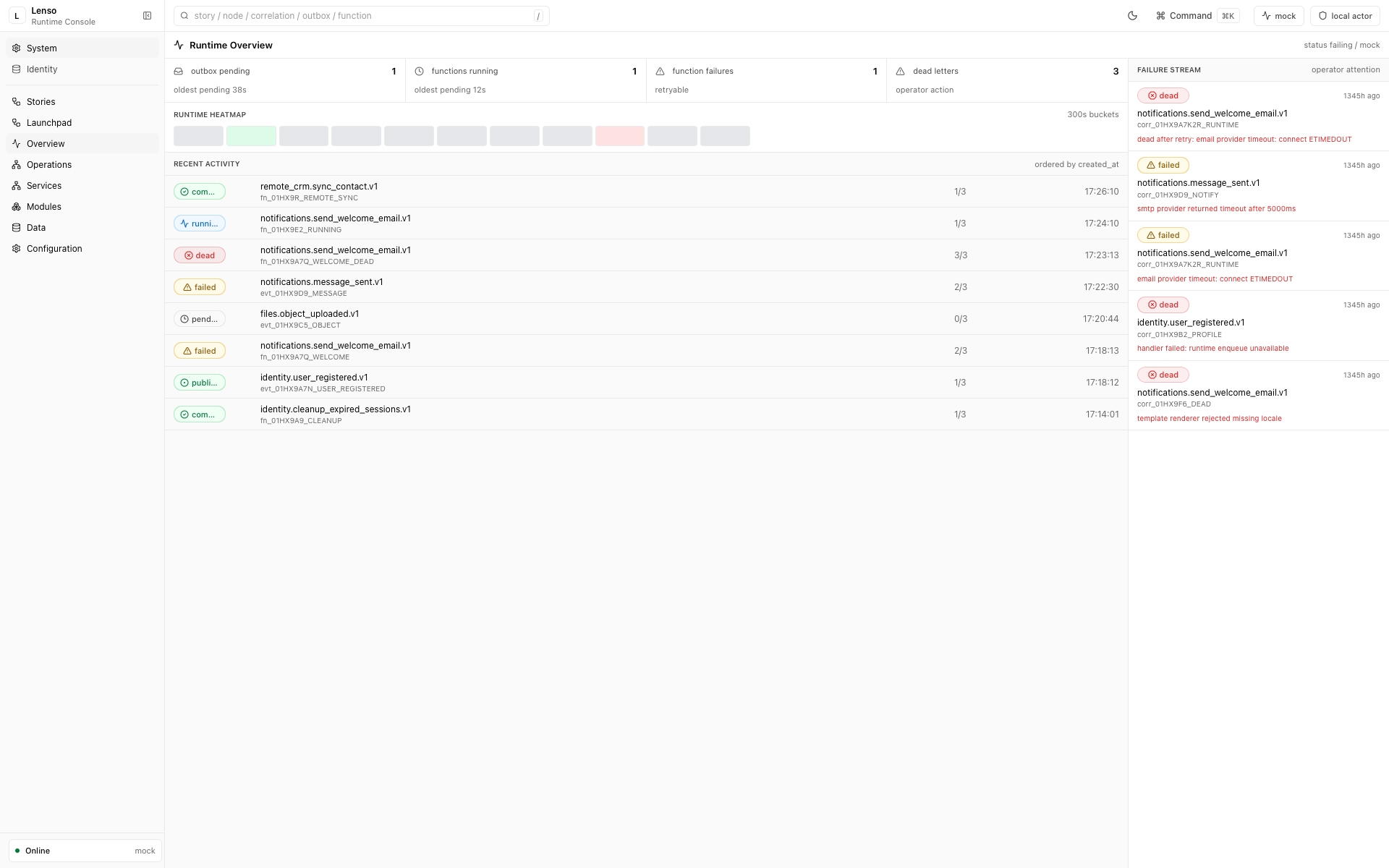
Runtime Overview brings queue pressure, active work, recent activity, failures, and dead letters into one operator workspace.
These screenshots use the seeded demo dataset so the workflows are reproducible. Read the Console System Plane architecture for service boundaries, access controls, evidence, and Module UI isolation.
The public proof point is intentionally concrete:
Build a support ticket module for a Lenso app.
The result should be a bounded change with generated code, passing checks, App
Proof, and visible evidence in /console, not just a scaffold that compiles.
The working loop is:
product brief -> app compose -> change plan -> implementation -> checks + App Proof -> Lenso Console
Lenso's public skills cover business planning, app startup, linked Module authoring, Service-provided Module authoring, and API client generation. They give coding agents stable entrypoints while manifests, contracts, checks, and Console evidence keep the result inspectable.
See the agent-ready module demo. Runnable
support-ticket and account-profile examples are guarded in
LioRael/lenso-examples by module
smoke checks and real host API smokes.
| Surface | Role |
|---|---|
lenso |
Public Rust facade for module declarations, manifest lints, and the narrow host boot API. |
@lenso/cli / lenso-cli |
Compose apps, manage generated state, author capabilities, run local systems, and operate modules and services. |
LioRael/lenso |
This repository: backend platform crates, built-in Modules, System Plane contracts, framework SDKs, migrations, and architecture checks. |
LioRael/lenso-console |
Independent Console Service, web shell, composition Store, and isolated Module UI host. |
LioRael/lenso-examples |
Runnable product, module, service, and integration examples. |
lenso.dev |
Product documentation, guides, API reference, and agent-readable docs. |
Add the Rust authoring surface directly when building a module or custom host:
cargo add lensoGenerated hosts enable the crate's host feature. Lenso Console is installed
and operated as a separate Service; managed hosts never serve Console assets.
Keep lenso, lenso-cli, and lenso-console checked out as siblings
when changing behavior across backend, CLI, and Console boundaries. Repository
operations notes live in
docs/repository-operations.md.
- Modular monolith first: linked modules run in-process and can later be extracted behind independently running services over HTTP, gRPC, or event boundaries (guide).
- Services: independently running backends that provide one or more modules and are observed by the host.
- Service Workspace: local development control plane in
lenso.workspace.json;lenso service createregisters Rust/TS providers there, andlenso service devstarts them before the host. Workspace tools also check provider readiness and read older.lenso/services.jsonfiles during migration. - Modules: business capabilities installed through
lenso module install. A module may resolve to linked Rust code, a service-provided module, a bundled host capability, or a future sandbox package. - Rust first: API, worker, migrations, platform crates, modules, contract generators, and architecture checks are Rust workspace members.
- Explicit SQL and Postgres: no custom ORM, no hidden database magic.
- Transactional outbox: module writes and emitted events commit atomically.
- In-process outbox relay: worker claims outbox rows, dispatches registered handlers, and marks delivery state.
- Contract layer: Rust-authored OpenAPI and JSON Schema artifacts are committed.
More detail lives in docs/architecture/overview.md. Hard rules live in docs/architecture/rules.md.
lenso module install is the primary business-capability entrypoint. It may
enable linked code or resolve a lenso.module-release.json to a provider
service. lenso service install remains the lower-level provider/process
operation for operators who want to connect a service before enabling one of
its modules.
A small first-party proof path is audit-log: install it by name from the
official catalog, refresh the hosted Console, then inspect the module in
/console/modules?module=audit-log and its generic admin data in /console/data.
The module declares the audit_log.events.read data capability and surfaces
Audit Events through the Console's Data Surfaces panel.
First-time local setup lives in docs/getting-started.md.
crates/lenso-contracts: shared declaration contracts re-exported bylensoand consumed by platform crates.lenso: public Rust facade crate for serializable module-authoring declarations and manifest lints.lenso-api: Axum HTTP API app.lenso-worker: background worker and outbox relay app.lenso-migrate: deterministic migration runner.lenso-bootstrap: composition root listing the concrete modules; bothlenso-apiandlenso-workerwire their module set from here.platform-core: config, errors, context, DB, migrations, events, outbox, health, telemetry primitives.platform-http: Axum adapters, request context middleware, JSON extractor, error responses, health routes, and theOpenApiRouterre-exports for single-source OpenAPI.platform-runtime: embedded runtime primitives for functions, triggers, queues, flows, retries, and store traits.platform-module: behavior seams and compatibility re-exports for Module loading and Linked bindings.platform-system-plane: capability-neutral managed-Service management kernel mounted only on the dedicated System Plane listener.platform-testing: shared test database helpers.
modules/auth: host-owned authentication anchor and development session routes. Session resolution defaults to Postgres and can opt into Redis by enabling the auth module'sredisfeature, settingREDIS_URL, and setting runtime configauth.session_cache=redis.auth-oauth: reusable OAuth client flow substrate for authentication adapters.auth-anonymous: first-party anonymous provider for guest sessions.auth-password: first-party password provider for the auth anchor.auth-phone: first-party phone OTP and phone password provider for the auth anchor.auth-github: first-party GitHub OAuth provider built onauth-oauth.auth-google: first-party Google OAuth/OIDC provider built onauth-oauth.
fixtures/provider: internal provider fixture for integration and protocol checks.
contracts/- Generated and curated OpenAPI, JSON Schema, and error contracts.
tools/generate-contracts: writes committed contract artifacts from Rust sources.arch-check: lightweight architecture rule checker.
infrastructure/local/- Local Postgres and optional OpenTelemetry collector config.
Lenso Console source, its deployable Service backend, and the Runtime Stories
Console module live in the sibling ../lenso-console repository. This framework
repository owns public contracts, Module release declarations, and System Plane
capability contracts consumed by the Console.
Prerequisites:
- Rust toolchain compatible with the workspace (
rust-version = 1.94). just.- Docker if you want local Postgres via
just db-up. - The sibling
../lenso-consolecheckout if you want to work on the Runtime Console.
Create local environment config:
cp .env.example .envModule-local config belongs in env/static host config, not runtime-config DB
overrides. Use LENSO_MODULE_<MODULE>__<KEY>=<json-or-string> for local values;
for example LENSO_MODULE_AUTH_PASSWORD__JWT_ISSUER=acme is available to linked
module code through ctx.config.module_local_config("auth-password"). Module
load toggles remain LENSO_MODULE_<MODULE>_ENABLED=false and are also surfaced
as restart-only runtime config for operator overrides.
auth-phone also keeps OTP secrets in module-local config. Set
LENSO_MODULE_AUTH_PHONE__OTP_SECRET=<secret> outside local development; the
secret is intentionally not exposed as editable runtime config.
REDIS_URL is optional for the platform itself. The first-party auth module uses
Redis only when its dependency is built with the redis feature and runtime
config sets auth.session_cache=redis; otherwise session resolution reads
Postgres directly.
Generated hosts can install that auth profile with:
lenso module install auth --profile redis-session-cacheThe CLI applies the module descriptor profile, enabling the auth dependency's
redis Cargo feature, writing REDIS_URL=redis://localhost:6379/0 to .env,
and recording the runtime default auth.session_cache=redis in
.lenso/runtime-config-defaults.json. Provide a Redis service separately; the
starter Docker Compose file only starts Postgres by default.
Typical loop:
just db-up
just migrate
just api
Worker:
just workerConsole Service and CLI development shortcuts:
# Run the complete local Console Service from its own repository.
cd ../lenso-console
pnpm run service:serve

# Serve a generated host through the local lenso-cli checkout.
just host-serve <host-root>
Use an absolute or relative path for <host-root>; it does not need to be a
sibling directory. Managed Services never host Console web assets.
Production Console access must use real auth, not development bearer tokens.
With APP_ENV=production, dev-user:* and dev-service:* tokens are ignored.
Browser users should sign in through password auth or OIDC, then receive
the Console Service's own operator grant through lenso console operator bootstrap.
OpenTelemetry collector for local span export:
just observability-up
OTEL_EXPORTER_OTLP_ENDPOINT=http://localhost:4317 just api
OTEL_EXPORTER_OTLP_ENDPOINT=http://localhost:4317 just worker
The local collector receives OTLP over gRPC on localhost:4317 and OTLP over
HTTP on localhost:4318. The Rust exporter is configured for gRPC, so use:
OTEL_EXPORTER_OTLP_ENDPOINT=http://localhost:4317To verify the local loop without starting the API and worker, run:
just otel-smokeUser-facing examples live in LioRael/lenso-examples.
The smoke command starts the collector, emits one outbox-style span and one
function-style span, and checks collector debug logs for
lenso.correlation_id, lenso.story_id, lenso.execution.kind,
lenso.outbox_event_id, and lenso.function_run_id.
Common local collector failures:
- Docker is not running:
just observability-upfails during the Docker daemon preflight. - The observability profile is not selected: start the collector through
just observability-upor usedocker compose -f infrastructure/local/docker-compose.yml --profile observability .... - Ports
4317or4318are already occupied: stop the conflicting process or update both the compose ports andOTEL_EXPORTER_OTLP_ENDPOINT. - The collector config path is wrong:
just observability-upvalidatesinfrastructure/local/docker-compose.ymlbefore startup; the expected mount isinfrastructure/local/otel-collector.yamlto/etc/otelcol/config.yaml. - First startup needs an image pull: the recipe uses visible Compose output and a 45 second service wait timeout so failures are easier to see.
Regenerate contracts after changing Rust/OpenAPI sources:
just generatejust: list available recipes.just fmt: format Rust code.just fmt-check: check Rust formatting.just check: run the default local quality gate without slow smoke checks.just test: run Rust workspace tests with the locked dependency graph.just rust-check: runcargo checkfor the whole workspace.just arch-check: run architecture guardrails.just generate: generate OpenAPI and JSON Schema artifacts.just generated-check: regenerate committed artifacts and fail if they differ from git.just release-check: run the local release gate.just ci: run the local CI script.
just ci runs the same gates as GitHub Actions:
- Check Rust formatting, compile every Rust workspace target, and run Rust tests.
- Regenerate contracts, then fail if committed artifacts changed.
- Run architecture guardrails.
The architecture checker also fails on:
- DDD/Clean Architecture folders inside modules:
api,application,domain,infrastructure. - Cross-module imports inside module source code.
- Missing OpenAPI artifacts.
- Stale contract artifacts.
- Missing event payload contracts for current events.
Generated files are source-controlled artifacts, but they are not hand-edited. Update Rust/OpenAPI sources, then regenerate.
Use just release-check before cutting a release branch or tag. It runs the
backend quality gate. Runtime Console release checks live in the sibling
lenso-console repository. The release scope and manual smoke checklist live in
docs/release-readiness.md.
Release packaging and tagging steps live in docs/release-process.md.