Cross-platform web client for the kv4p HT open-source
ham radio: voice RX/TX, frequency scanner, memories, and SSTV image transmit /
receive. Pure pip install — no C compiler, no MSYS2, no Android phone.
Works on Windows and Linux. Speaks the current kv4p serial protocol (KISS
framing + HOST_DESIRED_STATE / DEVICE_STATE snapshots) and auto-detects the
firmware's audio codec: legacy Opus (command 0x07) or 4-bit ADPCM
(command 0x0C). Frame layouts were verified byte-for-byte against real hardware.

- Connection — serial port picker, editable baud (default 115200), ESP32 reset on connect, live debug console with optional raw hex dump.
- Tuning — large frequency readout, live slider over the module's range,
−/+steppers with configurable step (12.5k / 25k / 100k / 1M shortcuts). - Voice — RX monitor and PTT (mouse or keyboard, default Space, re-bindable). Audio plays on the computer's sound card, not in the browser.
- S-meter / squelch — RSSI bar, live squelch-threshold slider (0 = monitor), open/closed indicator, CTCSS TX/RX selectable in Hz (38-tone table).
- Scanner — sweeps a range (clamped to the module's limits), detects activity by squelch-open or RSSI threshold, with an Active tab summarising hits; click any row to tune there.
- Memories — name and store channels; saved to a JSON file and reloaded automatically. Click to load and tune.
- SSTV — send and receive images. Encodes all PySSTV modes (Martin M1/M2, Scottie S1/S2, Robot 36, PD90, PD120, plus B/W Robot 8/24). Decoding supports Martin M1/M2 with automatic VIS detection. Images are sent through a high-bitrate Opus profile instead of the speech profile used for voice, which roughly halves the codec damage to the tones.
- Station identification — the callsign is shown in the header and beside the TX indicator, appended to SSTV as a standard FSK-ID, and can optionally be burned into the picture so any decoder shows it.
- Persistent settings — TX-allowed, high power, pre-emphasis, high/low-pass, squelch, bandwidth, frequency, CTCSS, PTT key, callsign and the callsign-overlay choice survive restarts and are re-applied to the radio after each connect.
pip install -r requirements.txt
python kv4p_web.py
Opens http://127.0.0.1:5000/. Keep kv4p_web.py and sstv.py in the same
folder.
PortAudio may need to be installed system-wide, and the serial port is
/dev/ttyUSB0 rather than COM3:
sudo apt install libportaudio2
sudo usermod -aG dialout $USER # then log out and back in- Pick the serial port, baud 115200, keep reset on connect checked.
The console should show a
HELLOevent with the firmware version and the module's frequency range. The RX monitor starts automatically. - Tick TX allowed — the firmware boots with transmit disabled as a safety measure. The client remembers your choice and re-applies it on every connect.
- Tune with the slider, the steppers, or the manual fields, then talk with the on-screen PTT or the keyboard key.
- Optionally set your station callsign: it appears in the header and next to the TX indicator, and is sent as the SSTV FSK-ID. (FM voice has no data channel, so identify by voice as usual.)

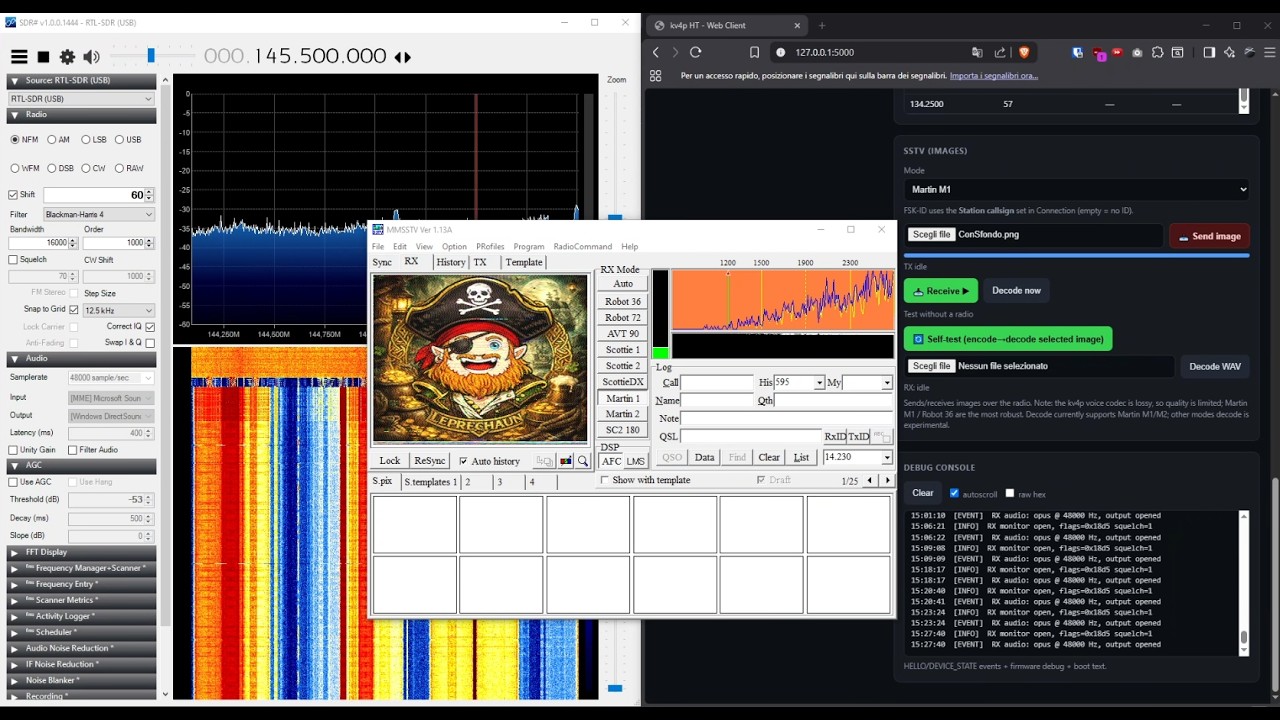
Choose a mode, pick an image and press Send image — the client generates the tones, keys the radio and paces the stream in real time. To receive, press Receive and then Decode now.
Identifying yourself. The callsign is always appended as a standard FSK-ID. Because some decoders ignore it, or need it explicitly enabled (in MMSSTV: Option → Setup MMSSTV → RX → Decode FSKID), there is also an optional checkbox that paints the callsign onto the image itself — visible in any software. It is off by default and remembered between sessions.
Three ways to test without a second radio:
- Self-test — encodes the selected image and decodes it straight back, no radio involved. On a clean signal the round-trip is essentially lossless (correlation 1.000).
- Save as WAV — renders the full transmission, image and FSK-ID included, to a file you can feed to MMSSTV or QSSTV. Note that MMSSTV cannot open a WAV directly: route it through a virtual audio cable, or Stereo Mix, and enable Auto slant so the different playback clock does not skew the picture.
- Decode WAV — decode any SSTV recording from a file.
Over the air the kv4p compresses audio with a lossy codec, so quality is limited; Martin M1 travels best and is also the mode this client decodes. Every mode can be transmitted, but reception here covers Martin M1/M2 only.
Sending and receiving an image with kv4p-web:
| Symptom | Cause |
|---|---|
Boot banner but no HELLO |
Wrong baud (use 115200) or the ESP32 didn't reset |
| PTT returns an error | TX allowed is off |
No audio, no RX audio ... frames |
Firmware isn't streaming — check squelch/signal |
| RSSI stuck at 0 | RSSI is only sampled while RX audio is open |
nvs_open failed: NOT_FOUND at boot |
Harmless first-run warning |
| SSTV sent with no callsign | Station callsign left empty — the console logs the FSK-ID used for each transmission |
| Slanted picture when decoding a WAV | Playback clock differs from the sound card; enable Auto slant in the decoder |
Enable raw hex to inspect the wire: valid frames start with
c0 06 4b 56 34 50 ("KV4P"). The build date is printed at startup and logged
on connect, so it is easy to confirm which version is actually running.
Transmit only on frequencies your licence authorises, and observe your national band plan. The module range reported by the radio (e.g. 134–174 MHz for the VHF module) is wider than the amateur allocations.
GNU General Public License v3.0 (GPL-3.0-or-later). See LICENSE.