Draw on the frame. Get the coordinates back in Python.
Boxes, polygons, lines and points — picked interactively, returned as objects that drop straight into YOLO, SAM and Supervision.



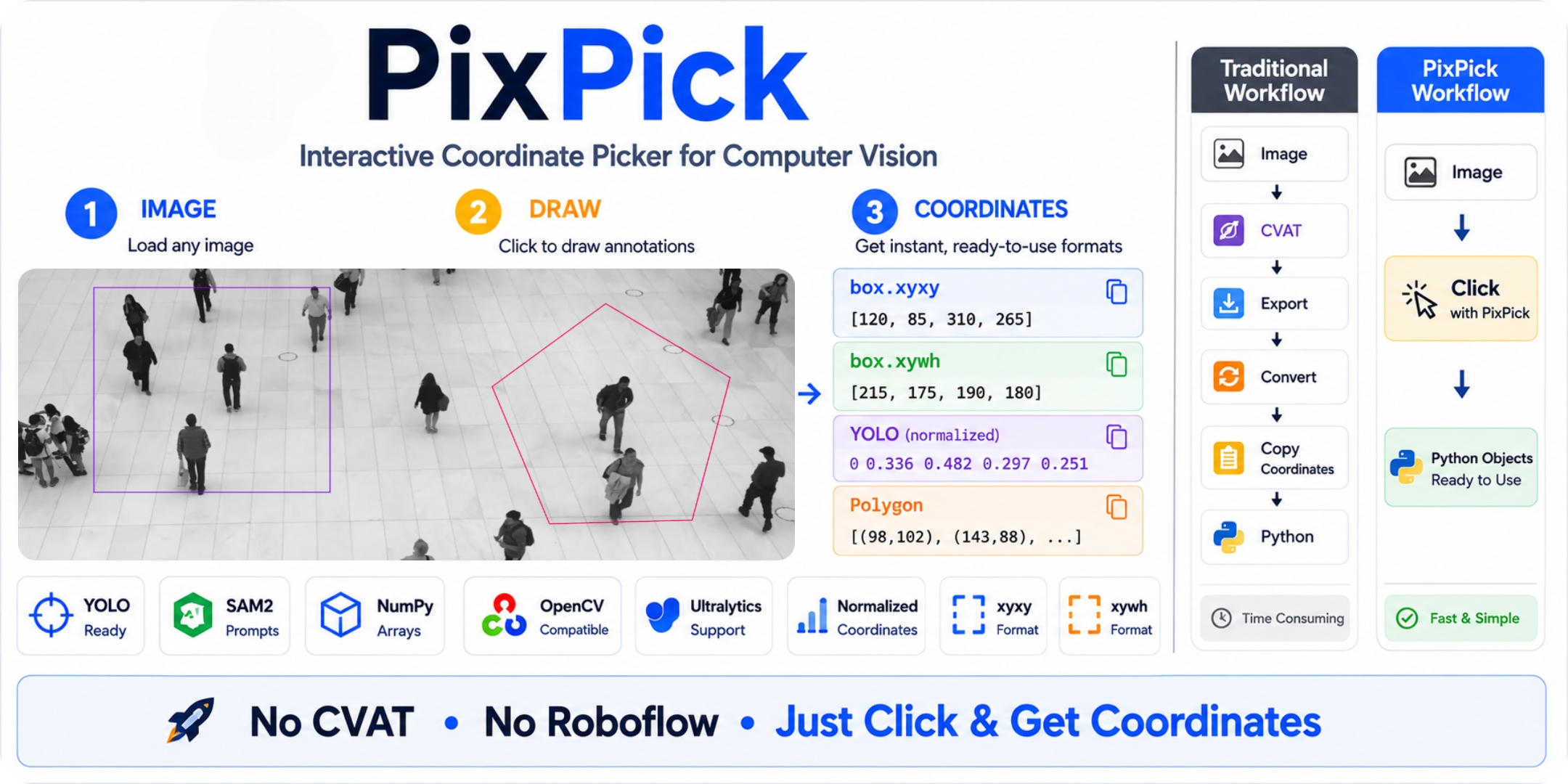
Every CV pipeline starts with coordinates you don't have yet.
# YOLO
counter = RegionCounter(region=[(120, 80), (640, 80), (640, 480), (120, 480)])   # where do these come from?

# SAM2 / SAM3
masks = predictor.predict(box=np.array([120, 80, 640, 480]))                     # same question
So you do one of three things:
- Guess and rerun. Type some numbers, run, squint at the output, nudge, run again.
- Write the throwaway script.
cv2.setMouseCallback,print(x, y), copy from the terminal, paste into the real code, delete the script. Next project — write it again. - Open an annotation tool just to read pixel values off the cursor.
None of that is the work. It's the step everyone hates and nobody automated.
import pixpick

region = pixpick.box("video.mp4", frame=10)  # drag a box on a specific video frame
zone   = pixpick.polygon("image.jpg")        # click polygon vertices

# coordinates are ready — unpack directly into any framework
# YOLO:
regioncounter = RegionCounter(
     region=zone.yolo_region,  # pass region points
     model="yolo26n.pt",
 )

# same for YOLOE
model.predict("image.jpg", visual_prompts=dict(bboxes=region.yolo_prompt, cls=classes))

# SAM/SAM2/SAM3:
predictor.predict(box=region.sam)
A window opens on your image or video frame. You draw. The coordinates come back as Python objects, already in the shape each framework wants. No terminal copy-paste, no throwaway scripts.
All selectors accept a frame= argument when the source is a video file.
pip install pixpick| Selector | How to use | Returns |
|---|---|---|
pixpick.box() |
Left-click + drag | Box |
pixpick.polygon() |
Click vertices | Polygon |
pixpick.line() |
Click start → click end | Line |
pixpick.point() |
Click points (fg / bg) | Point / MultiPoint |
Make several selections in one pass and you get the matching wrapper — Multibox, MultiPolygon, MultiLine or MultiPoint — each holding a list of the singular objects.
For more information on controls, see Getting Started.
Every selection object carries all the formats you'll ever need.
# ── Box ──────────────────────────────────────────────────────
region = pixpick.box("frame.jpg")

region.xyxy              # [x1, y1, x2, y2]            absolute pixels
region.xywh              # [x, y, w, h]                absolute pixels
region.cxcywh            # [cx, cy, w, h]              absolute pixels (YOLO format)
region.center            # (cx, cy)
region.area              # pixels²


# ── Polygon ───────────────────────────────────────────────────
zone = pixpick.polygon("frame.jpg")

zone.points              # [(x0,y0), (x1,y1), ...]     absolute pixels
zone.as_numpy            # np.array shape (N, 2)
zone.norm                # [(x0n,y0n), ...]             0.0 – 1.0
zone.bbox                # [x1, y1, x2, y2]  tight bounds around the polygon
zone.npoints             # int


## ── Line ─────────────────────────────────────────────────────
line = pixpick.line("frame.jpg")

line.points              # [(x0,y0), (x1,y1)]           absolute pixels
line.as_numpy            # np.array shape (2, 2)
line.norm                # [(x0n,y0n), (x1n,y1n)]       0.0 – 1.0
line.center              # (cx, cy)
line.length              # pixels
line.vertical            # [(x,y), (x,y)]  same line re-drawn vertically


## ── Point ────────────────────────────────────────────────────
pick = pixpick.point("frame.jpg")        # one click → Point

pick.xy                  # (x, y)                       absolute pixels
pick.label               # 1 = foreground, 0 = background
pick.norm                # (xn, yn)                     0.0 – 1.0
pick.is_foreground       # bool
pick.rescale(640, 640)   # → Point remapped to another resolution
For more details, see Selectors.
| Framework | Selector | Properties |
|---|---|---|
| Ultralytics YOLOE — visual prompt | Box |
region.yolo_prompt |
| Ultralytics YOLO — region | Box/Polygon |
region.yolo_region |
| SAM / SAM2 / SAM3 — box prompt | Box |
region.sam |
| SAM / SAM2 / SAM3 — point prompt | Point / MultiPoint |
picks.sam |
| Supervision PolygonZone — polygon | Polygon |
zone.supervision |
| Supervision KeyPoints — points | Point / MultiPoint |
picks.supervision |
| Any other format | all selectors | region.raw |
Pick once, reuse forever.
region.save("zone.json")
region = pixpick.load("zone.json")   # Box and Polygon both work
Production pattern — pick interactively the first time, load on every subsequent run:
from pathlib import Path
import pixpick

ZONE = "config/count_zone.json"

zone = pixpick.load(ZONE) if Path(ZONE).exists() else pixpick.polygon("frame.jpg")
zone.save(ZONE)| 🚀 Getting Started | Installation, first selection, controls |
| 🎯 Selectors | All properties and methods for Box and Polygon |
| 🔌 Framework Integration | YOLO, SAM2/SAM3 and more |
| 💾 Persistence | Save, load, JSON schema |
| 🏗️ Architecture | How it's built and how to extend it |
| 🗺️ Roadmap | What's coming next |
We welcome contributions! Please open a GitHub issue or submit a pull request. For more information, see Contribution Guidelines.