
English | 简体中文
Ludork is a game editor and native runtime for creating 2D role-playing games. It combines visual map and data authoring, Blueprint graphs, Lua scripting, and a C++20 runtime in one production workflow.
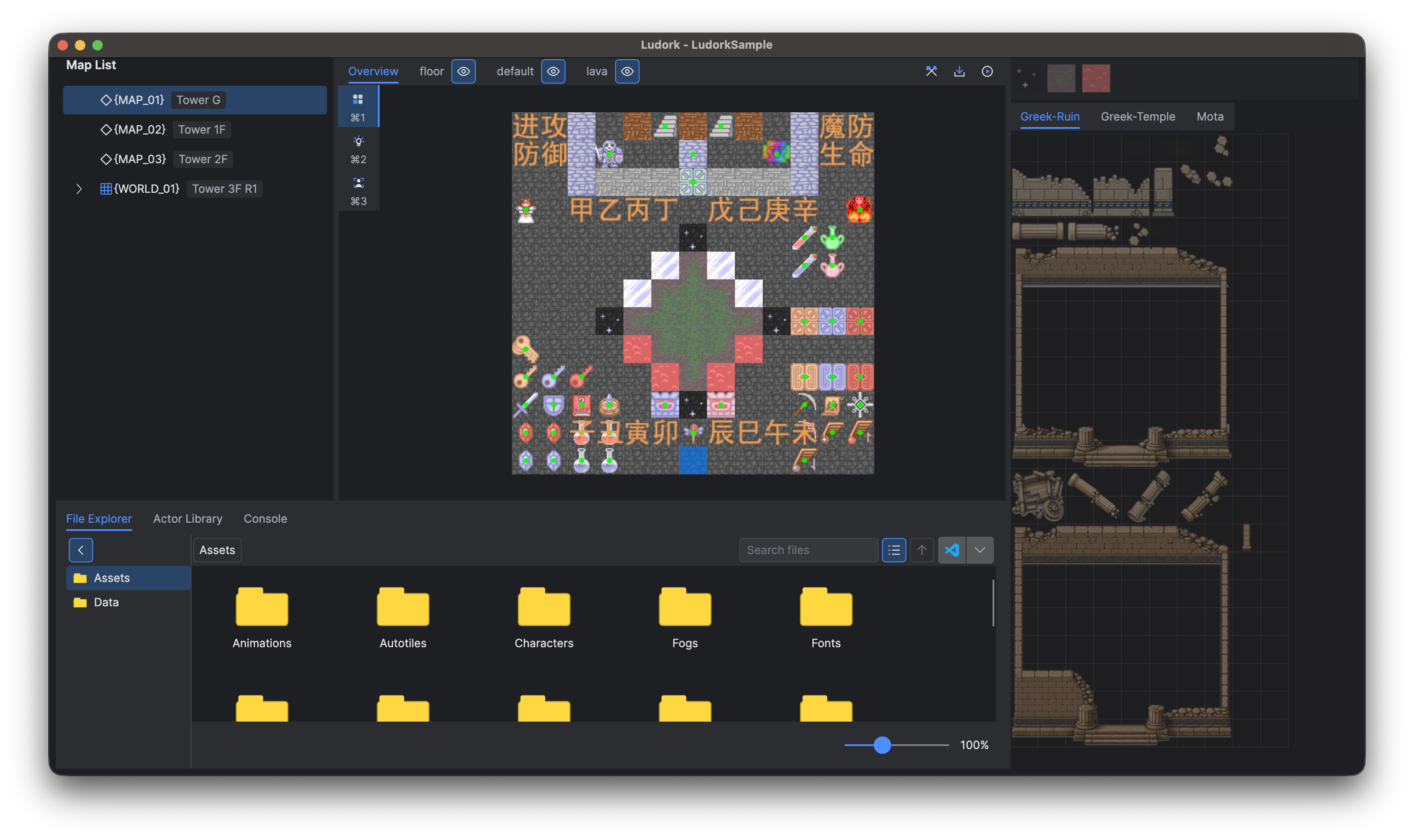
- A unified editor for projects, maps, tilesets, actors, animations, curves, general data, text configuration, and declarative UI assets.
- Blueprint graphs for visual gameplay logic, with Lua modules and direct script attachments for code-driven systems.
- A C++20 runtime built on LuaSF and SFML, with generated bindings, LuaLS definitions, and Blueprint metadata.
- Four project templates: Standalone, Standalone with FFmpeg, C++ Source, and C++ Source with FFmpeg.
- Fully trusted C# 13 editor plug-ins for adding commands, tools, project operations, and editor integrations.
| Area | Supported target | Notes |
|---|---|---|
| Ludork editor | Windows 10 or newer, x64 | Distributed as a self-contained Windows package. |
| Ludork editor | macOS 13.3 or newer, Apple Silicon | Distributed as a native .app bundle. |
| Desktop game projects | Windows 10 or newer, x64; or macOS 13.3 or newer, Apple Silicon | A project is created from the template for the editor's host platform. |
| iOS game projects | iOS 16.3 or newer, arm64 | Packaging requires a C++ Source project, Apple Silicon macOS, full Xcode, and Apple development signing. |
| HarmonyOS game projects | HarmonyOS 6.0.2 / API 22 or newer, arm64-v8a | Mobile uses OpenGL ES; 2in1 uses OpenGL by default and can select OpenGL ES. HAP packaging requires a C++ Source project, Apple Silicon macOS, and DevEco Studio. |
| Android game projects | Android 7.0 / API 24 or newer, arm64-v8a | APK packaging requires a C++ Source project, Apple Silicon macOS, Android Studio, SDK Platform 36, Build Tools 36.0.0, Android NDK r27 or newer, and host CMake 3.28 or newer. Output is unsigned by default and may optionally be signed with an existing JKS or PKCS12 keystore. |
Linux and Intel-based macOS editor packages are not provided in Ludork 1.0.0.
- Open the Ludork Releases page and download the package for your computer.
- Install or extract the package as described in the release notes.
- Start Ludork and select a language.
- Create a project from the start page, or open an existing
Main.projfile.
Release packages are self-contained; installing a separate .NET runtime is not required. macOS may ask you to confirm that you trust an application downloaded from the internet.
On Windows, start Ludork.exe in the installation root. This launcher opens the actual editor under Binaries, which also contains its DLLs and .NET runtime files. Locale, Templates, tools, Plugins, plugins.json, and licences remain in the installation root. Editor settings are saved to Ludork.ini there; plug-in data is stored under Plugins/.data. Keep the complete package together when moving a portable installation.
| Template | Choose it when | Development requirements |
|---|---|---|
| Standalone | You want to author Lua, Blueprints, maps, data, and assets immediately. | No C++ toolchain is required. |
| Standalone + FFmpeg | You need the Standalone workflow and H.264/AAC MP4 playback. | No C++ toolchain is required; FFmpeg notices and source materials are included. |
| C++ Source | You need to change native engine code, add bindings, debug C++, or target iOS, HarmonyOS, or Android. | CMake 3.21 or newer and the platform compiler toolchain. Android packaging requires CMake 3.28 or newer. |
| C++ Source + FFmpeg | You need native source access and video playback. | The C++ requirements above; the project contains the FFmpeg source and build configuration. |
FFmpeg is disabled by default. The prebuilt FFmpeg Standalone templates target desktop platforms; use a C++ Source template for iOS, HarmonyOS or Android output. Those platform packages statically link their FFmpeg builds and therefore have additional LGPL relinking-material obligations; review the bundled FFmpeg notice before distribution.
IDE configuration generators are included in the root of C++ Source projects. On Windows, run generate_vs2022.bat and open Main.sln from the project root, or run generate_clion.bat and open the project directory in CLion. On Apple Silicon macOS, run ./generate_clion.sh and open the project directory in CLion. Both CLion generators configure the CMake project before returning, so Ludork Play can be selected and run immediately after the project opens.
Visual Studio Run and Debug use the same Debug C++ build tool as editor Play, use the project root as the working directory, and start the same native individual-window flow. CLion builds the same Main target from its generated Debug profile. Editor-only save handling, plug-in Before Run hooks, embedded viewport integration, and editor command or performance bridges are not available when launching from an IDE.
The generators find the tools installed with Ludork automatically. If the editor was moved or is used as a portable package, set LUDORK_TOOLS_DIR to its tools directory before running a generator. Generated Main.sln, .vs, .idea, CMake user presets, and CLion build output are local files and are excluded by the template .gitignore.
- Select New Project, choose Standalone for a prebuilt desktop runtime or C++ Source when you need native source access or an iOS, HarmonyOS, or Android package, enter a project name and location, then select Create.
- Save your changes and use Play to run the project in the editor or in a separate game window.
- Before distribution, replace the default
LudorkSamplevalue assigned toAPP_NAMEinScripts/Entry.lua. - Select File → Pack Project, choose the target and options, and complete the platform-specific prompts.
- Test the resulting
distpackage on a clean target system before publishing it.
Packaging through the editor runs registered plug-in preparation hooks. A Standalone project can be edited and packaged without compiling C++; a C++ Source project performs the required native build.
For Android, leaving Sign APK clear creates dist/<game-name>-android-arm64-v8a-unsigned.apk. Selecting it opens the signing dialog for an existing JKS or PKCS12 keystore and can save the signing information on this device for later packaging. Passwords use the operating-system credential store and are never written to the project. A successful signed build publishes only dist/<game-name>-android-arm64-v8a-signed.apk. Reuse the same signing key for later versions of an installed application. Neither mode installs or launches the APK.
For HarmonyOS, choose Mobile for the OpenGL ES phone/tablet host, or 2in1 and then choose OpenGL or OpenGL ES; OpenGL is the 2in1 default. An unsigned package is written as dist/<game-name>-harmony-mobile-unsigned.hap, dist/<game-name>-harmony-2in1-opengl-unsigned.hap, or dist/<game-name>-harmony-2in1-opengl-es-unsigned.hap. Export to matching HarmonyOS device signs the corresponding HAP, installs it on the single connected device whose form matches the selection, and launches it.
Source builds are intended for contributors and editor developers. End users should normally install a release package.
Requirements:
- .NET 9 SDK
- CMake 3.21 or newer
- Windows: Windows 10 or newer with Visual Studio 2022 and the MSVC x64 toolchain
- macOS: Apple Silicon, Xcode Command Line Tools, and macOS 13.3 or newer
- Python 3.12 for native binding-generation tools
Windows:
tools\init.bat
tools\run_editor.bat
macOS:
./tools/init.sh
./tools/run_editor.sh
The initialisation script prepares the native dependencies and the editor-owned UI preview host. It does not build the Game project game. Build the Game project separately with tools\build_cpp.bat Game Debug or ./tools/build_cpp.sh Game Debug.
GitHub Actions provides six packaging entries. Export Package, Export Package Windows and Export Package macOS include project templates; the combined entry retains scheduled and tag-release packaging. Export Editor, Export Editor Windows and Export Editor macOS package the editor and its tools without compiling or including templates, for tests and existing projects. The combined Export Package and Export Editor workflows both run at 02:00 and 14:00 UTC+8, with independent unchanged-commit checks. Tag pushes only run Export Package and create a draft Release containing complete packages. Both macOS modes use the same signing and notarisation. Each export builds from a clean runner without restoring or saving dependency or build caches; see automated packages.
- Visit the Ludork website for an overview, downloads, and project information.
- Start with the Ludork documentation.
- Follow Getting Started for project creation, running, and packaging.
- Report reproducible faults and request features through GitHub Issues.
Documentation sources and the website live on the independent gh-pages branch. Contributors use a separate worktree and update all affected languages after code verification; see the documentation workflow. The editor opens the online documentation for its major/minor version.
When reporting a problem, include Ludork 1.0.0, your operating system, the selected template, the steps to reproduce the problem, and the relevant Console output. Do not attach projects containing credentials or content you cannot redistribute.
Ludork editor plug-ins are C# source packages that execute with the editor process's full user permissions. Import and enable only plug-ins whose source and publisher you trust. Review updates before installing them, and never treat a plug-in package as sandboxed content.
Ludork itself is distributed under the Zlib License, including commercial use. Dependencies and redistributed tools remain under their respective terms; see the Third-Party Notices and the complete licence-text index.
Project templates carry the Ludork licence together with the applicable game-runtime, optional video-runtime and bundled-asset notices and complete local licence texts. Editor, managed-runtime, preview-host and build-tool notices are available on the website; their licence texts remain in the editor distribution and are not copied into projects. Packaging preserves project legal materials when they are present, but Android APK and HarmonyOS HAP packaging do not treat them as format prerequisites or verify legal completeness. Preserve the applicable materials, add notices for your own dependencies and assets, and review the result before distribution.
The Game project's bundled music is not covered by the Ludork Zlib License. Its Suno Free Tier terms restrict use to personal, non-commercial purposes and do not establish permission to redistribute the raw track in a project template. Remove or replace the track, or obtain express redistribution rights, before publishing any package that contains it. The Game project font retains its supplied terms.